
×

How to add product on Home page in Magento 2

How to add the product on the Home page in Magento 2

The home page is a big part of every website. Where we showcase all our consumer products that make it easier for the consumer to pick the items and help them by running nicely and properly. If our home page isn't right, then the customer won't visit the website again.

There are several forms to make it look nice on a homepage. Each of which includes all things. To make our homepage look more appealing, several other items can be shown on our website's home page, in this part we will be able to show our items on Magento 2's home page.

Our website includes two forms of product listings, which we will talk about in detail.

New Added Goods in Similar Class

Products from Specific Category

Step 1: Open the sidebar of the Admin Panel in your Magento 2 to go to Sites and press Pages.
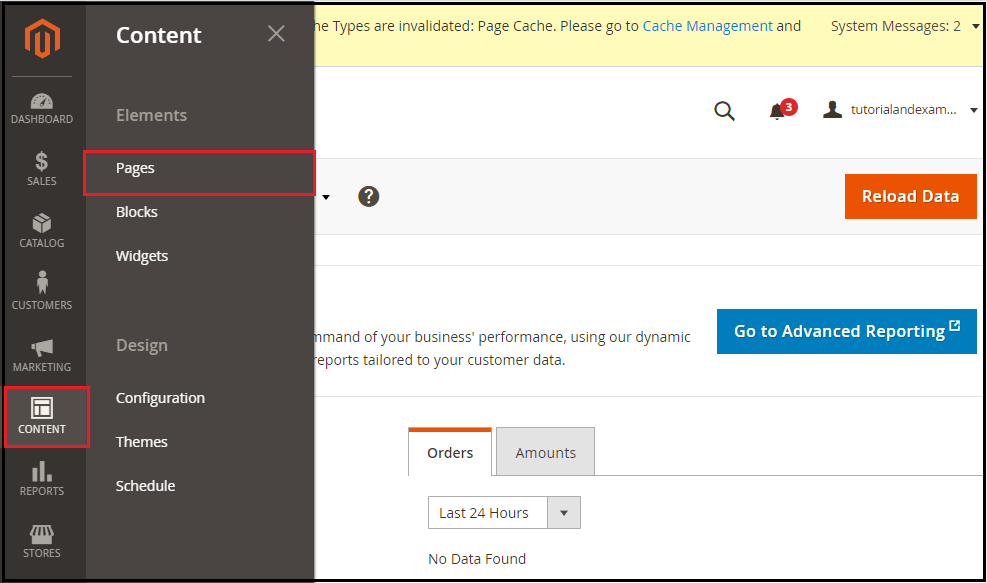
Here are all the pages in our Store, from which you can see in the image below.
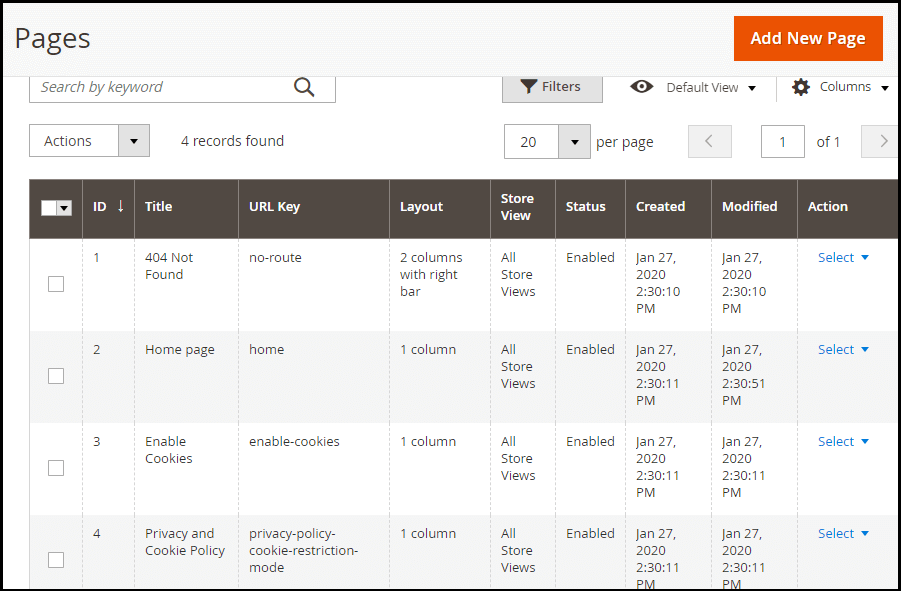
Step 2: Now, in the action menu below, we'll click on Edit.
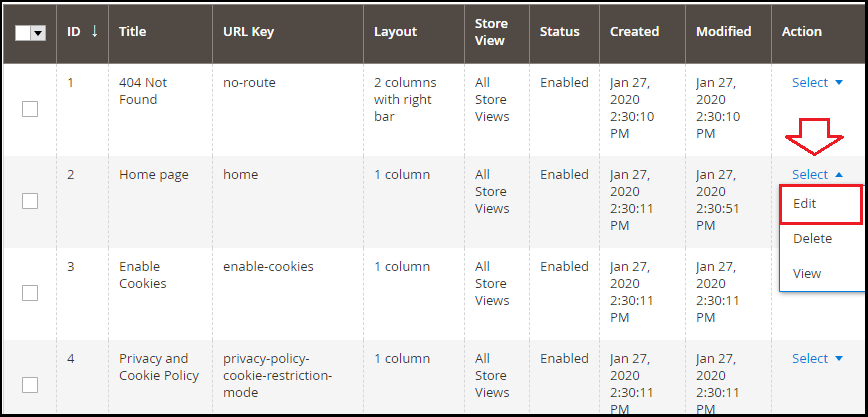
Step 3: Here, first, we will extend the content section and then select the Add Widget, as shown in the picture below. By using this content section, you can change the message on the home page that displays the customers.
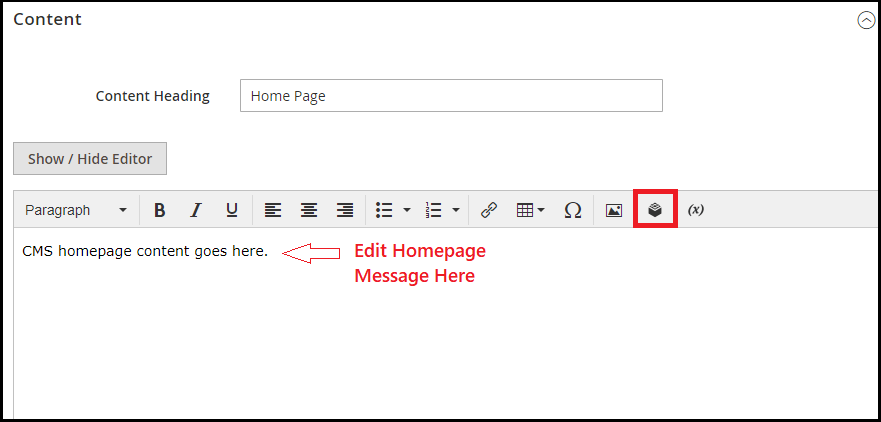
Step 4: You'll now see the Insert Button page here. In this we enlarge the drop-down menu and click on the option that contains the list of Catalog Items that you can see in the picture attached below, it will show you the new releases, selected items, bestsellers, and helps in listing regular offers.
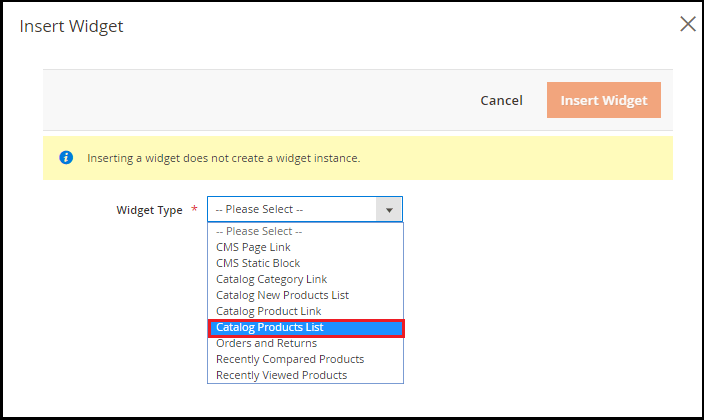
Step 5: The next tab shows the Conditions attribute. Choose the category on your online store's home page to include in the category area and then press the Insert Widget button.
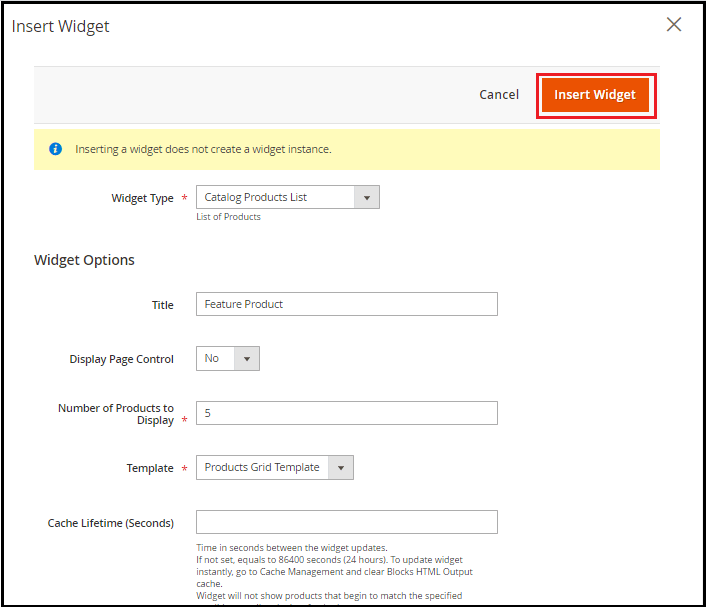
Widget Options

Title: Enter the title you want the product listed for on the homepage here.

Display Page Control: Two possibilities exist: Yes, and No. The Field Basics are not set.

The number of products to display: A variety of items are available that will show up in a dashboard.

Template: We have only one Product Grid Design.

Cache Lifetime: We will be suggesting that you leave the area free.

Condition: On that condition, items from the sector will appear on your web store's home page. The condition limit attributes which objects you want to view on your home page. With some of your product attributes, we will slim down the items that appear on the Home page.

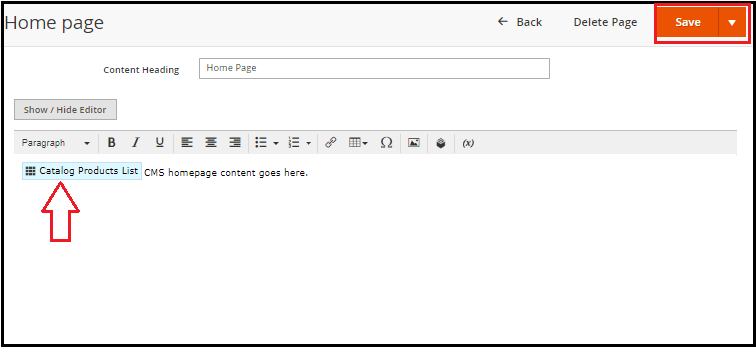
Step 6: Now go to the tab Content. You can see an Object icon here in the Text window. Double-clicking this button helps you to change the widget. Click the Save button to complete the page changes.
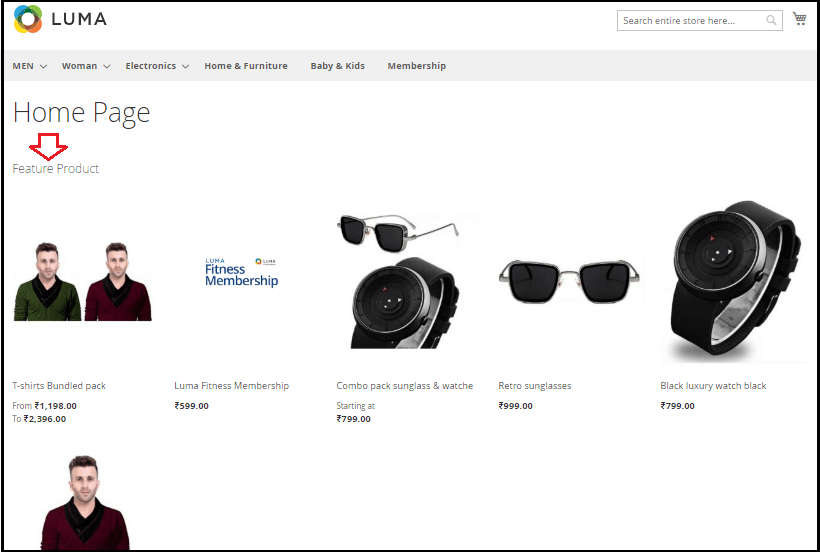
Next, we will be directed to the store, and refresh this tab. From here, the Store page of Magento 2 can see the relevant product category.
New Added Products

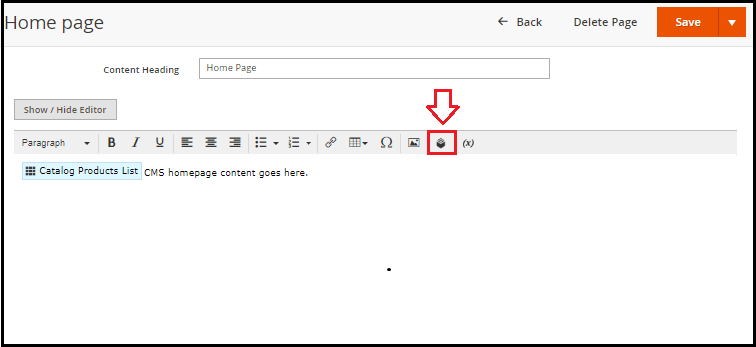
Now, press on the Insert Widget icon from your Home page content editor area.
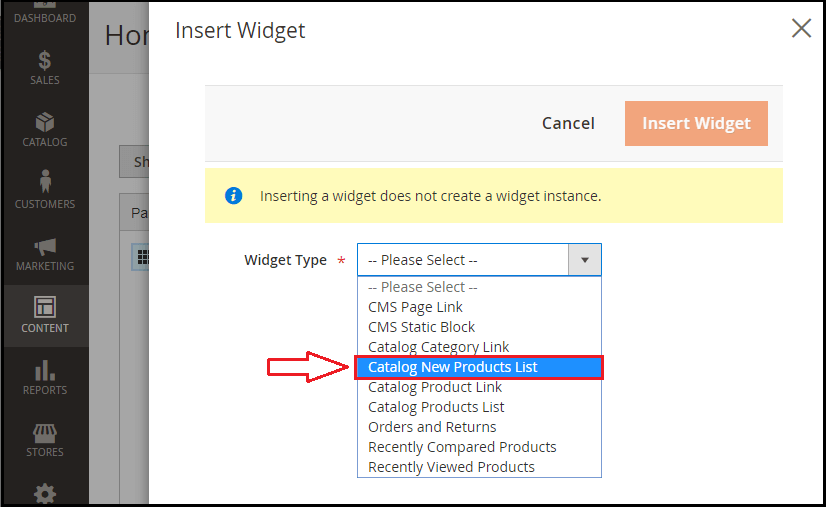
Now, choose the Catalog New Product List from the list of the Widget Form and Enter all the information according to your requirements.
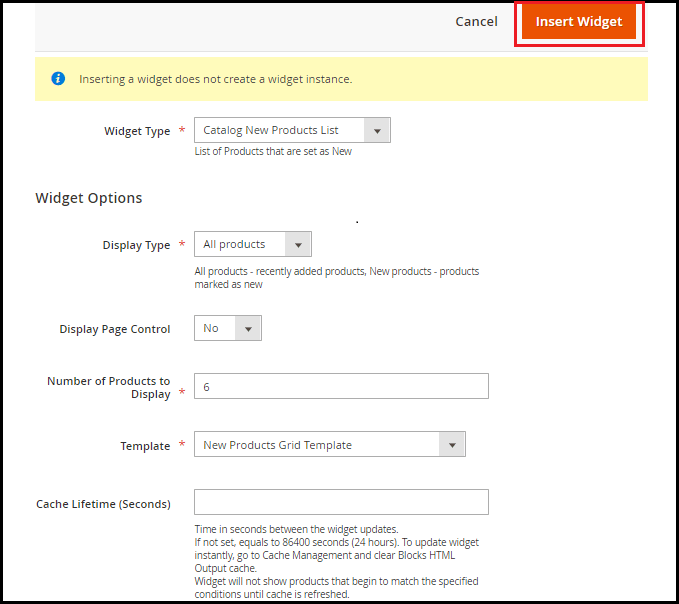
Click the Insert Widget button after you have given all of the information.
Now press the Save button to refresh the modifications.
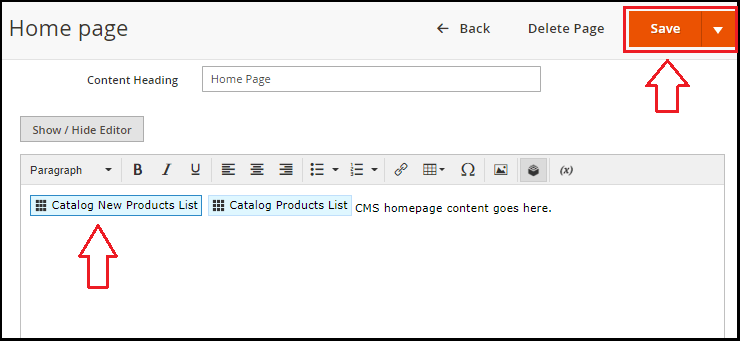
Go to your store's homepage and see the items that are recently added to your store's home page.
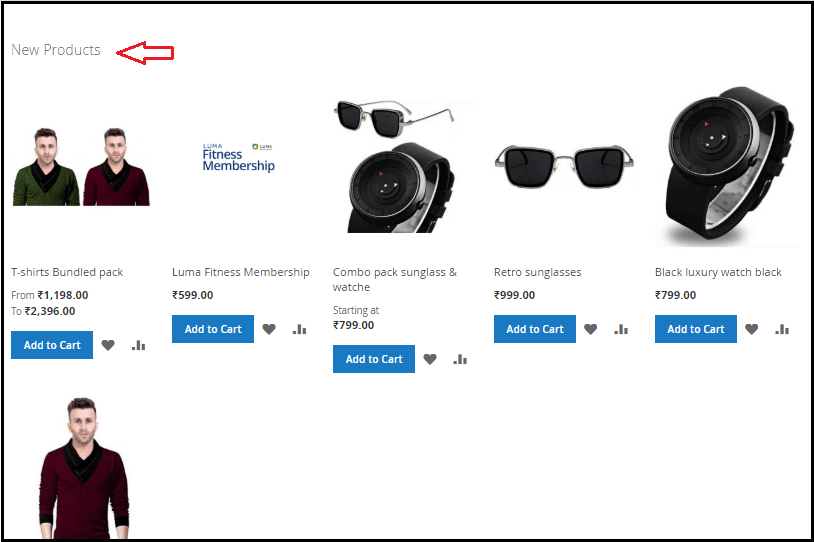
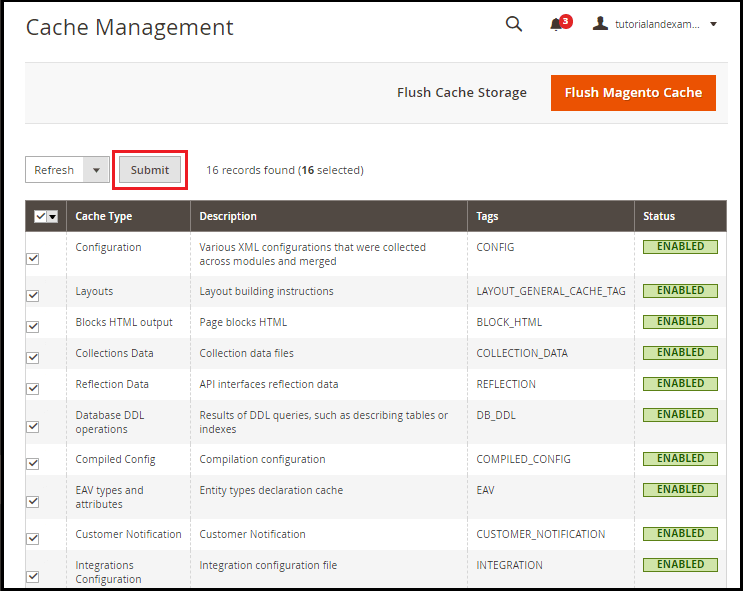
After reloading the home page, if nothing has been changed, and also the newly added items are not available on the home page, then clear the cache. For this end, follow the steps below: 

Go to System > > Cache Management on the left-hand side of the Admin screen.

Select all the tick option, and press the submit button to refresh it.

Related Topics

Installation of Xampp

Xampp Installation: XAMPP is a cross-platform, open-source software. Xampp stands for X (Cross-platform), A (Apache), M(MySQL), P(PHP), P(Perl). It is a complete package software, which includes Apache web server, PHP,...

2 minutes read.

Magento 2 vs. Magento 1

Difference Between Magento 2 and Magento 1 Magento 1 has changed the way developers and store owners treated an e-commerce site. Now it is approaching toward the end of its life, while Magento...

4 minutes read.

How to set up Zero Subtotal Checkout payment method in Magento 2

set up Zero Subtotal Checkout payment method in Magento 2 The payment method Zero Subtotal Checkout is only available for orders generated by the admin. A customer never says no to free goods,...

2 minutes read.

Products and their Types in Magento 2

Products and their Types in Magento 2 Magento 2 is not only flexible with many different products, but it also helps us in managing our store. Magento 2 even provides us a high...

3 minutes read.

How to add product on Home page in Magento 2

How to add the product on the Home page in Magento 2 The home page is a big part of every website. Where we showcase all our consumer products that make it easier...

3 minutes read.

Errors and Fixes in Magento2

Errors & Fixes in Magento 2 Admin Login panel is not working In this error, the black screen is visible when you log in to your Magento. As shown in the image...

2 minutes read.

What is Composer in Magento 2

Composer is a package-manager in Magento 2 at the program level for both PHP and Magento 2 software. To manage dependencies of the Magento 2 application and required libraries, Magento...

3 minutes read.

Difference Between Magento 2 vs Shopify

Magento 2 Vs. Shopify Both Magento 2 and Shopify are an eCommerce platform used to build online shopping stores. But still, the two are quite different from each other. Shopify is a hosted...

6 minutes read.

Profiling and DBase performance in Magento 2

Profiling and DBase performance in Magento 2 Profiler is an integrated internal debugging tool. It is used for debugging in Magento. It plays an important part in the development of Magento. We have various...

2 minutes read.

Magento 2 Tutorial

Introduction to Magento 2: Magento provides an introduction to Magento software. Magento is an open-source E-commerce software, made by Varien Inc. that is useful for online business. It has a...

4 minutes read.

History of Magento 2

History and Version of Magento: In Early 2007, Magento officially began production. And seven months later, the first public beta version was released on August 31, 2007. Formerly partnered with osCommerce...

5 minutes read.

Payment Methods in Magento 2

Payment Methods in Magento 2 The payment method is a way for customers in the Magento 2 store to pay for the purchase of a product or service. Magento 2 provides various default...

3 minutes read.

Store Configuration in Magento 2

Store Configuration in Magento 2 There is a basic configuration that we need to change before we start using our Store in Magento 2. Magento 2 provides configuration files that allow us to...

7 minutes read.

How to Setup Check Money Order Payment Method in Magento 2

Payment Methods The payment form Check / Money Order is a substitute for the online retailer's credit cards. In Magento 2 application, we can set the Check / Money order as a default...

2 minutes read.

How to Set up Cash on Delivery payment method in Magento 2

Set up Cash on Delivery payment method in Magento 2 Customers pay for their purchase in cash in the Cash on Delivery (COD) process when receiving an order from the shipping carrier. The...

2 minutes read.

Create and Manage CMS in Magento 2

Create and Manage CMS in Magento 2 We will discuss the usage of Magento 2 CMS in this section of Magento 2. We can build a new page, block, and widget on our...

3 minutes read.

How to create product category in Magento 2

create product category in Magento 2 Product categories are the root of online stores. The owners in the store always spend time planning for the products and creating the above categories,...

4 minutes read.

Install Magento2 using Composer

Let's discuss the installation of Magento 2.3.4 using Composer on windows operating system. We are installing the newest version of Composer, before installing the Composer, XAMPP must be installed on your system. Otherwise,...

4 minutes read.

PayPal Setup in Magento 2

PayPal Setup in Magento 2 In this page, we will explore how to use Magento 2 for both credit cards and PayPal payments using PayPal as a payment processor. PayPal is the easiest...

5 minutes read.

Features of Magento

Features of Magento: Magento features are very comprehensive, and the attributes that you need to build and run your online store are likely to be present in it. Here are...

3 minutes read.