×

How to set up multiple websites, stores, and store views in Magento 2

set up multiple websites, stores, and store views in Magento 2

Magento helps us to set up and manage multiple store or domain instances within a single Magento backend. In this segment, we'll go over how multiple websites, stores, and views are set up in Magento 2.

Some of the variable functionalities that Magento 2 brings to store owners is the establishment of several stores in a single Magento 2 backend. This feature helps us to create as many different stores as we need in one configuration. Here all the stores just share the same domain and can be set up as a sub-domain of the same domain. It is a completely different domain and still share a backend for possible easy administration.

Step 1: Create websites

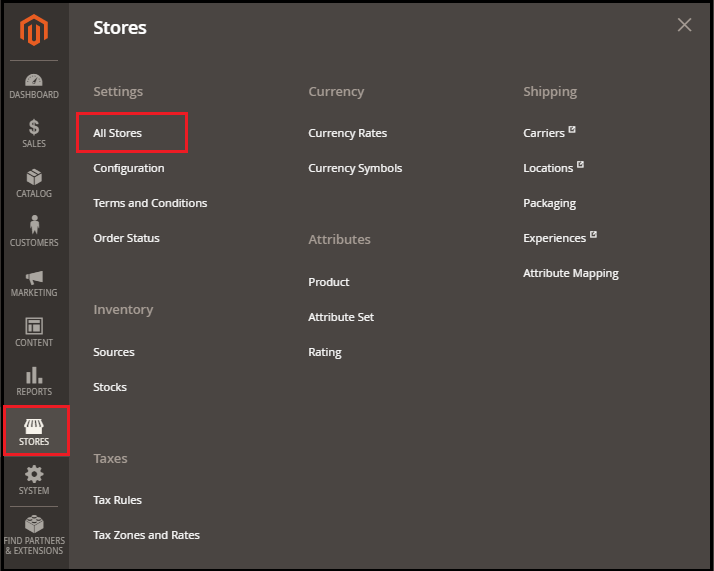
1. Go to Stores > > Settings > > All Stores inside the Magento 2 Admin screen.
set up multiple websites stores and store views in Magento

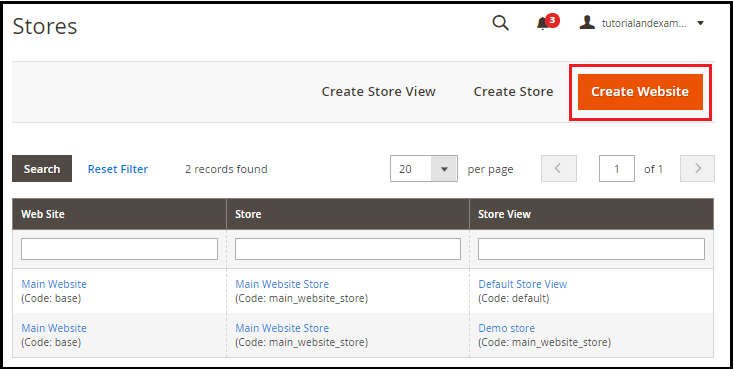
2. Stores tab, click on Create Website and appears before you.
set up multiple websites stores and store views in Magento

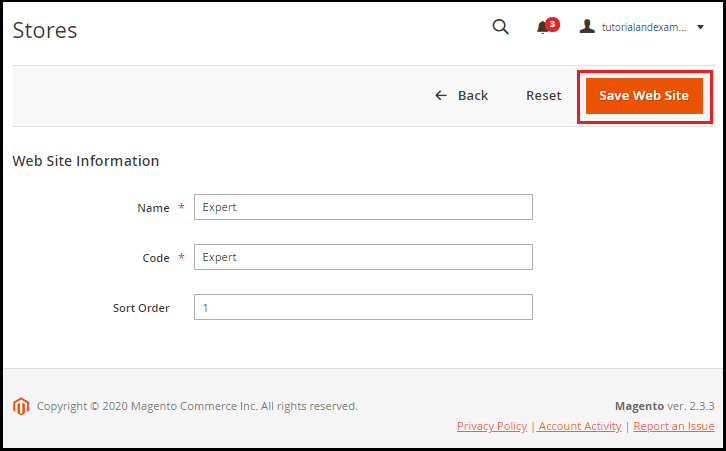
3. Enter the appropriate information in the specified area, such as Name, Code, and Sort Order, and click the Save Website button.
set up multiple websites stores and store views in Magento

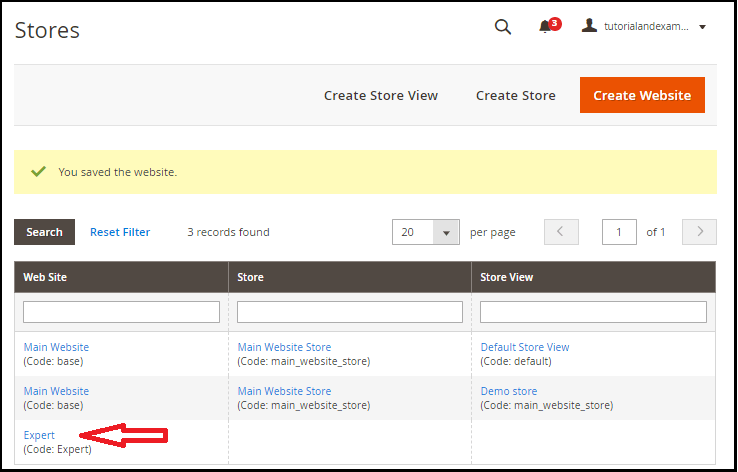
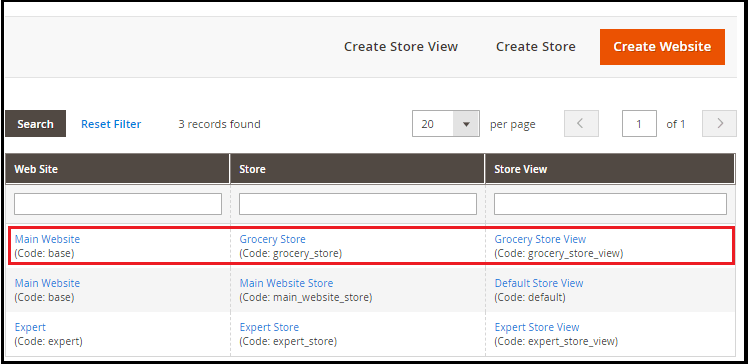
4. Now, on the Store side, we can see that the website is being installed that is visible below the Main Website. To build your website, repeat those steps as many times as possible.
set up multiple websites stores and store views in Magento

 Step 2: Create Stores

  1. Go to Stores > > Settings > > All Stores inside the Magento 2 Admin screen.

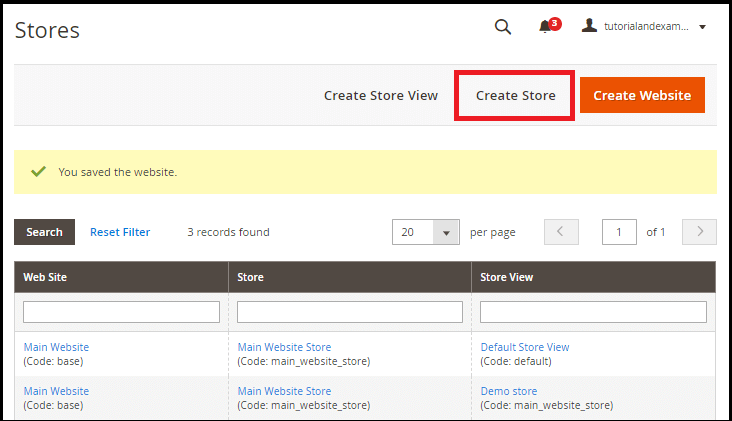
2. Now, click the Create Store button on the Stores page to build the shop.
set up multiple websites stores and store views in Magento

3. Follow the instructions below to fill in the necessary details within the specified fields:

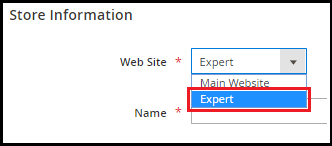
 a. Select the location from the drop-down list, which is the parent of the new store. If only one domain exists, then use the Main Domain as the norm. Here we will pick the Expert we have generated in previous acts.
set up multiple websites stores and store views in Magento

b. Enter the name of the new store for internal reference only.

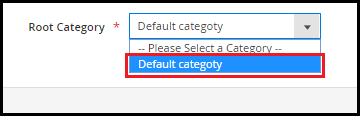
c. In the Root, the Category area picks a category for the main menu of the shop. We are going to choose the Default Group here.
set up multiple websites stores and store views in Magento

After completing the product details, press the Save Store button.
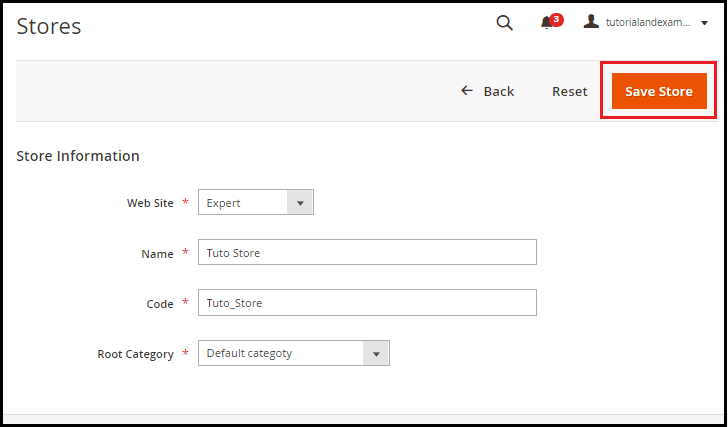
set up multiple websites stores and store views in Magento

4. Now we can see that the shop is being built as well, which is visible on the Shop side below the Main Website. Repeat those steps as many times as possible to create your shop.
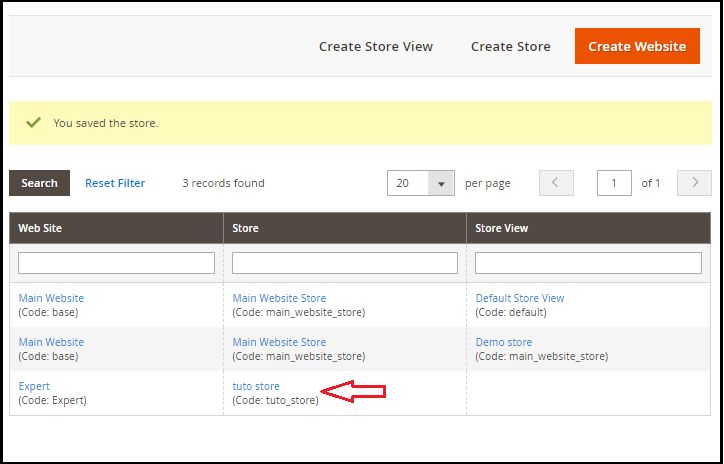
set up multiple websites stores and store views in Magento

Step 3: Create Store Views

1. Go to Stores > > Settings > > All Stores inside the Magento 2 Admin screen.

2. Now click on the Create Store View button in the Shops tab to establish your shop view.
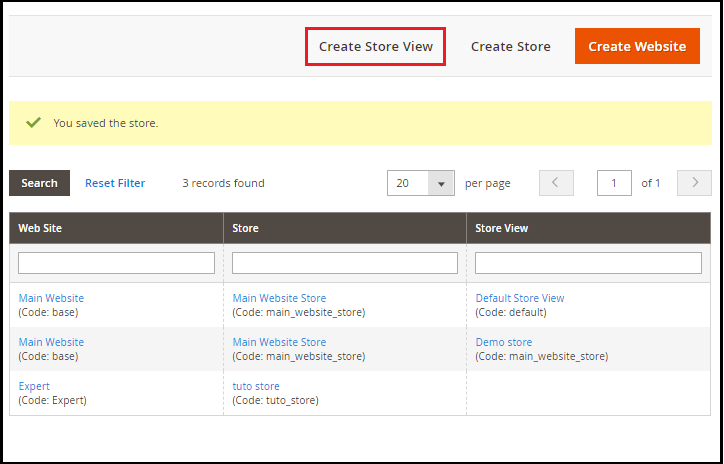
set up multiple websites stores and store views in Magento

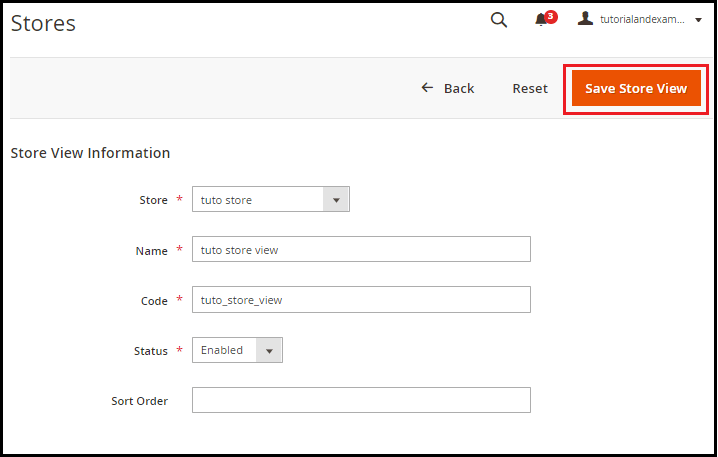
3. Fill in the necessary details in the fields you mentioned.

a. To link the shop view, choose the shop from the drop-down list.
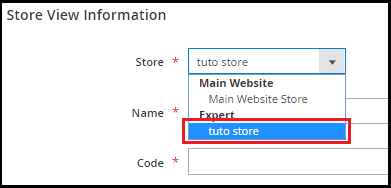
set up multiple websites stores and store views in Magento

b. To set this store view, enter the name in Name field.

c. Provide a special name to that store view in the Code field.
set up multiple websites stores and store views in Magento

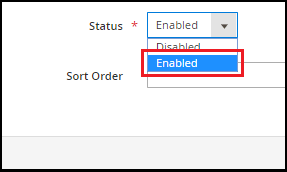
d. Set Status to Trigger

e. Join a numerical sort order as an alternative.

Now, click the Save Shop View button to save new shop information.
set up multiple websites stores and store views in Magento

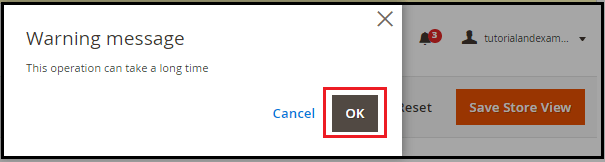
4. A pop-up will open when you save details of the view of the shop. Click OK, and then start.
set up multiple websites stores and store views in Magento

5. Repeat the steps as many times as needed to establish a view of the store. In the screenshot below, you can see that the User view for your new website and shop is being created.

Step 4: Setup the Store URL

We'll be configuring the Store URL in this phase.

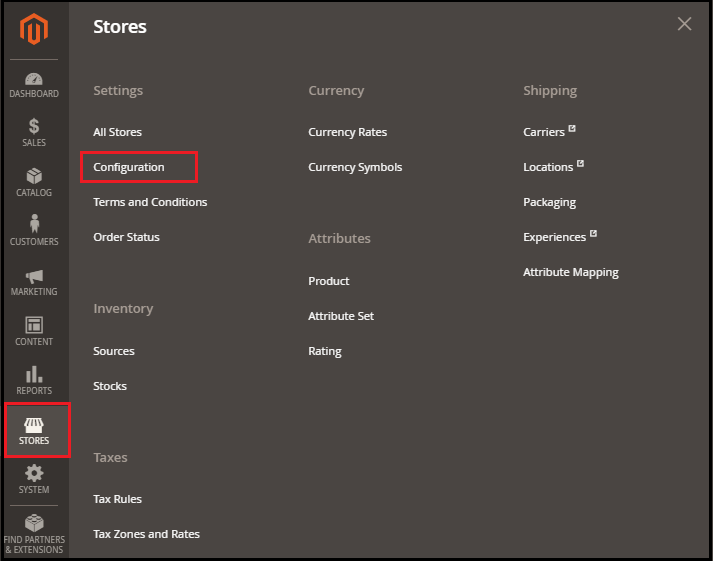
1. Go to Stores > Configuration > Setup on the left-hand sidebar of the Admin Screen.
set up multiple websites stores and store views in Magento

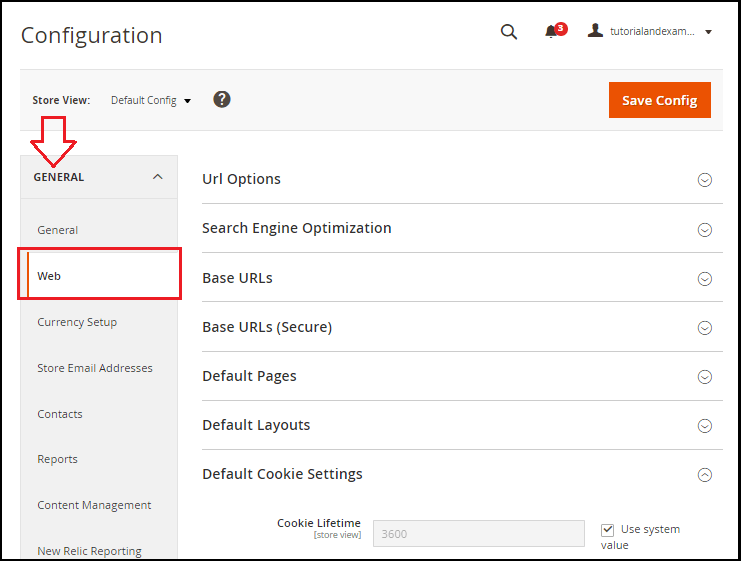
2. Under the General tab, click Web.

set up multiple websites stores and store views in Magento

3. Expand the segment URL Options, and set Yes to connect and save Store Code to URLs. And when we turn the store, the store code will automatically be appended to the URL.
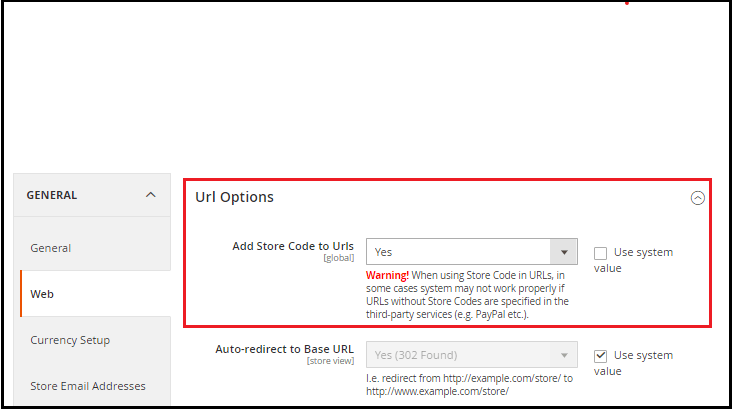
set up multiple websites stores and store views in Magento

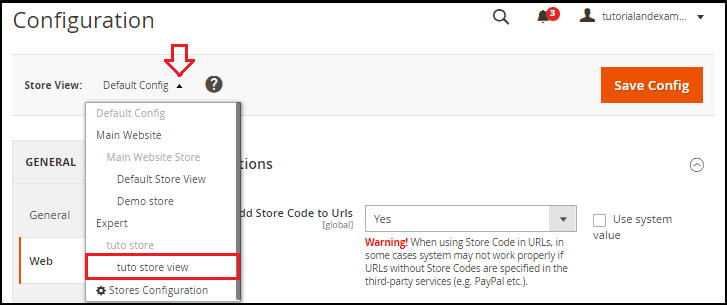
4. Select the Store View on the upper left corner to test the new store we've created. From the Store View list, pick a Website. In the Shop View, we can get the information by selecting any shop from the drop-down list.
set up multiple websites stores and store views in Magento

Click on OK to test the move to scope.

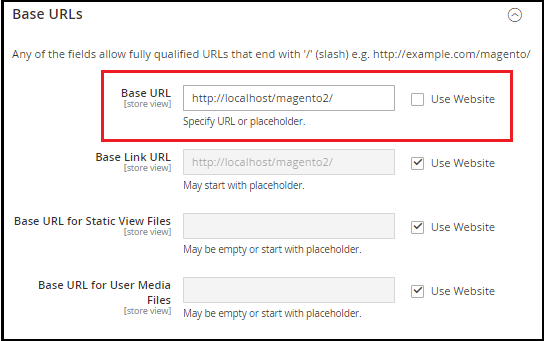
5. Expand the segment on Base URLs. Clear the checkbox for Using Website that is next to the Base URL area and change the store's Base URL.
set up multiple websites stores and store views in Magento

6. Open the section Secure Base URLs and set the secure URL of the store, if necessary.

Click the To full Save Config button at the top of the page.
set up multiple websites stores and store views in Magento

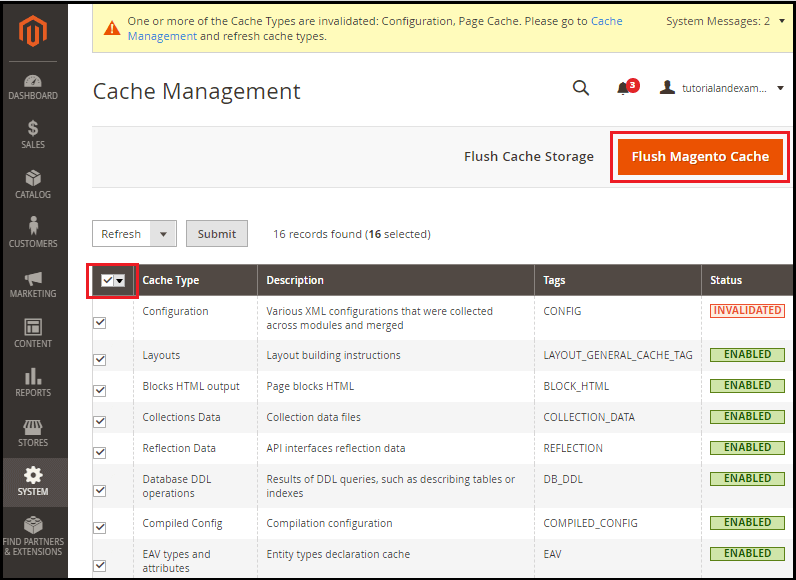
Clear cache management Go to System > > Tools > > Cache management on the Admin side.

Pick everything from the drop-down list, and click on the Cache Flush Magento button.
set up multiple websites stores and store views in Magento

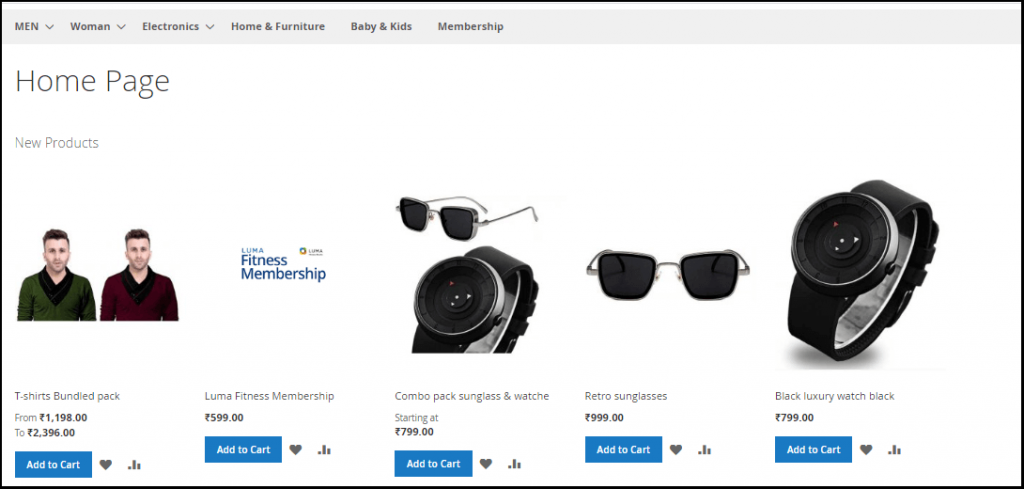
Now, open your frontend and reload your webpage. Here, by clicking on the Main Website Store subdomain, you can move from one store to another. See the screenshot below.
set up multiple websites stores and store views in Magento

Related Topics

Errors and Fixes in Magento2

Errors & Fixes in Magento 2 Admin Login panel is not working In this error, the black screen is visible when you log in to your Magento. As shown in the image...

2 minutes read.

Installation of Magento

Installation of Magento System requirement of Magento Database - MYSQL Web server-XAMPPOperating System-WINDOWS, ...

5 minutes read.

How to create product category in Magento 2

create product category in Magento 2 Product categories are the root of online stores. The owners in the store always spend time planning for the products and creating the above categories,...

4 minutes read.

PayPal Setup in Magento 2

PayPal Setup in Magento 2 In this page, we will explore how to use Magento 2 for both credit cards and PayPal payments using PayPal as a payment processor. PayPal is the easiest...

5 minutes read.

How to Set up Cash on Delivery payment method in Magento 2

Set up Cash on Delivery payment method in Magento 2 Customers pay for their purchase in cash in the Cash on Delivery (COD) process when receiving an order from the shipping carrier. The...

2 minutes read.

Basic Configuration in Magento 2

Basic Configuration in Magento 2 We will introduce the Admin tools of the store in this section. Here we will see the concepts of the scope of store hierarchy and configuration, as well...

3 minutes read.

What is Composer in Magento 2

Composer is a package-manager in Magento 2 at the program level for both PHP and Magento 2 software. To manage dependencies of the Magento 2 application and required libraries, Magento...

3 minutes read.

How to set up Zero Subtotal Checkout payment method in Magento 2

set up Zero Subtotal Checkout payment method in Magento 2 The payment method Zero Subtotal Checkout is only available for orders generated by the admin. A customer never says no to free goods,...

2 minutes read.

Installation of Xampp

Xampp Installation: XAMPP is a cross-platform, open-source software. Xampp stands for X (Cross-platform), A (Apache), M(MySQL), P(PHP), P(Perl). It is a complete package software, which includes Apache web server, PHP,...

2 minutes read.

Features of Magento

Features of Magento: Magento features are very comprehensive, and the attributes that you need to build and run your online store are likely to be present in it. Here are...

3 minutes read.

How to set up multiple websites, stores, and store views in Magento 2

set up multiple websites, stores, and store views in Magento 2 Magento helps us to set up and manage multiple store or domain instances within a single Magento backend. In this segment,...

4 minutes read.

Magento 2 Tutorial

Introduction to Magento 2: Magento provides an introduction to Magento software. Magento is an open-source E-commerce software, made by Varien Inc. that is useful for online business. It has a...

4 minutes read.

Magento 2 vs. Magento 1

Difference Between Magento 2 and Magento 1 Magento 1 has changed the way developers and store owners treated an e-commerce site. Now it is approaching toward the end of its life, while Magento...

4 minutes read.

How to add product on Home page in Magento 2

How to add the product on the Home page in Magento 2 The home page is a big part of every website. Where we showcase all our consumer products that make it easier...

3 minutes read.

Payment Methods in Magento 2

Payment Methods in Magento 2 The payment method is a way for customers in the Magento 2 store to pay for the purchase of a product or service. Magento 2 provides various default...

3 minutes read.

Architecture of Magento

Magento Architecture: Here we are going to discuss Magento’s architecture. There isn't much difference between Magento 1 and Magento 2 architecture. Now we are going to implement (User Interface) UI....

2 minutes read.

Difference Between Magento 2 vs Shopify

Magento 2 Vs. Shopify Both Magento 2 and Shopify are an eCommerce platform used to build online shopping stores. But still, the two are quite different from each other. Shopify is a hosted...

6 minutes read.

Products and their Types in Magento 2

Products and their Types in Magento 2 Magento 2 is not only flexible with many different products, but it also helps us in managing our store. Magento 2 even provides us a high...

3 minutes read.

Advantages and Disadvantages of Magento

Magento 2 Advantages and Disadvantages Magento is the undisputed king of the eCommerce shopping cart. Many e-businesses vouch by its usefulness and rave its fully functional feature-rich eCommerce platform. According to...

4 minutes read.

Store Configuration in Magento 2

Store Configuration in Magento 2 There is a basic configuration that we need to change before we start using our Store in Magento 2. Magento 2 provides configuration files that allow us to...

7 minutes read.