×

CCNA Tutorial

What is CCNA?

CCNA stands for Cisco Certified Network Associate. It is a certification course offered by Cisco.

CCNA improves your understanding of the internet working and how different network topologies work together to form a network.

What is Cisco?

Cisco is the American multinational technology company in the centre of California. It is the king of routing, switching, and security. Most of the companies use Cisco devices in their daily routine.

Cisco developers manufacture and sell networking hardware, telecommunication equipment, and other high-technology services and products.

Why CCNA?

  • CCNA validates the ability to understand, operate, configure, and troubleshoot routed and switched network.
  • It helps to resolve a customer's problem more efficiently.
  • Once you are CCNA certified, you can get a higher salary.
  • It teaches the candidate how to create a point-point connection.
  • It explains how to construct network addresses.

Types of CCNA Certification

 There are different types of CCNA Certification given below:

  • CCNA Routing & Switching (R&S)
  • CCNA Wireless
  • CCNA Data Center
  • CCNA Security
  • CCNA Service Provider
  • CCNA Voice

Note: This tutorial covers everything about CCNA routing and switching.

Network Connecting Devices

Network connecting devices are used to connect two or more devices to share data or resources from one network to another network.

Some important network connecting devices are given below:

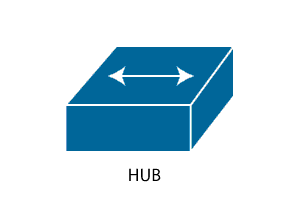
HUB

  • The general meaning of the word hub is any connecting device.
  • It works on the physical layer of OSI Model.
  • A hub is designed to connect computers in a private network.
  • It is used to connect peer to peer small networks.
  • Hub is slow and insecure.

HUB

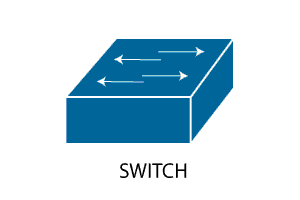
Switch

  • A switch also connects computers like a hub.
  • It works on the Data link layer of OSI Model.
  • It determines what computer or device the packet is intended for and sends it to that computer only.
  • A switch is fast and secure.

 Switch Networking

Router

It is designed to receive, analyze, and move incoming packets to another network.

A router has more capabilities than other devices, such as a hub or a switch.
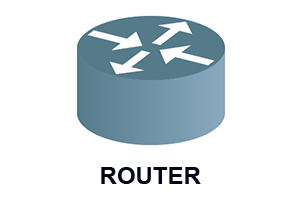
Router

End Devices

The network devices that people are most familiar with are called end devices. It is a source to a destination device in a networked system.

Example

PC, Server, Laptop, etc.
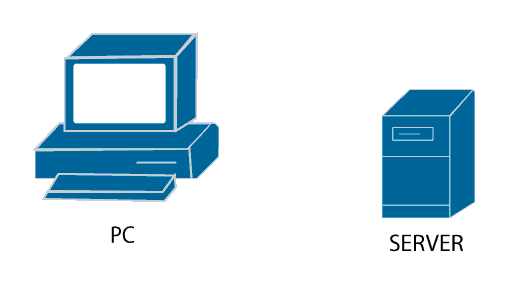
End Devices

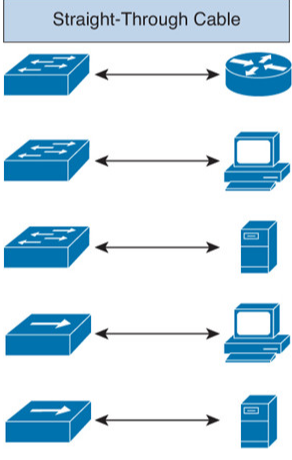
Straight-through Cable

It is used when we want to

  • Connect Switch to Router
  • Connect Switch to PC
  • Connect Switch to Server
  • Connect Hub to PC
  • Connect Hub to Server

Straight-through Cable

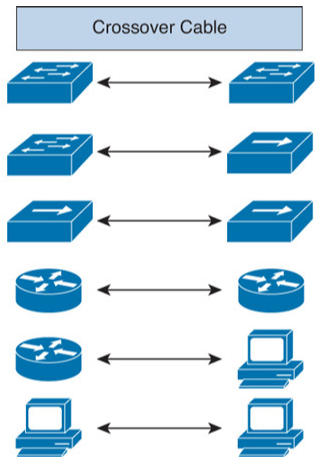
Crossover Cable

It used when we want to

  • Connect Switch to Switch
  • Connect Switch to Hub
  • Connect Hub to Hub
  • Connect Router to Router
  • Connect Router to PC
  • Connect PC to PC

Cross Cable

What is next after CCNA?

If you learn CCNA, then you get the job opportunity in the following designation:

  • Technical Support Representative
  • Network Support Engineer
  • Network Administrator
  • IT Manager
  • System Administrator

After getting sufficient experience in the job, you can also move for professional and expert level certification i.e., Cisco Certified Network Professional (CCNP) and Cisco Certified Internetworking Expert (CCIE).

CCNA Tutorial Topics

Internetworking:

Ethernet Networking and Data Encapsulation:

Introduction to TCP/IP:

IP Addressing

Cisco’s Internetworking Operating System(IOS):

Administrative Configurations

Managing a Cisco Internetwork:

IP Routing:

Open Shortest Path First (OSPF):

Enhanced IGRP

Switching

VLAN’s

Access Lists

  • Introduction to Access Lists
  • Standard Access Lists
  • Extended Access Lists

Network Address Translations (NAT)

  • What is NAT?
  • Types of NAT
  • Port Address Translation (PAT) configuration

Internet Protocol Version 6(IPv6)

  • What is IPv6
  • IPv6 routing protocols
  • How to configure IPv6

IP Services

  • Hot Standby Routing Protocol (HSRP)
  • Gateway Load Balancing Protocol
  • Syslog
  • SNMP

Wide Area Networks

  • Introduction to Wide Area Network
  • High Level Data Link Control (HDLC)
  • Point-to-Point Protocol (PPP)
  • Virtual Private Networks


Related Topics

Configure DHCP

 DHCP DHCP stands for Dynamic Host Configuration Protocol.It is a client server-based architecture which involves DHCP client and DHCP server.It is a messaging system for the communication between the DHCP server and DHCP client.It...

3 minutes read.

Variable Length Subnet Masks (VLSMs)

Variable Length Subnet Masks (VLSMs) A VLSM is a process of allocating IP addresses to the subnets according to the user’s need.VLSM is introduced to avoid the wastage of IP addresses.It allows you to...

3 minutes read.

Types of Spanning Tree Protocol

There are the following types of Spanning Tree Protocol – 1. Common Spanning Tree (802.1D) A Common Spanning Tree (802.1D) standard is developed by IEEE which elects only one Root Bridge for the...

2 minutes read.

Subnetting

Subnetting is the process of dividing a big network into many small networks. Suppose there is a company which has four departments like Development, HR, Marketing, and Testing. We don't want that all...

5 minutes read.

Data Encapsulation and De-Encapsulation

Data Encapsulation It is the process of adding headers and trailers to data. When a host transmits data to another device over a network, the data is encapsulated, with protocol information...

5 minutes read.

The OSI Reference Model

OSI Reference Model OSI stands for Open System Interconnection. OSI provides a framework for creating and implementing networking standards, devices, and internetworking schemes. The following devices operate at the OSI model: Network...

6 minutes read.

IP Addressing

IP Addressing IP Addressing is designed to allow hosts on a network to communicate with another host on a different network. There are two types of IP address: IPv4 IPv4 addresses are 32-bits long. It allows...

2 minutes read.

Getting familiar with the IOS modes

  There are following primary modes of operation in IOS. Setup ModeUser Exec ModePrivileged Exec ModeGlobal Configuration ModeInterface Configuration ModeRommon Mode Setup Mode In router or switches, all configurations are saved in NVRAM.If there is no...

3 minutes read.

Download and Install the Cisco Packet Tracer

Download and Install the Cisco Packet Tracer Step1: -Download Cisco Packet Tracer from the link given below: https://arief-jr.blogspot.com/2016/01/download-cisco-packet-tracer-62-for.html Here we will download Cisco packet tracer for Windows OS, so for Windows, go for...

1 minute read.

Internetworking Basics

What is a Network? A network is a group of two or more devices connected by some transmission media, i.e., cables. The purpose of designing a network is to enable the sharing...

4 minutes read.

TCP/IP and DoD Model

Introduction to TCP/IP Model TCP/IP model was introduced in 1974. TCP/IP stands for Transmission Control Protocol/Internet Protocol. TCP/IP is an underlying communication protocol used by internet and commercial networks. The Transmission Control Protocol (TCP)...

10 minutes read.

Spanning Tree Protocol (STP)

Spanning Tree Protocol (STP) is a Data link layer (layer 2) protocol that is used to discover and maintain a valid loop-free path for the switched network. It is also used to analyze...

4 minutes read.

Saving, Erasing, and Verifying Configuration

Saving Configuration Cisco device store commands information into two configuration files: running configurationstartup configuration running configuration In the running configuration, you can manually save the data from RAM to NVRAM by typing the copy running-config startup-config command. When you...

3 minutes read.

Power on a Cisco device

Power on a Cisco device When you power on a new purchased Cisco device for the first time, it performs a power-on-self-test (POST) operation to identify the hardware components and to verify that all...

1 minute read.

Configuring EIGRP

Consider the topology given below – The initial IP configuration table is given below: Devices Interface IP address Router1 ...

2 minutes read.

EIGRP Basics

EIGRP stands for Enhanced Interior Gateway Routing Protocol. It is also called as the Hybrid routing protocol. It contains the features of both distance vector and link-state routing protocols. Characteristics of EIGRP There are the...

5 minutes read.

Configure Password

Password configuration is an in-built feature of Cisco devices.Each Cisco device uses a password to authenticate users for accessing the device and also provides security to the Cisco devices. There are five types of the...

2 minutes read.

Configure Hostname

Configure a hostname on a router A hostname is a unique name given to a device (router or switch) on a network and is used to identify one device from another on a specific...

1 minute read.

Configure IP Routing

IP Routing stands for “Internet Protocol Routing.”It is the process of sending packets (data) from a source network to a destination network.In IP Routing, routers select the best route for a data packet from the...

2 minutes read.

Ethernet Networks in Review

Ethernet Networks in Review Today, Ethernet is the most used technology for the LANs. It is described as IEEE 802.3 standard. Ethernet is a connection-based media access method i.e., Carrier Sense...

2 minutes read.