How to insert an email in android application in android version 8

Email Address Insertion

It is used to insert email adrress from the user in the android application.The only point of difference between an EditText and an Emailtext is that EmailText consisits of attribute named as android:inputType="textEmailAddress".

Email address consists of a local part followed by '@' and then a case sensitive domain name.

In this tutorial, we are going to demonstrate the use of Email Edit text.

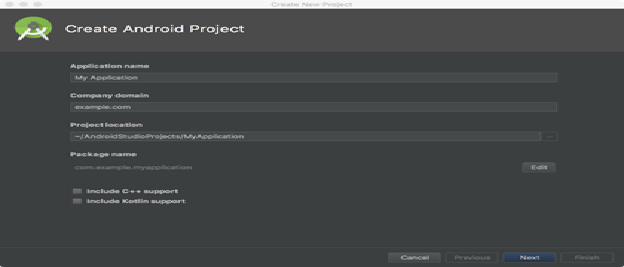
Step 1: Create a brand new android project on android studio IDE.
/></figure>
<!-- /wp:image -->


<!-- wp:list -->
<ul><li>Open the android studio</li><li>Select create a new project</li><li>Insert your application name, company domain(if any) and the location of the project press on next and then finish.</li></ul>
<!-- /wp:list -->


<!-- wp:paragraph -->
<p><strong>Step 2:</strong> After creating the new android studio project, you will be displayed XML file and a java file corresponding to it.</p>
<!-- /wp:paragraph -->


<!-- wp:paragraph -->
<p><strong>Step 3:</strong></p>
<!-- /wp:paragraph -->


<!-- wp:image {

In the next step, select the activity_main.xml file to access the front-end side of the android application.

Step 4: Go to the design tab and select email under text.

Step 5: Drag and drop email on your android application preview.
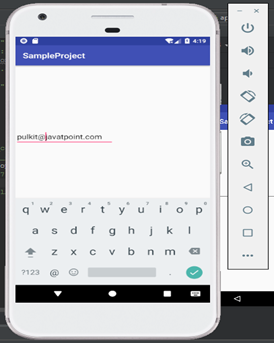
After getting the email edit text XML file will look like this:-

<?xml version="1.0" encoding="utf-8"?>
<RelativeLayout xmlns:android="http://schemas.android.com/apk/res/android"
xmlns:app="http://schemas.android.com/apk/res-auto"
xmlns:tools="http://schemas.android.com/tools"
android:layout_width="match_parent"
android:layout_height="match_parent"
tools:context=".MainActivity"
    android:id="@+id/layout">


    <EditText
        android:id="@+id/editText3"
        android:layout_width="wrap_content"
        android:layout_height="wrap_content"
        android:layout_alignParentTop="true"
        android:layout_marginTop="173dp"
        android:ems="10"
        android:inputType="textEmailAddress" />
</RelativeLayout>

android:inputType="textEmailAddress"

This line represents an Edit text as an textEmailAdress i.e. this Edit Text will be used to insert email from the user.

After the step 5, front-end work is completed, you can take a button for 'submit' according to your requirement. You can also go through my android Button tutorial to understand the working of button in android application.

Step 6: Insert the following code in your Main Activity file:

import android.widget.EditText;

Step 7: Insert the following code in your MainActivity class:

private EditText email;

This will create an instance variable of class EditText as email.

Step 8: Inside the onCreate method of your MainActivity class, insert the following code:

email=findViewById(R.id.editText);
String mail=email.getText().toString();

This will initialize the email instance.

Step 9: In the final step, you can use the String mail to get the email inserted by the user.

Developer may check the email-address entered by the user against the email in his database via mail String.

I would suggest you to take a button to insert the email from the user.

Insert the following code on your onCreate method inside the

MainActivity.java file:

if(mail==HR@javatpoint.com){
Toast.makeText(MainActivity.this,"Welcome HR@javatpoint.com",Toast.LENGTH_SHORT).show();
}
else{
Toast.makeText(MainActivity.this,"Not a valid user",Toast.LENGTH_SHORT).show();
}

Related Topics

Android Studio Resources

To build an outstanding Android application there are many items that you need to use. Aside from the coding of your application, you need to handle various resources such as...

5 minutes read.

Android Tutorial

This Android tutorial will provide you with all the concepts that will be beneficial for both beginners and advanced-level students or candidates. You can learn this tutorial to begin your...

6 minutes read.

Jetpack Architecture Components in Android

A collection of software elements, libraries, tools, and instructions is called Android Jetpack. It is available to assist in creating reliable Android applications. Jetpack, which was introduced by Google in...

8 minutes read.

Event Handling in Android

Events are a convenient way to gather data about user interactions with interactive elements of your application. Like a button click or a screen touch. A queue of events on...

3 minutes read.

Broadcast Receiver in Android with Example

When a device wakes up, receives a message, receives an incoming call, switches to aeroplane mode, or initiates any other system-wide action, it is said to have been broadcast in...

5 minutes read.

How to crop Image from Camera and Gallery in Android?

In this tutorial, we'll learn how to crop photos in the Android Gallery and Camera. There is no crop feature in this project, contrary to what was covered in the...

5 minutes read.

How to insert an email in android application in android version 8

Email Address Insertion It is used to insert email adrress from the user in the android application.The only point of difference between an EditText and an Emailtext is that EmailText consisits...

1 minute read.

Top Programming Languages for Android Development

For mobile apps, there are so many programming languages. You would need to spend days simply researching if you had to pick one from a list of 30 coding languages...

8 minutes read.

Assets folder in Android

You might have noticed that unlike the Eclipse ADT (App Development Tools), the Android Studio does not have an Assets folder, which is mainly used to store the web resources...

3 minutes read.

Android RecyclerView

RecyclerView is a ViewGroup brought to AndroidStudio as successor to ListView and GridView. These are all improvements and are included in the latest v7 support package. It was written to...

8 minutes read.

How to Generate QRCode in Android?

Many apps use QR codes to show data in a way that is machine-readable. Data is represented using these codes in a secure manner such that only computers, not humans,...

4 minutes read.

Android Broadcast Receivers

Android applications can send or receive broadcast messages from the Android operating system and other Androidapplications, like the publish-subscribe design pattern. When an event of interest happens,these broadcasts are sent. For...

4 minutes read.

How to insert the mobile number on an android application using EditText

Number Insertion in android application: Sometimes while dealing with numbers, we don't want to insert any string inside an number so, we premiliary define an EditText so we externally specify...

2 minutes read.

Android Date picker example

How to pick date from the user in Android? Write an android example to pick date from the user and display it. Android provides control for the user to pick a date...

3 minutes read.

Button Widget in Android Tutorial

Explanation: Button is a widget under Buttons section which is used to execute specific code. Example: XML file: <?xml version="1.0" encoding="utf-8"?> <RelativeLayout xmlns:android="http://schemas.android.com/apk/res/android" xmlns:app="http://schemas.android.com/apk/res-auto" xmlns:tools="http://schemas.android.com/tools" android:layout_width="match_parent" android:layout_height="match_parent" tools:context=".MainActivity">     <Button         android:id="@+id/button"         android:layout_width="wrap_content"    ...

1 minute read.

Android Toast

Android is one of the most successful operating systems available in today's world. It is an open-source phone platform, compatible with almost all the devices. There are numerous features and...

3 minutes read.

Content Providers of Android with Example

An essential part of Android that performs the function of a relational database by storing application data is called a content provider. The function of the content provider in the...

13 minutes read.

Android Activity

What is an Activity? Android Activity is a screen in the user interface of an Android application. In this way, Android activity is very similar to the desktop application window. An...

4 minutes read.

Android Project Folder Structure

JetBrains community developed Android Studio, the official IDE (Integrated Development Environment) for Android app development and is freely distributed by Google. After the complete Android Architecture setup, we can construct an...

4 minutes read.

How to show image on an android application

ImageView Widget in Android What you should already KNOW? You should be familiar with: 1) Creating, building, and running apps in Android Studio 2) Basics of android widgets   Explanation: Image View widget is used...

2 minutes read.