Android Date picker example

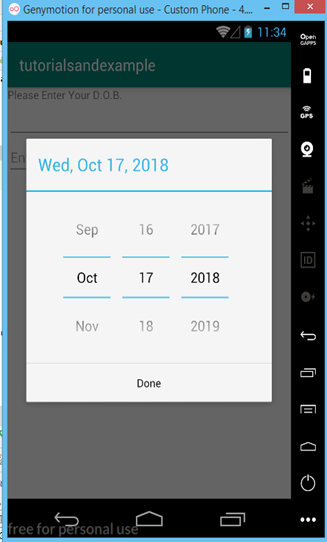
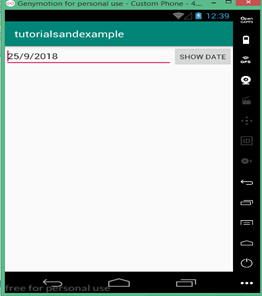
How to pick date from the user in Android? Write an android example to pick date from the user and display it. Android provides control for the user to pick a date through a pre-defined dialog box. Picker provides control for selecting each part of the date i.e. month, day, and year. Pickers help us to ensure that users can pick a date that is valid, formatted correctly, and adjusted to the user's locale. In this tutorial, we are going to ask the user to input the date with the help of date picker and with the simple one click show button user can view the date entered. Date class is required to hold the data set by the picker. Data members inside the Date class are static to access the data from the MainActivity. Static data members of the class were created only for the first time when the object of that class has been created. Use DialogFragment class to host each time or date picker, the DialogFragment class manages the dialog lifecycle for you and allows you to display the pickers in different layout configurations. OUTPUT   SCREEN:                     public class DatePickerDialog extends AlertDialog implements DialogInterface.OnClickListener,DatePicker.OnDateChangedListener
java.lang.Object
   ? android.app.Dialog
   ? android.app.AlertDialog
   ? android.app.DatePickerDialog
  JAVA FILE:          MainActivity.java
package com.example.android.tutorialsandexample;
import android.support.v4.app.DialogFragment;
import android.support.v7.app.AppCompatActivity;
import android.os.Bundle;
import android.view.View;
import android.widget.Button;
import android.widget.EditText;

import java.util.Calendar;

public class MainActivity extends AppCompatActivity {
EditText editText;
Button button;
@Override
protected void onCreate(Bundle savedInstanceState) {
super.onCreate(savedInstanceState);
setContentView(R.layout.activity_main);
final DialogFragment newFragment = new DatePickerFragment();
newFragment.show(getSupportFragmentManager(), "datePicker");

editText=findViewById(R.id.editText);

button=findViewById(R.id.show);
button.setOnClickListener(new View.OnClickListener() {
@Override
public void onClick(View v) {
date dv=new date();

String date=new String();
date="";
date=date+dv.getDay()+"/"+dv.getMonth()+"/"+dv.getYear();
editText.setText(date);
}
});
}
}
JAVA FILE 2:       date.java
package com.example.android.tutorialsandexample;

public class date {
static int year;
static int month;
static int day;

public static int getYear() {
return year;
}

public static void setYear(int year) {
date.year = year;
}

public static int getMonth() {
return month;
}

public static void setMonth(int month) {
date.month = month;
}

public static int getDay() {
return day;
}

public static void setDay(int day) {
date.day = day;
}
}
JAVA FILE 3:       DatePickerFragment.java
package com.example.android.tutorialsandexample;
import android.app.DatePickerDialog;
import android.app.Dialog;
import android.content.Context;
import android.os.Bundle;
import android.support.v4.app.DialogFragment;
import android.widget.DatePicker;
import java.util.Calendar;

public class DatePickerFragment extends DialogFragment
        implements DatePickerDialog.OnDateSetListener {

    @Override
    public Dialog onCreateDialog(Bundle savedInstanceState) {
        // Use the current date as the default date in the picker
        final Calendar c = Calendar.getInstance();
        int year = c.get(Calendar.YEAR);
        int month = c.get(Calendar.MONTH);
        int day = c.get(Calendar.DAY_OF_MONTH);

        // Create a new instance of DatePickerDialog and return it
        return new DatePickerDialog(getActivity(), this, year, month, day);
    }

    public void onDateSet(DatePicker view, int year, int month, int day) {
        // Do something with the date chosen by the user
        date date=new date();
        date.setDay(day);
        date.setMonth(month);
        date.setYear(year);
    }
}
XML FILE:
<?xml version="1.0" encoding="utf-8"?>
<RelativeLayout xmlns:android="http://schemas.android.com/apk/res/android"
xmlns:app="http://schemas.android.com/apk/res-auto"
xmlns:tools="http://schemas.android.com/tools"
android:layout_width="match_parent"
<?xml version="1.0" encoding="utf-8"?>
<LinearLayout xmlns:android="http://schemas.android.com/apk/res/android"
xmlns:app="http://schemas.android.com/apk/res-auto"
xmlns:tools="http://schemas.android.com/tools"
android:layout_width="match_parent"
android:layout_height="match_parent"
tools:context=".MainActivity">

<EditText
android:id="@+id/editText"
android:layout_width="wrap_content"
android:layout_height="wrap_content"
android:layout_weight="1"
android:ems="10"
android:inputType="date"
android:text="This is blank text"/>
<Button
android:layout_width="wrap_content"
android:layout_height="wrap_content"
android:text="Show date"
android:id="@+id/show"/>

</LinearLayout>

 

Related Topics

Creating a Calendar View App in Android

This article demonstrates how to make an Android application that uses CalendarView to display the Calendar. It also provides the option to pick the current date and view the date....

3 minutes read.

Android ListView

A kind of AdapterView that displays a vertical list of scrollable views, each of which is laid out below each other is called ListView. Using adapters, items are inserted into...

4 minutes read.

Different Ways to Create aar File in Android Studio

A file called an Android archive file (*.aar) can be created using Android Studio and comprises classes and methods that use related files and classes for Android. The Android library...

4 minutes read.

Top Programming Languages for Android Development

For mobile apps, there are so many programming languages. You would need to spend days simply researching if you had to pick one from a list of 30 coding languages...

8 minutes read.

Dashboard UI Design in Android

One of the essential components that draw the user’s attentions into the application's operation is the dashboard design. It offers details on the application's general functionality in one location. Imagine...

11 minutes read.

Android Project Folder Structure

JetBrains community developed Android Studio, the official IDE (Integrated Development Environment) for Android app development and is freely distributed by Google. After the complete Android Architecture setup, we can construct an...

4 minutes read.

Android Studio Resources

To build an outstanding Android application there are many items that you need to use. Aside from the coding of your application, you need to handle various resources such as...

5 minutes read.

Button Widget in Android Tutorial

Explanation: Button is a widget under Buttons section which is used to execute specific code. Example: XML file: <?xml version="1.0" encoding="utf-8"?> <RelativeLayout xmlns:android="http://schemas.android.com/apk/res/android" xmlns:app="http://schemas.android.com/apk/res-auto" xmlns:tools="http://schemas.android.com/tools" android:layout_width="match_parent" android:layout_height="match_parent" tools:context=".MainActivity">     <Button         android:id="@+id/button"         android:layout_width="wrap_content"    ...

1 minute read.

Android GridView

Theview group that displays items in a two-dimensional scrolling grid is called GridView. The data isadded into this grid layout from anArray List or database. The adapter class isutilized to...

4 minutes read.

Android Time picker example

How to pick Time from the user in android? Write an android example to pick Time from the user and display the date to the user. Android provides controls for the user...

3 minutes read.

Assets folder in Android

You might have noticed that unlike the Eclipse ADT (App Development Tools), the Android Studio does not have an Assets folder, which is mainly used to store the web resources...

3 minutes read.

Difference between android developer and web

From a small business to a big firm, every organization in the world of technology requires a digital market presence and only mobile applications and websites/web applications provide for digital...

4 minutes read.

How to insert an email in android application in android version 8

Email Address Insertion It is used to insert email adrress from the user in the android application.The only point of difference between an EditText and an Emailtext is that EmailText consisits...

1 minute read.

Event Handling in Android

Events are a convenient way to gather data about user interactions with interactive elements of your application. Like a button click or a screen touch. A queue of events on...

3 minutes read.

Android Date picker example

How to pick date from the user in Android? Write an android example to pick date from the user and display it. Android provides control for the user to pick a date...

3 minutes read.

AdapterViewFlipper in Android with Example

The AdapterViewFlipper class, a subclass of the ViewAnimator class, is what we use to switch from two or multiple views when only one is present at a time. The AdapterViewFlipper...

10 minutes read.

Android Tutorial

This Android tutorial will provide you with all the concepts that will be beneficial for both beginners and advanced-level students or candidates. You can learn this tutorial to begin your...

6 minutes read.

Android Toast

Android is one of the most successful operating systems available in today's world. It is an open-source phone platform, compatible with almost all the devices. There are numerous features and...

3 minutes read.

Android EditText

In Android, EditText is a UI widget utilized to allow the user to input or change the text. While using the EditTextwidget in your Android application, you need to use...

4 minutes read.

Android Styles and Themes

Android styles allow you to design the appearance (for example, colors, size, and fonts) of Android UI components from XML resource files. With this method, you only need to set...

5 minutes read.