
WordPress Theme

Writing our WordPress Theme is relatively simple.

Requirements:

Before we begin, we need to know about the following set of requirements.

  • We need to have full knowledge of WordPress setup, which is either on the local host or live hosting. Click here to know more about WordPress.
  • A conceptual design, either HTML CSS or PSD that follow throughout the development process.
  • Basic knowledge of PHP Programming.

 Let`s Start:

The first thing we need to know that everything we do in WordPress is inside the wp-content directory. When we open the wp,-content->theme file, we will find some default WordPress themes like twentyfifteen, twentythirteen, etc.
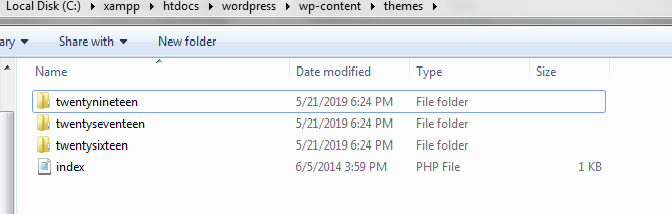
wordpress theme

We need to create a new file with any name we prefer.

We will call it a “newtheme.”

A WordPress theme contains at least two files, which are index.php and style.css.

Now go into the newtheme folder and create these two files.

In the style.css, we will insert the following comment, which is used to tell the user about the theme details and Meta information.

/* 
 Theme Name: NewTheme  
 Description: WordPress First Theme
 Version: 0.8  
 */ 

Go to the WordPress Dashboard, click on the Appearance-> Themes.  We will find NewTheme in the themes collection.
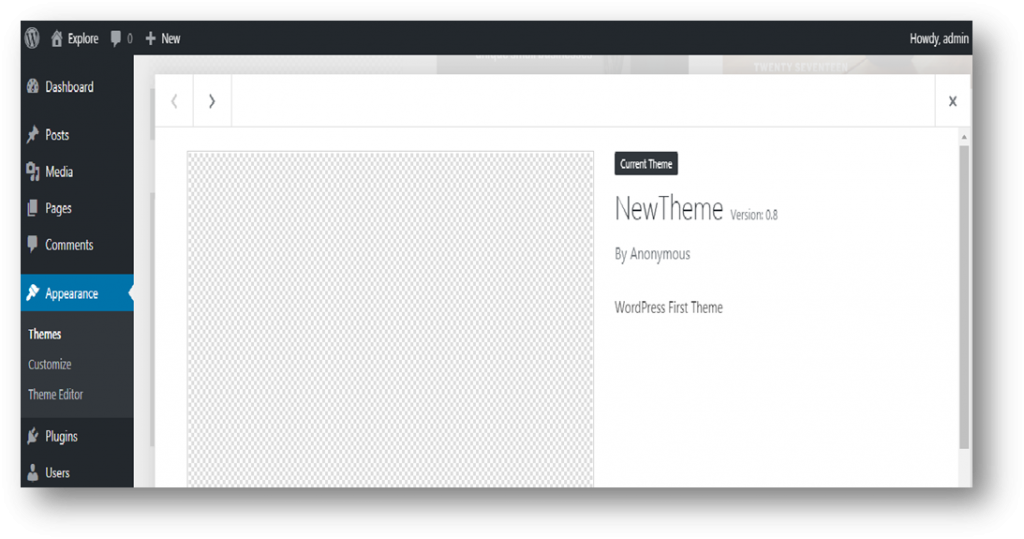
wordpress theme 1

Now, open index.php in the text editor and write the following code.:


Hello WordPress Theme.

Sections:

To develop a standard WordPress Theme, we need to divide our work into sections. It is not necessary to do everything in index.php, but a good programming practice involves standardized. We will divide our Theme into four sections, i.e., header, footer, sidebar, and body. These sections are created into four different files, namely, header.php, footer.php, sidebar.php, and content.php.

 Let`s do our Theme Header (Header.php) :


  <?php echo get_bloginfo( "name" ); ?>  


 <?php echo get_bloginfo( "name" ); ?>  

This is embedding HTML code into PHP code.

With some additional changes, it becomes:


  <?php echo get_bloginfo( "name" ); ?>  


The above code is used to get the template directory, CSS,JS etc additional resources can be located.

The above code is used to echo the homepage url.

wordpress theme 2

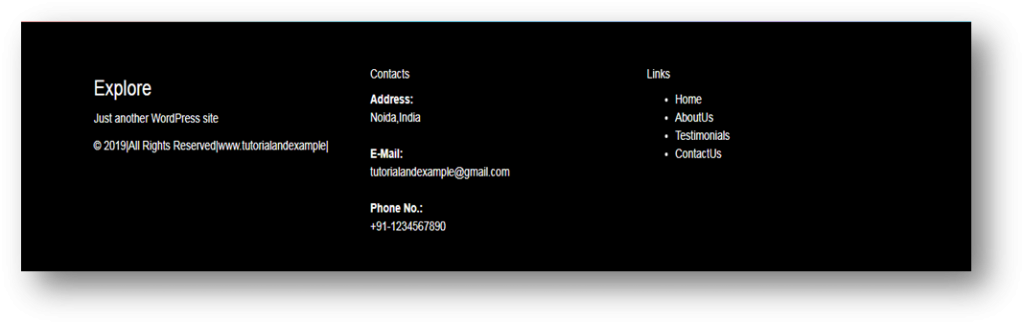
Footer.php:


The above code is used to place the site description.
sidebar.php: Often sidebars display archive links, recent posts, social media accounts, etc. In our Theme, we’ll create archive links and social media links.


Integration:

In index.php file, we will integrate all the sections. We have to clearly put these sections. Let`s see how I have done it.


  • In the above code, we have get_header(), get_sidebar() and get_footer() that all are predefined functions used for embedding sections.

And for the custom section like content.php, we have embedded with the following code:

Style.css: Let`s add some charm with CSS.

/* 
  Theme Name: NewTheme 
 Description: WordPress First Theme 
 Version: 0.8
 */
 body{
 background-image: linear-gradient
(to right, #eea2a2 0%, #bbc1bf 19%, #57c6e1 42%, #b49fda 79%, #7ac5d8 100%);
 }
 nav.navbar .navbar-brand .site-branding { 
 margin: 0; 
 } 
 footer.site-footer { 
 background-color: black; 
 color: #fff; 
 padding: 40px 0 20px 0; 
 } 
 footer.site-footer a { 
 color: #fff; 
 } 

The Loop:

The Loop is a functionality through which we can insert content into our theme.


content.php:


  • In the above code, anything which is inside the Loop will be repeated, till the page done with all of its posts.

Changed the (index.php):


The Loop inside the index.php file is calling the content.php file every time the page has a new updated post. Inside the content.php file, we have checked if the current post is_single(). This condition is used to hold true if the current page contains only a single post to Loop through. If it is not single, we wanted to link to the post via its title. So we used get_permalink() to get the URL for the particular post. If the page is single, there is no need to link it, and therefore, we have used only the_title() function.

We have displayed the_date() which is used to tell the user when the article/post is published and it’s the_author().  At last, we have used the same concept of is_single() which is used to display the_excerpt() or the_content() of the post.

So, it was easy, with the little charm of CSS, we have got the following result:
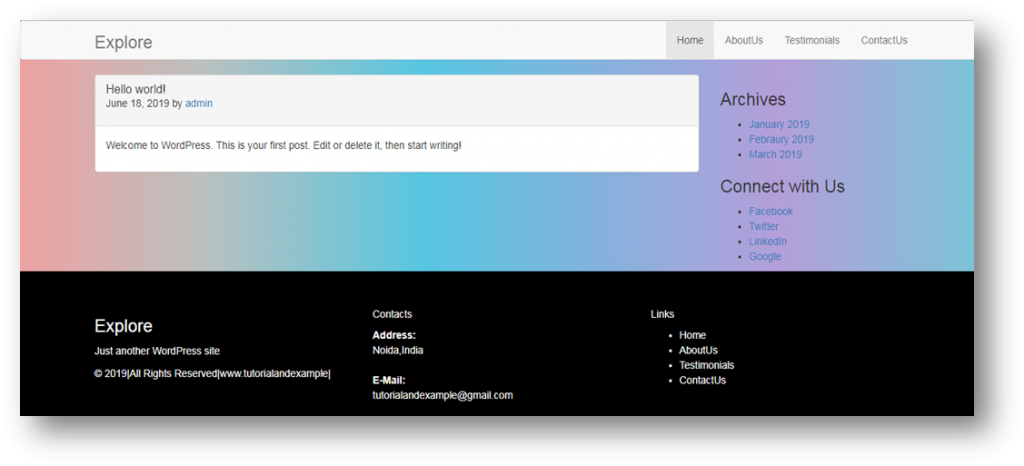
wordpress theme 4

  • We are ending this post, but we need to know there is still a lot to learn about WordPress.
  • It was a simple example, but a standard theme would be much complex.

Related Topics

PHP String get_html_translation_table() Function

The get_html_translation_table() function in PHP is used to return the translation table used by the htmlentities() and htmlspecialchars() functions. Syntax get_html_translation_table ([ int $table = HTML_SPECIALCHARS [, int $flags = ENT_COMPAT | ENT_HTML401 [, string $encoding = "UTF-8" ]]] ) Parameter table (optional)- This parameter specifies which translation table to return. It...

2 minutes read.

PHP pos() Function

PHP pos() Function The pos() function in PHP returns the current element in an array which is initialized to the first element of the array. This function is an alias of current(). Syntax pos ( array...

1 minute read.

PHP str_repeat() Function

PHP str_repeat() Function The str_repeat() function in PHP repeats a string a specified number of times. Syntax str_repeat ( string $input , int $multiplier ) Parameter string(required)- This parameter signifies the string to be repeated. multiplier(required)- This parameter represents the number of times the string will be...

1 minute read.

PHP array_shift() Function

PHP array_shift() Function The array_shift() in PHP shifts the first value of the array off. This function returns the same value after shortening the array by one element and moving everything. Syntax array_shift ( array &$array )  Parameter array(required)- This parameter represents the input array Return This function returns...

1 minute read.

PHP get_defined_vars() Function

PHP get_defined_vars() Function The get_defined_vars() function in PHP returns an array of all defined variables. It returns a multidimensional array containing a list of all defined variables. Syntax get_defined_vars ( void ) Parameter NA Return This function returns a multidimensional array containing a list...

1 minute read.

PHP array_intersect_assoc() function

PHP array_intersect_assoc() function The array_intersect_assoc() function in PHP is used to compute the intersection of arrays with the help of an additional index check. It returns an array containing all the entries from array1 that are present...

1 minute read.

PHP is_bool() Function

The is_bool() Function in PHP is used to  find whether a variable is a Boolean or not. It returns a Boolean value true if the parameter var is a Boolean else it returns...

1 minute read.

PHP levenshtein() Function

PHP levenshtein() Function The levenshtein() function in PHP calculates the Levenshtein distance between two strings. Syntax levenshtein ( string $str1 , string $str2 , int $cost_ins , int $cost_rep , int $cost_del )  Parameter str1(required)- This parameter signifies one of the strings being evaluated for Levenshtein distance. str2(required)- This parameter signifies one of the strings being evaluated...

1 minute read.

PHP Operator

PHP Operator is used to perform operations on variable and values. Following are the types of Operator: PHP Arithmetic Operator PHP Arithmetic operator is used for arithmetical operations, such as addition, subtraction, multiplication...

2 minutes read.

PHP array_unshift() Function

PHP array_unshift() Function The array_unshift () function in PHP prepends one or more elements to the beginning or front of an array. It returns the new number of elements in the array. Syntax array_unshift ( array &$array [, mixed $... ] ) Parameter array(required)- This array represents...

1 minute read.

Python if-else

Python if-else The else statement is associated with if statement. An else statement executes if the conditional expression in if the statement becomes false or a Zero value. If the conditional expression...

2 minutes read.

PHP For loop with Example

For loop in PHP : The for loop is the most potent loop, it combines the abilities to set up variables as we enter the loop, test for conditions while iterating...

3 minutes read.

PHP asort() function

PHP asort() function The asort() function in PHP is used to sort an array while maintaining the index association. Syntax asort ( array &$array [, int $sort_flags = SORT_REGULAR ] )  array(required)- This parameter represents the input array to sort. sort_flags (optional)- This parameter is used to...

1 minute read.

Python main() function

What is a main() function? In most of the programming languages, there is this one special function i.e., main() which is executed firstly everytime when we run the program. The special...

6 minutes read.

PHP array_search() Function

PHP array_search() Function The array_search() function in PHP searches the array for the specified value. This function returns the first corresponding key if the value is found. Syntax array_search ( mixed $needle , array $haystack [, bool $strict ])  Parameter needle(required)- This parameter represents the value to...

1 minute read.

PHP htmlspecialchars_decode() Function

PHP htmlspecialchars_decode() Function The htmlspecialchars_decode() function in PHP convert some predefined HTML entities to characters. The some predefined HTML entities that will be decoded are as follows: &amp; OR & (ampersand)&quot; OR " (double quote)&#039;...

2 minutes read.

PHP is_array() Function

The is_array() Function in PHP is used to  find whether a variable is an array or not. It returns a Boolean value true if the parameter var is an array else it returns...

1 minute read.

PHP strtok() Function

PHP strtok() Function The strtok() function in PHP splits a string into smaller strings or tokenize the specified string.  Syntax strtok ( string $str , string $token ) Parameter str(required)- This parameter represents the input string to split into smaller strings or tokens. token(required)- It signifies...

1 minute read.

PHP array_fill() function

PHP array_fill() function The array_fill() function in PHP fills an user-defined array with num entries of the value that of specified values parameter, where the keys start at the start_index parameter. Syntax array_fill ( int $start_index , int $num , mixed $value ) Parameter start_index(required)- This parameter represents the first index of the...

1 minute read.

PHP gettype() Function

PHP gettype() Function The gettype () function in PHP gets the type of the specified variable. Syntax gettype ( mixed $var ) Parameter var(required)- This parameter represents the variable being type checked. Return This function returns the type of the PHP variable specified by “var”...

1 minute read.