
×

CodeIgniter Models

Models are the classes that deals with backend operations. It is used to fetch the data from the database and send it to the Controller. All the database related information provided inside the CI_Model. For example, suppose you have created a web application using the CodeIgniter framework to manage the users. or this, you have to require a model class through that you can perform the update, read, insert, and delete.

Syntax:

<?php 
    class Model_abc extends CI_Model 
    { 
       public function __construct()
               {  
          parent:: __construct(); 
       } 
    } 
 ?>

There are a few essential points listed

  • You have to create a new folder inside the application/model’s folder, that is present in the CodeIgniter folder of your server.
  • The first letter of the model class must be in the uppercase. The model class name and model file name must be same.

For example, suppose Model_abc, Modelname, and ModelName are class names, the file name of these class name will be Model_abc.php, Modelname.php, and ModelName.php.

  • A model class extends a codeignitor model file to access all predefined functions of the original file that can be inherited to the newly created file.

Loading a Model

A CodeIgniter provides a load() method for loading the model in the Controller’s file. In this method, a model file is rendered to the Controller’s action.

Syntax:

$this->load->model(‘modelName’);

The above syntax represents that a modelName is the name of your model class that will be loaded to the model() method. So, we don’t require to use the .php extension in the model file.

After loading the model file in the controller, now you have to load the function of the model’s class.

Syntax:

$this->modelName-> modelFunction();

Similarly, you can create multiple model classes and their function in the model folder. You can call the models and their function in the Controller class.

Creating a Model file

Here we will understand how we can create a model class inside the model folder of the application in the CodeIgniter. There are following steps to create a model file in CodeIgniter:

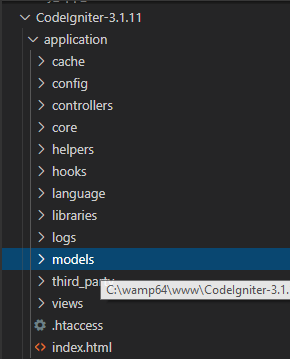
  1. Extend the application folder and select the models folder.
CodeIgniter Models

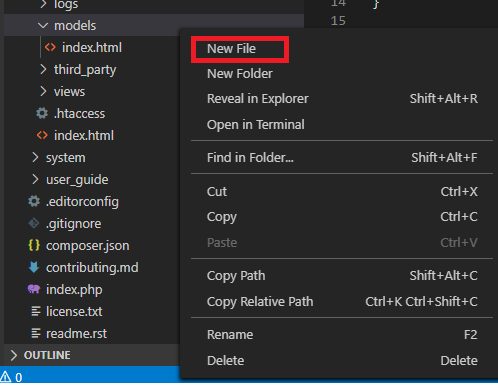
2. Right-click on the models folder, click on the New File menu.
CodeIgniter Models

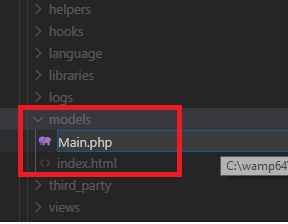
3. Provide the file name. We have provided the file name Main.php.
CodeIgniter Models

4. Write the following code in Main.php file.

<?php
 class Main extends CI_Model
 {
     public function fetchData()
     {
         return ['name' => 'Tutorials & Examples','topic'=> 'CodeIgniter Full Tutorial'  ]; 
     }
 }
 ?> 

Create a controller file in the folder application/controller. We have created a controller file with the name Users.php.

<?php
 class Users extends CI_Controller 
 {
             public function index()
             {
         echo "This is my first Example of Model"; 
         echo "</br>";
         $this->load->model('Main'); // Here we have loaded the model file in the Controller.  
   $data=$this->Main->fetchData(); // here we call the fetchData method of the Main.php file
         print_r($data);
     }
 }
 ?> 

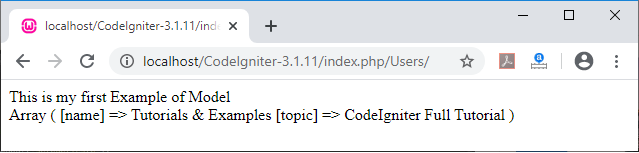
Open the browser and execute the URL localhost/CodeIniter-3.1.11/index.php/Users/. It shows the output, as shown below.
CodeIgniter Models

Create a program using MVC

Let’s create a program by using the following steps, in CodeIgniter framework that follows MVC design pattern.

Step 1: Create three folders model, view, and controller inside the application folder of the project.

Step 2: Create Main.php in models folder.

Main.php

<?php
 class Main extends CI_Model
 {
     public function fetchData()
     {
         return [
             ['topic' => 'CodeIgniter', 'site' => 'Tutorial And Examples'],
             ['topic' => 'CakePHP' , 'site' => 'Tutorial And Examples']
         ];
     }
 }
 ?> 

Step 3: Create User.php in the view folder.

User.php

<!DOCTYPE
html>
 <html>
 <head>
             <title style="color:red;"> Welcome to the Tutorials & Examples </title>
     </head> 
     <body>
     <h1 style="color:blue;" >Tutorials and Topic </h1>
     <table>
     <tr>
     <th> Topic Name </th>
     <th> Web Site </th> 
     </tr>
     <?php foreach($users as $row): ?>
     <tr>
     <td style="color:red;"> <?php echo $row['topic']; ?> </td> 
     <td style="color:green;"> <?php echo $row['site']; ?> </td>
     </tr>
     <?php endforeach; ?>
     </table>
     </body>
     </html> 

Step 4: Create Users.php in controller folder.

Users.php

<?php
 class Users extends CI_Controller {
             public function index()
             {    
         echo "This is a simple program using the model, View and the Controller";  
         echo "</br>";
         $this->load->model('Main');
         $data['users'] = $this->Main->fetchData(); 
         $this->load->view('users/user', $data);
     }
 } 
 ?> 

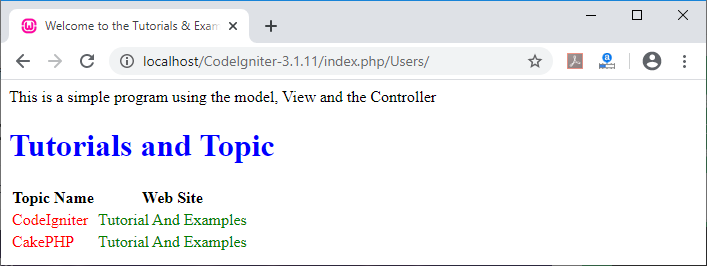
After creating all the files open the browser and invoke the URL localhost/CodeIgniter-3.1.11/index.php/Users. It shows the output as shown below.
CodeIgniter Models

Related Topics

CodeIgniter Shopping Cart Class

It contains the various function that enables the user to add or update, display, and delete data item from the shopping carts while browsing the site. The items added in the cart...

10 minutes read.

Update a Record CodeIgniter

Update a record In this topic, we will learn how we can update existing records in database tables. To update a record, CodeIgniter provides an update() function used with the set()...

10 minutes read.

CodeIgniter Text Helper

The text helper contains the various function that is used to operate with text such as define a word limit and characters limit, conversion of word from ASCII to entities, etc. Loading the text...

4 minutes read.

CodeIgniter Pagination Class

Pagination Class The CodeIgniter framework provides a pagination class that is used in the data list to create pagination links in a web application. Generally, it is used to retrieve data records from...

10 minutes read.

CodeIgniter URL Helper

The helper file contains some predefined functions that are used to work with URL, such as generate the current file path, transfer control, redirect, create a link, etc. Load the URL Helper Before using...

7 minutes read.

CodeIgniter Views

A View is a presentational part which shows the information to the users. It is a complex web page which contains navbar, header, footer, sidebar, etc. A view file cannot be called directly...

5 minutes read.

CodeIgniter Encrypt Class

The Codeigniter provides an encrypt class used to protect confidential data stored on computer systems or data transmitted over a network. It provides two-way data encryption techniques such as Mcrypt PHP extension and...

4 minutes read.

CodeIgniter Creating Library

As we know, CodeIgniter has a large collection of library functions that are stored in the system/libraries folder. CodeIgniter also provides some additional functionality in library files. For example, if you want to...

3 minutes read.

Structure of Codeigniter

The File structure of CodeIgniter is divided into three parts: ApplicationSystemuser_guide Application -: As the name represents Application, which contains all the main parts of the project like a controller, libraries, view, models, and others....

3 minutes read.

CodeIgniter Email Class

CodeIgniter provides an e-mail library that helps to send a message from one application to another. You can create and send text messages easily in CodeIgniter application even you can set email...

9 minutes read.

Installation of CodeIgniter

Before installing CodeIgniter, you need to make sure that the wamp or xampp server in the system is preinstalled. The installation procedure for CodeIgniter is very easy. You can download CodeIgniter by following these...

2 minutes read.

CodeIgniter Smiley Helper

The smiley helper file contains smiley images that are used in the application for showing emotions and comments while chatting with others. Load a Smiley Helper Before using Smiley Helper in the CodeIgniter application, you...

4 minutes read.

CodeIgniter HTML Helper

The HTML helper function is used in CodeIgniter to provide various functionality, such as headings, images, links, list tags, etc. Loading the HTML Helper Before using the html helper function, you must load the...

7 minutes read.

CodeIgniter Language Class

Language Class The CodeIgniter’s language class contains the various functionality that is used to access the language-specific files and text line for the purposes of internationalization. This class provides you suitability to add or...

4 minutes read.

Calendaring Class CodeIgniter

Calendaring Class The calendar library contains various functions that are used to create a dynamic calendar. It also enables you to pass the data to calendar cells and 100% control over the calendar...

6 minutes read.

CodeIgniter Array Helper

The Array Helper contains some predefined functions that are used to perform the various operation with array. Load Array helper It is used to load the helper class. We can pass the helper function in the...

6 minutes read.

CodeIgniter Tutorial

What is CodeIgniter? CodeIgniter is an open-source framework for developing a dynamic web application with the use of PHP. It uses the MVC framework to develop the project, which is much...

3 minutes read.

CodeIgniter String Helper

The string helper file contains functions that allows separate operations with strings in CodeIgniter. Loading the String Helper Before using the string helper in the CodeIgniter application, you must load it in the controller...

7 minutes read.

Delete a record from Database CodeIgniter

Delete a record from the Database After inserting, retrieving, and updating table records, we will now learn how we can delete a particular record from a database table. To delete a record, first, we...

6 minutes read.

CodeIgniter Date helper

A date helper file contains some predefined functions that work with date functions. Before using the date function in CodeIgniter, you have to load the date helper in the controller. For example: $this->load->helper(‘date’); Functions of...

12 minutes read.