HTML Table Class CodeIgniter
HTML Table Class
The CodeIgniter framework provides an HTML Table Class that is used to develop an auto-generated table using a defined array or result sets of the database table.
Loading an HTML Table Class
Like other libraries, we must load a table class in the Controller file by using the following syntax.
Syntax
$this->load->library(‘table’);
 Once the class is loaded, you can use the table library object, as shown in the syntax:
 $this->table
Class Reference
There are various class references available in the Html table class:
- $function = NULL
A $function enables you to use a basic PHP function or a valid array object that can be applied to all cell data.
$this->table->function = ‘htmlspecialchars()’;
- generate():As the name suggests, a generate() function is used to create a table that contains table data. It also allows you to pass an optional parameter that can be an array or a database result sets.
Syntax
generate ( [$table_data = NULL ])
$table_data: It defines the data that you want to show with table rows.
Example: Create a Html_controller.php controller file and save it to the following path application/controller/Html_controller.php folder. After that, write the following program in the controller file.
Html_controller.php
<?php
 defined(' BASEPATH ') OR exit('No direct script access allowed');
 class Html_controller extends CI_Controller
 {
     public function useFunction()
     {
         $this->load->library('table');
         echo "<title> Tutorial and Example </title>";
         $this->table->set_heading('Name', 'Qualification', 'Occupation', 'Country');
         $this->table->add_row('James', 'B.COM', 'Accountant', '<i>England</i>');
         $this->table->add_row('Josef', '<strong>M.TECH</strong>', 'IoS Developer', 'USA');
         $this->table->add_row('Allis', 'Zoology', 'Zoologist', 'USA');
         $this->table->add_row('John', 'A Level', 'Computer Teacher', '<b>France</b>');
         $this->table->function = 'htmlspecialchars()';
         echo $this->table->generate(); // it is used to generate a table with row data
     }
 }
 ?>
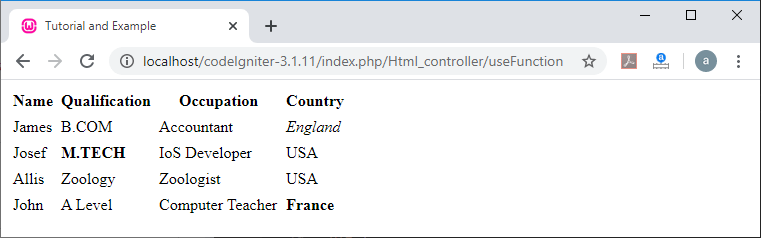
To run the program in the localhost by invoking the URL localhost/CodeIgniter-3.1.11/index.php/Html_controller/useFunction; it shows the output as shown below.
- set_caption(): A set_caption() function is used to show captions on a table.
Syntax
set_caption ($caption)
$caption: It is a variable that contains a string.
$this->table->set_caption( ‘Tutorial and Example’ );
- set_heading(): As the name defines, it is used to create a table heading by passing an array or multiple strings as a parameter to the set_heading() function.
Syntax
set_heading ([ $arg = array() ])
$arg: In this field, you can pass an array or string that contains table titles.
Example: $this->table->set_heading(‘Name’, ‘Roll_no’, ‘College’);
Using an array: $this->table->set_heading(array(‘Name’, Roll_no’, ‘College’);
- add_row(): An add_row() function that allows you to create a row in your table by passing row values.
Syntax
add_row ([ $args = array() [,.. ] ])
$args: It consists of an array or multiple strings containing row values.
$this->table->add_row( ‘One’, ‘Two’, ‘Three’ );
 $this->table->add_row(array (‘One’, ‘Two’, ‘Three’, ‘Four’)); // using an array.
If you want to set multiple attributes in a single cell, you can use an associative array. And this attribute includes a key-value pairs for that cell.
$cell = array(‘name’ => ‘Thomas’, ‘class’ => ‘highlight’, ‘colspan’ => 3);
 $this->table->add_row($cell, ‘Egypt’, ‘Adverb’);
Example: Create a Html_controller.php controller file and save it to the following path application/controller/Html_controller.php folder. After that, write the following program in the controller file.
Html_controller.php
<?php
 defined(' BASEPATH ') OR exit('No direct script access allowed');
 class Html_controller extends CI_Controller
 {
      public function setCaption()
     {
         $this->load->library('table');
        $this->load->view('data_view'); // load data_view file
     }
 }
 ?>
Example: Create a data_view.php view file and save it to the following path application/views/data_view.php folder. After that, write the following program in the view file.
data_view.php
<html>
 <head>
 <title> Tutorial and Example </title>
 </head>
 <body>
 <?php
 $template = array('table_open' => '<table border = "3" >' );
 $this->table->set_template($template);
 $this->table->set_caption('Table 2 - Student Details'); // It shows caption to the table.
 $this->table->set_heading(array('Roll_no.', 'Name', 'Email', 'Address')); // set_heading
 $this->table->add_row(array('01', 'Finch', 'Finch@yahoo.com', 'Australia'));
 $this->table->add_row(array('02', 'Lyra', 'lyra@gmail.com', 'UK'));
 $this->table->add_row(array('03', 'John', 'john@hcl.com', 'London'));
 echo $this->table->generate();
 ?>
 </body>
 </html>
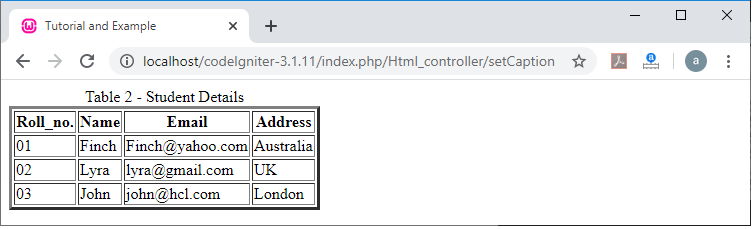
To run the program in the localhost by invoking the URL localhost/CodeIgniter-3.1.11/index.php/Html_controller/setCaption function; It shows the output as shown below.
- make_columns(): A make_columns() function is used to create a multidimensional array with an equal depth using a one-dimensional array and number of columns as the input to be displayed in a table.
Syntax
make_columns ([ $array = array() [, $col_limit = 0 ]])
It has two parameters:
$array: It defines an array that contains multiple rows’ data as an input.
$col_limit: It shows the number of columns in the table.
Example: Create a Html_controller.php at application/controller/ folder and write the following program in the Html_controller.php file
Html_controller.php
<?php
 defined(' BASEPATH ') OR exit('No direct script access allowed');
 class Html_controller extends CI_Controller
 {
 public function col()
 {
     echo "<title> Tutorial and Example </title>";
     $this->load->library('table');
     $template = array(
         'table_open'  => '<table border="3"
         bgcolor ="red" cellpadding="2"
         cellspacing="1" class="mytable">'
     );
     $this->table->set_template($template);
     $num = array('One', 'Two', 'Three',
     'Four', 'Five', 'January', 'February', 'March', 'April',
      'May', 'Sunday', 'Monday', 'Tuesday', 'Wednesday', 'Thursday');
 $data = $this->table->make_columns($num, 3);
 echo $this->table->generate($data);
 }
 }
 ?>
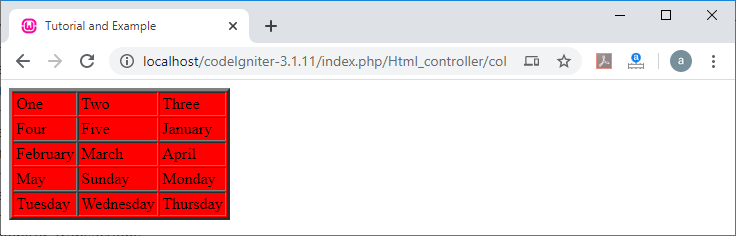
To run the program in the localhost by invoking the URL localhost/CodeIgniter-3.1.11/index.php/Html_controller/col function; it shows the output as shown below.
- set_template(): A set_template() function is used to set an additional attributes in a template or table.
Syntax
set_template ($template)
$template: It defines an associative array that contains a template value.
Example:
$data = array(
             ‘table_open’ => ‘<table border =”3” cellpadding =”2” cellspacing=”2” class=”tutorial” bgcolor=”skyblue” >’ );
 $this->table->set_template($data);
- set_empty(): It is used to set a default value in any table cells such as, set a non-breaking space:
Syntax
set_empty($value)
$value: It contains a value that is placed in an empty cell.
Example:
$this->table->set_empty(“ ”);
- clear(): As the name suggests, it is used to clear table headings and row data. And if you want to show multiple tables with different data, you can call a clear() function after each generated table to clear the previous information of the table.
$this->table->clear();
Example:
$this->table->set_heading('Name', 'Hobbies', 'Country');
 $this->table->add_row('Watson', 'Wednesday', 'USA');
 $this->table->add_row('Morris', 'Cricket', 'UK');
 echo $this->table->generate();
 $this->table->clear(); // It clears the previous data after each generated table
 $this->table->set_heading(array('Name', 'Subject', 'Division'));
 $this->table->add_row(array('Angelina', 'English', 'First'));
 $this->table->add_row('Mary', 'Economics', 'Second');
 echo $this->table->generate();
Create a table from the database query:
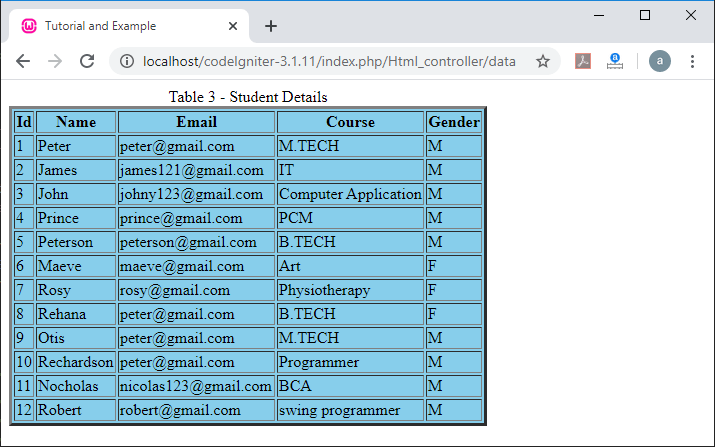
In this topic, we will learn how we can create a table from the database query result. The database query() function is used to fetch all stored data from the database table and produces a heading based table that you have defined in the set_heading() function.
Syntax
$query = $this->db->query( ‘select * from tablename’ );
 echo $this->table->generate($query);
Example: To create an html table from the database records:
While creating an Html table, you have to ensure that your database connection should be connected with your Codeigniter application, and there must be some records in a database table. Suppose there is a ‘users’ table in the database to create Html table.
Create an Html_controller.php file at the application/controller/ folder and write the following program in the controller file.
Html_controller.php
<?php
 defined(' BASEPATH ') OR exit('No direct script access allowed');
 class Html_controller extends CI_Controller
 {
 public function data()
     {
       $this->load->library('table');
         $this->load->database(); // load database connection
         $this->load->view('data_view'); // load view file
     }
 }
 ?>
Similarly, create a data_view.php file at the application/views/ folder and write the following program in the view file.
data_view.php
<html>
 <head>
 <title> Tutorial and Example </title>
 </head>
 <body>
 <?php
 $template = array('table_open' => '<table border = "3"
 bgcolor ="skyblue" cellspacing ="2" class ="table3"
 >' );
 $this->table->set_template($template);
 $this->table->set_caption('Table 3 - Student Details'); // set caption to the table
 $this->table->set_heading(array('Id', 'Name', 'Email', 'Course', 'Gender'));
 $query = $this->db->query('SELECT * FROM users'); // users is the database table
 $result = $this->table->generate($query); // create database table
 echo $result;
 ?>
 </body>
 </html>
To run the program in the localhost by invoking the URL localhost/CodeIgniter-3.1.11/index.php/Html_controller/data function; it shows the output as shown below.