×

Structure of Codeigniter

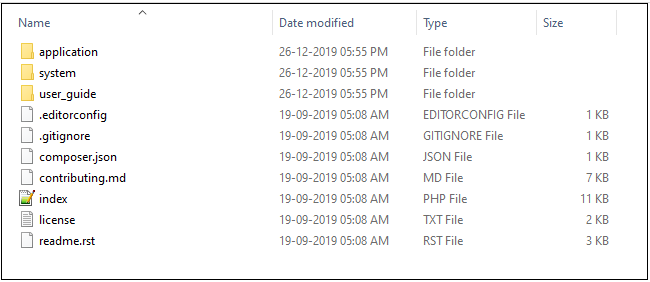
The File structure of CodeIgniter is divided into three parts:

  1. Application
  2. System
  3. user_guide
Structure of Codeigniter

Application -:

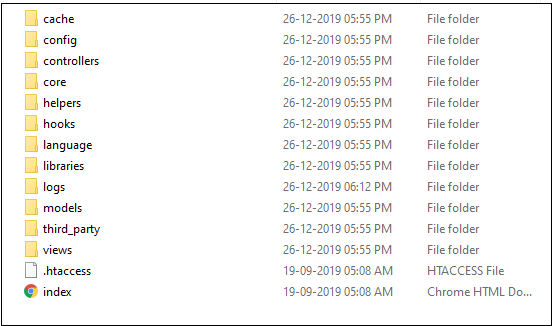
As the name represents Application, which contains all the main parts of the project like a controller, libraries, view, models, and others. Also, it is that place where you will develop your web application. Here we will discuss some components used in the Application folder.
Structure of Codeigniter2

Cache – This folder contains all the web pages records which you have used in your web application. The cache pages also used to increase web performance and faster to access the web pages in the web application.

Config – The Config folder contains many files that are used to configure the web application. Like autoload.php file which is used to load all libraries, helpers, you can also define your custom files, so you don’t require to call the records or method again and again in your web application. In the database.php file, you can configure your database table with the application. And in routes.php file, you can define the controller’s files and their actions in the application.

Controllers – A controller is used to control the flow of the web application. It means, this can handle all the server-side functionalities. If the controller fails, then all the associated features related to the controller are also failed.

Note: The name of the controller should be in capital letters. Example Main.php file should not be written as main.php.

Core – A CodeIgniter contains some core class that is used as a base class of the application. So, you don’t require any changes in the core files.

Helpers – This helper folder is used to load the functions in the CodeIgniter. Like

load->helper (‘date’); This function will provide the date functionality in the application. Similarly, you can add web files like as html, CSS, javascript, form function.

Hooks- This folder contains some files which are used to tap and update the internal working of the web framework without harming the core files of the application.

Libraries - This folder contains the language-related library files of your application.

Logs – This folder contains some files for checking the status of the CodeIgniter application. Suppose if your CodeIgniter application is facing some error or exception messages and you want to know what they are, then you can check in the logs folder.

Models – Models are used to handle database queries. By use of a model, we can perform CRUD (Create, Read, Update, and Delete) operation in the web application.

Third_party – This folder contains the plugins which are used in the web application for adding the additional functionality in the CodeIgniter application.

View – It contains all the HTML files for showing the output on the browser. A view is used to display a message or information to the user that they want to see.

System

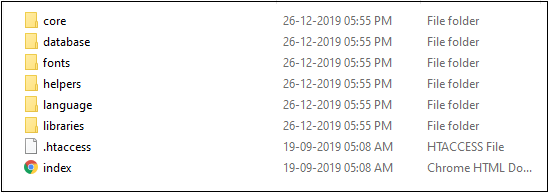
A System folder in CodeIgniter application is used to contain the core codes, libraries, helpers, and other files, which helps to create the coding easy for the developers.

Core – All the core files that are used to create a framework will be stored in this folder. And if you want to enhance the functionality of the web application, then you can create a custom core files in the application folder.

Database – A database folder contains all the database files like drivers, cache, query_builder, and database utilities.

Fonts – This folder contains all the fonts related information and other utilities.

Helpers – It contains some CodeIgniter helpers, which are useful to perform various operations such as cookie, date, email, form, etc.

Language- A CodeIgniter supports multi language web application.

Libraries – A library folder consists of many supported files such as JavaScript, calendar, email, encryption, parser, file upload, etc. and that will be stored in the “application/libraries.”
Structure of Codeigniter3

User_guide

A CodeIgniter provides a basic user_guide to their user/developer for a better understanding and development of the web application. It is an offline user manual guide that shows the step by step learning of the CodeIgniter framework. This manual describes many libraries, function, helpers, and classes which will be used in the CodeIgniter web application.

Besides these three folders (Application, System, and User_Guide), there is another file “index.php.” In this file, you can define the application environment and error level. Also, you can set the system and application folder name. If you are a beginner, then we strongly recommend you, please don’t modify this file.


Related Topics

CodeIgniter Cookie Helper

A cookie is a small set of files sent from the web server to the end-user system. In Helpers, the cookie helper file has some predefined functions that are used to the...

4 minutes read.

CodeIgniter Security Helper

A Security helper file contains some predefined functions that are used to protect application from unauthorized access. Loading the Helper The following syntax is used to load the security helper in the CodeIgniter application. Syntax $this-> load->...

4 minutes read.

CodeIgniter Benchmarking Class

The CodeIgniter contains the Benchmarking class that is used to calculate the time difference between two points or the memory usage of the passed statements in the application. By default, the Benchmarking...

7 minutes read.

CodeIgniter Libraries

The library is an important part of the CodeIgniter framework. It has a large collection of libraries files that are used to increase the performance of an application. By default, all CodeIgniter libraries...

4 minutes read.

CodeIgniter Views

A View is a presentational part which shows the information to the users. It is a complex web page which contains navbar, header, footer, sidebar, etc. A view file cannot be called directly...

5 minutes read.

CodeIgniter Helpers

The Helpers (functions) are stored in the Helper file. It helps CodeIgniter to perform different tasks. The helper file is the collection of many functions that is used to perform specific task. It...

3 minutes read.

CodeIgniter Smiley Helper

The smiley helper file contains smiley images that are used in the application for showing emotions and comments while chatting with others. Load a Smiley Helper Before using Smiley Helper in the CodeIgniter application, you...

4 minutes read.

CodeIgniter Tutorial

What is CodeIgniter? CodeIgniter is an open-source framework for developing a dynamic web application with the use of PHP. It uses the MVC framework to develop the project, which is much...

3 minutes read.

CodeIgniter URI Class

URI Class The CodeIgniter contains a URI class that is used to retrieve information from URI strings. It also provides suitability to get information from the re-routed segments. The system automatically initializes this...

6 minutes read.

CodeIgniter Security Class

Security Class The security class provides various function that helps to create a secure application and process input data securely to the application. This class is preloaded in the CodeIgniter application, so you...

4 minutes read.

CodeIgniter Controller

As its name suggest that it is a Controller that controls the web application, and it works as an intermediary between the Models and the View. A controller takes requests from the user...

3 minutes read.

CodeIgniter CAPTCHA Helper

A CAPTCHA (Complete Automated Public Turning test to tell Computer and Humans Apart) helper is a function that is used in web application to check whether the user is human or machine. It...

3 minutes read.

HTML Table Class CodeIgniter

HTML Table Class The CodeIgniter framework provides an HTML Table Class that is used to develop an auto-generated table using a defined array or result sets of the database table. Loading an HTML Table Class...

8 minutes read.

Form Validation Library Codeigniter

Form Validation Library The Codeigniter provides a form validation library that contains predefined rules to validate the form fields. It also helps in optimizing the form validation code, which reduces the effort and time...

31 minutes read.

Insert data to the database CodeIgniter

After successfully creating a database connection with the CodeIgniter application, we will now understand how we can insert records into the database. To insert a record into a database table, Codeigniter provides...

8 minutes read.

CodeIgniter URL Helper

The helper file contains some predefined functions that are used to work with URL, such as generate the current file path, transfer control, redirect, create a link, etc. Load the URL Helper Before using...

7 minutes read.

CodeIgniter Array Helper

The Array Helper contains some predefined functions that are used to perform the various operation with array. Load Array helper It is used to load the helper class. We can pass the helper function in the...

6 minutes read.

Retrieve data from Database

Retrieve data from the Database Now we will discuss how we can retrieve data from the database that we have inserted to the employees table of the database in our previous topic “inserted...

2 minutes read.

Image Manipulation Codeigniter

Image Manipulation A Codeigniter provides an image manipulation class that is used for resizing, cropping, rotation, and many other manipulation tasks. This class also support three major image libraries such as GD/GD2, NetPBM, and...

11 minutes read.

CodeIgniter String Helper

The string helper file contains functions that allows separate operations with strings in CodeIgniter. Loading the String Helper Before using the string helper in the CodeIgniter application, you must load it in the controller...

7 minutes read.