
CodeIgniter Security Class
Security Class
The security class provides various function that helps to create a secure application and process input data securely to the application. This class is preloaded in the CodeIgniter application, so you do not need to load it manually in the controller file.
The Function of the Security class
- XSS Filtering
- Cross-site request forgery (CSRF)
XSS Filtering
It is a cross-site scripting filter technique that is used to trigger JavaScript or other types of code that effort to destroy cookies or other malicious code. Furthermore, if any disallowed code is encountered, it can be called to the application by converting the data to the character entities.
It uses xss_clean() method to filter the data as follows:
$data = $this->security->xss_clean($data);
It is also used to protect images from potential XSS attacks during the transmission and uploading of image files to the server. It uses is_image as a second optional parameter in the XSS_clean method that protects an image file in the application from malicious attacks, so you need to set the TRUE value for the second parameter, and it returns a TRUE value instead of a string that indicates an image is safe. And when it encounters any malicious data in the browser, it returns FALSE.
if ($this->security->xss_clean($file, TRUE) == FALSE)
 {
   // define the false statement, if the file is not available.
 }
Create a controller file Secure_controller.php and save it in application/controller/Secure_controller.php. After that, write the following program in the controller file.
Secure_controller.php
<?php
 defined( 'BASEPATH ') OR exit( 'No direct script access allowed');
 class Secure_controller extends CI_controller
 {
     public function cross()
     {
         echo "<title> Tutorial and Example </title>";
          $data = "<script> Welcome to the world </script>";
 echo $this->security->xss_clean($data). "<br>";
 $is_image = 'images/my_pic.jpg';
 if ($this->security->xss_clean($data, $is_image = TRUE))
 {
     echo "file failed the XSS test";
 }
 else
 {
     echo "true";
 }
 }
 ?>
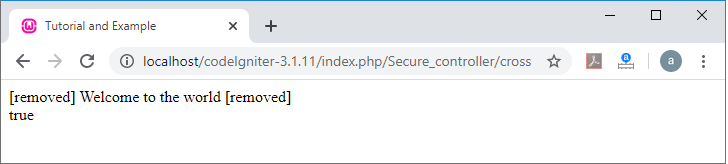
To run the program in the localhost by invoking the URL localhost/CodeIgniter-3.1.11/index.php/Secure_controller/cross function; it shows the output, as shown below.
CSRF Protection
It stands for Cross-site request forgery, that protects user data from malicious attack by altering in the application/config/config.php file:
$config[ ‘csrf_protection’ ] = TRUE;
When you build a form using the form open() function in the form helper, it automatically inserts a secret CSRF field into the form. It also enables you to add the CSRF manually by using the get_csrf_hash() and get_scrf_token_name() function. A get_csrf_hash() function is used to return the hash value, whereas, get_csrf_token_name() return the name of the CSRF.
Example:
$csrf = array(
                         ‘name’ => $this->security->get_csrf_token_name(),
                         ‘$hash’ => $this->security->get_csrf_hash()
 );
 <input type = ”hidden” name =”<? echo $csrf[‘name’]; ?>” value =”<? echo $csrf[‘hash’]; ?>” />
Create a controller file Secure_controller.php and save it in application/controller/Secure_controller.php. After that, write the following program in the controller file.
Secure_controller.php
<?php
 defined( 'BASEPATH ') OR exit( 'No direct script access allowed');
 class Secure_controller extends CI_controller
 {
   public function csrfdisplay()
 {
     echo "<title> Tutorial and Example </title>";
 $csrf = array(
 'name' => $this->security->get_csrf_token_name(),
 'hash' => $this->security->get_csrf_hash('document'));
 print_r($csrf);
 }
 }
 ?>
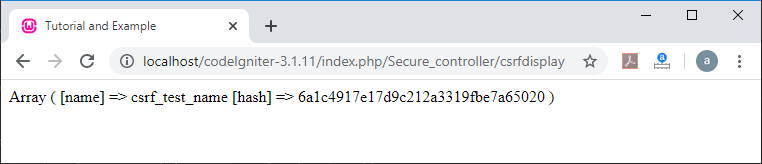
To run the program in the localhost by invoking the URL localhost/CodeIgniter-3.1.11/index.php/Secure_controller/csrfdisplay function; it shows the output, as shown below.
Class References
- xss_clean(): It is used to clean the XSS exploit from the input data and return a clean string.
Syntax
xss_clean( $str, [ $is_image = TRUE ] );
It has two parameters:
$str: It contains an input string or an array of strings.
$is_image: It is an optional parameter. If you want to protect your image, set it to TRUE, and it returns a TRUE value that shows your image is safe; otherwise it returns FALSE.
- sanitize_filename(): As the name suggests, a sanitize_filename () function helps to prevent directory or folder traversal and other security issues that are useful for specific files supplied via user input.
Syntax
sanitize_filename( $str [, $relative_path = FALSE ]);
It has two parameters:
$str: It contains the file name/path
$relative_path (bool): Uses a Boolean value to determine if you want to preserve the directory path in the file path.
- get_csrf_token_name(): It is used to display the CSRF token name.
Syntax
get_csrf_token_name()
or it can be set in the config file as $config[ ‘csrf_token_name’] value).
- get_csrf_hash(): It is used to return the CSRF hash value.
Syntax
get_csrf_hash()
- entity_decode(): An entity_decode() function is used to detect the HTML entities until it encountered a semicolon.
Syntax
entity_decode ($str [, $charset = NULL ]);
It has two parameters:
$str: It takes input string.
$charset: It defines the character set as an input string to the security class.
- get_random_bytes(): It is used to return the binary stream of random bytes, and if any error occurred, it returns FALSE.
Syntax
get_random_bytes ($length)
$length(int): It defines the Output length.