
How to delete Instagram account?

What is Instagram?

delete Instagram account

Instagram is used for sharing the images and videos on social networking websites through various platforms such as iOS, Android, Windows Phones, and Desktop. In 2010, Instagram was developed by Kevin Systrom and Mike Krieger. Facebook acquired Instagram in April 2012.

Initially, it was only run on iOS devices. In April 2012, an Instagram version was launched for Android devices. Later, a limited feature website interface was introduced in November 2012, a Fire OS app in June 2014, and an app for Windows 10 tablets and computers was launched in October 2016. Instagram allows users to share photos and short videos with their followers or with a selected friend group. Users can also edit the photos and videos by using the various filters and uses the location information.

Users can share the posts publicly or with approved followers. Users can view, like, and comments to their friend’s post and also follow other users to add their post to a news-feed. You can send a direct message to the other user by using the Instagram Direct feature.

Anyone can create an account on Instagram by registering the email address, username, and mobile number.

How can we temporarily deactivate the Instagram account?

If you want to temporarily deactivate your account, it will disable your photos, videos, likes, and comments until you do not reactivate it by logging back to your Instagram account. For this, you are required to follow these following steps:

Step 1: Login into your Instagram account from a mobile device or computer browser on https://www.instagram.com/.
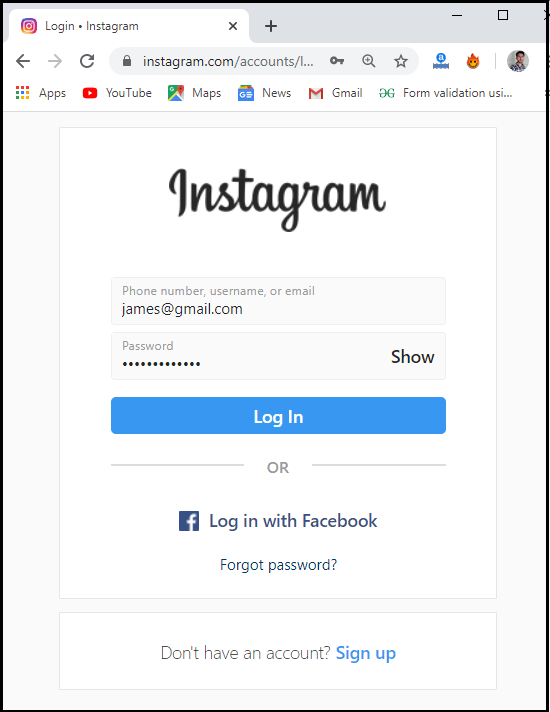
How to delete Instagram account?

Step 2: Firstly, click on the profile option, which displays at the top right side of the screen, as shown in the below screenshot:
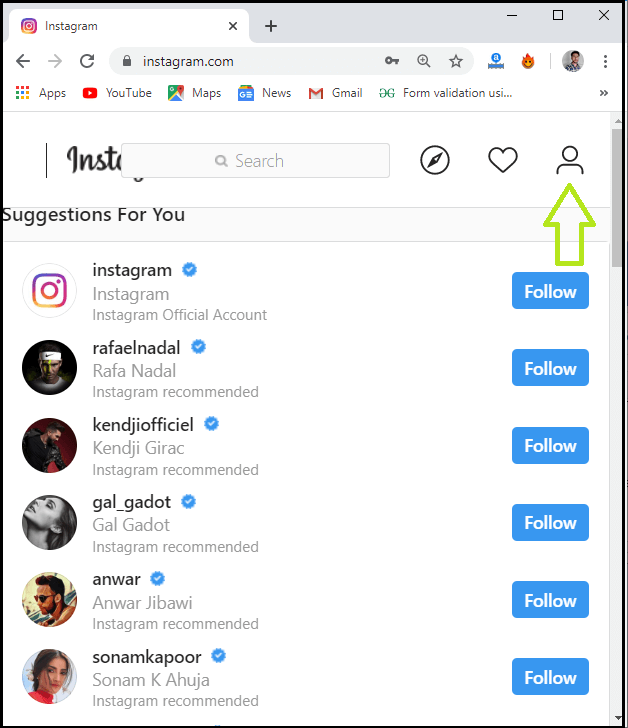
How to delete Instagram account?

Step 2: Next, you need to select the “Edit profile” option.
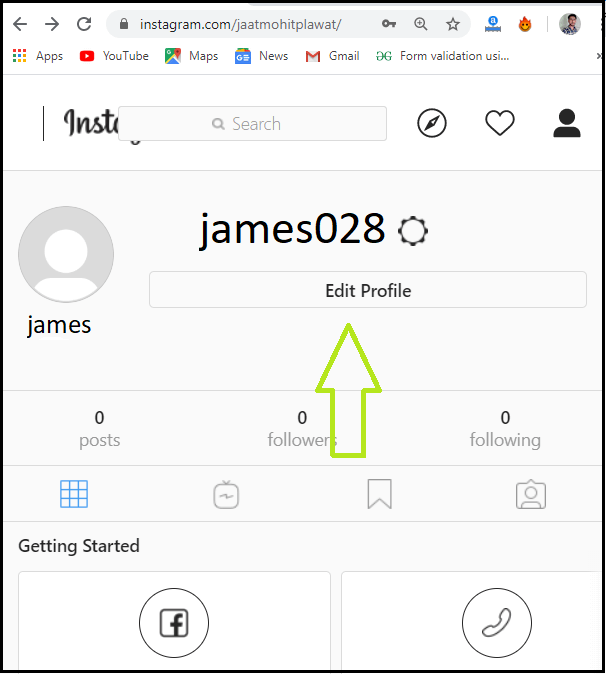
How to delete Instagram account?

Step 3: After click on the “Edit Profile” option, scroll down the screen page and click on the “Temporarily disable my account” option that displays in the bottom right of the screen.
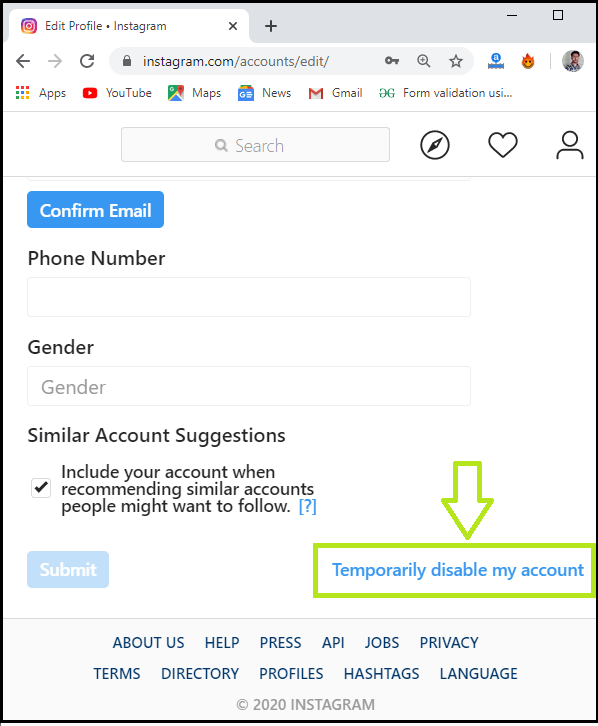
How to delete Instagram account?

Step 4: Once you click on the “Temporarily disable my account” option, it is required to select the reason from the drop-down menu list that asks, “Why are you disabling your account?”
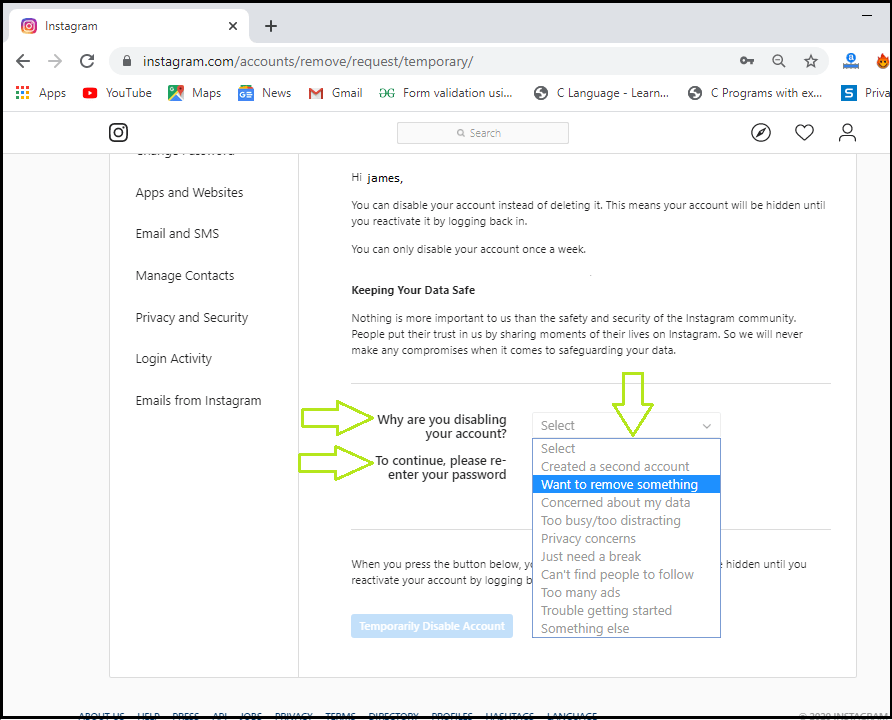
How to delete Instagram account?

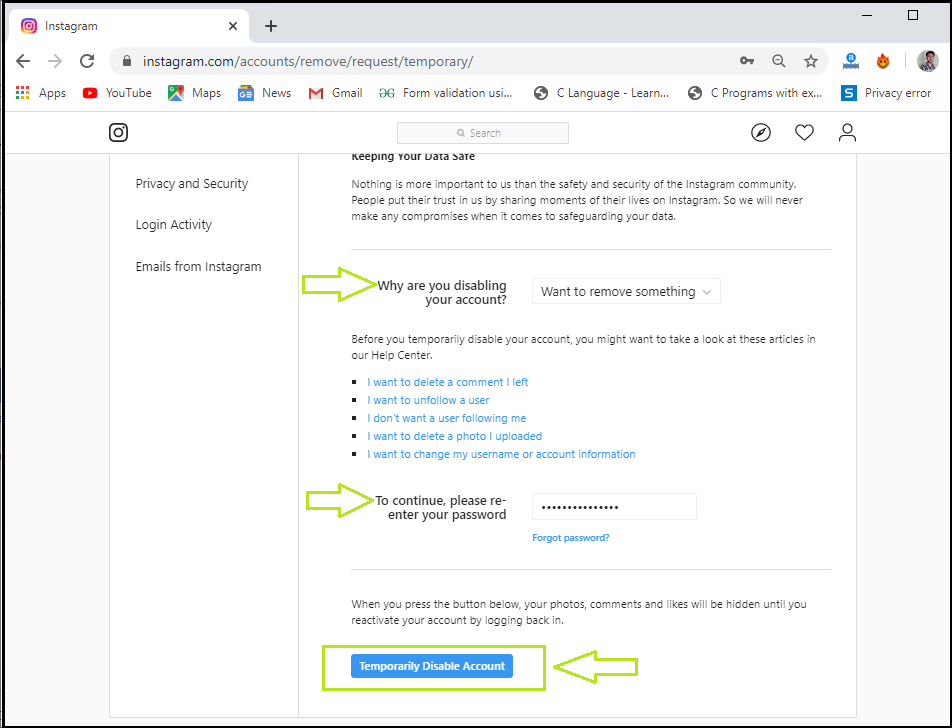
After providing the appropriate reason, you are required to enter the password to deactivate an Instagram account.
How to delete Instagram account?

When you complete all the above processes, the option “Temporarily disable your account” will appear again.

Step 5: Now, click on the “Temporarily Disable Account” option to deactivate your account.

Note: We can reactivate the temporarily disabled account by logging back.

How can we permanently delete the Instagram account?

If we delete the Instagram account permanently, our photos, videos, likes, comments, and followers will also be deleted permanently from the account. Once we remove the Instagram account permanently, it can’t be reactivated again by using the same username. You can use that username to another account.

To permanently delete your Instagram account, you are required to follow these steps:

Step 1: Login your account on the Instagram website by using the username and password.

Step 2: Now, go to the “delete your account” page. You can use this https://www.instagram.com/accounts/remove/request/permanent/ link to access the “delete your account” page. Next, you need to select the reason from the drop-down menu list that asks, “Why are you deleting your account?” and then enter the password to delete your account permanently.
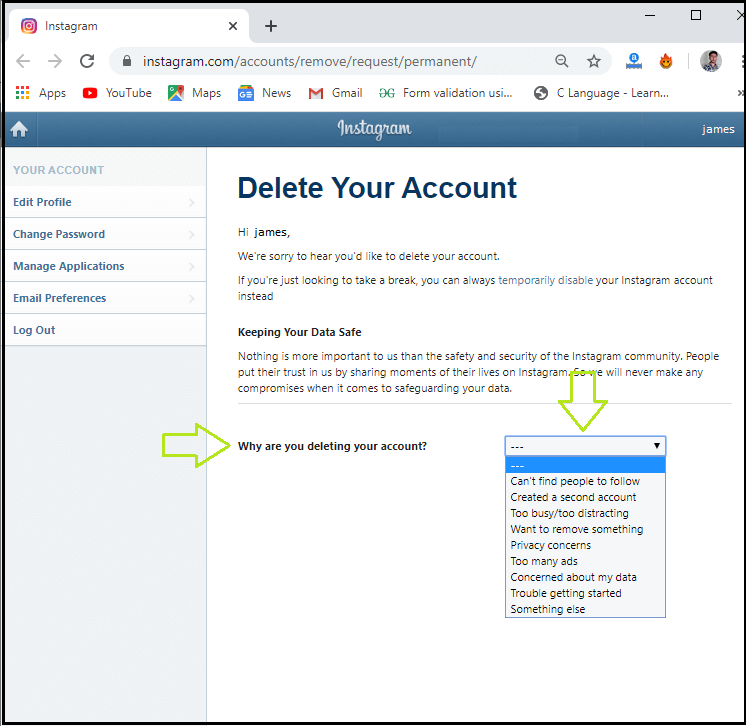
How to delete Instagram account?

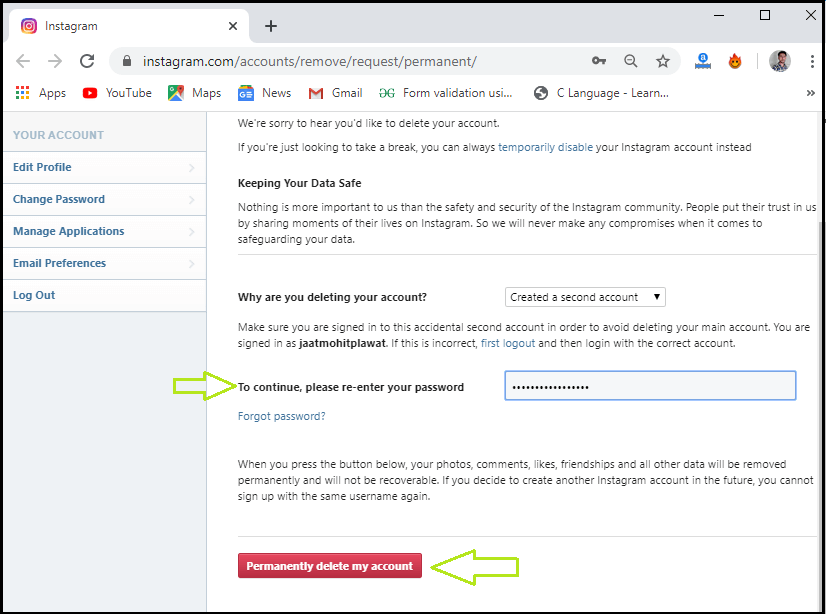
Step 3: Once you provide the reason from the drop-down menu list, the option “enter your password” and “permanently delete my account” will appear.
How to delete Instagram account?

Step 4: After completing the above steps, click on the “Permanently delete my account” option to delete your account from the Instagram.

 Note: If you have permanently deleted the Instagram account, it can’t be reactivated again.


Related Topics

How to delete Snapchat Account?

What is Snapchat? Snapchat is a social networking app, which is developed by Snap Inc. It is created by Even Spiegel, Bobby Murphy, and Reggie Brown. Snapchat was launched in September 2011. It is...

3 minutes read.

How to change Gmail Password?

How to change Gmail Password? Today Gmail account is linked to all your application and software unlike, Instagram, Facebook, and Skype, etc. You can log in to different platforms directly using...

6 minutes read.

How to Create Folders in Gmail

How to Create Folders in Gmail Gmail is a leading email service provider and is used by 1.5 billion-plus active users worldwide. All Gmail professional users receive at least dozens of...

6 minutes read.

How to Delete Facebook Account?

How to Delete Facebook Account Facebook is a social networking platform that helps you to quickly communicate and share online with your family and friends. Initially developed for college students, Mark Zuckerberg founded Facebook...

3 minutes read.

How to add contacts to Gmail?

How to add contacts to Gmail? Managing your inbox is a tiresome task, but one way to make it effortless and easier is to gain an add on the benefit of...

5 minutes read.

How to find Computer name on Windows?

How to find computer name on Windows The computer’s name is undoubtedly useful and needed at times to resolve technical issues or downloading any new software or pairing your system with...

4 minutes read.

How to Create a Group Email in Gmail

How to Create a Group Email in Gmail Every now and then, one needs to pass on or share a message to several people at the same time. To make this...

6 minutes read.

How to find your Computer’s specs?

How to find your computer’s specs The computer specs include the details for every single component in your computer, including your CPU, hard drive space, and even the little things like...

7 minutes read.

How to mark all emails as read in Gmail?

How to mark all emails as read in Gmail Gmail is extensively used to exchange official documents, expressions, proposals around the world. In the business industry leaving unread mails is considered...

3 minutes read.

How to Find Divisors of a Number?

A number that equally divides a larger integer is referred to as a divisor or factor. By simply listing all the possible methods to multiply two numbers together to obtain...

3 minutes read.

How to Cancel Netflix

How to Cancel Netflix Netflix Netflix is a service that lets its members watch a variety of television shows, movies, documentaries, and web series who purchase its subscription. You can enjoy unlimited ad-free...

3 minutes read.

How to flip your Computer Screen

How to flip your computer screen The word flip refers to turn over or rotate something quickly. Computers provide the flip functionality, which facilitates the providers to rotate the screen in...

5 minutes read.

How to Find Element in Rotated Sorted Array?

In this article, we are going to find the element in a rotated sorted array using the programs in different computer languages like Java and C++. We are going to...

3 minutes read.

How to address a letter (formal and in-formal)

How to address a letter In the generation of (SMS) and emails, it is still necessary to know how to address a letter for the one. Throughout the modern world, formal letters are...

7 minutes read.

How to schedule an email in Gmail?

How to schedule an email in Gmail Imagine scenarios where you send an important message to one of your international clients, and you know the time difference is significant. Earlier, you...

7 minutes read.

What does RAM do on a computer?

What does RAM do on a computer? Many of us might have heard the word RAM in our daily life but do not know what it does except the fact that...

10 minutes read.

How to take a screenshot on the iPhone?

How to take a screenshot on the iPhone? A screenshot is an excellent thing to quickly save your screen content, which is open on your screen. You can share your favorite videos, high scores...

4 minutes read.

Does my computer have Bluetooth?

Does my computer have Bluetooth? With the advancement of IOT (Internet of things) and high-tech electronic gadgets, Bluetooth has become perennial in our digital lives. Most of us are already familiar...

6 minutes read.

How to write a cover letter

How to write a cover letter The letter that you include with your job application is known as a cover letter. One is suggested to always include a cover letter with your job application...

5 minutes read.

How to add Signature to your Mail

How to add Signature to your Mail Gmail has formed an inevitable aura around the business world. Gmail was launched in the year 2004 as an email service provider with very...

7 minutes read.