
How to Delete Facebook Account?

How to Delete Facebook Account

Facebook is a social networking platform that helps you to quickly communicate and share online with your family and friends. Initially developed for college students, Mark Zuckerberg founded Facebook in 2004 while enrolling at Harvard University. In 2006 anyone over 13 could access Facebook with a valid email address. Today Facebook is the largest social network in the world, with over 1 billion users worldwide.

How should you use Facebook?

Do you ever wonder why people just like using Facebook? After all, there are also other ways to connect online, such as through email, instant messaging, etc. The opportunity to communicate and interact with people you care about at the same time makes Facebook special.

Getting a Facebook account is now required to be available for others, just like getting your own email address. And other websites have worked to incorporate Facebook, since Facebook is so successful. This means that you can use a single Facebook account to log in to numerous services across the Network.

How to permanently delete a Facebook account?

Before doing so, log in and download a copy of your information (such as your images and posts), which may be necessary to you from Facebook before deleting your account permanently. You won't be able to retrieve your account back , after deleting your account. 

  1. Left-click this symbol in the top right of your Facebook account.
  2. Slide it down until you find the Settings option.
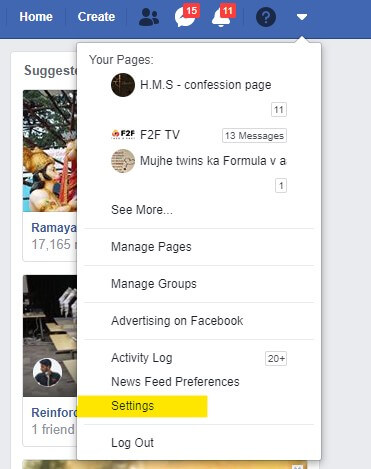
How to Delete Facebook Account
  • Scroll down and Left click on Deactivation and Deletion option, which is present under Your Facebook Information.
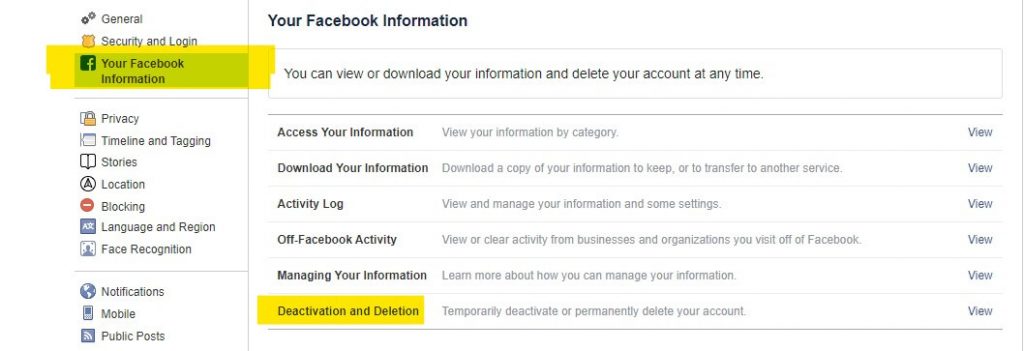
How to Delete Facebook Account
  • Left-click on Deactivation and Deletion, as shown in the above image.
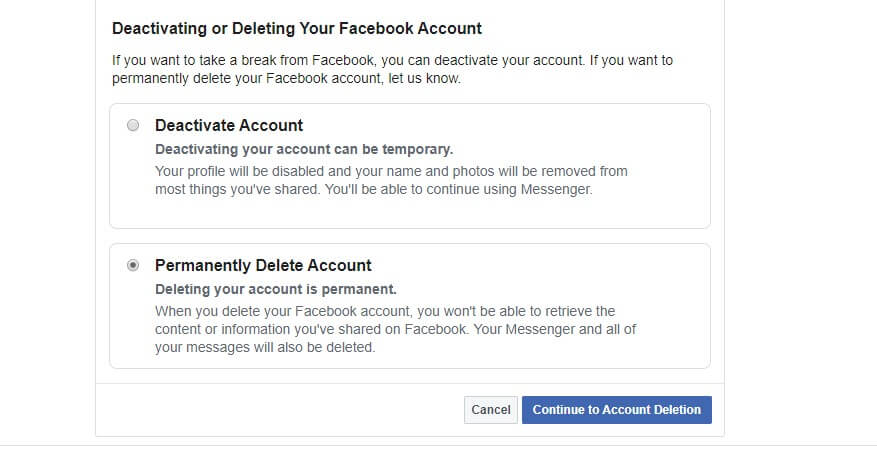
How to Delete Facebook Account
  • Tick on the Permanently Delete Account option as shown and click on the Continue to Account Deletion button present in the bottom right corner of your screen.
  • Hurray!! You did it.

Note-

If the process of termination of your account has been less than 30 days than you can stop the process and get access to your account again. All your information will be removed from the database of Facebook after a time period of 30days.

While Facebook is deleting this information, it is not accessible to other people or your friends using Facebook. It may take up to a time of 90 days to erase all the stuff you've written from the start of the deletion process.

To cancel your request for deletion of account:

  1. Log into your Facebook account with the same ID and Password within 30 days after placing the request for termination of a statement.
  2. Click on the Cancel Deletion option.

How to take a break from a Facebook account (temporary deactivation)?

You can deactivate your account temporarily also and opt to return whenever you want.

To have your account deactivated follow the given steps:

  1. Left-click this symbol in the top right of your Facebook account.
  2. Scroll down until you find the Settings option.
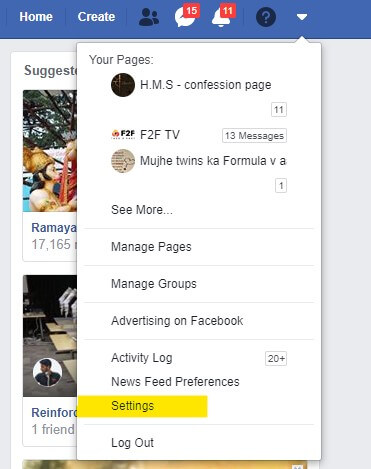
How to Delete Facebook Account
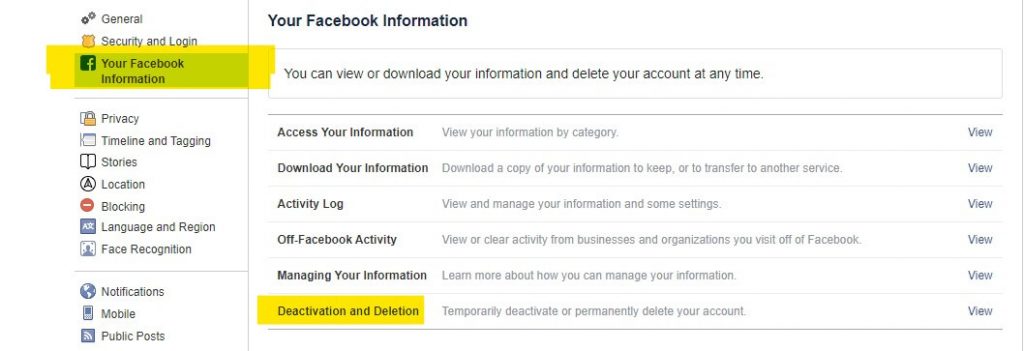
  • Scroll down and Left click on Deactivation and Deletion option, which is present under Your Facebook Information.
How to Delete Facebook Account
  • Left-click on Deactivation and Deletion.
How to Delete Facebook Account
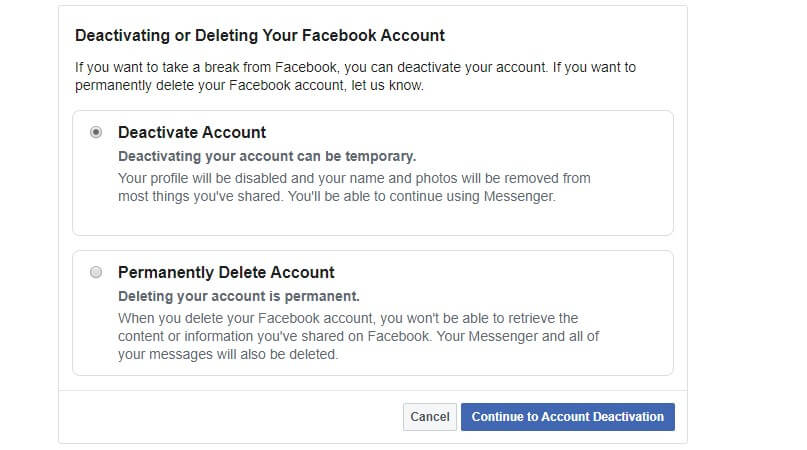
  • Left-click, the mouse button on the options, Deactivate Account and continue to Account Deactivation option.
  • Follow the confirmation instructions.
  • Press the Continue to Account Deactivatiion button.
  • Hurray!! You did it.

Related Topics

How to change Gmail Password?

How to change Gmail Password? Today Gmail account is linked to all your application and software unlike, Instagram, Facebook, and Skype, etc. You can log in to different platforms directly using...

6 minutes read.

How to clean a Computer Screen?

How to clean a computer screen Professionalism is a trait to possess attitude, neatness, and maintenance in every trail of business. Imagine, if you are designated as Marketing Manager, and you...

5 minutes read.

How to block emails on Gmail?

How to block emails on Gmail? Email or electronic mail is shared on the internet, including content, website URL, signature and different forms of attachments (unlike images, mp4, mp3, Pdf, excel,...

7 minutes read.

How to Delete Facebook Account?

How to Delete Facebook Account Facebook is a social networking platform that helps you to quickly communicate and share online with your family and friends. Initially developed for college students, Mark Zuckerberg founded Facebook...

3 minutes read.

How to schedule an email in Gmail?

How to schedule an email in Gmail Imagine scenarios where you send an important message to one of your international clients, and you know the time difference is significant. Earlier, you...

7 minutes read.

How to Check String is Alphanumeric or Not Using Regular Expression

If we have a string and want to know whether it is either alphanumeric or not, we can do it using Regular Expression(regex). What is Regular Expression? A Regular Expressionor regexis a...

3 minutes read.

How to create a Gmail account?

How to create a Gmail account? Gmail is a free email service provider widely used worldwide to communicate and exchange personal and professional emails. With almost a billion active users, Gmail...

7 minutes read.

How to cancel amazon prime?

How to cancel amazon prime? Amazon Prime is a subscription that offers variety of services with it. The advantage of amazon prime is that you can expect hassle-free shipping within two days, access to...

3 minutes read.

How to change the name in Gmail

How to change the name in Gmail Frequently asked questions: How I can change my Gmail nameSteps to change the name of Gmail accountStep to change to the name of Gmail on...

3 minutes read.

How to take a Screenshot on computer?

How to take a Screenshot on computer The ScreenShot feature is widely used to procure the content of the screen as an image. This feature was introduced in the late ’90s,...

8 minutes read.

How to Find Element in Rotated Sorted Array?

In this article, we are going to find the element in a rotated sorted array using the programs in different computer languages like Java and C++. We are going to...

3 minutes read.

How to add Signature to your Mail

How to add Signature to your Mail Gmail has formed an inevitable aura around the business world. Gmail was launched in the year 2004 as an email service provider with very...

7 minutes read.

How to write a cheque?

How to write a cheque? In today's time, digital payments are consistently gaining more market share, but it's also important to know how to write a cheque. Many companies, employers, workers, and landlords still...

2 minutes read.

How to delete a page in Microsoft Word?

What is Microsoft Word? Microsoft word is a word processing program, which is developed by Microsoft. It was initially launched on 25 October 1983 and has since been modified many times. Generally, Microsoft Word...

2 minutes read.

How to select all in Gmail

How to select all in Gmail Undoubtedly Gmail is one of the leading email service providers across the world. Teenagers, adults, old ages all rely upon Gmail because of its free...

3 minutes read.

How to mark all emails as read in Gmail?

How to mark all emails as read in Gmail Gmail is extensively used to exchange official documents, expressions, proposals around the world. In the business industry leaving unread mails is considered...

3 minutes read.

How to Multiply Fractions?

What is a Fraction? A fraction is a number that divides a whole number into equal parts. A fraction tells us how many parts we have from the whole part. We...

2 minutes read.

How to backup iPhone to Computer?

How to backup iPhone to computer iPhone or iPad is an electronic gadget useful to store all preferences, memories, personal or official data, unlike essential documents, emails, messages, photos, running apps,...

6 minutes read.

How to convert epoch date to time?

How to convert epoch date to time? The concept of the epoch is vital for computation purposes. Epoch is nothing but the total milliseconds passed from 1st January 1970. This concept...

3 minutes read.

How to find your Computer’s specs?

How to find your computer’s specs The computer specs include the details for every single component in your computer, including your CPU, hard drive space, and even the little things like...

7 minutes read.