
How to write a cheque?

How to write a cheque?

In today's time, digital payments are consistently gaining more market share, but it's also important to know how to write a cheque. Many companies, employers, workers, and landlords still rely on checks for their payment. This article will help us with easy steps and diagrams to learn how you can fill the cheque. You need to follow the following steps:

Date
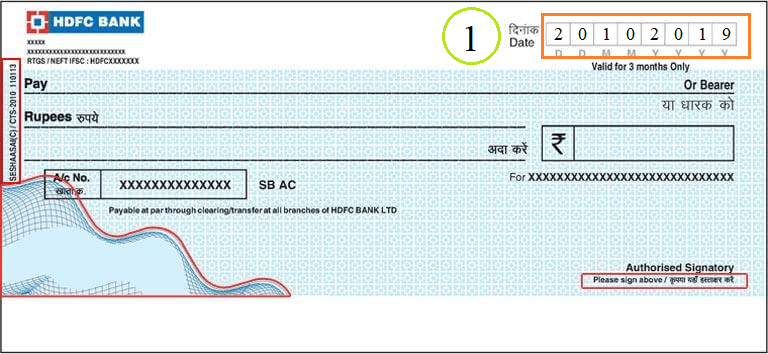
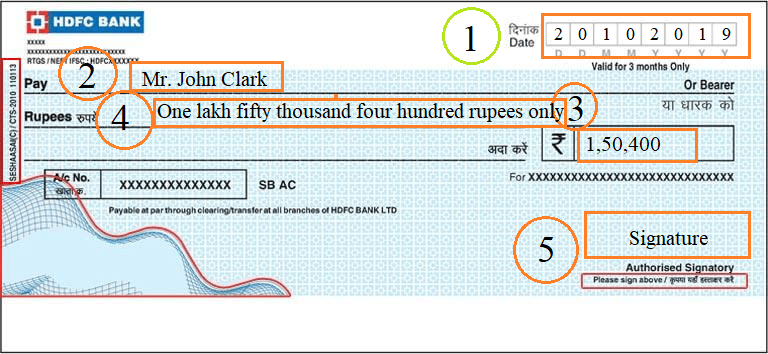
The first step is straightforward. Write the date in the date box, which is display at the top right-hand corner. In most cases, you will use the current date to write the cheque, which helps you and the recipient to maintain accurate records.    

Example: 20-03-2020

Pay
How to write a cheque?

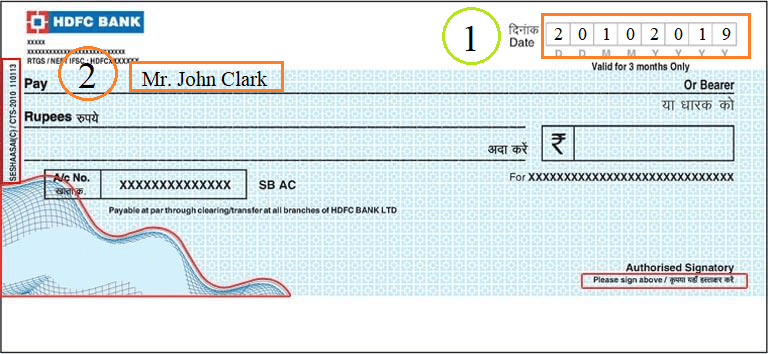
In the Pay line of the cheque, write the name of the person or company to whom you are paying the money. If you are not sure exactly what is the company name, make sure that what’s the company name before writing the check. If it's a person, write the first and the last name of the person. If it's a company or organization, write its full name and make sure that the name is correct.

Example: Mr. John Clark

Rupees (In Numbers)
How to write a cheque?

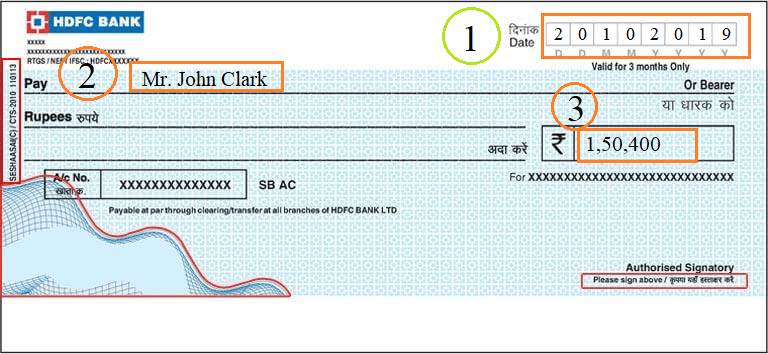
In the Rupees box, write the amount of your payment in numbers, which is displays at the right-hand side.

Example: 1,50,400

Rupees (In Words)
How to write a cheque?

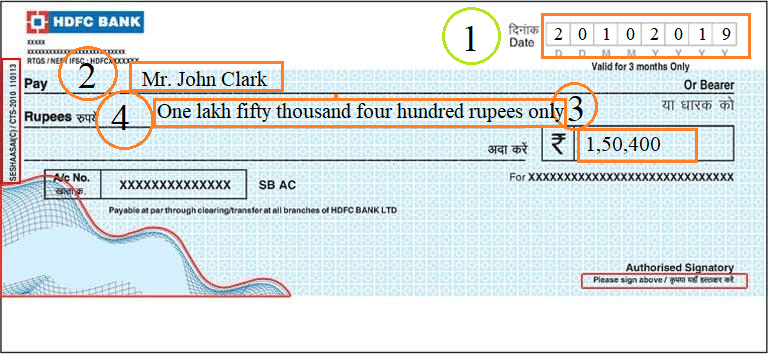
It is easier to write the amount in numbers first, then words. In this step, see the amount that you write in the numbers and then write it into the words. After writing the amount in words, make sure that the amount in words is the same as the numbers.

Example: One lakh fifty thousand four hundred rupees only.

Signature
How to write a cheque?c

In the bottom right corner, there is a space for the account holder’s signature. If you do not sign there, the cheque would not be valid. If you sign there, the cheque will be valid and also make sure that your sign matches your account signature.

Tear off the cheque

If you are using the checkbook, tear off the top cheque from the checkbook that is original. The top cheque copy is for the recipient, and the second copy is called a carbon copy, which is for the account holder to maintain the record.

Note: By using the above steps, you can easily write the cheque.


Related Topics

How to select all in Gmail

How to select all in Gmail Undoubtedly Gmail is one of the leading email service providers across the world. Teenagers, adults, old ages all rely upon Gmail because of its free...

3 minutes read.

How to add contacts to Gmail?

How to add contacts to Gmail? Managing your inbox is a tiresome task, but one way to make it effortless and easier is to gain an add on the benefit of...

5 minutes read.

How to Multiply Fractions?

What is a Fraction? A fraction is a number that divides a whole number into equal parts. A fraction tells us how many parts we have from the whole part. We...

2 minutes read.

How to take a Screenshot on computer?

How to take a Screenshot on computer The ScreenShot feature is widely used to procure the content of the screen as an image. This feature was introduced in the late ’90s,...

8 minutes read.

How to change Gmail Password?

How to change Gmail Password? Today Gmail account is linked to all your application and software unlike, Instagram, Facebook, and Skype, etc. You can log in to different platforms directly using...

6 minutes read.

How to change the name in Gmail

How to change the name in Gmail Frequently asked questions: How I can change my Gmail nameSteps to change the name of Gmail accountStep to change to the name of Gmail on...

3 minutes read.

How to Find Element in Rotated Sorted Array?

In this article, we are going to find the element in a rotated sorted array using the programs in different computer languages like Java and C++. We are going to...

3 minutes read.

How to schedule an email in Gmail?

How to schedule an email in Gmail Imagine scenarios where you send an important message to one of your international clients, and you know the time difference is significant. Earlier, you...

7 minutes read.

How to Find Connected Components in Graph

In this article, we are going to find connected components in a graph by building a program in C++ language. We are going to use different approaches to build the...

4 minutes read.

How to unarchive in Gmail?

How to unarchive in Gmail Earlier, we have learned how to archive an email on a computer or a phone device via the Google app. But archiving is not sufficient; you...

3 minutes read.

How to clean a Computer Screen?

How to clean a computer screen Professionalism is a trait to possess attitude, neatness, and maintenance in every trail of business. Imagine, if you are designated as Marketing Manager, and you...

5 minutes read.

How To Connect Air pods To Computer?

How To Connect Air pods To Computer Apple has put light on a statement and said that it believes the future is wireless. This technology is pacing up with the time,...

5 minutes read.

What does RAM do on a computer?

What does RAM do on a computer? Many of us might have heard the word RAM in our daily life but do not know what it does except the fact that...

10 minutes read.

How to find your Computer’s specs?

How to find your computer’s specs The computer specs include the details for every single component in your computer, including your CPU, hard drive space, and even the little things like...

7 minutes read.

How to change Computer Name?

How to change computer name Today computers are all around us and have become an indispensable part of our lives. Every computer generally has a name attached to it. There might...

6 minutes read.

How to convert epoch date to time?

How to convert epoch date to time? The concept of the epoch is vital for computation purposes. Epoch is nothing but the total milliseconds passed from 1st January 1970. This concept...

3 minutes read.

How to Create a Group Email in Gmail

How to Create a Group Email in Gmail Every now and then, one needs to pass on or share a message to several people at the same time. To make this...

6 minutes read.

How to find archived emails in Gmail

How to find archived emails in Gmail Similar/Related Questions Where do Gmail archived emails go? How can Gmail users access archived emails? How to get to archived Gmail? In which folder does the archived Gmail...

4 minutes read.

How to delete a page in Microsoft Word?

What is Microsoft Word? Microsoft word is a word processing program, which is developed by Microsoft. It was initially launched on 25 October 1983 and has since been modified many times. Generally, Microsoft Word...

2 minutes read.

How to delete Instagram account?

What is Instagram? Instagram is used for sharing the images and videos on social networking websites through various platforms such as iOS, Android, Windows Phones, and Desktop. In 2010, Instagram was...

3 minutes read.