
Fixed and Floating-Point Number
Fixed and Floating-Point Number: In digital technology, data is stored in memory registers with binary bits 0’s and 1’s because the computer only understands binary language. When we enter data in the system, it is converted into binary bits, and it is processed and used in the CPU in different ways. Memory registers have a format and a specific range to store data. Scientists have designed a real number representation method in memory registers of 8 bit, 16 bit, 32bit.
There two types of approaches that are developed to store real numbers with the proper method.
- Fixed point number
- Floating point number
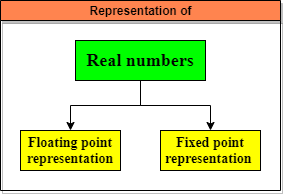
Fixed point representation
In computing, fixed-point number representation is a real data type for a number. With the help of fixed number representation, data is converted into binary form, and then data is processed, stored and used by the system.
Fixed point representation of data

Sign bit -The fixed-point numbers in binary uses a sign bit. A positive number has a sign bit 0, while a negative number has a sign bit 1.
Integral Part – The integral part is of different lengths at different places. It depends on the register's size, like in an 8-bit register, integral part is 4 bits.
Fractional part – Fractional part is also of different lengths at different places. It depends on the register's size, like in an 8-bit register, integral part is of 3 bits.
8 bits = 1Sign bit + 4 bits(integral) + 3bits (fractional part)
16 bits = 1Sign bit + 9 bits(integral) +6 bits (fractional part)
32 bits = 1Sign bit + 15 bits(integral) + 9 bits (fractional part)
How to write the number in Fixed-point notation?
Number is 4.5
Step 1:- Convert the number into binary form.
4.5 = 100.1
Step 2:- Represent binary number in Fixed point notation

The smallest negative number in fixed-point representation.
| 1 | 1 | 1 | 1 | 1 | 1 | 1 | 1 |
Smallest negative number = -15.875
The largest number in fixed-point representation.
| 0 | 1 | 1 | 1 | 1 | 1 | 1 | 1 |
Larger number = +15.875
Note:- Range of fixed-point notation is from -15.875 to +15.875. We conclude that the fixed-point notation range is very less as we can only represent the number in a set limit. It is not suitable for presenting a large amount of data, so it is not used in computer nowadays.
Therefore, scientists feel that the system needs a new representation format with the least or no limit because data is becoming a vast nowadays. So, floating-point representation came into existence.
Floating-point representation
To discard the limitation of fixed-point notation, floating-point number representation was developed by scientists. The computer system uses floating-point numbers representation to convert input data into binary form. The binary form number is converted into ‘scientific notation,' and then this scientific notation is converted into floating-point representation.
The floating-point notation has two types of notation
- Scientific notation
- Normalized notation
Scientific notation – Method of representing binary numbers into a x be form. Scientific notation is further converted into floating-point notation because floating-point notation only accepts scientific notation. For example:-
Number = 376.423 ( its not scientific notation)
Number in scientific = 36.4423 x 101 or 3.64423 x 10²
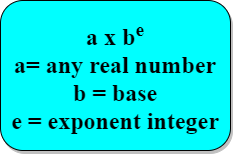
For example:- 32.625 x 10³
1101.101 * 2101
where 1101.101 is the mantissa part.
2101 = It is the base part where we need not explicitly represent radix or base because the binary base is always 2.
Note: The major problem in this notation is while storing mantissa, we need to tell the decimal position every time to the processor. So to overcome this problem, normalized notation was invented and used.
Normalized notation- It is a special case of scientific notation. Normalized means after the decimal point, we have atleast one non-zero digit.
Normalized notation -
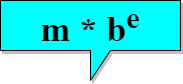
where, value of m= .1?m?1, b= base, e= exponent integer
± 0.1bbbb…..b * 2±e
If mantissa =101, then the processor will interpret it as 0.101 itself, so it's not necessary to tell the position of the decimal point every time to the processor.
For example- .36 x 1035 is a normalized notation in which the value of m is between .1 to 1. In normalized notation, value of m remains between .1 ?m?1.
For example:- 1101.101 * 2101 = (5)10 (convert this into normalized form)
0.1101101 * 2(1001)2 =(9)10=(5+4)10
So, there is no need to tell about the decimal point's position every time to the processor.
- Zero (0) cannot be represented or normalized because the representation set starts from 0.1, so how can we normalize zero. It’s not possible.
- If the most significant bit of mantissa is a non zero, then such a representation is called normalized floating-point.
So, four things are used to represent a floating-point number: -
- Sign of Mantissa
- Sign of Exponent
- Magnitude of Mantissa
- Magnitude of Exponent
How to represent a number in floating-point representation?
Floating-point representation of data in a 16-bit register.

Sign bit -The fixed-point numbers in binary uses a sign bit. A positive number has a sign bit 0, while a negative number has a sign bit 1. In floating-point representation, sign of a number always depends on mantissa, not on exponent. Hence sign bit in the format is always for mantissa and not for the exponent.
Mantissa Part –Mantissa part is of different length at a different place. It depends on the size of the register like in 16-bit register; mantissa part is of 8 bits.
Exponent part – Exponent is the power of the number. It depends on the register's size; like in the 16-bit register, exponent part is 7 bits. Excess 16,64,128, 512 are used to store exponent in this format.
Steps for representing the number in Floating point format
Step 1: Convert the given number into binary.
6.25 = 110.01
Step 2: Normalize the number = .11001 * 23 ( base is 2)
Step 3: Represent the number in a 16-bit register in floating-point notation.
| 0 | 1 | 1 | 0 | 0 | 1 | 0 | 0 | 0 | 1 | 0 | 0 | 0 | 0 | 1 | 1 |
This represent value = 6443H
Largest normalized number in 16 bit register with excess 64
| 0 | 1 | 1 | 1 | 1 | 1 | 1 | 1 | 1 | 1 | 1 | 1 | 1 | 1 | 1 | 1 |
= .11111111* 2127-64 ( excess- 64 is used to store exponent in this format)
= .11111111* 263
= 27 -1 * 263
Smallest normalized number in 16 bit register with excess 64
| 0 | 1 | 0 | 0 | 0 | 0 | 0 | 0 | 0 | 0 | 0 | 0 | 0 | 0 | 0 | 0 |
= .1* 20-64 ( excess- 64 is used to store exponent in this format)
= .1* 2-64
= .5 * 264
= 2-65
De-normalized Notation
It is just reverse of normalized notation. In normalized notation, after decimal we have‘1’ written in the equation but in de-normalized notation, we have ‘0’ after decimal. For example:-
Largest De-normalized number with excess-64
| Sign bit | Exponent | Mantissa |
0 1111111 01111111
= .01111111 * 2127-64
= .01111111 * 263
= .1111111 * 262
= (1-2-7 )* 262
Smallest De-normalized number with excess-64
| Sign bit | Exponent | Mantissa |
0 1000000 0000000
= .00000001 * 20-64
= .00000001 * 2-64
= 2-8 * 2-64
= 2-72