
×

How to change the ApacheHTTP port in Linux

What is an Apache HTTP server in Linux?

When we talk about the most commonly used web servers, one of the web servers that cannot be missed is Apache. With the help of their device, users request web pages, and to serve those requests, web servers are used. Apache is one of them. The Apache HTTP server is flexible, stable, provides many outstanding features, and is a free open-source platform.

Features of the Apache HTTP server

  • Digital Certificate authentication and Password authentication are supported by it.
  • It has Loadable Dynamic Modules.
  • It hasMPMs (Multiple Request Processing Modes) including Threaded, Prefork, and Event-Based Async.
  • It can easily handle over 10K synchronous connections i.e., it is highly scalable.
  • It supports caching with reverse proxy.
  • Virtual servers are based on name and IP address.
  • Status can be viewed in real-time.
  • It is compatible with IPv6.
  • A separate module supports FTP (File Transfer Protocol).
  • It also supports Computer Gateway Interface (CGI).
  • You can rewrite the URL in this server.
  • Contents and headers can also be rewritten.
  • Dynamic Configuration.
  • User and his ongoing session can be tracked easily.
  • Generic Expression parser.

Performance of Apache HTTP server

Choice of Multiprocessing Modules (MPM) and configuration is important as Apache does not implement a single architecture; it provides a variety of MPMs to cope with the demands of every particular infrastructure, which permits it to execute in any of the process-basedmodes, whether it is an event-hybrid mode or a hybrid mode. Apache is designed in such a way that it can reduce latency and increase throughput, regardless of increasing requests, therefore it ensures reliable and consistent processing of requests in descent time-frames.

Development of the Apache HTTP server

The Apache HTTP server was created for the implementation of the HTTP web server. The aim was to create a commercial-grade, feature-rich, robust, and freely available source code.

Some key points of the Apache HTTP server

  • For incoming connections, the Apache web server is ordered to bind and listen to port 80.0. This is the default setting of the Apache web server.
  • A new statement has to be added to order the Apache webserver to listen and bind to web traffics on ports other than default web ports.
  • /etc/apache2/ports.conf is the configuration file that needs to be changed on a Debian/Ubuntu-based device and on RHEL/CentOS-based distributions, /etc/httpd/conf/httpd.conf configuration file has to be updated.

With a console text editor, open a file that is specific to your distribution and the new port statement has to be added to it as shown below:

# nano /etc/apache2/ports.conf   [On Debian/Ubuntu]
# nano /etc/httpd/conf/httpd.conf  [On RHEL/CentOS]

In this example, we are going to make the Apache HTTP server listen to connections on port 8081, which is not its default port. We have to make sure that we add the statement written below, after the command that instructs the web server to listen to connections on port 80.

Listen 8081
How to change the ApacheHTTP port in Linux

Changing Apache HTTP server port on Ubuntu and Debian

How to change the ApacheHTTP port in Linux

Changing Apache HTTP server port on RHEL and CentOS

After adding the above line, to initialize the binding process, now we have to create or change an Apache virtual host on Ubuntu/Debian-based distribution, and these changes should be specified to our own vhost needs.

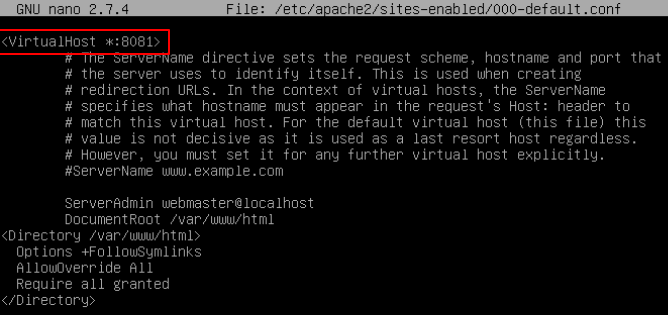
     The default virtual host is directly altered in RHEL/CentOS distributions. In the example given below, we will alter the default virtual host of the web server and order the Apache HTTP server to listen to web traffic from port 80 to port 8081.

# nano /etc/apache2/sites-enabled/000-default.conf
How to change the ApacheHTTP port in Linux

Changing Apache HTTP server port on Virtual Host

Now, to bind the Apache HTTP server to the new port and apply the changes made, the daemon has to be restarted and the local network socket table has to be checked using the ss command.

# systemctl restart apache2
# netstat -tlpn| grep apache
# ss -tlpn| grep apache
How to change the ApacheHTTP port in Linux

Verifying the Apache HTTP server port

Apart from all these things, we have an alternative method, i.e., we can open a new tab on a browser and traverse to our server domain name or IP address on port 8081. The default page of the Apache HTTP Server should be displayed on the screen. And due to some reasons, you are not able to access the webpage, go back to the server console, and reassure that to allow the port traffic, proper firewall rules are set up.

http://server.ip:8081
How to change the ApacheHTTP port in Linux

The default page of the Apache HTTP server on Debian and Ubuntu


Related Topics

Difference Between Linux and Windows

Linux vs. Windows Here in this tutorial, we are going to discuss several features of Linux and Windows. These features or characteristics help us to come to a conclusion about which...

5 minutes read.

netstat Command in Linux/Unix with Examples

The "netstat" command in Linux is a command-line utility that displays network connections, routing tables, and various network statistics. It is used to display the status of network connections, both...

3 minutes read.

gzip Command in Linux/Unix with Examples

The gzip command in Linux is used for compressing and decompressing files. It uses the Lempel-Ziv coding (LZ77) algorithm to compress files, which is known for its high compression ratio...

6 minutes read.

rename Command in Linux/Unix with Examples

The rename command in Linux is used to rename multiple files at once, using a specified pattern. The command is also known as rename, ren, and mv. This command is...

3 minutes read.

adduser Command in Linux with Examples

What is the adduser command? The adduser command creates a new user, and this command may be used to add apre-existing user to a group that already exists. How to use the...

4 minutes read.

Linux Admin Tutorial

In publishing and graphic design, lorem ipsum is a placeholder text commonly used to demonstrate the visual form of a document without relying on meaningful content....

1 minute read.

tar Command in Linux/Unix with Examples

The 'tar' command in Linux is used to create, maintain, and extract files from archive files called tarballs. The command stands for "tape archive" and it allows you to combine...

4 minutes read.

mv Command in Linux/Unix with Examples

The 'mv' command in Linux is used to move or rename files and directories. The command stands for "move" and it allows you to move files and directories from one...

3 minutes read.

rm Command in Linux/Unix with Examples

The "rm" command in Linux (and other Unix-like operating systems) is used to remove files and directories. The "rm" command stands for "remove" and it is used to delete files...

4 minutes read.

ping Command in Linux/Unix with Examples

The "ping" command in Linux (and other Unix-like operating systems) is used to test the connectivity between two networked devices. The "ping" command sends a small packet of data, called...

4 minutes read.

sudo Command in Linux/Unix with Examples

The sudo command in Linux is used to run a command or set of commands with the privileges of another user, typically the root user. This allows users to perform...

3 minutes read.

wget Command in Linux/Unix with Examples

The wget command is a command-line utility in Linux that is used to download files from the internet. It supports various protocols including HTTP, HTTPS, and FTP and can be...

5 minutes read.

mkdir Command in Linux/Unix with Examples

The "mkdir" command in Linux (and other Unix-like operating systems) is used to create new directories. The "mkdir" command stands for "make directory" and it is used to create a...

3 minutes read.

Rename Folder in Linux

Rename Folder in Linux In the Linux system, there is not any single dedicated command for renaming the files and directories. Mostly, the mv command is used extensively for the purpose...

3 minutes read.

cut Command in Linux/Unix with Examples

The "cut" command in Linux (and other Unix-like operating systems) is used to remove sections from each line of a file or stream of data. The cut command is often...

3 minutes read.

wc Command in Linux/Unix with Examples

The wc command in Linux is a command-line utility that is used to count the number of lines, words, and characters in a text file or standard input. The name...

4 minutes read.

pwd Command in Linux/Unix with Examples

The "pwd" command in Linux (and other Unix-like operating systems) stands for "print working directory." When executed, it simply displays the current directory (or folder) that the user is currently...

3 minutes read.

chmod Command in Linux/Unix with Examples

The chmod command in Linux is a command-line utility that is used to change the permissions of files and directories. It stands for "change mode" and it is used to...

4 minutes read.

Linux Distributions

Linux Distributions Linux OS is not like other operating systems. Linux can be modified according to the user’s requirements, and it is very flexible to any change. Linux distributions are often...

4 minutes read.

find Command in Linux/Unix with Examples

The find command in Linux is a command-line utility that is used to search for files and directories in a file system. It is a versatile command that can be...

5 minutes read.