CodeIgniter Pagination Class
Pagination Class
The CodeIgniter framework provides a pagination class that is used in the data list to create pagination links in a web application. Generally, it is used to retrieve data records from a database and display some definite records on each page to load data faster, enhance the performance, and make the web application user-friendly.
Why we use Pagination?
Suppose, if you want to display thousands of records on a single web application, the length and complexity of the records are very high, due to which users may face many issues while browsing the site such as:
- It takes too much time to load all records
- It requires to scroll the same web page multiple times to see the information.
- It is not easy to search for portable devices like mobile, tablet, etc.
- It reduces the performance of the web application.
In order to resolve those conditions, the web application introduced the pagination process.
Example: Suppose there are a total 100 of records on a single page, and you want to show only 10 records on each page. As we solve simple math to get the 100 records like 100/10 = 10, it means we have to create 10 links in which there are 10 records available on each page.
Loading the pagination class
Before using the pagination class in the Codeigniter application, you must load this library in the controller file.
Syntax
$this->load->library( ‘pagination);
Class Reference
- initialize(): As the function name defines, it is used to initialize the Pagination class variables with the available option.
Syntax
initialize ([ $params = array() ]);
$params (array): In this parameter, you can define the configuration option of the pagination class.
- create_links(): A create_links() function is used to create the links on the web pages, and if there is no pagination to show, it returns an empty string.
Structure of pagination example:
$this->load->library( ‘pagination’ );
$config[ ‘base_url’ ] = ‘http://example.com/index.php/Page_controller/test’;
$config[ ‘total_rows ] = 100; // it defines the total number of record stored in database
$config[ ‘per_page’ ] = 10;  // it display 10 records on per page
$this->pagination->initialize( $config );
echo $this->pagination->create_links(); // it is used to create the links on the web page.
Important Notes:
The $config array defines the configuration variables that are helpful to initialize the pagination functionality in the Codeigniter application and passes it to the $this->pagination->initialize() method. Furthermore, the pagination class contains some twenty methods for configuration, but it required three main methods for creating the links and transfer the control to another page of the web application. There are some important methods of configuration variables which are as follows.
- base_url: It consists of the full URL path to the controller class/ function that contains the pagination class and its function. In the above example, Page_controller is the controller class name, and the test is the function of the controller
- total_rows: It represents the total number of records that are stored in the database table for using the pagination. For example, 100 is the records of the database table.
- per_page: It is used to display the total number of records on each page. In the above example, 10 is the record that is available on per page.
Create a simple Example of a Pagination class in the Codeigniter application.
You have to require these three files for creating the pagination functionality:
- Pagination_controller.php file
- Hello_Model.php file
- fetch.php file
Create a controller file Pagination_controller.php and save it in application/controller/Pagination_controller.php. After that, write the following program in the controller file.
Pagination_controller.php
<?php
 defined('BASEPATH') OR exit('No direct script access allowed');
 class Pagination_controller extends CI_controller
 {
 public function page_link($start = 1)
 {
         $this->load->database(); // load database
         $this->load->helper('url');
 $this->load->library('pagination'); // load pagination class
 $this->load->model('Hello_Model');
 $config['base_url'] = 'http://localhost/codeIgniter-3.1.11/index.php/Pagination_controller/page_link';
 $config['total_rows'] = $this->Hello_Model->record_count(); /* count total record of DB. */
 $config['per_page'] = 6;
 $config['uri_segment'] = 3;
 $page = ($this->uri->segment(3)) ? $this->uri->segment(3) : 0;
         $this->pagination->initialize($config);
         $data['info'] = $this->Hello_Model->getUserPagintaion($config['per_page'], $page);
                 $this->load->view('fetch', $data);
 }
 }
 ?>
Create a model file Hello_Model.php and save it in application/model/Hello_Model.php. After that, write the following program in the controller file.
Hello_Model.php
<?php
 defined('BASEPATH') OR exit('No direct script access allowed');
 class Hello_Model extends CI_Model
 {
 public function getUserPagintaion($limit, $start = 1)
  {
             $this->db->limit($limit, $start);
             $query = $this->db->get('users');
             return $result = $query->result_array();
 }
 public function record_count()
 {
             return $this->db->count_all("users"); /* it counts all the rows from the database table. */
             }
 }
 ?>
Create a view file fetch.php and save it in application/views/fetch.php. After that, write the following program in the controller file.
fetch.php
<h2> Pagination Example </h2>
 <table border = 1>
     <tr>
         <th>Id</th>
         <th>Name</th>
         <th>Email</th>
                         <th>Course</th>
         <th>Gender</th>
             </tr>
     <?php foreach ($info as $row): ?>
              <tr>
                         <td> <?= $row['id'] ?></td>
                         <td> <?= $row['name'] ?> </td>
                         <td> <?= $row['email'] ?> </td>
                         <td> <?= $row['course'] ?> </td>
                         <td> <?= $row['gender'] ?> </td>
         </tr>
     <?php endforeach; ?>
 </table>
 <br />
 <center> <?php echo $this->pagination->create_links(); ?> </center>
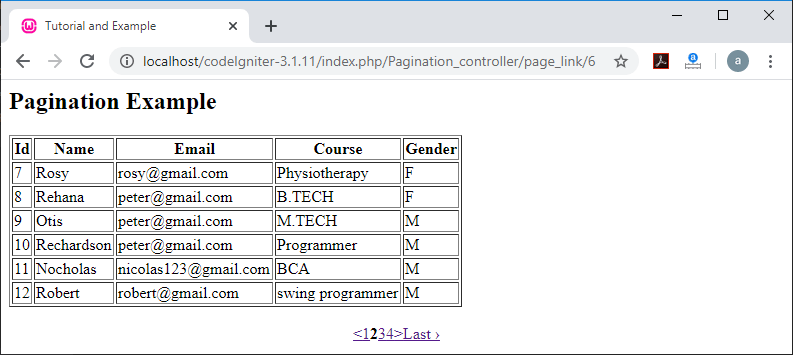
To run the program in the localhost by invoking the URL localhost/CodeIgniter-3.1.11/index.php/Pagination_controller/page_link function; it shows the output, as shown below.
Hiding the page number:
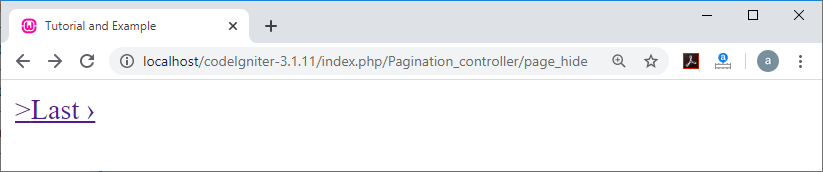
If you want that your pagination number should not be displayed except the “next” and “Last” links on the web page, you have to use the given below syntax:
$config[ ‘display_pages’ ] = FALSE;
Note: By setting the TRUE value of display_page, it shows the number of pages along with the next and last link.
Example: Create Pagination_controller.php file to the application/controller/ directory and write the following program as shown below:
Pagination_controller.php
<?php
 defined('BASEPATH') OR exit('No direct script access allowed');
 class Pagination_controller extends CI_controller
 {
 public function page_hide()
 {
 echo “<title> Tutorial and Example </title>”;
 $this->load->library('pagination');
 $config['base_url'] = 'http://localhost/codeIgniter-3.1.11/index.php/Pagination_controller/page_link';
 $config['total_rows'] = 50;
 $config['per_page'] = 10;
 $config['display_pages'] = FALSE;
 $this->pagination->initialize($config);
 echo $this->pagination->create_links();
 }
 }
 ?>
To run the program in the localhost by invoking the URL localhost/CodeIgniter-3.1.11/index.php/Pagination_controller/page_hide function; it shows the output, as shown below.
Add the additional attributes to the anchor’s tag:
It allows you to add an extra attribute that can be added to any link and called by the pagination class. It uses key-value pairs to set the functionality in the “attributes” config.
$config[ ‘attributes’ ] = array( ‘class’ => ‘classname’);
Customizing the Pagination class
There is a list of all the available preferences in the pagination function to enhance the display or UI of the Codeigniter application.
- $config[‘uri_segment’] = ‘’;
The pagination function is used to automatically detect the segment of the URI that contains the records of the table. You can also modify it according to the application needs.
For example:
When uri_segment is 2, It displays the following result
http://localhost/codeigniter-3.1.11/index.php/Pagination_controller/page_link
and then it shows only a single record on each link of the page.
uri_segment = 3; It displays the following result along with the record of each page to the URL as a third parameter.
http://localhost/codeigniter-3.1.11/index.php/Pagination_controller/page_link/6
- $config[‘num_link’] = 2;
It is used to create the number of “digit” links before and after the selected page number. For example: here the number 2 will create the two numeric digits on either side of the pagination links.
- $config[‘use_page_numbers’] = TRUE;
It uses a default URI segment to start the index for the paginating items. It also permits you to show the actual page number by setting this to TRUE.
- $config[‘page_query_string’] = TRUE;
It also uses a default pagination library to create the links which is similar to URI segments such as:
http://localhost/codeigniter-3.1.11/index.php/Pagination_controller/page_link/6
- $config[‘full_tag_open’] = ‘<p>’;
It is used to set the opening tag on the left side of the pagination.
$config[‘full_tag_close’] = ‘</p>’;
It is used to close the full_tag on the left side of the pagination result.
- Uses of First Link
$config[‘first_link’] = ‘First’;
It allows you to set the text as ‘First’ link on the left of the pagination. If you don’t want to use this link, you can set the value FALSE.
$config[‘first_tag_open’] = ‘<span>’;
It is used to show the opening tag for the ‘first’ link.
$config[‘first_tag_close’] = ‘</span>’;
It is used to show the closing tag for the ‘first’ link.
$config[‘first_url’] = ‘’;
It enables you to set an alternative URL for the ‘first page’ link.
- Uses of Last Link
$config[‘last_link’] = ‘Last’;
You can also set any text link to the right side of the pagination such as ‘Last’ link. If you don’t want to use the link, you can set the value FALSE.
$config[‘last_tag_open’] = ‘<span>’;
It is used to show the opening tag for the ‘last’ link.
$config[‘last_tag_close’] = ‘</span>’;
It is used to show the closing tag for the ‘last’ link.
- Uses of “Next” link
$config[‘next_link’] = ‘>’;
It allows you to set a text to the “next” page link. If you don’t want to use the link, you can set its value to FALSE.
$config[‘next_tag_open’] = ‘<span>’;
It is used to show the opening tag for the ‘next’ link.
$config[‘next_tag_close’] = ‘</span>’;
It is used to show the closing tag for the ‘next’ link.
- Uses of “Previous” link
$config[‘prev_link’] = ‘<’;
It allows you to set a text to the “previous” page link. If you don’t want to use the link, you can set its value to FALSE.
$config[‘prev_tag_open’] = ‘<span>’;
It is used to show the starting tag for the ‘previous’ link.
$config[‘prev_tag_close’] = ‘</span>’;
It is used to show the end tag for the ‘previous’ link.
- Uses of “Current Page” link
A Current Page link is used to show the status of the active page in the pagination.
$config[‘curr_tag_open’] = ‘<p>’;
It is used to show the opening tag for the ‘current’ link.
$config[‘curr_tag_close’] = ‘</p>’;
It is used to show the closing tag for the ‘current’ link.
- Uses of “Digit” link
$config[‘num_tag_open’] = ‘<span>’;
It is used to show the opening tag for the ‘digit’ link.
$config[‘num_tag_close’] = ‘</span>’;
It is used to show the closing tag for the ‘digit’ link.
For customizing the Pagination, you need to make some changes in the Pagination_controller.php only, and the remaining files, such as Hello_Model.php, fetch.php, will be the same as the above example of the pagination.
Pagination_controller.php
<?php
 defined('BASEPATH') OR exit('No direct script access allowed');
 class Pagination_controller extends CI_controller
 {
 public function page_link($start = 1)  // start = 1; denotes the starting page index
 {
         echo "<title> Tutorial and Example </title>";
         $this->load->database(); // load the database
         $this->load->helper('url'); // load the URL helper
 $this->load->library('pagination'); // load pagination class
 $this->load->model('Hello_Model'); // load model class
 $config['base_url'] = 'http://localhost/codeIgniter-3.1.11/index.php/Pagination_controller/page_link';
 $config['total_rows'] = $this->Hello_Model->record_count(); /* it count the total rows in a database table. */
 $config['per_page'] = 6; // it shows only 6 record per pages.
 $config['uri_segment'] = 3; // it defines the segment of each page
 $config['num_links'] = 4;
 $config['use_page_numbers'] = TRUE;
 //$config['reuse_query_string'] = TRUE;
 $config['full_tag_open'] = '<p class = "pagination" width = "30">';
 $config['full_tag_close'] = '</p>';
 $config['first_link'] = 'First Page';
 $config['first_tag_open'] = '<span class = "first-link">';
 $config['first_tag_close'] = '</span>';
 $config['last_link'] = 'Last Page';
 $config['last_tag_open'] = '<span class = "last-link">';
 $config['last_tag_close'] = '</span>';
 $config['next_link'] = 'Next->';
 $config['next_tag_open'] = '<span class = "nextlink">';
 $config['next_tag_close'] = '</span>';
 $config['prev_link'] = '<- Prev';
 $config['prev_tag_open'] = '<span class = "prevlink">';
 $config['prev_tag_close'] = '</span>';
 $config['cur_tag_open'] = '<span class = "curlink">';
 $config['cur_tag_close'] = '</span>';
 $config['num_tag_open'] = '<span class = "numlink">';
 $config['num_tag_close'] = '</span>';
 $page = ($this->uri->segment(3)) ? $this->uri->segment(3) : 0;
         $this->pagination->initialize($config);
         $data['info'] = $this->Hello_Model->getUserPagintaion($config['per_page'], $page);
                 $this->load->view('fetch', $data);  /* it load a view file and $data is used to send the data to the view file. */
 }
 }
 ?>
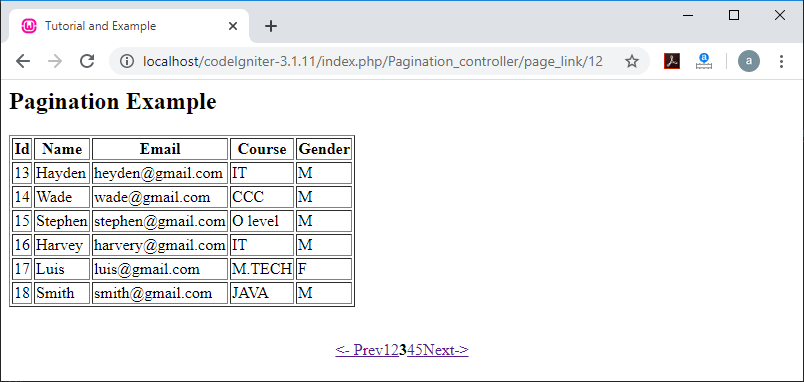
To run the program in the localhost by invoking the URL localhost/CodeIgniter-3.1.11/index.php/Pagination_controller/page_link function; it shows the output, as shown below.