CodeIgniter User Agent Class
User Agent Class
The CodeIgniter provides a user agent class that helps to identify and collect information about the browser, mobile devices, or robots visiting your site. Besides this, it is also used to obtain referrer information, language support, and character sets from another web site that are linking to your web site.
Load the user agent class
Before using the agent library in the CodeIgniter application, you must load this library in the controller file, as shown below.
Syntax
$this->load->library( ‘user_agent’);
When the library is loaded, you can simply use ‘$this->agent’ as an object to execute the user agent function.
Class Reference
The following class references are available in the user agent class:
- is_browser(): The is_browser() function is used to determine whether you are using a browser or not. And, If the user agent is a specified browser, it returns TRUE; otherwise, it shows FALSE.
Syntax
is_browser( [$key = NULL] )
$key: It defines an optional browser name, such as Google, Firefox, etc.
2. is_mobile(): The is_mobile() function is also used to determine whether the user agent is a specified mobile device or not. And if the user agent is a known device, it returns TRUE; otherwise, FALSE.
Syntax
is_mobile( [$key = NULL] )
$key: It defines an optional mobile device name.
3. is_robot(): The is_robot() function is used to determine whether the user agent is a specified robot or not, and if it user agent is a specified robot, it returns TRUE; otherwise, it shows FALSE.
Syntax
is_robot( [$key = NULL] )
$key: It defines an optional robot name.
4. is_referral(): The is_referral() function is used to determine whether the user agent is referred from another site. And, if the user agent is a referral, it returns TRUE; otherwise, it shows FALSE.
Syntax
is_referral()
5. browser(): A browser() function is used to return the name of a web browser through which your site is viewing.
Syntax
$this->agent->browser();
6. version(): As the name suggests, a version() function is used to detect the version number of the web browser through which your site is viewing.
Syntax
$this->agent->version();
7. mobile(): A mobile() function is used to detect and return the name of the mobile device through which your site is viewing.
Syntax
$this->agent->mobile();
8. robot(): A robot() function is used to return the detected robot name that is viewing your site.
Syntax
$this->agent->robot();
9. platform(): A platform() function is used to return the detected operating system through which your site is viewing. For example, Linux, Macintosh, Windows, etc.
Syntax
$this->agent->platform();
10. referrer(): A referrer() function is used to return the name of detected referrer string from another site that’s linking to your site.
Syntax
$this->agent->referrer();
11. agent_string(): An agent_string() function is used to return the full user agent string of your site.
Syntax
$this->agent->agent_string();
Example:
User_controller.php
<?php
 defined( 'BASEPATH') OR exit( 'No direct script access allowed');
 class User_controller extends CI_Controller
 {
 public function temp()
     {
         echo "<title> Tutorial and Example </title>";
         $this->load->library('user_agent');
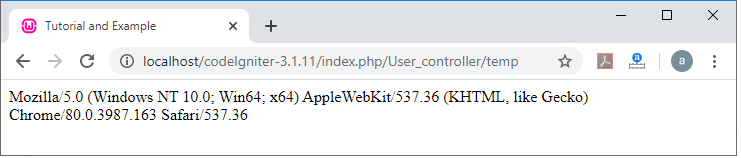
         echo $this->agent->agent_string();
     }
 }
 ?>
Execute the above program in localhost by invoking the URL localhost/CodeIgniter-3.1.11/index.php/User_controller/temp, it shows the output, as shown below.
12. accept_lang(): As the name suggests, an accept_lang() function is used to accept only a defined language in your site.
Syntax
accept_lang( [$lang = ‘en’] )
$lang: You can define a language key that is accepted by the user agent.
Example:
If ( $this->agent ->accept_lang(‘en’))
             {
                       echo ‘You have provided the English Language’;
                 }
13. languages(): The languages() function is used to return all the languages that are supported by the user agent.
Syntax
$this->agent->languages(); // it returns an array of accepted languages
14. accept_charset(): An accept_charset() function is used to accept only the defined charset in your site.
Syntax
accept_charset( [$charset = ‘utf-8’] )
$charset: You can define a character set that is accepted by the user agent.
15. charsets(): The charset() function is used to return the character set that is supported by the user agent class.
Syntax
$this->agent->charsets(); // It returns an array of character sets
16. parse(): A parse() function is used to parses a custom user agent that is different from the one generated by the current visitor.
Syntax
parse ($string)
$string: It defines a custom user-agent string.
Example of User-Agent Class:
Create a User_controller.php controller file and save it to the following path application/controller/User_controller.php folder. After that, write the following program in the controller file.
User_controller.php
<?php
 defined( 'BASEPATH') OR exit( 'No direct script access allowed');
 class User_controller extends CI_Controller
 {
     public function show_browser()
     {
   $this->load->library('user_agent');
         echo "<title> Tutorial and Example </title>";
         if ($this->agent->is_browser())
         {
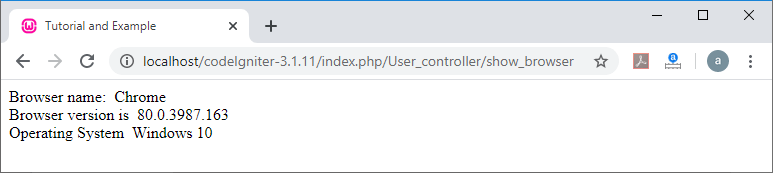
                echo "Browser name:  " $this->agent->browser(). "<br/> Browser version is  ". $this->agent->version();
                 $info = $this->agent->platform();
                 echo "<br/>". "Operating System  ". $info;
         }
     }
 }
 ?>
To run the program in the localhost by invoking the URL localhost/CodeIgniter-3.1.11/index.php/User_controller/show_browser, it shows the output, as shown below.
Example 2. User_controller.php
<?php
 defined( 'BASEPATH') OR exit( 'No direct script access allowed');
 class User_controller extends CI_Controller
 {
  public function detect_browser()
            {
                echo "<title> Tutorial and Example </title>";
                $this->load->library('user_agent');
         if ($this->agent->is_browser())
         {
         $user = $this->agent->browser();
         }
         elseif ($this->agent->is_mobile())
         {
             $user = $this->agent->mobile();
         }
         elseif ($this->agent->is_robot())
         {
             $user = $this->agent->robot();
         }
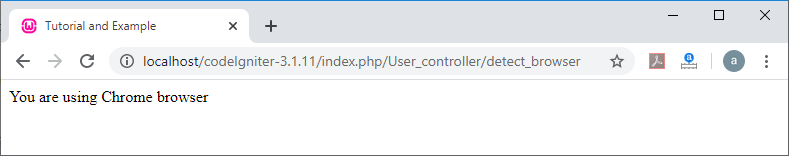
         echo "You are using ". $user. " browser";
     }
 }
 ?>
To run the program in the localhost by invoking the URL localhost/CodeIgniter-3.1.11/index.php/User_controller/detect_browser, it shows the output, as shown below.