CodeIgniter Language Class
Language Class
The CodeIgniter’s language class contains the various functionality that is used to access the language-specific files and text line for the purposes of internationalization. This class provides you suitability to add or create files of your own languages file or text ??as needed; even you can show a specific error message on the application or translate any core message into other languages.
Note: When Codeigniter loads the language file, it must first be loaded into the system/language/ folder, and then it will search for the folder that defines it in the application/language directory to override.
Switching languages
A language class provide a suitability to switch between multiple languages by the following example:
$file_name = $this->session->get_userdata( ‘language’ );
$this->lang->load( ‘error_messages’, $file_name);
$data = $this->lang->line( ‘message_key’ );
Create a Languages File
The creation of a language file is simple with the _lang.php as the suffix filename extension in the application/language/filename_lang.php. For example, suppose you are creating a file that contains welcome messages; the name of the file can be welcome_lang.php.
Inside the file you can assign each line of text to an array called $lang with the following Syntax:
$lang[ ‘language_key’] = ‘You can define actual contents here’;
$lang[ ‘error_url’ ] = ‘This is not a valid URL’;
$lang[ ‘error_username_missing’] = ‘Please provide a valid username’;
Loading a language file
To fetch a line from a specific file in the language folder, you have to load that file first. The loading of a language file can be done with the following code:
$this->lang->load( ‘file_name’, ‘language_name’);
Where file_name denotes the name of the file that you want to load (without the file extension), and the language_name shows the language that you want to display ( english, hindi, Chinese, etc.) with your file. If the second parameter is blank ( or missing), the default language set in the application/config/config.php file can take place.
If you want to load multiple filename at same time, you can pass the filename in an array of language files.
$this->lang->load(array ( ‘filename’, filename1’, ‘filename2’));
To fetch a line of text
Once the selected language files have been loaded, you can fetch any line of text using the following function:
$this->load->line( ‘language_key’);
Here language_key is the selected array key to fetch a line of text that you want to display in the Codeigniter application.
Autoload a Languages
If you want a particular language should be run globally in the application, you have to specify the Codeigniter to autoload the selected language during the system initialization. Furthermore, it can be done through the following path application/config/autoload.php file and add a language to the autoload function that you want to run in the application.
Class function
- load(): It is a load() function that is used to load a language file with the specified language name.
Syntax
lang ( $langfile [, $idiom = ‘’ [, $return = FALSE [, $add_suffix = TRUE [, $alt_path = ‘’ ] ] ] ]);
It has few parameters as listed below:
$langfile: It defines the language file to be load or an array with multiple files.
$idiom: It defines the language name (such as english, chinese, hindi).
$return (bool): In this field, whether you wish to return a loaded array of translations.
$add_suffix (bool): It defines whether you want to add ‘_lang’ as a suffix to the language file name or not.
$alt_path: It defines the alternate path to search for the language file.
- line(): As the name suggests, a line() function is used to select a single line of text from the preloaded language files, based on the line’s name.
Syntax:
$data = $this->lang->line( ‘line_name’ );
Example: To shows a different type of language message in the Codeigniter application.
Create a controller file Language_controller.php and save it in application/controller/Language_controller.php. After that, write the following program in the controller file.
Language_controller.php
<?php
 defined('BASEPATH') OR exit('No direct script access allowed');
 class Language_controller extends CI_Controller
 {
 public function input()
 {
     echo "<title> Tutorial and Example </title>";
 $this->lang->load('alert_eng', 'english'); // alert_eng_lang.php is the file name.
  $eng = $this->lang->line('welcome_message'); // it fetches only a single line message
  echo "<h2> $eng </h2>";
  $this->lang->load('alert_eng', 'english');
 $eng2 =  $this->lang->line('alert_url');
  echo "<h2> $eng2 </h2>";
 $this->lang->load('alert_language', 'hindi');
 $hn = $this->lang->line('welcome_message');
 echo "<h2> $hn </h2>";
 $this->lang->load('show_message', 'spanish');
 echo $this->lang->line('spanish_welcome');
 }
 }
 ?>
You have to create english, hindi and spanish folder inside the application/language/ folder. After that, create a separate file of each languages with _lang.php extension such as:
alert_eng_lang.php
<?php
 $lang['welcome_message'] = 'Welcome to the Tutorial and Example.com!';
 $lang['alert_url'] = ' This is not a valid URL';
 ?>
Follow this path: application\language\spanish\alert_language_lang.php
alert_language_lang.php
<?php
 $lang['welcome_message'] = '?????????? ?? example.com ??? ???? ?????? ??!';
 ?>
Follow this path: application\language\spanish\show_message_lang.php
show_message_lang.php
<?php
 $lang['spanish_welcome'] = 'Bienvenido al tutorial y example.com.';
 ?>
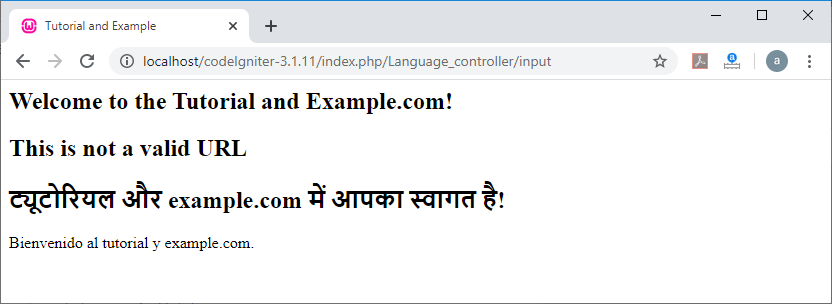
When you execute the program in the localhost by invoking the URL localhost/CodeIgniter-3.1.11/index.php/Language_controller/input function, it shows the output, as shown below.