CodeIgniter Routes
The Routes are used to handle URL requests on the browser. It matches the URL request to the predefined routes in CodeIgniter. Therefore, a file must be predefined as a routes.php file to access the controller and its functions on the browser. It contains one to one mapping with the controller and its actions in the URL, that follows the following pattern:
localhost/controller_name/action_name/
For example, example.com/main/about-us
Where
- example.com is the domain name
- main is the controller name that you have passed in the routes.php.
- about-us is the action name of the controller that calls on the browser.
If the particular request is not full filled by the routes in the URL, the CodeIgniter throws an error, page not found.
Routing path in the CodeIgniter
The routes.php file is defined inside the config folder of the application in CodeIgniter. When we run application, the routes file performs three actions, by default that calls on the browser.
$route['default_controller']
= 'welcome';
 $route['404_override'] = '';
 $route['translate_uri_dashes'] = FALSE;
Here, the $route['default_controller'] represents that you had created a default controller in the routes.php file. It automatically calls when you run application in the browser.
The $route[‘404_override’] represents that it will throws an exception message or page not found in the application. Also, you can show an exception related page in your application when the particular request does not present.
$route[‘ translate_uri_dashes’] represents that it is not a route. It contains a Boolean value that allows you to automatically convert dashes (-) into underscores in the controller and action/method.
So, when you run CodeIgniter application in the browser, it fetches a welcome controller from the routes.php file, by default. Because it has a predefined welcome controller to run in the server.
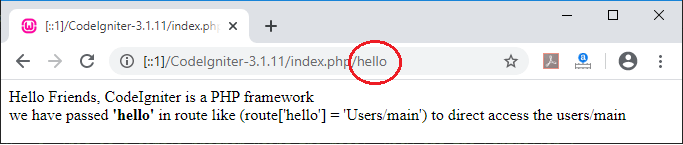
Example: We are going to create a controller and action that can call in URL. So, you have to define controller and action in routes.php like: $route[ ‘hello’ ] = ’Users/main’;
We have created a Users.php in application/controller folder.
Users.php
<?php
 class Users extends CI_Controller {
  public function index()
 {
  echo “ This is the first program in which, we have define routes”;
 }
  public function main()
     {
         echo "Hello Friends, CodeIgniter is a PHP framework";
         echo "<br>";
         echo "Here, We have used route['(:num)']= 'Users/main' which accept only number in url to call users/main";
     }
 }
 ?>
Let’s execute the above program. In the browser, type the URL localhost/CodeIgniter-3.1.11/index.php/hello. It returns the output, as shown below.
We can also customize the routes in two ways:
- Wildcards
- Regular
Wildcards
The wildcards route might be represented like the following:
$route[ ‘hello/ :num’ ] = ‘Users/main’ ;
The $route[] contains an array key that is matched with the URL to select a particular controller and action. In the above example, hello is the first segment of the URL, and the num is the second argument that calls the controller. It calls the action name instead of calling the full name in the URL.
The wildcards are divided into two parts:
- :num - The :num function is used to match only numbers in routes that passes from the URL.
$route[ ‘hello/ :num’ ] = ‘Users/main’ ;
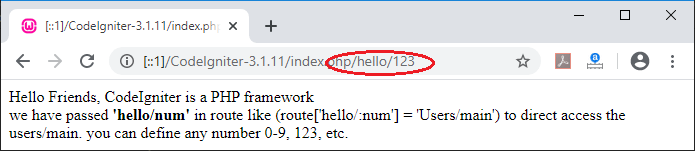
Example: We are going to create a controller and action that can call in URL. So, you have to define controller and action in routes.php such as $route[ ‘hello/:num’ ] = ’Users/main’;
Users.php
<?php
 class Users extends CI_Controller {
  public function index()
 {
  echo “ This is the first program in which, we have define routes”;
 }
  public function main()
     {
         echo "Hello Friends, CodeIgniter is a PHP framework";
         echo "<br>";
        echo " we have passed <b>'hello/num'</b> in route like (route['hello/:num'] = 'Users/main') to direct access the users/main. you can define any number 0-9, 123, etc.";
     }
 }
 ?>
Run the above program by invoking the URL localhost/CodeIgniter-3.1.11/index.php/ and write 123. It returns the output, as shown below.
$route[ ‘( :num)’ ] = ‘Users/main’ ;
Similarly, you can also define the above routes method in routes.php for getting the following output.
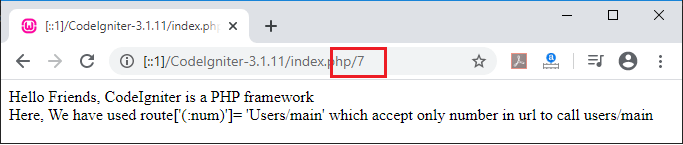
Note: When you execute the program then it takes only a number for calling the controller (Users) and its method (main).
2. :any – The :any function is used to accept or match any type of character, either the number or string from the URL to match with define segments in routes.
Syntax: $route[‘ (:any) ‘] = ‘MainController/index/$1’ ;
Example: You have to create controller and action, that can call in URL, as you have done in the :num function. So, you have to define controller and action in routes.php.
$route[ ‘users/:any’ ] = ’Users/main’;
Users.php
<?php
 class Users extends CI_Controller {
  public function index()
 {
  echo “ This is the first program in which, we have define routes”;
 }
 public function main()
     {
         echo "Hello Friends, CodeIgniter is a PHP framework";
         echo "<title> Welcome to Tutorials And Examples </title>";
         echo "<br>";
         echo " Here, we have described about the <b> (:any) </b> function in routes" ;
         echo "<br>";
         echo " <b> routes(:num) ='Users/main <b>" ;
     }
 }
 ?>
Let’s run the application. Open the browser and invoke the URL localhost/CodeIgniter-3.1.11/index.php/users/hello. It returns the output, as shown below.
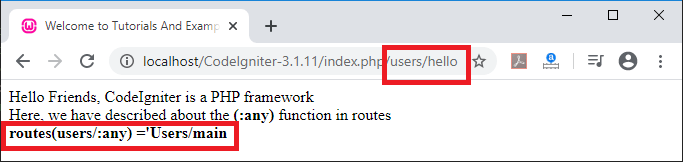
Note: The condition should be matched, as you have defined in routes.php file such as:
$route[users/:any]
= ‘USERS/main’
 $route[users/:any/:num] = ‘USERS/main’
Similarly, define the function “$routes (users/: any/: any) = ‘Users/main’” in routes.php file. Execute the URL localhost/CodeIgniter-3.1.11/index.php/users/hello/boy. It shows the following output.
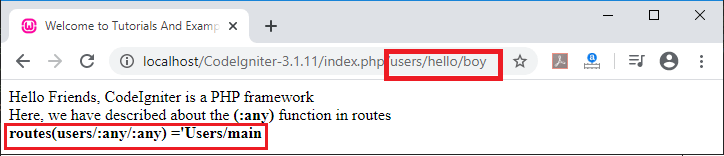
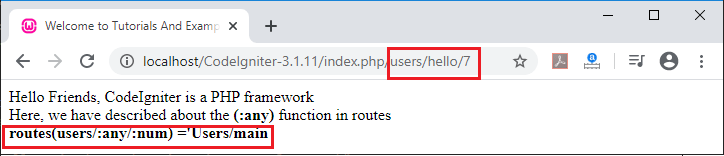
Note: You can specify any alphanumeric string in the URL,as shown above. You have to follow the same sequence as defined in routes.php file. Or you can define the $route[] with the combination of “:any/:num”, that shows the output, as shown below.
Regular Expressions
It is similar to wildcards. You can define regular expression in $routes array to match the expression that passes from the URL. If the matches found with the $routes array, it will fetch that page from the routes to show on the browser.
Syntax:
$route['usesrs/([a-z]+)/(\d+)'] = '$1/id_$2';=
‘product/parts’;
URL Suffix
If you want to add a suffix to show the extension of the file in url, go to config.php file in application/config folder and add the extension as shown below. In this method, you can add any type of extension such as .css, .php, .html, and .jsp, etc.
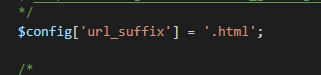
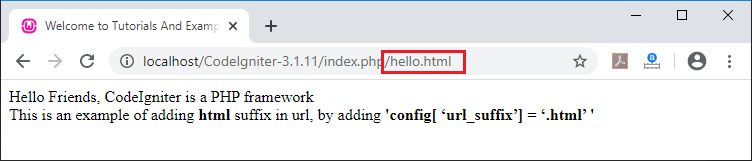
Example: Consider the URL https:// localhost/CodeIgniter-3.1.11/index.php/hello
After adding .html suffix in the URL, it looks like https:// localhost/CodeIgniter-3.1.11/index.php/hello.html, andshows the following output.
Passing Parameters from URL to controller
In this method of routes, you can pass the parameters from URL to the controller. For passing parameters, define the argument in controller’s action along with the routes.php file. For example:
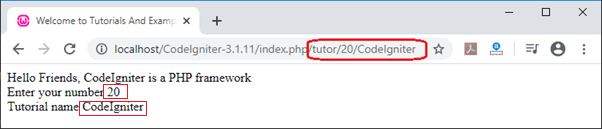
$route[' tutor/ (:num)/ (:any)'] = 'Users/main/$1/$2';
Here, In the above function we are passing the parameter in the URL. We have used two parameters in the $route[] function that is :num and :any. The $1 represent the :num and $2 represents :any. The first parameter ($1) can accept only numeric value while in the second parameter ($2) you can pass either numeric or string value.
Users.php
<?php
 class Users extends CI_Controller {
 public function main($id, $name)
     {
         echo "Hello Friends, CodeIgniter is a PHP framework";
         echo "<title> Welcome to Tutorials And Examples </title>";
      echo "<br>";
        echo "Enter your number" .' ' .$id. ' '. "<br>". "Tutorial name" .' ' .$name;
     }
 }
 ?>
Now execute the above program. Open the browser and invoke the URL localhost/CodeIgniter/index.php/tutor/ and pass the parameters values 20 and CodeIgniter, respectively. It shows the output, as shown below.