
CodeIgniter Shopping Cart Class
It contains the various function that enables the user to add or update, display, and delete data item from the shopping carts while browsing the site. The items added in the cart remain active during the entire session,
Load a cart library
Before using the shopping cart class, you must load in the controller file by following the syntax:
$this -> load-> library ( ‘cart’ );
Functions of the shopping cart
- Adding an item to the cart: It contains five reserved key variables that are used to add an item in the shopping cart, and these items remain stored during the browsing session.
There are Five Reserved keys variables
Id: Every product has a unique id to identify the particular data items from similar items.
Qty: It defines the quantity of purchased items.
Price: It defines the price of purchased items.
Name: It defines the name of the items such as Nokia, Samsung, Vivo, etc.
Options: It consists of any additional features that help to identify the data items.
However, it consists of two more reserved words such as rowed and subtotal, that are used internally in the cart class, so you don’t need to use this as an index variable when inserting the data into the cart.
Example:
Create a controller file Shop_cart.php and save it in application/controller/Shop_cart.php. After that, write the following program in the controller file.
Shop_cart.php
<?php
 class Shop_cart extends CI_Controller
 {
 public function cart_function()
     {
              echo "<title> Tutorial and example </title>";
         $this->load->library('cart');
          $data = array(
             'id'      => 'sku_123ABC',
             'qty'     => 3,
             'price'   => 45.95,
             'name'    => 'T-Shirt',
             'options' => array('Size' => 'M', 'Color' => 'Blue')
     );
    echo "Your Item has been added to the cart <br/>";
    echo "This is a unique id: ".$this->cart->insert($data);
 }
 }
 ?>
When you execute the above program in localhost by invoking the URL localhost/CodeIgniter-3.1.11/Shop_cart/cart_function, it shows the output, as shown below.

2.Adding Multiple data items to the cart
Shopping cart classes also provide the facility to add multiple data items to the cart in one action. It is useful where you want to select only a few items from the same web page.
Similarly, if you want to add multiple data items in the cart, write the following program in the application/controller/Shop_cart.php file.
Shop_cart.php
<?php
 class Shop_cart extends CI_Controller
 {
 public function cart_function()
     {
              echo "<title> Tutorial and example </title>";
         $this->load->library('cart');
          $datas= array(
         array(
             'id'      => 'Leecap_123ABC',
             'qty'     => 5,
             'price'   => 149.55,
             'name'    => 'LEECAP ',
             'options' => array('Size' => 'L', 'Color' => 'Black')
         ),
           array(
             'id'      => 'apple_567ZYX',
             'qty'     => 2,
             'price'   => 10.95,
             'name'    => 'Iphone '
     ),
        array(
             'id'      => 'oppo_965QGT',
             'qty'     => 1,
             'price'   => 32.95,
             'name'    => 'Oppo 89PRO'
         ),
 );
 echo "Your Items has been added to the cart <br/>";
 print_r($this->cart->insert($datas));
 }
 }
 ?>
When you execute the above program in the localhost by invoking the URL localhost/CodeIgniter-3.1.11/Shop_cart/cart_function, it shows the output, as shown below.

3.Displaying the cart
It is used to display cart items that are stored in the session.
Example
Create a controller file Shop_cart.php and save it in application/controller/Shop_cart.php. After that, write the following program in the controller file.
Shop_cart.php
<?php
 class Shop_cart extends CI_Controller
 {
 public function show_items()
 {       echo "<title> Tutorial and example </title>";
         $this->load->library('cart');
         $this->load->helper('form');
         $items['product'] = $this->cart->contents();
         $this->load->view('shopping', $items);
 }
 }
 ?>
Create a view file shopping.php and save it in application/views/shopping.php. After that, write the following program in the shopping file.
<?php echo form_open(); ?>
 <h2> Items in Cart</h2>
 <table border ="1">
     <tr>
         <th>Id</th>
         <th>Name</th>
         <th>Quantity</th>
             <th>Price</th>
         <th> Optional</th>
         <th> Subtotal</th>
     </tr>
     <?php foreach ($product as $data): ?>
     <tr>
         <td> <? = $data['id']?> </td>
             <td> <? = $data['name'] ?> </td>
             <td> <? = $data['qty'] ?> </td>
             <td> <? =  $data['price'] ?> </td>
             <td> <? var_dump($data['options'])?> </td>
         <td style="text-align:right">$<?php echo $this->cart-      >format_number($data['subtotal']); ?> </td>
     <?php endforeach; ?>
 </tr>
 <tr> <td colspan = "5"> Grand Total :</td> <td colspan = "2">$<?php echo $this->cart->format_number($this->cart->total()); ?> </td> </tr>
 </table>
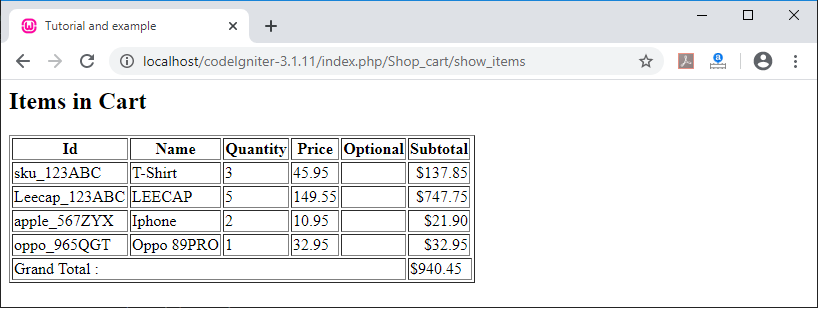
When you execute the above program in the localhost by invoking the URL localhost/CodeIgniter-3.1.11/Shop_cart/show_items function, it shows the output, as shown below.
4.Updating the cart
If you want to update the items of the cart, you have to pass an array that containing the RowID and one more predefined properties to the update cart() function, such as price, colors, quantity, etc.
Example
Create a controller file Shop_cart.php and save it in application/controller/Shop_cart.php. After that, write the following program in the controller file.
Shop_cart.php
<?php
 class Shop_cart extends CI_Controller
 {
 public function update_items()
 {       echo "<title> Tutorial and example </title>";
         $this->load->library('cart');
        $data = array(
         array(
                 'rowid'   => '8e2c52e84811b99777e8fef1d5ad9acd',
                 'qty'     => 2
         ),
         array(
                 'rowid'   => '6151f8e120dec826fb57f5f95c91459b',
                 'qty'     => 6
         ),
         array(
                 'rowid'   => 'b09150a6fffe4370213fcc83db477d42',
                 'qty'     => 8
         ),
         array(
                 'rowid'   => ' 686a5f1362f8f21b1f7a3f4586188753',
                 'qty'     => 3
         )
 );
 $this->cart->update($data);
 echo "<h2>Items has been updated </h2>";
 }
 }
 ?>
When you execute the above program in localhost by invoking the URL localhost/CodeIgniter-3.1.11/Shop_cart/update_items function, it shows the output, as shown below.

5.Delete Cart: It is used to delete all the available data from the cart.
Example:
Create a controller file Shop_cart.php and save it in application/controller/Shop_cart.php. After that, write the following program in the controller file.
<?php
 class Shop_cart extends CI_Controller
 {
 public function show_items()
 {       echo "<title> Tutorial and example </title>";
         $this->load->library('cart');
         $this->load->helper('form');
         $items['product'] = $this->cart->contents();
         $this->load->view('shopping', $items);
 }
 }
 ?>
When you execute the above program in localhost by invoking the URL localhost/CodeIgniter-3.1.11/Shop_cart/delete_cart function, it shows the output, as shown below.

What is a Row ID?
A row id, which is a unique id, is created automatically by the cart code when a product is added to the cart. The reason for creating a unique is that to manage the identical product with different options through the cart. For example:
array(
                 'rowid'   => ' 686a5f1362f8f21b1f7a3f4586188753',
                 'qty'     => 3
         );
Class References
- insert(): As the names define, it is used to insert the items in the cart and save it to the session table. If the data has been saved, it returns true else it returns false on failure.
Syntax
insert ( [ $items = array() ]);
$items: It contains all the value related to the items such as price, name, id etc.
2.update(): The update() function is used to update the items available in the cart. When a user wants some change in the quantity of items before checkout, it can be called from the view cart to update the cart.
Syntax
update ( [$items = array() ]);
$items(array): It should contain a rowid with a description of the items to be updated in the cart.
3.remove(): It is used to remove the particular item or group of items from the shopping cart by using the rowed in the remove() function.
Syntax
remove ($rowid);
4.total(): As the function shows, it is used to calculate the total price of the items that are available in the cart.
Syntax
total();
5.total_items(): It is used to find the total number of items available in the cart.
Syntax
total_items();
6.get_item(): As the function defines, it is used to retrieve an item from the shopping cart that is matching with the specified row Id; otherwise, it returns False if items not exist.
Syntax
get_item ($row_id);
$row_id: It takes a row ID to fetch a particular item from the cart.
7.has_options(): This function is used to return a TRUE(Boolean) value, if an item has multiple variations in terms of size, colors, etc. in the cart; so, you need to pass a rowID to this method otherwise, it returns a False value.
Syntax
has_options ($row_id = ‘ ‘);
8.destroy(): As the name suggests, destroy() function is used to permanently delete the cart.It is called when you want to completely finished the customer’s order.
Syntax
destroy();