
Database Configuration CodeIgniter
In every application, there is an important part of a database through which developers can connect an application to store users’ data and perform various functions in the database application such as inserting, updating, reading, and deleting the values. Before performing these functionalities, you have to set the database configuration in the CodeIgniter application. A CodeIgniter contains an inbuilt database.php file that allows you to set database connection values such as hostname, username, password, database, dbdriver name, etc. and this file is located at application/config/database.php.
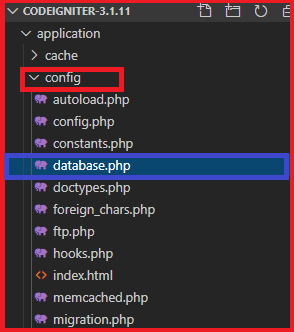
Set the Default Database Configuration
The default structure of the database configuration is as follows:
$db['default'] = array (
 'dsn'     => '',
             'hostname' => 'localhost',
             'username' => 'root',
             'password' => 'db_password',
             'database' => 'codedb',
             'dbdriver' => 'mysqli',
             'cache_on' => FALSE,
             'cachedir' => '',
             'dbprefix' => '',
             'pconnect' => FALSE,
             'db_debug' => (ENVIRONMENT ! == 'production'),
             'swap_pre' => '',
             'encrypt' => FALSE,
             'dbcollat' => 'utf8_general_ci',
             'char_set' => 'utf8',
             'compress' => FALSE,
             'save_queries' => TRUE,
             'failover' => array(),
             'stricton' => FALSE
 );
There are the following key points available in the database.php file while connecting with the database configuration:
- It specifies the host location of your database. For example- localhost or IP address
- It defines the username of your database, such as root.
- As the name suggests, it is used to set the password of your database. By default, this is blank in most databases, and you can also set your own database password.
- It is used to specify the name of the database that you have created in phpMyAdmin, MySQL, etc.
- In this dbdriver, you can specify the type of databases such as MySQL, Postgre SQL, ODBC, MySQLi, and MS SQL.
It also contains some database driver such as PDO, Oracle, ODBC and PostgreSQL that require full DSN string to be connected with database.
For example:
// Oracle
 $db[ ‘default’ ][ ‘dsn’ ] = ‘//localhost/XE’;
 // PDO
 $db[ ‘default’][ ‘dsn’ ] = ‘pgsql:host = localhost; port = 5432; dbname = database_name’;
Failover database connection
You can also set a failover database connection when the main connection is not working. This can be achieved by setting the connection as shown below:
$db['default'] ['failover'] = array(    // if the default connection has lost, failover works
                 array(
                         'hostname' => 'localhost',
                         'username' => '',
                         'password' => '',
                         'database' => '',
                         'dbdriver' => 'mysqli',
                         'dbprefix' => '',
                         'pconnect' => TRUE,
                         'db_debug' => TRUE,
                         'cache_on' => FALSE,
                         'cachedir' => '',
                         'char_set' => 'utf8',
                         'dbcollat' => 'utf8_general_ci',
                         'swap_pre' => '',
                         'encrypt' => FALSE,
                         'compress' => FALSE,
                         'stricton' => FALSE
                 ),
                 array(
                         'hostname' => 'localhost1', // provide another localhost name
                         'username' => '',
                         'password' => '',
                         'database' => '',
                         'dbdriver' => 'mysqli',
                         'dbprefix' => '',
                         'pconnect' => TRUE,
                         'db_debug' => TRUE,
                         'cache_on' => FALSE,
                         'cachedir' => '',
                         'char_set' => 'utf8',
                         'dbcollat' => 'utf8_general_ci',
                         'swap_pre' => '',
                         'encrypt' => FALSE,
                         'compress' => FALSE,
                         'stricton' => FALSE
                 )
         );
Multiple Database Configuration
A Codeigniter also provides a suitability to add multiple database connection with a default connection that can work simultaneously in the database.php file, as follows.
//Default database configuration
$db['default'] = array(
     'dsn'       => '',
     'hostname' => 'localhost',
     'username' => 'db_username',
     'password' => 'db_password',
     'database' => 'db_name',  // provide database name
     'dbdriver' => 'mysqli',
     'dbprefix' => '',
     'pconnect' => FALSE,
     'db_debug' => (ENVIRONMENT !== 'production'),
     'cache_on' => FALSE,
       'cachedir' => '',
       'char_set' => 'utf8',
        'dbcollat' => 'utf8_general_ci',
         'swap_pre' => '',
          'encrypt' => FALSE,
               'compress' => FALSE,
                'stricton' => FALSE
 );
//Another database configuration
$db['another_db'] = array(
     'dsn'       => '',
     'hostname' => 'localhost',
     'username' => 'db_username',
     'password' => 'db_password',
     'database' => 'db_name2',
     'dbdriver' => 'mysqli',
     'dbprefix' => '',
     'pconnect' => FALSE,
     'db_debug' => (ENVIRONMENT !== 'production'),
     'cache_on' => FALSE,
     'cachedir' => '',
     'char_set' => 'utf8',
     'dbcollat' => 'utf8_general_ci',
     'swap_pre' => '',
     'encrypt'  => FALSE,
     'compress' => FALSE,
     'stricton' => FALSE,
     'failover' => array(),
     'save_queries' => TRUE
 );
// third database configuration
$db['test_db'] = array(
     'dsn'       => '',
     'hostname' => 'localhost',
     'username' => 'db_username',
     'password' => 'db_password',
     'database' => 'db_name3',
     'dbdriver' => 'mysqli',
     'dbprefix' => '',
     'pconnect' => FALSE,
     'db_debug' => (ENVIRONMENT !== 'production'),
    'cache_on' => FALSE,
     'cachedir' => '',
     'char_set' => 'utf8',
     'dbcollat' => 'utf8_general_ci',
     'swap_pre' => '',
     'encrypt'  => FALSE,
     'compress' => FALSE,
     'stricton' => FALSE,
     'failover' => array(),
     'save_queries' => TRUE
 );
After connecting the multiple database connection, you must to load a database in the CodeIgniter application as follows:
// load another database
 $db2 = $this->load->database(‘another_db’, TRUE);
The first parameter contains the ‘database name’, whereas second parameter contains ‘TRUE’ to get the database object.
Similarly,
// load third database
 $db2 = $this->load->database(‘test_db’, TRUE);
How to use multiple database in CodeIgniter?
Now, if you want to access the multiple connection by the database object, follows the given below syntax:
// for default database
 $this->db->select( ‘username’, ‘password’);
 $this->db->from(‘students’);
 $this->db->where(‘id’, 35);
 $query = $this->db->get();
 // for another database
 $db->select( ‘rollno’, ‘course’);
 $db->from(‘student_registraion’);
 $db->where(‘id’, 15);
 $query = $db->get();
How to call a database connection in the CodeIgniter application?
There are two ways to call a database connection in the application as:
It is an automatic connection that automatically loads the database library into the Codeigniter application, and this connection can be made using the application/config/autoload.php file.
Syntax
$autoload[ ‘libraries’ ] = array(‘database’);
 // or you can load database connection with other libraries
 $autoload[ ‘libraries’ ] = array(‘database’, ‘email’, ‘form_validation’);
In manual connection, it allows you to load database connection on some page of the class controller or to access it globally for that particular class.
Syntax
$this->load->database();
What is $active_group?
A $active_group tells the system to access a globally defined database that is located in the config/database.php file. And if you want to add more active group, you can specify the database in $active_group, as shown below:
$active_group = ‘default’;  // it shows default active group
 $active_group = ‘test_db’;  // it shows test_db $active_group
What is a Query Builder?
A Query Builder class that globally enables you to perform a query to the database by setting the $query_builder variables to TRUE/FALSE in the database configuration file. The default setting of the query builder is TRUE, and if you are not using the query builder, set it to FALSE.
$query_builder = TRUE;
Reconnecting or Keeping the connection is alive
In some situations, where the database server’s idle timeout exceeded due to heavy PHP processing in the CodeIgniter application. Therefore, you should reconnect the server by using the reconnect() method before performing further queries to your database. That way, you can keep the connection alive or reconnect it.
$this->db->reconnect();
Closing the Connection
If you want to close a database connection, you must manually close the connection by executing the following syntax-
$this->db->close();  // it close the default database connection
$this->another_db_name->close(); // it close the defined database connection