
×

VBA Charts

What is a Chart?

A chart is used to visually show numbers or data in a spreadsheet (or spread over multiple spreadsheets) so that the end-user can look at the chart and interpret the results or observe the trends easily.

Excel gives an advantage to the user to create customized charts, instantly displaying the data in a visually attractive manner for users. The user can easily manipulate the charts placed within a worksheet or a chart sheet. There are several types of charts in excel, unlike Column chart, Line chart, Bar chart, Stacked chart (bar, line, column), Pie chart, & Bubble charts with Column Bar being the most commonly used.

Charts are created either by directly working with the chart object that defines the chart data. In order to get to the object without an existing chart, you create a ChartObject on a given Worksheet and then get the Chart object from it.

Parts of a Charts
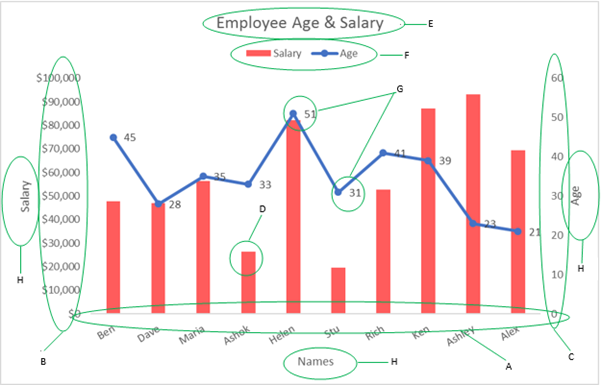
VBA Charts

A - Horizontal Axis: – It is also known as the X-axis. It consists of different values of the variable for which we are plotting data on the graph.

B - Primary Vertical Axis: – It is also known as Y-axis. It consists of a scale based on different data points we are plotting on the graph.

C - Secondary Vertical Axis:– It is not present in all the graphs and is used when we are plotting two different variables on the graph, and there is a huge value difference between the two variables – for example, we are plotting age and salary – age will be in 10’s multiples whereas Salary in 1,000’s – so if we plot them on the same Y-axis, age graph/line/data-points will not be visible at all.

D - Data-Points: – It represents the values that we are plotting on the graphs like age, salary, units, etc,.

E - Chart Title: – It represents the title of the chart, which you can change, link to a cell, or even can format as per your requirement.

F - Legend: – The legend is a sort of key. It informs the users regarding the values that have been plot on the graphs.

G - Data Label: – When you plot values on a graph, you may also want to see the values of each of these data-points, and these values are called Data Labels.

H - Title Axis: – It denotes the title for the horizontal and vertical axis, unlike in the above example we have used Name and Salary on our Title axis.

Embedded Charts vs Chart sheets

Embedded ChartsChart Sheets
These charts are set within a worksheet & and can be shown along with the data or any other informationChart sheets are represented as a separate sheet in the workbook. It contains only a single chart in which the source data or any other information is not displayed.
It can be seen together with other facts in a worksheet.It cannot be a part of the worksheet.
It is saved as part of the worksheet on which it is created.It is saved with is its own sheet name.
These charts are to display or print one or more charts within the worksheet.These charts are used to review or amend large or complicated charts individually from the worksheet data. It is also used when the user wants to preserve screen space to work upon the worksheet.

Related Topics

Excel VBA StrConv Function

The StrConv function in VBA converts a string into a specified format. Syntax StrConv (String, Conversion, [LocaleID]) Parameter String (required) – This parameter represents the string to be converted. Conversion (required) – This parameter specifies the type of conversion. It can...

1 minute read.

Excel VBA CInt Function

VBA CInt Function: The VBA Cint function converts the specified expression into an Integer. Syntax Cint (Expression) Parameter Expression (required) – This parameter represents the expression that you want to convert to an Integer wherein...

1 minute read.

VBA Object Required

What is Object Required Error? VBA Object Required is a run time error which occurs when the user does not define a valid object qualifier, or the assigned object doesn’t exist in the...

6 minutes read.

Excel VBA Time Function

Excel VBA Time Function: The Time function in VBA returns the current time. Syntax Time () Parameter NA Return This function returns the current time.  Example 1 Sub TimeFunction_Example1() ' returns the current time Dim time_val...

1 minute read.

Excel VBA Format Function

VBA Format Function The format function in VBA applies a specified format to an expression and returns the result as a string. Syntax Format (Expression, [Format], [FirstDayOfWeek] , [FirstWeekOfYear] ) Parameter Expression (required)- This parameter represents the expression that you want to format. Format...

3 minutes read.

VBA Dim

What is Dim? DIM or Dimension or Declare in Memory is a keyword that is used in VBA to declare a variable with the different data types (Integer, String, variable, Boolean, Double, etc.)...

7 minutes read.

Excel VBA- Pivot Table Fields

VBA- Pivot Table Fields: The Pivot Fields collection contains all the fields from the data source, including any calculated fields. The main aspect of adding a field is its Position...

4 minutes read.

Excel VBA Oct Function

VBA Oct Function: The Oct function in VBA converts the given number into octal notation and returns the result as a string. Syntax Oct (Number) Parameter Number (required) – This parameter represents the numeric value...

1 minute read.

Excel VBA: Select … Case Statement

Select … Case Statement When a group of statements is executed, depending upon the value of an Expression, then Switch Case is used.  If you have several conditions to check, then the If condition...

4 minutes read.

Excel VBA DateDiff Function

The DateDiff function in VBA returns a Long data value representing the number of intervals between two specified dates/times where the type of interval is supplied by the user. Syntax DateDiff (Interval, Date1, Date2, [FirstDayOfWeek], [FirstWeekOfYear]) Parameter Interval (required)...

2 minutes read.

Excel VBA Sgn Function

VBA Sgn Function: The Sgn function in VBA returns an integer (+1, 0, or -1), stating the arithmetic sign for the specified number. Syntax Sgn (Number) Parameter Number (required) –This parameter represents the number that...

1 minute read.

VBA Global Variable

What is Global Variable? The Global Variables in VBA refers to the variables declared before the start of any macro. They are defined outside the functions and are used by all the functions or...

6 minutes read.

Excel VBA Year Function

Excel VBA Year Function: The Year function in VBA returns the four-digit year for the specified date. Syntax Year (Date) Parameter Date (required) – This parameter represents the significant date. Return This function returns the four-digit year...

1 minute read.

Excel VBA FormatPercent Function

VBA FormatPercent Function: The FormatPercent function in VBA is used to apply a percent format to a numeric expression, and it returns the result as a string. Syntax FormatPercent (Expression, [NumDigitsAfterDecimal], [IncludeLeadingDigit], [UseParensForNegativeNumbers], [GroupDigits]) Parameter Expression (required)...

2 minutes read.

Excel VBA AutoFilter

One of the reasons for Excel VBA’s popularity is its capability to filter and analyze data from huge database with the help of a method known as AutoFilter. This method permits a...

4 minutes read.

Scope in Visual Basics

Definition of Scope The scope of any programming language implies the area of code where the variables will be identified, accessed, and used. Every variable has a scope associated with it. The scope of...

4 minutes read.

Excel VBA Sin Function

VBA Sin Function: The Sin function in VBA returns the sine value for a supplied angle. Syntax Sin (Number) Parameter Number (required) –This parameter represents the angle (in radians) to calculate the sine value. Return This function...

1 minute read.

Excel VBA DateAdd Function

The DateAdd function in VBA adds a time interval to a supplied date and/or time and returns the resultant date/time. Syntax Dateadd (Interval, Number, Date) Parameter Interval (required) – This parameter a string specifying the interval to be...

1 minute read.

VBA Find Function

VBA Find Function The Excel VBA FIND function finds any information in your Excel. It can be used on a Range object on the worksheet. It works the same, unlike the Excel Find &...

6 minutes read.

Excel VBA WeekdayName Function

Excel VBA WeekdayName Function: The WeekdayName function in VBA returns a string containing the weekday name, for the specified integer representation of a weekday. Syntax WeekdayName (Weekday, [Abbreviate], [FirstDayOfWeek]) Parameter Weekday (required) – This parameter represents...

2 minutes read.