
×

Debugging in Excel VBA

Debugging in VBA: Debugging is a technique used to fix errors in programming languages. In Excel VBA, we have different ways by which you can identify the error in the code and resolve it.:

The commonly used methods are as follows:

  • Breakpoint
  • Stepping

1. Breakpoint

A selected program line at which execution will automatically stop and then you can see if the error has occurred till that line or not – if the error hasn’t occurred, then you can be sure that the remaining part of the code has the error statement. The Breakpoint is a useful technique in long procedures where it would be tedious and time-consuming to run through each and every line of code before you get to the part that you are trying to debug.

Apply Breakpoint

To add a breakpoint, click on the right-side margin of the line you want the execution to stop at or use the F9 as a shortcut key.

Remove Breakpoint

To remove a breakpoint, either click on the red dot or place the cursor on the specified breakpoint line and again press F9. Next, click on the green arrow to continue execution.

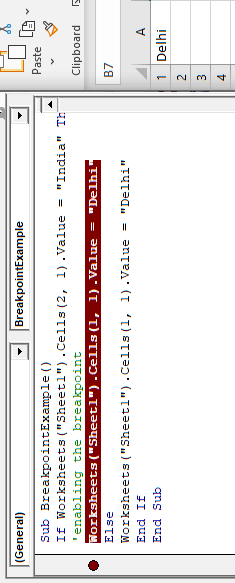
Program: In the below program, the execution will stop at 3rd line of the program before ‘Else’.

Sub BreakpointExample()
 If Worksheets("Sheet1").Cells(2, 1).Value = "India" Then
 'enabling the breakpoint and halting the process
 Worksheets("Sheet1").Cells(1, 1).Value = "Delhi"
 Else
 Worksheets("Sheet1").Cells(1, 1).Value = "Delhi"
 End If
 End Sub 

Output
Debugging in Excel VBA

2. Stepping (for Run-time error debugging)

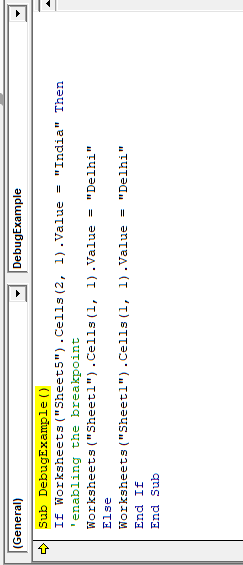
If while running the code, excel throws an error, you can step into the code and go from one line to another by pressing F8 and see which line excel has thrown an error for. It is the easy and commonly used debugging method is to manually check every line and understand which line gave the error, we use ‘Step-Into’ from Debug menu or press F8 –
Debugging in Excel VBA

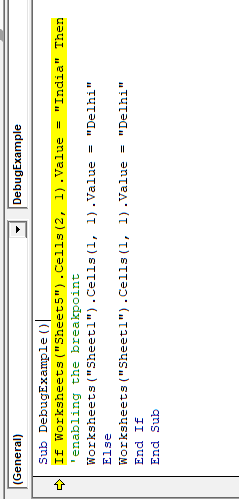
As we keep on pressing F8, VBA will keep on highlighting the lines –
Debugging in Excel VBA

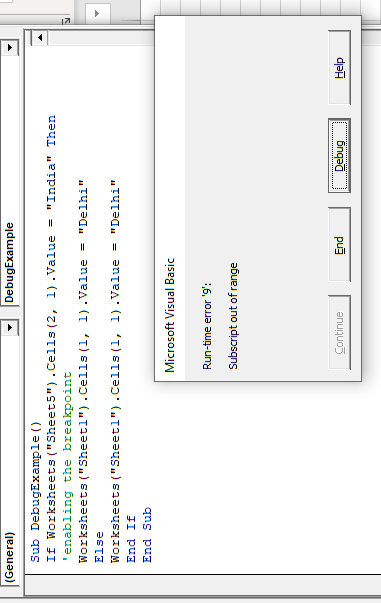
As we try to move from this line to another, VBA gives the same error which we got when we ran the entire code suggesting that the error occurred because of this 3rd line which is right – as we are passing a text value to a variable which has been declared as a date variable.
Debugging in Excel VBA

This feature is even more useful when the code is complex or has a lot of lines – this example had just 4 lines.


Related Topics

Excel VBA Conditional Statement

Conditional Statement in VBA Excel Conditional Statements in Excel VBA are one of the most powerful and useful features in programming, this will give you to perform comparisons to decide or...

2 minutes read.

VBA UBound

VBA UBound  The UBound or Upper Bound function in VBA is used to specify the length of an array and returns the highest subscript for a dimension for the specified array. It is...

3 minutes read.

Excel VBA InStrRev Function

VBA InStrRev Function: The InStrRev function in Excel VBA returns an integer representing the position of a substring within the specified string if the substring is fount else it returns...

2 minutes read.

Excel VBA For Each Loop

A For Each loop executes a statement or a group of statements for each element in an array or collection. It repeats the statement/condition/code for each element in a collection. For Each Loops loop through every...

4 minutes read.

Excel VBA FormatNumber Function

VBA FormatNumber Function: The FormatNumber function in VBA is used to apply a number format to a numeric expression, and it returns the result as a string. Syntax FormatNumber (Expression, [NumDigitsAfterDecimal], [IncludeLeadingDigit], [UseParensForNegativeNumbers], [GroupDigits]) Parameter Expression (required)...

2 minutes read.

Excel VBA INT Function

VBA INT Function: The INT function in VBA rounds the given supplied number down and returns an integer value. The positive numbers are rounded to zero, and the negative numbers are rounded away from zero. Syntax Int...

1 minute read.

VBA Pivot Table Grouping

VBA- Pivot Table Grouping For an instance, if in our pivot table, we have 11 different age groups from 20 to 30 -  but there might be a possibility that we...

2 minutes read.

VBA Regex Pattern Validation

VBA Regex Pattern Validation The key purpose of using Regex in VBA was to validate the data and extract the same category of data. There are certain formats that are standard...

6 minutes read.

Excel VBA Array

Introduction to VBA Array An array is a type of variable that holds more than one piece of data. In VBA, you can refer to a specific variable (element) of an array by using...

5 minutes read.

Excel VBA RTrim Function

VBA RTrim Function: The Rtrim function in VBA removes the leading spaces from the text in the specified string. Syntax RTrim (String) Parameter String (required) – This parameter represents the string from which you want...

1 minute read.

VBA runtime error 1004

What is 1004 error?  VBA 1004 Error, also known as object-defined or application-defined, is a runtime error in VBA, usually, if the specified range does not exist in the worksheet or if the Application...

6 minutes read.

Excel VBA StrComp Function

VBA StrComp Function: The StrComp function in VBA compares two strings and returns an integer value displaying the result of the comparison. Syntax StrComp (String1, String2, [Compare]) Parameter String1 (required)- This parameter represents the first string to...

2 minutes read.

Excel VBA Array Function

VBA Array Function: The Array function in VBA generates an array containing the given set of values. Syntax Array (Arglist) Parameter Arglist (required) – This parameter the list of values that you want to make...

2 minutes read.

Excel VBA Second Function

Excel VBA Second Function: The Second function in VBA returns the second element for the specified time.  Syntax Second (Time) Parameter Time (required) – This parameter represents the time. Return This function returns the second...

1 minute read.

Excel VBA WeekdayName Function

Excel VBA WeekdayName Function: The WeekdayName function in VBA returns a string containing the weekday name, for the specified integer representation of a weekday. Syntax WeekdayName (Weekday, [Abbreviate], [FirstDayOfWeek]) Parameter Weekday (required) – This parameter represents...

2 minutes read.

Excel VBA FormatDateTime Function

VBA FormatDateTime Function: The FormatDateTime function in VBA returns the result as a string after applying a date and/or time format to the supplied expression. Syntax FormatDateTime (Expression, [NamedFormat]) Parameter Expression (specified) – This parameter...

2 minutes read.

Excel VBA CBool Function

VBA CBool Function: The CBool function in VBA calculates an expression and returns the result as a Boolean data type. Syntax CBool (Expression) Parameter Expression (required) – This parameter represents the expression that that you want...

1 minute read.

Excel VBA Exp Function

VBA Exp Function: The Exp function in VBA returns the value of the exponential function ex (mathematical constant ‘e’ raised to specified power) for the given value of x. Syntax Exp (Number) Parameter Number (required) –This parameter represents...

1 minute read.

Excel VBA Sgn Function

VBA Sgn Function: The Sgn function in VBA returns an integer (+1, 0, or -1), stating the arithmetic sign for the specified number. Syntax Sgn (Number) Parameter Number (required) –This parameter represents the number that...

1 minute read.

Excel VBA Error Function

VBA Error Function: The Error function in VBA returns the error message corresponding to a supplied error code. Syntax Error ([ErrorNumber]) Parameter ErrorNumber (optional) – This parameter represents the required error number. By default, the...

1 minute read.