
×

How to save Macro Workbook?

Saving Macro Workbook

Default Excel File Extension

The default excel file extension is “.xlsx”. But the standard file extension “.xlsx” cannot contains macros. So, the workbook contains macro when save din.xlsx file, all VBA code is removed automatically. Fortunately, Excel gives warning that macro content will be removed when saving a macro-free workbook or a san.xlsx file.

Macro-enabled File Extensions

All macro workbooks must be saved as an Excel Macro-Enabled Workbook which gives a file an .xlsm extension.
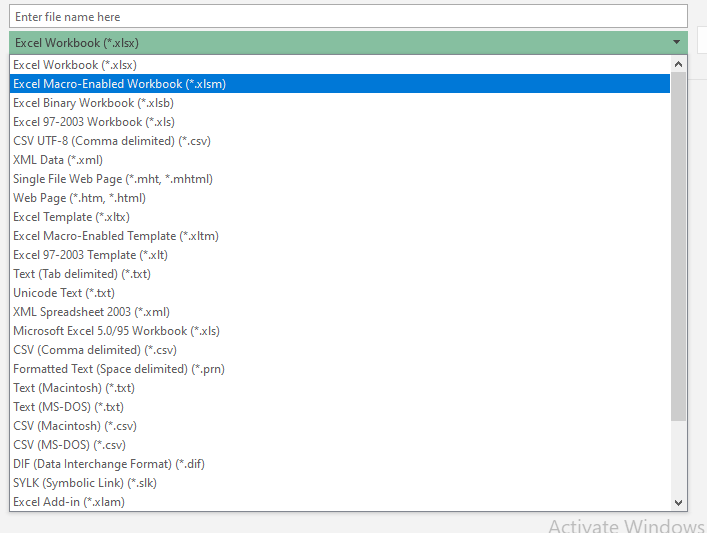
save Macro Workbook

Note: Workbooks with an .xlsx file extension are known to be safe for your systems, whereas .xlsm files could have a potential threat.


Related Topics

Excel VBA FormatCurrency Function

VBA FormatCurrency Function: The FormatCurrency function in VBA is used to apply a currency format to a numeric expression and returns the result as a string. Syntax FormatCurrency (Expression, [NumDigitsAfterDecimal], [IncludeLeadingDigit], [UseParensForNegativeNumbers], [GroupDigits]) Parameter Expression (required)...

2 minutes read.

Introduction to Visual Basic Editor Window

How to enable the Developer Ribbon Tab? In order to work with VBA, users need to make a small change in Excel to display a new tab (Developer) at the top of the...

5 minutes read.

Excel VBA Replace Function

VBA Replace Function: The Replace function in VBA searches for a substring within the specified string and replaces its occurrences with a second substring. Syntax Replace (Expression, Find, Replace, [Start], [Count], [Compare]) Parameter Expression (required) – This parameter represents...

2 minutes read.

Excel VBA Atn Function

VBA Atn Function: The Atn function in VBA returns the arctangent between quadrant -?/2 and +?/2 for the specified number, in radians. Syntax Atn (Number) Parameter Number (required) – This parameter represents the number that...

1 minute read.

Excel VBA FormatPercent Function

VBA FormatPercent Function: The FormatPercent function in VBA is used to apply a percent format to a numeric expression, and it returns the result as a string. Syntax FormatPercent (Expression, [NumDigitsAfterDecimal], [IncludeLeadingDigit], [UseParensForNegativeNumbers], [GroupDigits]) Parameter Expression (required)...

2 minutes read.

Procedures in VBA

Procedures in VBA A procedure is a block of statements or units of computer code that performs some action. It is enclosed with a declaration statement, and its primary purpose is to carry out...

3 minutes read.

UserForm and its Properties Excel VBA

UserForm and its Properties Userform has certain properties that can be viewed as category wise (based on appearance, behavior, font) or in an alphabetic manner. The property window is used to set or...

11 minutes read.

Excel VBA Error Function

VBA Error Function: The Error function in VBA returns the error message corresponding to a supplied error code. Syntax Error ([ErrorNumber]) Parameter ErrorNumber (optional) – This parameter represents the required error number. By default, the...

1 minute read.

Excel VBA CLng Function

VBA CLng Function: The CLng function in VBA converts an expression into a Long data type. It returns a long value ranging between -2,147,483,648 and 2,147,483,647. Syntax CLng (Expression) Parameter Expression (required) – This...

1 minute read.

Excel VBA Split Function

Excel VBA Split Function: The Split function in VBA is used to split a string into several substrings and return a one-dimensional array of substrings. Syntax Split (Expression, [Delimiter], [Limit], [Compare]) Parameter Expression (required) – This parameter...

2 minutes read.

VBA Cell

What is VBA cell? Cells is one of the elements (workbook, worksheet, range) in Excel VBA, which refers to cells of the Excel worksheet.  In VBA, the cell is also a property...

5 minutes read.

Declaring a Variable in VBA

Declaring a Variable A variable is broadly described as a storage location combined with a name and representing a specific value. Declaring a variable is instructing the computer to reserve space...

2 minutes read.

Excel VBA InStrRev Function

VBA InStrRev Function: The InStrRev function in Excel VBA returns an integer representing the position of a substring within the specified string if the substring is fount else it returns...

2 minutes read.

Excel VBA RTrim Function

VBA RTrim Function: The Rtrim function in VBA removes the leading spaces from the text in the specified string. Syntax RTrim (String) Parameter String (required) – This parameter represents the string from which you want...

1 minute read.

Excel VBA Left Function

VBA Left Function: The Left function in VBA returns a substring from the start of the specified string. Syntax Left (Str, Length) Parameter Str (required) – This parameter represents the string that you want to extract...

1 minute read.

Excel VBA : With End-with Constructs

With End-with Constructs The With-End With construct enables the user to perform multiple operations on a single object. If you are going to perform several different actions on the same object and typing the same...

4 minutes read.

Excel VBA StrComp Function

VBA StrComp Function: The StrComp function in VBA compares two strings and returns an integer value displaying the result of the comparison. Syntax StrComp (String1, String2, [Compare]) Parameter String1 (required)- This parameter represents the first string to...

2 minutes read.

Excel VBA: IF…..THEN …ELSE Statement

VBA : IF…..THEN …ELSE Statement: This function enables you to check one condition and, based on that, then run one of the two statement blocks present. If the ‘IF’ condition...

2 minutes read.

Excel VBA Sgn Function

VBA Sgn Function: The Sgn function in VBA returns an integer (+1, 0, or -1), stating the arithmetic sign for the specified number. Syntax Sgn (Number) Parameter Number (required) –This parameter represents the number that...

1 minute read.

VBA Updating Pivot Table

VBA- Updating Pivot Table The pivot table is an important feature to explore, summarize, and interpret the bulk amount of data. It helps data evaluating, reviewing, as well as making useful...

3 minutes read.