
×

Excel VBA InStrRev Function

VBA InStrRev Function: The InStrRev function in Excel VBA returns an integer representing the position of a substring within the specified string if the substring is fount else it returns the value 0. It searches the string from right to left (i.e. from the end to the start of the string).

Syntax

InStrRev( StringCheck, StringMatch, [Start], [Compare] )

Parameter

StringCheck (required) – This parameter represents the string you want to search.

StringMatch (required)- This parameter represents the substring you want to search for.

Start (optional)- This parameter represents an integer argument, representing the position that you want to start the searching. The default value is -1 (search starts from the end of the string).

Compare (optional) - This parameter represents the type of comparison to make.

It can take any of the following values:

  • vbBinaryCompare: To perform a binary comparison
  • vbTextCompare: To perform a text comparison
  • vbDatabaseCompare: To perform a database comparison

Return

This function returns an integer representing the position of a substring within the specified string if the substring is fount else it returns the value 0.

Example 1

Sub InStrRev_Example1()
 Dim pos As Integer
 'returns an integer representing the position of a substring within a string
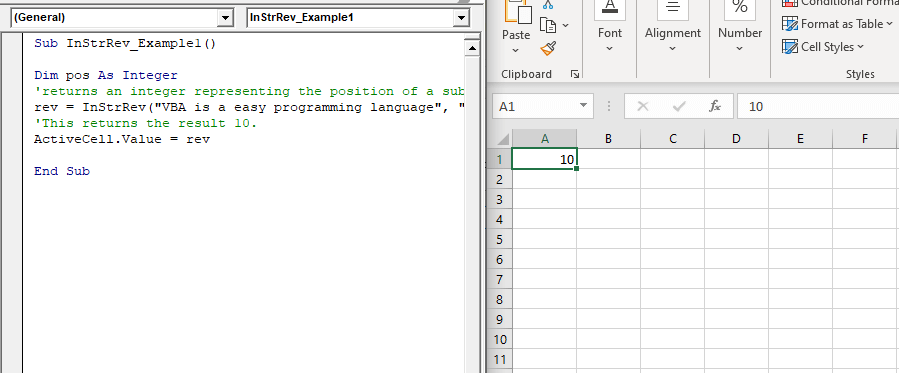
 rev = InStrRev("VBA is an easy programming language", "easy", 17)
 'This returns the result 10.
 ActiveCell.Value = rev
 End Sub 

Output

10
VBA InStrRev Function

Example 2

Sub InStrRev_Example2()
 'Finding the position of the last space that occurs within the string before the character 17.
 Dim rev As Integer
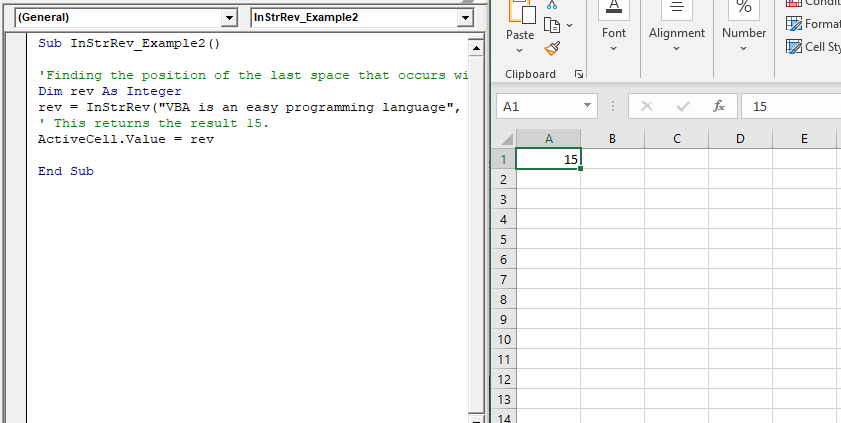
 rev = InStrRev("VBA is an easy programming language", " ", 17)
 ' This returns the result 15.
 ActiveCell.Value = rev
 End Sub 

Output

15
VBA InStrRev Function

Example 3

Sub InStrRev_Example3()
 'Find the last occurrence of the "ZZ" within the string.
 Dim rev As Integer
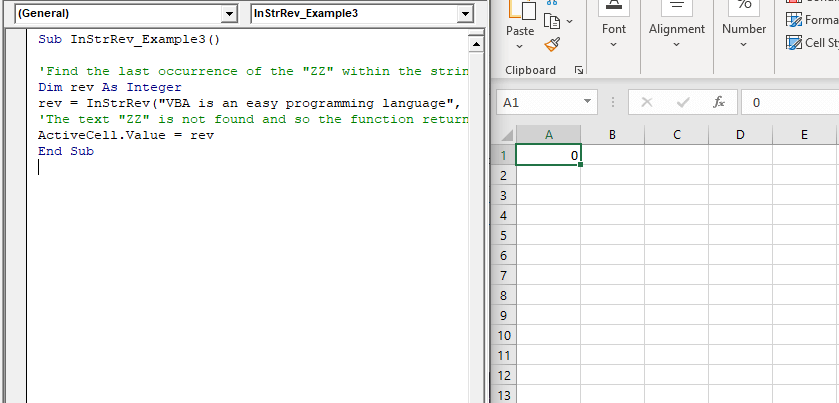
 rev = InStrRev("VBA is an easy programming language", "ZZ")
 'The text "ZZ" is not found and so the function returns the value 0.
 ActiveCell.Value = rev
 End Sub 

Output

0
VBA InStrRev Function

Related Topics

VBA ListBox

What is a ListBox? ListBox refers to a permanently displayed control (usually box-shaped) which contains a list of objects (or attribute, or elements) from which the user can select single or multiple attributes....

8 minutes read.

Excel VBA Space Function

VBA Space Function: The Space function in VBA creates a String consisting of a specified number of spaces. Syntax Space (Number) Parameter Number (required) - This parameter represents the number of spaces. Return This function returns a...

1 minute read.

Excel VBA UCase Function

The UCase function in VBA converts a String into upper case text. Syntax UCase (String) Parameter String (required) – This parameter represents the string that you want to convert to upper case. Return This function returns a string...

1 minute read.

Excel VBA: IF…..THEN …ELSE Statement

VBA : IF…..THEN …ELSE Statement: This function enables you to check one condition and, based on that, then run one of the two statement blocks present. If the ‘IF’ condition...

2 minutes read.

Excel VBA: Do Until….Loop

DO UNTIL….Loop The “Do Until” Loop is same unlike DO WHILE statement just that it will keep on looping till the condition is not met. This loop is used to repeat a set...

4 minutes read.

Excel VBA Log Function

VBA Log Function: The Log function in VBA returns the natural logarithm for the specified number. Syntax Log (Number) Parameter Number (required) –This parameter represents a positive numeric value that you want to find the...

1 minute read.

Excel VBA IsError Function

VBA IsError Function: The IsError function in VBA returns a Boolean value showing whether the specified Expression represents an error or not. Syntax IsError (Expression) Parameter Expression (required)- This parameter represents the variant that you...

1 minute read.

Excel VBA StrConv Function

The StrConv function in VBA converts a string into a specified format. Syntax StrConv (String, Conversion, [LocaleID]) Parameter String (required) – This parameter represents the string to be converted. Conversion (required) – This parameter specifies the type of conversion. It can...

1 minute read.

VBA ActiveCell Property

What is the ActiveCell Property? The active cell signifies the active selected cell in the current worksheet. The Active property acts as a reference point and is used to move the cell cursor...

5 minutes read.

Excel VBA Round Function

VBA Round Function: The Round function in VBA rounds a number to a specified number of decimal places and returns the number. Syntax Round (Number, [NumDigitsAfterDecimal]) Parameter Number (required) –This parameter represents a numeric value one wants...

1 minute read.

Excel VBA IsEmpty Function

VBA IsEmpty Function: The IsEmpty function in VBA returns a Boolean value showing whether the specified Expression is Empty (variant has not been declared) or not. Syntax IsEmpty (Expression) Parameter Expression (required)- This parameter...

1 minute read.

Excel VBA CStr Function

VBA CStr Function: The CStr function in VBA converts an expression into a string data type. Syntax CStr (Expression) Parameter Expression (required) – This parameter represents the expression that you want to convert to a...

1 minute read.

VBA Pivot Table Grouping

VBA- Pivot Table Grouping For an instance, if in our pivot table, we have 11 different age groups from 20 to 30 -  but there might be a possibility that we...

2 minutes read.

Excel VBA TimeValue Function

Excel VBA TimeValue Function: The TimeValue function in VBA returns a Time from the specified String interpretation of a time /date where the date information for the given string is...

1 minute read.

Excel VBA Val Function

VBA Val Function: The Val function in VBA converts the given string into a numeric value. This function ignores spaces and continues to read the characters after space(s). It stops...

1 minute read.

Excel VBA User-Defined Functions

User-Defined Functions One of the advantages of VBA is that you can create your own functions using macros. These functions can be called and used as other functions in excel and use them. You can...

3 minutes read.

Userform Events

What are Events? Anything you do in to trigger an excel file is an event (an action). Example: If you want a greeting message ‘Good Day’ whenever an excel file is...

7 minutes read.

Excel VBA Exp Function

VBA Exp Function: The Exp function in VBA returns the value of the exponential function ex (mathematical constant ‘e’ raised to specified power) for the given value of x. Syntax Exp (Number) Parameter Number (required) –This parameter represents...

1 minute read.

Excel VBA IsDate Function

VBA IsDate Function: The IsDate function in VBA returns a Boolean value indicating whether the given expression is interpreted as a VBA Date or not. Syntax IsDate (Expression) Parameter Expression (required) – This parameter...

1 minute read.

Excel VBA GoTo Statement

GoTo Statement he GoTo statement branches unconditionally to a specified line in a procedure. It is used to transfer the program control to a new statement, which is headed by a label. It sends...

2 minutes read.