Excel VBA- Pivot Table Fields
VBA- Pivot Table Fields: The Pivot Fields collection contains all the fields from the data source, including any calculated fields. The main aspect of adding a field is its Position and Orientation. Each pivot field has its own orientation i.e. column orientation, row orientation, page orientation, or data orientation. It is always advisable to explicitly define the field parameter as the developer decides the positioning at the beginning of any report creation. These actions only affect the given Pivot Table, not the Pivot Cache.
The commonly used Pivot fields are as follows:
- RowFields
- ColumnFields
- PageFields
- DataFields
- HiddenFields
- VisibleFields
- AddFields
RowFields
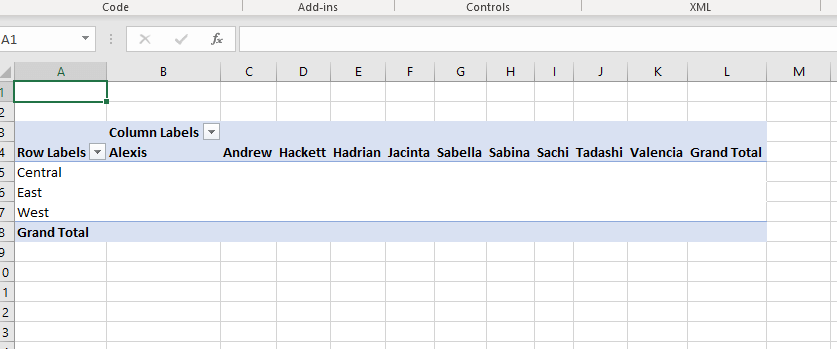
It returns a single field PivotTable object or the collection of all row fields. It is used to add the PivotTable’s row field names to a list in the worksheet. It can be created using ‘AddField’ feature.
Program:
Sub PivotTable_RowField()
     Dim PTCache As PivotCache
     Dim PT As PivotTable
     'Set the Pi   vot Cache
     Set PTCache = ActiveWorkbook.PivotCaches.Create(xlDatabase, Sheets("Pivot Table").Range("A1").CurrentRegion)
     ' Adding a new sheet for Pivot Table
     Worksheets.Add
     'Create the Pivot Table
     Set PT = ActiveSheet.PivotTables.Add( _
         PivotCache:=PTCache, _
         TableDestination:=Range("A3"))
     'Specifying the Row fields in Pivot Table
     PT.AddFields _
         RowFields:="Region", _
         ColumnFields:="Rep"
 End Sub
Output
ColumnField
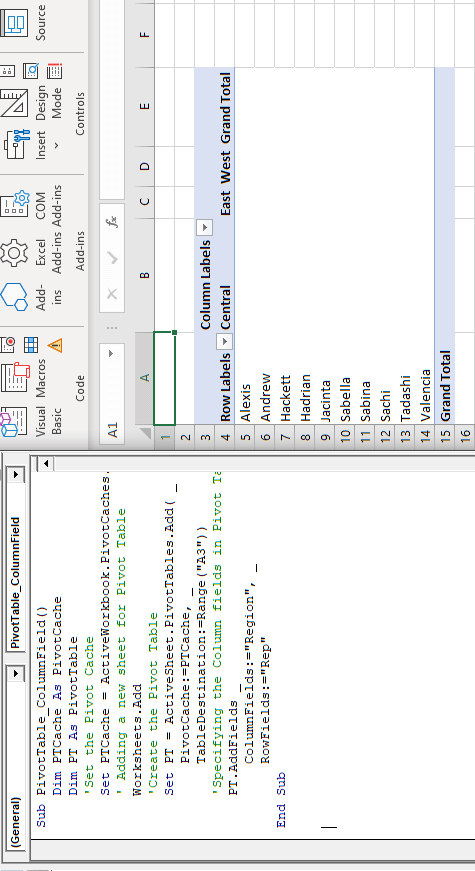
It returns a single field PivotTable object or the collection of all column fields. It is used to add the PivotTable’s column field names to a list in the worksheet. It can be created using ‘AddField’ feature.
In the below example, we have used to “Region” Field in column orientation with Central, East, and West as its values.
Program:
Sub PivotTable_ColumnField()
     Dim PTCache As PivotCache
     Dim PT As PivotTable
     'Set the Pivot Cache
     Set PTCache = ActiveWorkbook.PivotCaches.Create(xlDatabase, Sheets("Pivot Table").Range("A1").CurrentRegion)
     ' Adding a new sheet for Pivot Table
     Worksheets.Add
     'Create the Pivot Table
     Set PT = ActiveSheet.PivotTables.Add( _
         PivotCache:=PTCache, _
         TableDestination:=Range("A3"))
     'Specifying the Column fields in Pivot Table
     PT.AddFields _
         ColumnFields:="Region", _
         RowFields:="Rep"
 End Sub
PageFields
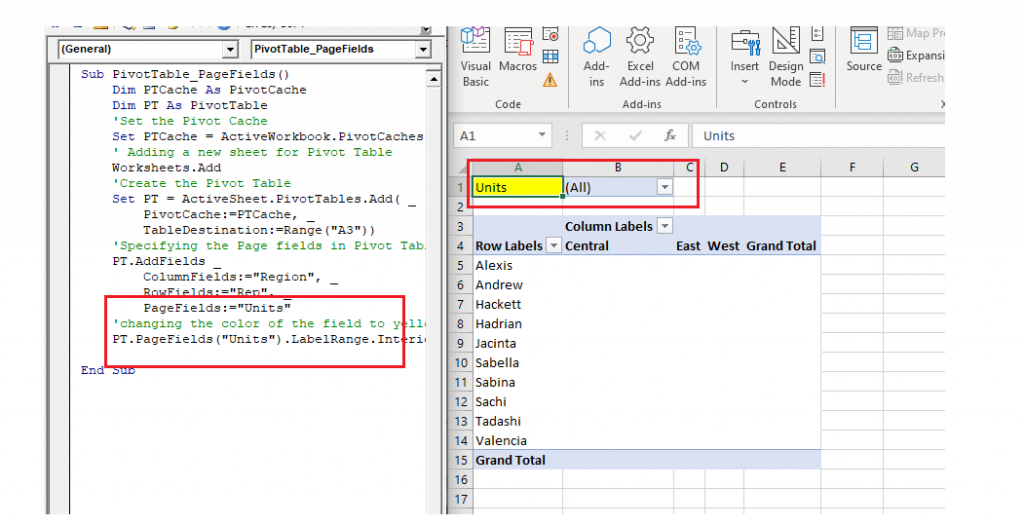
It returns a single field PivotTable object or the collection of all page fields. It is used to add the PivotTable’s page field names to a list in the worksheet. It can be created using ‘AddField’ feature.
Program:
Sub PivotTable_PageFields()
     Dim PTCache As PivotCache
     Dim PT As PivotTable
     'Set the Pivot Cache
     Set PTCache = ActiveWorkbook.PivotCaches.Create(xlDatabase, Sheets("Pivot Table").Range("A1").CurrentRegion)
     ' Adding a new sheet for Pivot Table
     Worksheets.Add
     'Create the Pivot Table
     Set PT = ActiveSheet.PivotTables.Add( _
         PivotCache:=PTCache, _
         TableDestination:=Range("A3"))
     'Specifying the Page fields in Pivot Table
     PT.AddFields _
         ColumnFields:="Region", _
         RowFields:="Rep", _
         PageFields:="Units"
     'changing the color of the field to yellow
     PT.PageFields("Units").LabelRange.Interior.Color = vbYellow
 End Sub
Output
DataFields
It returns the “sum of” the fields for the PivotTable object. These are not displayed in the PivotFields collection. It is different from the other three fields as it cannot be added using AddField property.
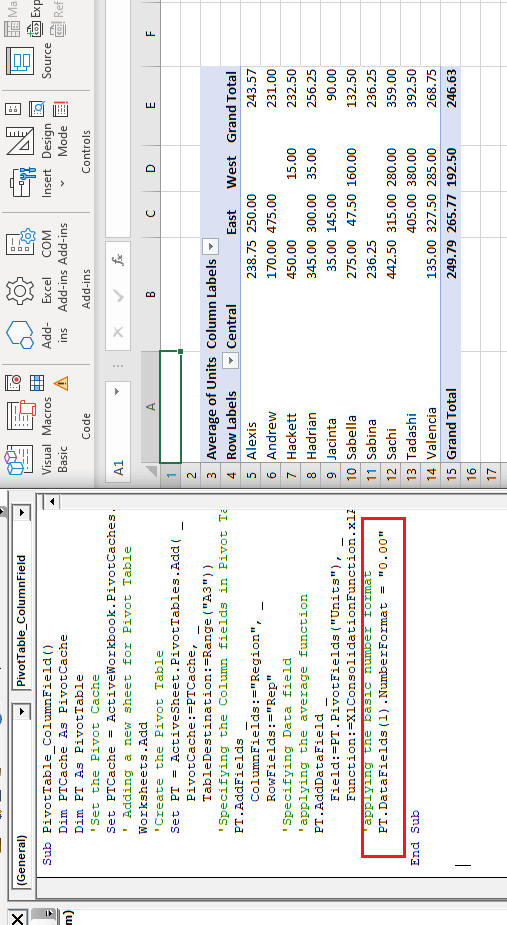
In the below example, we have used the “Units” field as our DataFields and have calculated the sum of each Region’s unit individually. At last, we have formatted the value using number format with two zeros.
Program:
Sub PivotTable_DateField()
     'Specifying the Column fields in Pivot Table
     PT.AddFields _
         ColumnFields:="Region", _
         RowFields:="Rep"
     'Specifying Data field
     'applying the average function
     PT.AddDataField _
         Field:=PT.PivotFields("Units"), _
         Function:=XlConsolidationFunction.xlAverage
     'applying the basic number format
     PT.DataFields(1).NumberFormat = "0.00"
 End Sub
Output
HiddenFields
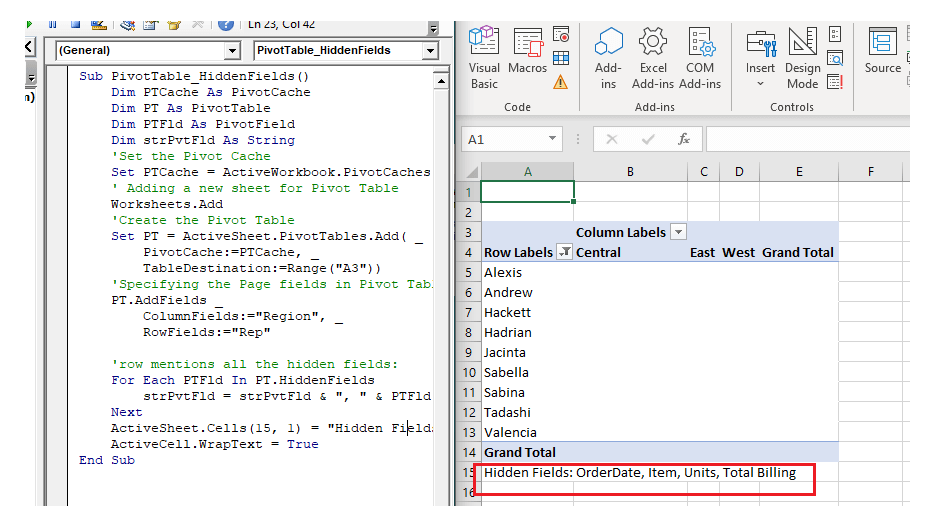
This field is used to return the hidden fields in a Pivot Table.
Program:
Sub PivotTable_HiddenFields()
     Dim PTCache As PivotCache
     Dim PT As PivotTable
     Dim PTFld As PivotField
     Dim strPvtFld As String
     'Set the Pivot Cache
     Set PTCache = ActiveWorkbook.PivotCaches.Create(xlDatabase, Sheets("Pivot Table").Range("A1").CurrentRegion)
     ' Adding a new sheet for Pivot Table
     Worksheets.Add
     'Create the Pivot Table
     Set PT = ActiveSheet.PivotTables.Add( _
         PivotCache:=PTCache, _
         TableDestination:=Range("A3"))
     'Specifying the Page fields in Pivot Table
     PT.AddFields _
         ColumnFields:="Region", _
         RowFields:="Rep"
     'row mentions all the hidden fields:
     For Each PTFld In PT.HiddenFields
         strPvtFld = strPvtFld & ", " & PTFld.Name
     Next
     ActiveSheet.Cells(15, 1) = "Hidden Fields: " & Mid(strPvtFld, 3)
     ActiveCell.WrapText = True
 End Sub
Output
VisibleFields
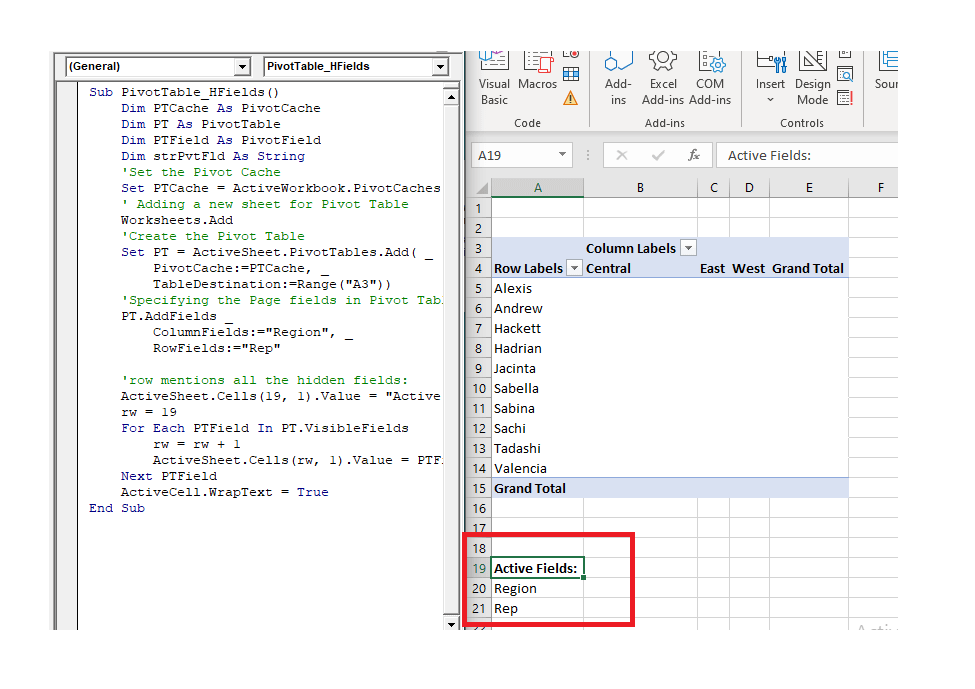
VisibleFields is the vice-versa of the Hidden Field. It is used to display all the fields used up in the Pivot Table.
Program:
Sub PivotTable_VisibleFields()
     Dim PTCache As PivotCache
     Dim PT As PivotTable
     Dim PTField As PivotField
     Dim strPvtFld As String
     'Set the Pivot Cache
     Set PTCache = ActiveWorkbook.PivotCaches.Create(xlDatabase, Sheets("Pivot Table").Range("A1").CurrentRegion)
     ' Adding a new sheet for Pivot Table
     Worksheets.Add
     'Create the Pivot Table
     Set PT = ActiveSheet.PivotTables.Add( _
         PivotCache:=PTCache, _
         TableDestination:=Range("A3"))
     'Specifying the Page fields in Pivot Table
     PT.AddFields _
         ColumnFields:="Region", _
         RowFields:="Rep"
     'row mentions all the hidden fields:
     ActiveSheet.Cells(19, 1).Value = "Active Fields:"
     rw = 19
     For Each PTField In PT.VisibleFields
         rw = rw + 1
         ActiveSheet.Cells(rw, 1).Value = PTField.Name
     Next PTField
     ActiveCell.WrapText = True
 End Sub
Output
AddFields
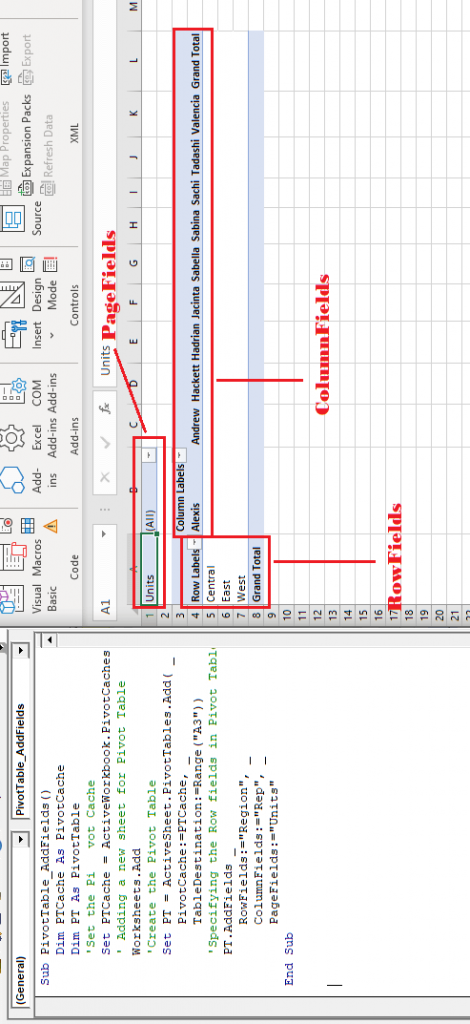
The AddFields method is used to add multiple fields (RowFields, ColumnFields, AddtoTable, or PageFields) in our Pivot Table. It accepts all types of fields to accept the DataField. The user can even apply Array Function to add multiple fields in one location.
Program:
Sub PivotTable_AddFields()
     Dim PTCache As PivotCache
     Dim PT As PivotTable
     'Set the Pi   vot Cache
     Set PTCache = ActiveWorkbook.PivotCaches.Create(xlDatabase, Sheets("Pivot Table").Range("A1").CurrentRegion)
     ' Adding a new sheet for Pivot Table
     Worksheets.Add
     'Create the Pivot Table
     Set PT = ActiveSheet.PivotTables.Add( _
         PivotCache:=PTCache, _
         TableDestination:=Range("A3"))
     'Specifying the Row fields in Pivot Table
     PT.AddFields _
         RowFields:="Region", _
         ColumnFields:="Rep", _
         PageFields:="Units"
 End Sub
Output