×

Excel VBA Conditional Statement

Conditional Statement in VBA Excel

Conditional Statements in Excel VBA are one of the most powerful and useful features in programming, this will give you to perform comparisons to decide or loop through a specified number of iterations based on certain criteria.

The various conditional statements are as follows:

  1. IF….THEN statement
  2. IF…..THEN …ELSE Statement
  3. If … ElseIf … Else Statement
  4. If … ElseIf … ElseIf Statement or Nested If statement
  5. Select … Case

Example 1

Sub Conditional_Statement_Example1()
Dim CurRow As Byte
CurRow = 2
'Using Do Until Loop
Do Until Cells(CurRow, 1) = ""
'If..Else statement
If Cells(CurRow, 3) > 200 Then
Cells(CurRow, 5) = "Qualified" 
Else
Cells(CurRow, 5) = "Not Qualified"
'Closing the IF
End If
CurRow = CurRow + 1
Loop
End Sub 

Output
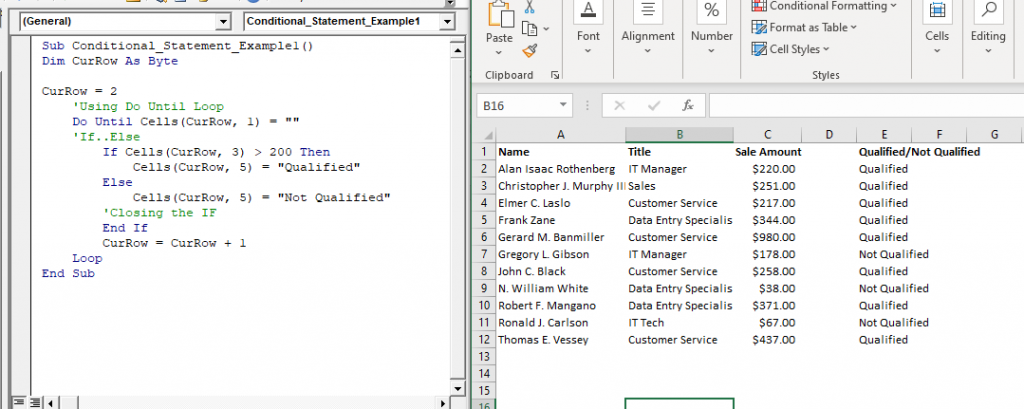
Conditional Statements in Excel VBA

Example 2

Sub Conditional_Statement_Example2() 
  'Variable declaration
  Dim Marks As String
  'Accepting the month by the user
  Marks = InputBox("Enter the students percentile marks:", "Marks")
  If Marks <= 100 And Marks >= 91 Then
  'Check if the Student's Grade is A1 
  MsgBox "Grade : A1"
  ElseIf Marks < 91 And Marks >= 81 Then
  'Check if the Student's Grade is A2
  MsgBox "Grade : A2"
  ElseIf Marks < 81 And Marks >= 71 Then
  'Check if the Student's Grade is B1
  MsgBox "Grade : B1" 
  ElseIf Marks < 71 And Marks >= 61 Then
  'Check if the Student's Grade is B2
  MsgBox "Grade : B2"
  ElseIf Marks < 61 And Marks >= 51 Then
  'Check if the Student's Grade is C1
  MsgBox "Grade : C1"
  ElseIf Marks < 51 And Marks >= 41 Then
  'Check if the Student's Grade is C2
  MsgBox "Grade : C2" 
  ElseIf Marks < 40 And Marks >= 33 Then
  'Check if the Student's Grade is D
  MsgBox "Grade : D"
  Else
  'Check if the student has failed
  MsgBox "Grade : Fail" 
  End If
 End Sub 

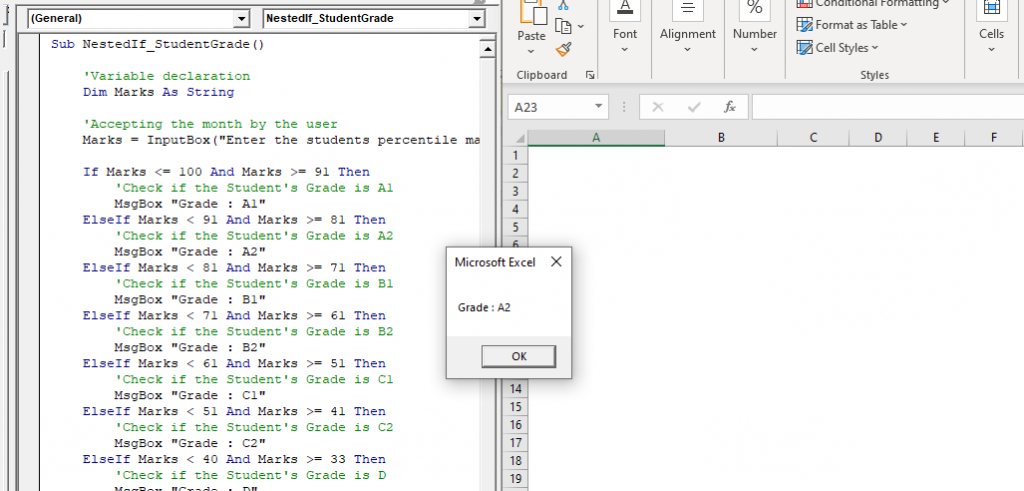
Output
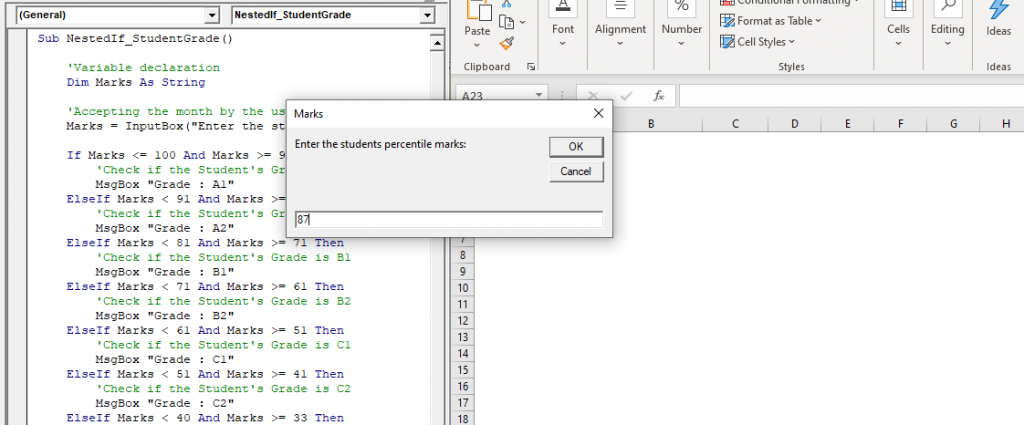
VBA Conditional Statement
Conditional Statement

Example 3

Sub Conditional_Statement_Example3()
Select Case Range("B2")
Case "C2"
Range("C2") = Range("B2") / 100
Case "D2"
Range("D2") = Range("B2") / 100
Case "D3", "D4"
Range("E2") = Range("B2") / 100
Case Else 
Range("F2") = Range("B2") / 100
End Select
End Sub 

Output
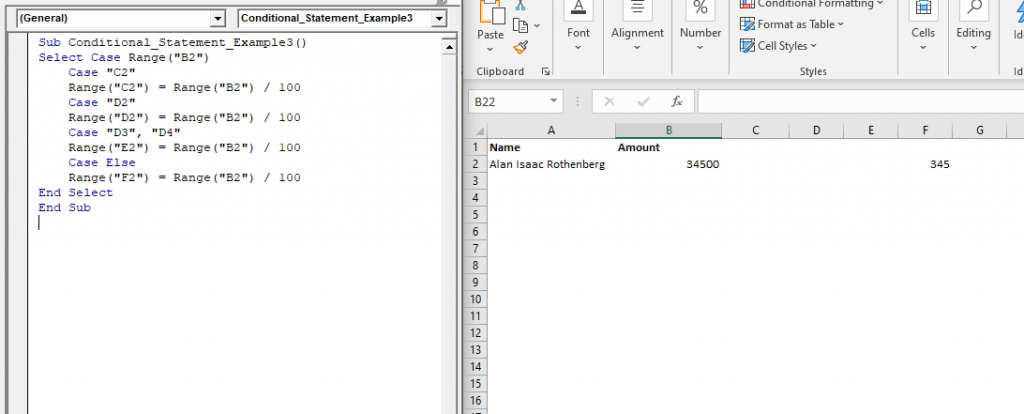
Sub Conditional Statement Example3

Related Topics

VBA Cell

What is VBA cell? Cells is one of the elements (workbook, worksheet, range) in Excel VBA, which refers to cells of the Excel worksheet.  In VBA, the cell is also a property...

5 minutes read.

VBA Updating Pivot Table

VBA- Updating Pivot Table The pivot table is an important feature to explore, summarize, and interpret the bulk amount of data. It helps data evaluating, reviewing, as well as making useful...

3 minutes read.

Excel VBA CCur Function

The CCur function in VBA is used to convert an expression into a Currency data type. It can take a maximum of 15 digits to the left of the decimal place and...

1 minute read.

Excel VBA Filter Function

VBA Filter Function: The Filter function in VBA returns a subset for the given string array, based on specified criteria. Syntax Filter (SourceArray, Match, [Include], [Compare]) Parameter SourceArray (required) – This parameter the array of Strings that you...

2 minutes read.

Excel VBA RTrim Function

VBA RTrim Function: The Rtrim function in VBA removes the leading spaces from the text in the specified string. Syntax RTrim (String) Parameter String (required) – This parameter represents the string from which you want...

1 minute read.

Excel VBA IsError Function

VBA IsError Function: The IsError function in VBA returns a Boolean value showing whether the specified Expression represents an error or not. Syntax IsError (Expression) Parameter Expression (required)- This parameter represents the variant that you...

1 minute read.

Excel VBA Space Function

VBA Space Function: The Space function in VBA creates a String consisting of a specified number of spaces. Syntax Space (Number) Parameter Number (required) - This parameter represents the number of spaces. Return This function returns a...

1 minute read.

Excel VBA IsEmpty Function

VBA IsEmpty Function: The IsEmpty function in VBA returns a Boolean value showing whether the specified Expression is Empty (variant has not been declared) or not. Syntax IsEmpty (Expression) Parameter Expression (required)- This parameter...

1 minute read.

Excel VBA Sgn Function

VBA Sgn Function: The Sgn function in VBA returns an integer (+1, 0, or -1), stating the arithmetic sign for the specified number. Syntax Sgn (Number) Parameter Number (required) –This parameter represents the number that...

1 minute read.

VBA runtime error 1004

What is 1004 error?  VBA 1004 Error, also known as object-defined or application-defined, is a runtime error in VBA, usually, if the specified range does not exist in the worksheet or if the Application...

6 minutes read.

Excel VBA INT Function

VBA INT Function: The INT function in VBA rounds the given supplied number down and returns an integer value. The positive numbers are rounded to zero, and the negative numbers are rounded away from zero. Syntax Int...

1 minute read.

Excel VBA Len Function

VBA Len Function: The Len function in VBA returns the number of characters in a supplied string or the number of bytes required to store a supplied variable. Syntax Len (Expression) Parameter Expression (required)-...

1 minute read.

Excel VBA IsDate Function

VBA IsDate Function: The IsDate function in VBA returns a Boolean value indicating whether the given expression is interpreted as a VBA Date or not. Syntax IsDate (Expression) Parameter Expression (required) – This parameter...

1 minute read.

Introduction to Visual Basic Editor Window

How to enable the Developer Ribbon Tab? In order to work with VBA, users need to make a small change in Excel to display a new tab (Developer) at the top of the...

5 minutes read.

Excel VBA CVErr Function

VBA CVErr Function: The CVErr function in VBA returns an Error data type, involving with a user-specified error code. Syntax CVErr (Expression) Parameter Expression (required)- This parameter represents the required error code. Return This function returns an...

1 minute read.

Excel VBA IsMissing Function

VBA IsMissing Function: The IsMissing function in VBA checks if any parameter to a procedure is missing or not. It returns a Boolean value True if the specified parameter has not been...

1 minute read.

Excel VBA Val Function

VBA Val Function: The Val function in VBA converts the given string into a numeric value. This function ignores spaces and continues to read the characters after space(s). It stops...

1 minute read.

Excel VBA InStr Function

VBA InStr Function The InStr function in VBA searches for a substring inside the given string. It returns the position of a substring within a string, as an integer if the substring is found...

1 minute read.

Excel VBA CDate Function

VBA CDate Function: The CDate function in VBA converts an expression into a Date (or Time) data type. Syntax CDate (Expression) Parameter Expression (required) - This parameter represents the expression that that you want to...

1 minute read.

Excel VBA: DO WHILE….Loop

DO WHILE….Loop The “Do While” Loop is the same, unlike the FOR statement, just that it will keep on looping till the specified condition is true. It is used when we want to...

3 minutes read.