
×

Excel VBA TimeValue Function

Excel VBA TimeValue Function: The TimeValue function in VBA returns a Time from the specified String interpretation of a time /date where the date information for the given string is ignored.

Syntax

TimeValue (Time)

Parameter

Time (required) – This parameter represents a valid String interpretation of time.

Return

This function returns a Time from the specified String interpretation of a time /date.

Example 1

Sub TimeValueFunction_Example1()
 ' Converting the given string into time
 Dim time_val As Date
 time_val = TimeValue("21:50:45")
 'The variable time_val will return the time 9:50:45 PM
 Cells(1, 1).Value = time_val
 End Sub 

Output

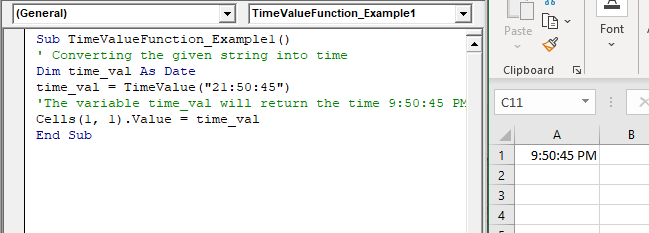
9:50:45 PM
VBA TimeValue Function

Example 2

Sub TimeValueFunction_Example2()
 ' Converting the given string into time
 Dim time_val As Date
 'will return the current Time
 time_val = TimeValue(Now())
 'The variable time_val will return the time 9:54:24 PM
 Cells(1, 1).Value = time_val
 End Sub 

Output

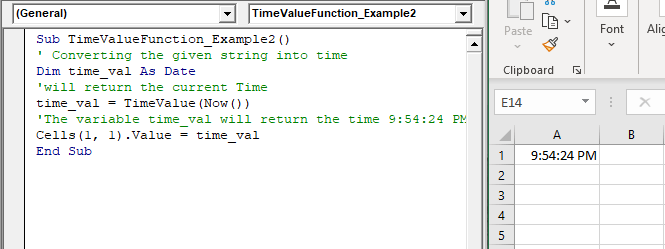
9:54:24 PM
VBA TimeValue Function

Example 3

Sub TimeValueFunction_Example3()
 ' Converting the given string into time
 Dim time_val As Date
 time_val = TimeValue("45:00")
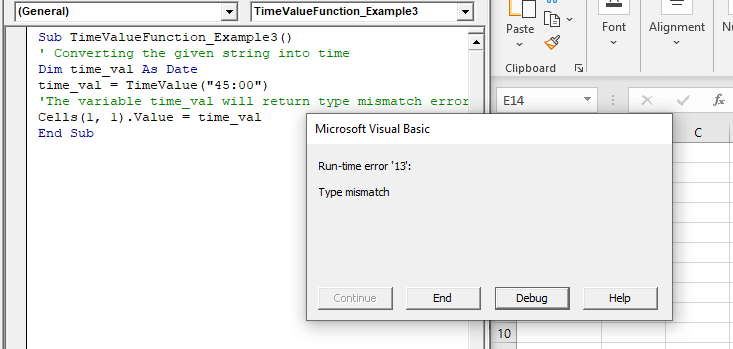
 'The variable time_val will return type mismatch error
 Cells(1, 1).Value = time_val
 End Sub 

Output
VBA TimeValue Function

Related Topics

Excel VBA String Function

The String function in VBA creates a String, consisting of several repeated characters. Syntax String (Number, Character) Parameter Number (required) – This parameter represents the number of characters in the returned String. Character (required) – This parameter...

1 minute read.

Excel VBA Array Function

VBA Array Function: The Array function in VBA generates an array containing the given set of values. Syntax Array (Arglist) Parameter Arglist (required) – This parameter the list of values that you want to make...

2 minutes read.

Excel VBA Trim Function

The Trim function in VBA removes the leading and trailing spaces from the specified string. Syntax Trim (String) Parameter String (required) – This parameter represents the string from which you want to remove the leading and...

1 minute read.

Steps to Create a Chart in VBA

Steps to Create a Chart Charts are created either by directly working with the chart variable object that defines the chart data or by ChartObject method. In order to get to...

3 minutes read.

Excel VBA IsDate Function

VBA IsDate Function: The IsDate function in VBA returns a Boolean value indicating whether the given expression is interpreted as a VBA Date or not. Syntax IsDate (Expression) Parameter Expression (required) – This parameter...

1 minute read.

Excel VBA Hex Function

VBA Hex Function: The Hex function in VBA converts the given number into hexadecimal notation and returns the result as a string. Syntax Hex (Number) Parameter Number (required) – This parameter represents the numeric value...

1 minute read.

Basics of Userform

A User Form is a built-in customized dialog box that fetches data from the user through a user-friendly dialog box or window that makes up part of an application's user interface. It...

9 minutes read.

Excel VBA: IF THEN Statement

VBA Excel: IF THEN StatementThis conditional statement enables you to check one condition and on the basis of that then run one or multiple statements if the condition holds. If...

1 minute read.

VBA Regex Pattern Validation

VBA Regex Pattern Validation The key purpose of using Regex in VBA was to validate the data and extract the same category of data. There are certain formats that are standard...

6 minutes read.

Excel VBA GoTo Statement

GoTo Statement he GoTo statement branches unconditionally to a specified line in a procedure. It is used to transfer the program control to a new statement, which is headed by a label. It sends...

2 minutes read.

Excel VBA: DO WHILE….Loop

DO WHILE….Loop The “Do While” Loop is the same, unlike the FOR statement, just that it will keep on looping till the specified condition is true. It is used when we want to...

3 minutes read.

VBA Dim

What is Dim? DIM or Dimension or Declare in Memory is a keyword that is used in VBA to declare a variable with the different data types (Integer, String, variable, Boolean, Double, etc.)...

7 minutes read.

ActiveX Controls

ActiveX Controls are one of the most used Excel Controls to automate applications with Excel VBA. It has the same controls, unlike Form Controls (Command Button, combo box, checkbox, etc.), but it...

3 minutes read.

Excel VBA DateSerial Function

The DateSerial function in VBA returns a Date from a supplied year, month, and day number. Syntax DateSerial (Year, Month, Day) Parameter Year (required) – This parameter represents an integer signifying the year. Month (required) – This parameter...

2 minutes read.

Four VBA Clear methods

Four VBA Clear methods In Microsoft Excel, many times, a situation arises where the user wants to clear the data or any specific range of data. What if the user automates this task with...

6 minutes read.

VBA Type Mismatch Error

What is a Type Mismatch Error? VBA Type Mismatch Error is a run time error in excel, which often occurs when the data types contained in a VBA code are not matched...

3 minutes read.

Excel VBA Right Function

VBA Right Function: The Right function in VBA returns a substring from the end of the given string. Syntax Right (Str, Length) Parameter Str (required) – This parameter represents the string from which you want to...

1 minute read.

Excel VBA Error Function

VBA Error Function: The Error function in VBA returns the error message corresponding to a supplied error code. Syntax Error ([ErrorNumber]) Parameter ErrorNumber (optional) – This parameter represents the required error number. By default, the...

1 minute read.

Excel VBA Sin Function

VBA Sin Function: The Sin function in VBA returns the sine value for a supplied angle. Syntax Sin (Number) Parameter Number (required) –This parameter represents the angle (in radians) to calculate the sine value. Return This function...

1 minute read.

Excel VBA Weekday Function

Excel VBA Weekday Function: The TimeValue function in VBA returns an integer (1 to 7), signifying the day of the week for the specified date. Syntax Weekday (Date, [FirstDayOfWeek]) Parameter Date (required) – This parameter...

2 minutes read.