×

Excel VBA Filter Function

VBA Filter Function: The Filter function in VBA returns a subset for the given string array, based on specified criteria.

Syntax

Filter (SourceArray, Match, [Include], [Compare])

Parameter

SourceArray (required) – This parameter the array of Strings that you want to filter.

Match (required) – This parameter the string that you want to search for within each element of the supplied SourceArray.

Include (optional) – This parameter represents the Boolean argument that specifies whether the returns array should consist of elements that include or do not include the supplied Match String.  By default, this parameter is set to True.

It can take the following values:

True (default)- It returns values that include the Match String

False – It returns values that do not include the Match String

Compare (optional) – This parameter represents the type of String to make the comparison. By default, this parameter is set to vbBinaryCompare.

It can take the following values:

vbBinaryCompare (default value)– It performs a binary comparison

vbTextCompare – It performs a text comparison

vbDatabaseCompare – It performs a database comparison

Return

This function returns a subset for the given string array, based on specified criteria.

Example 1

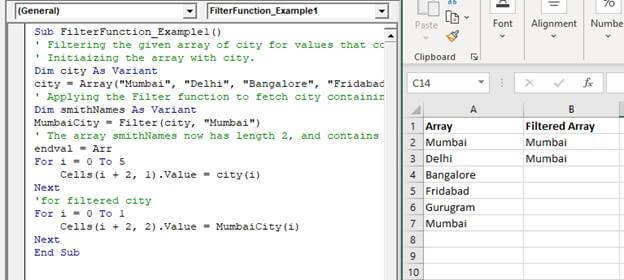
Sub FilterFunction_Example1()
 ' Filtering the given array of city for values that contain "Mumbai".
 ' Initializing the array with the cities values.
 Dim city As Variant
 Dim i As Integer 
 city = Array("Mumbai", "Delhi", "Bangalore", "Faridabad", "Gurugram", "Mumbai")
 ' Applying the Filter function to fetch city containing "Mumbai".
 Dim smithNames As Variant
 MumbaiCity = Filter(city, "Mumbai")
 For i = 0 To 5
     Cells(i + 2, 1).Value = city(i)
 Next
 'for filtered city
 For i = 0 To 1
     Cells (i + 2, 2).Value = MumbaiCity(i)
 Next
 End Sub 

Output

Array Filtered Array
Mumbai Mumbai
Delhi Mumbai
Bangalore
Faridabad
Gurugram
Mumbai
VBA Filter Function

Example 2

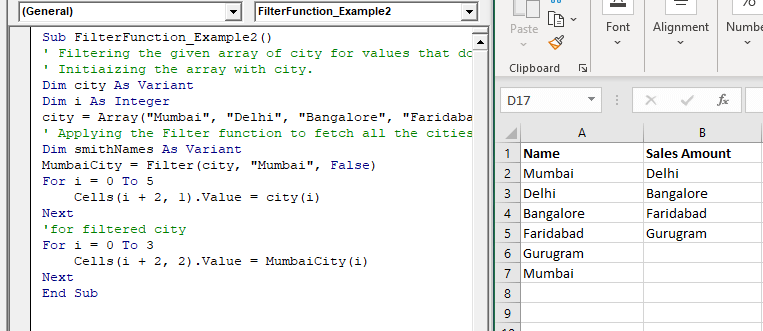
Sub FilterFunction_Example2()
 ' Filtering the given array of city for values that do not contain "Mumbai".
 ' Initializing the array with city.
 Dim city As Variant
 Dim i As Integer
 city = Array("Mumbai", "Delhi", "Bangalore", "Faridabad", "Gurugram", "Mumbai")
 ' Applying the Filter function to fetch all the cities except  "Mumbai".
 Dim smithNames As Variant
 MumbaiCity = Filter(city, "Mumbai", False)
 For i = 0 To 5
     Cells(i + 2, 1).Value = city(i)
 Next
 'for filtered city
 For i = 0 To 3
     Cells(i + 2, 2).Value = MumbaiCity(i)
 Next
 End Sub 

Output

Name Sales Amount
Mumbai Delhi
Delhi Bangalore
Bangalore Faridabad
Faridabad Gurugram
Gurugram
Mumbai
VBA Filter Function

Related Topics

Excel VBA Sqr Function

VBA Sqr Function: The Sqr function in VBA returns the square root for the specified number. Syntax Sqr (Number) Parameter Number (required) – This parameter represents a positive numeric value that you want to calculate...

1 minute read.

Excel VBA: IF THEN Statement

VBA Excel: IF THEN StatementThis conditional statement enables you to check one condition and on the basis of that then run one or multiple statements if the condition holds. If...

1 minute read.

Excel VBA IsObject Function

VBA IsObject Function: The IsObject function in VBA returns a Boolean value showing whether the specified variable represents an Object variable type or not. Syntax IsObject (Expression) Parameter Expression (required)- This parameter represents the...

1 minute read.

Excel VBA- Pivot Table Fields

VBA- Pivot Table Fields: The Pivot Fields collection contains all the fields from the data source, including any calculated fields. The main aspect of adding a field is its Position...

4 minutes read.

Excel VBA MonthName Function

Excel VBA MonthName Function: The MonthName function in VBA returns a string with the month name for the specified month number. Syntax MonthName (Month, [Abbreviate]) Parameter Month (required) – This parameter represents an integer between...

1 minute read.

VBA Charts

What is a Chart? A chart is used to visually show numbers or data in a spreadsheet (or spread over multiple spreadsheets) so that the end-user can look at the chart...

3 minutes read.

Excel VBA Split Function

Excel VBA Split Function: The Split function in VBA is used to split a string into several substrings and return a one-dimensional array of substrings. Syntax Split (Expression, [Delimiter], [Limit], [Compare]) Parameter Expression (required) – This parameter...

2 minutes read.

Excel VBA IsMissing Function

VBA IsMissing Function: The IsMissing function in VBA checks if any parameter to a procedure is missing or not. It returns a Boolean value True if the specified parameter has not been...

1 minute read.

Excel VBA Format Function

VBA Format Function The format function in VBA applies a specified format to an expression and returns the result as a string. Syntax Format (Expression, [Format], [FirstDayOfWeek] , [FirstWeekOfYear] ) Parameter Expression (required)- This parameter represents the expression that you want to format. Format...

3 minutes read.

Excel VBA Cos Function

VBA Cos Function: The Cos function in VBA returns the cosine value for a supplied angle. Syntax Cos (Number) Parameter Number (required) –This parameter represents the number that you want the absolute value of. Return This function...

1 minute read.

Excel VBA DateAdd Function

The DateAdd function in VBA adds a time interval to a supplied date and/or time and returns the resultant date/time. Syntax Dateadd (Interval, Number, Date) Parameter Interval (required) – This parameter a string specifying the interval to be...

1 minute read.

Excel VBA While wend Loop

WHILE wend loop is used when the user is not sure how many times they want to execute the VBA code within the program. With a WHILE loop, the loop body may...

3 minutes read.

Excel VBA Tan Function

VBA Tan Function: The Tan function in VBA returns the tangent for the specified angle in radians. Syntax Tan (Number) Parameter Number (required) – This parameter represents the angle supplied in radiant that you want...

1 minute read.

Excel VBA UBound Function

Excel VBA UBound Function: The UBound function in VBA returns the highest subscript for the specified dimension in the given array. Syntax UBound (ArrayName, [Dimension]) Parameter ArrayName (required) – This parameter represents an array for which...

1 minute read.

Basics of Userform

A User Form is a built-in customized dialog box that fetches data from the user through a user-friendly dialog box or window that makes up part of an application's user interface. It...

9 minutes read.

Scope in Visual Basics

Definition of Scope The scope of any programming language implies the area of code where the variables will be identified, accessed, and used. Every variable has a scope associated with it. The scope of...

4 minutes read.

Looping in VBA

Looping in VBA There are many situations where a programmer needs to execute a block of the repetitive code number of times. Writing the same statement will make the program tedious and monotonous....

3 minutes read.

Excel VBA Array

Introduction to VBA Array An array is a type of variable that holds more than one piece of data. In VBA, you can refer to a specific variable (element) of an array by using...

5 minutes read.

Finding Last Row or Column in Excel VBA

Finding Last Row or Column in VBA Finding the last used row, column, or cell is one very commonly used task when we write macros and VBA applications.  Like other codes...

5 minutes read.

Excel VBA: Select … Case Statement

Select … Case Statement When a group of statements is executed, depending upon the value of an Expression, then Switch Case is used.  If you have several conditions to check, then the If condition...

4 minutes read.