
×

Excel VBA CSng Function

VBA CSng Function: The CSng function in VBA converts the supplied expression into a single-precision floating-point number (single data type).

Syntax

CSng (Expression)

Parameter

Expression (required) – This parameter represents the expression that you want to convert to a single data type.

Return

This function returns a single-precision floating-point number after converting the supplied expression into a single data type.

Example 1

Sub CSngFunction_Example1()
 ' Converting the string and numeric value into Single
 Dim sng As Single
 sng = CSng("0.99999")
 ' The variable sng will return 0.999989986
 Cells(1, 1).Value = sng
 End Sub 

Output

0.999989986

VBA CSng Function

Example 2

Sub CSngFunction_Example2()
 ' Converting the string and numeric value into Single
 Dim sng As Single
 sng = CSng(2.01 * 2.01)
 ' The variable sng will return 4.040100098
 Cells(1, 1).Value = sng
 End Sub 

Output

4.040100098
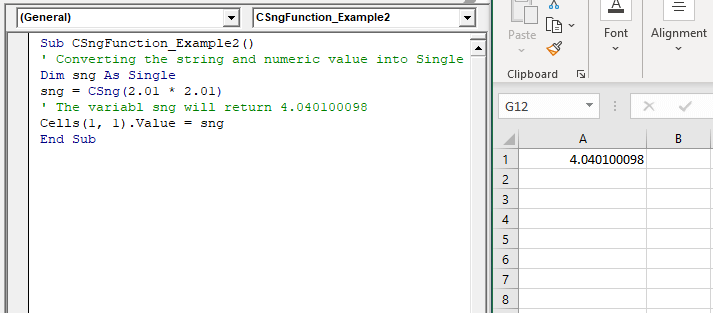
VBA CSng Function

Example 3

Sub CSngFunction_Example3()
 ' Converting the string and numeric value into Single
 Dim sng As Single
 sng = CSng("Hello VBA")
 ' The variable sng will return a run-time error
 Cells(1, 1).Value = sng
 End Sub 

Output

VBA CSng Function

Related Topics

VBA UBound

VBA UBound  The UBound or Upper Bound function in VBA is used to specify the length of an array and returns the highest subscript for a dimension for the specified array. It is...

3 minutes read.

VBA Option Explicit

VBA Option Explicit The Option Explicit in VBA is used to declare the variables at the top of your macro code. It is the most secure and easy option to maintain your variables....

5 minutes read.

Excel VBA RTrim Function

VBA RTrim Function: The Rtrim function in VBA removes the leading spaces from the text in the specified string. Syntax RTrim (String) Parameter String (required) – This parameter represents the string from which you want...

1 minute read.

Excel VBA IsEmpty Function

VBA IsEmpty Function: The IsEmpty function in VBA returns a Boolean value showing whether the specified Expression is Empty (variant has not been declared) or not. Syntax IsEmpty (Expression) Parameter Expression (required)- This parameter...

1 minute read.

Excel VBA Left Function

VBA Left Function: The Left function in VBA returns a substring from the start of the specified string. Syntax Left (Str, Length) Parameter Str (required) – This parameter represents the string that you want to extract...

1 minute read.

Excel VBA CBool Function

VBA CBool Function: The CBool function in VBA calculates an expression and returns the result as a Boolean data type. Syntax CBool (Expression) Parameter Expression (required) – This parameter represents the expression that that you want...

1 minute read.

VBA Cell

What is VBA cell? Cells is one of the elements (workbook, worksheet, range) in Excel VBA, which refers to cells of the Excel worksheet.  In VBA, the cell is also a property...

5 minutes read.

VBA Type Mismatch Error

What is a Type Mismatch Error? VBA Type Mismatch Error is a run time error in excel, which often occurs when the data types contained in a VBA code are not matched...

3 minutes read.

Excel VBA Hour Function

The hour function in VBA returns the hour element for the specified time. Syntax Hour (Time) Parameter Time (required) – This parameter represents the time. Return This function returns the hour element for the specified time. Example 1 Sub HourFunction_Example1() ...

1 minute read.

Scope in Visual Basics

Definition of Scope The scope of any programming language implies the area of code where the variables will be identified, accessed, and used. Every variable has a scope associated with it. The scope of...

4 minutes read.

VBA Object Required

What is Object Required Error? VBA Object Required is a run time error which occurs when the user does not define a valid object qualifier, or the assigned object doesn’t exist in the...

6 minutes read.

Basics of Userform

A User Form is a built-in customized dialog box that fetches data from the user through a user-friendly dialog box or window that makes up part of an application's user interface. It...

9 minutes read.

Excel VBA IsDate Function

VBA IsDate Function: The IsDate function in VBA returns a Boolean value indicating whether the given expression is interpreted as a VBA Date or not. Syntax IsDate (Expression) Parameter Expression (required) – This parameter...

1 minute read.

VBA Screen Updating

What is VBA Screen Updating property? Screen Updating is a VBA property which is used to display the output generation while running the code. If this property is enabled, we could see...

6 minutes read.

Excel VBA FormatPercent Function

VBA FormatPercent Function: The FormatPercent function in VBA is used to apply a percent format to a numeric expression, and it returns the result as a string. Syntax FormatPercent (Expression, [NumDigitsAfterDecimal], [IncludeLeadingDigit], [UseParensForNegativeNumbers], [GroupDigits]) Parameter Expression (required)...

2 minutes read.

Excel VBA DateSerial Function

The DateSerial function in VBA returns a Date from a supplied year, month, and day number. Syntax DateSerial (Year, Month, Day) Parameter Year (required) – This parameter represents an integer signifying the year. Month (required) – This parameter...

2 minutes read.

Excel Objects in VBA

What are Excel Objects? The Excel objects belong to the entities that make up an Excel Workbook, Worksheets, Columns, Rows, Cell Ranges, etc. Each object in Excel has loads of Properties that are...

6 minutes read.

Excel VBA: Select … Case Statement

Select … Case Statement When a group of statements is executed, depending upon the value of an Expression, then Switch Case is used.  If you have several conditions to check, then the If condition...

4 minutes read.

Excel VBA Format Function

VBA Format Function The format function in VBA applies a specified format to an expression and returns the result as a string. Syntax Format (Expression, [Format], [FirstDayOfWeek] , [FirstWeekOfYear] ) Parameter Expression (required)- This parameter represents the expression that you want to format. Format...

3 minutes read.

If ElseIf ElseIf Statement or Nested If statement in VBA

VBA Excel: If … ElseIf … ElseIf Statement or Nested If statement This function enables you to check multiple conditions and, based on that, then run one of the statement blocks present. If...

2 minutes read.