×

Angular 8 Components

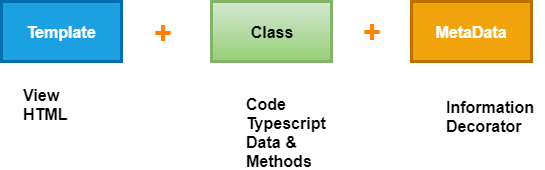
Angular is used for building mobile and desktop web applications. The component is the basic building block of Angular. It has a selector, template, style, and other properties, and it specifies the metadata required to process the component.

Components are defined using a @component decorator and a tree of the angular component. It makes our complex application in reusable parts which we can reuse easily. 

The component is the most critical concept in Angular and a tree of components with a root component. The root component is one contained in the bootstrap array in the main ngModule module defined in the app.module.ts file.

One crucial aspect of components is re-usability. A component can be reused throughout the application and even in other applications. Standard and repeatable code that performs a specific task can be encapsulated into a reusable component.
Angular 8 Components

What is Component-Based Architecture?

An Angular application is build of some components which form a tree structure with parent and child components.

A component is an independent block of an extensive system that communicates with the other building blocks of the systems using inputs and outputs. It has an associated view, data, and behavior and has parent and child components.

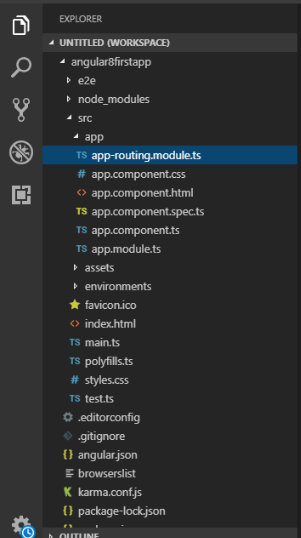
The component allows maximum re-usability, secure testing, maintenance, and separation of concerns. Go to our Angular project folder and open the src/app folder, which we will see the following files.

App folder: The app folder contains the data we have created for app components.

  • app.component.css: The component CSS file.
  • app.component.html: This component is used for HTML view.
  • app.component.spec.ts: The HTML view of the component
  • app.component.ts: Component code (data and behavior)
  • app.module.ts: The main application module.
Component-Based Architecture

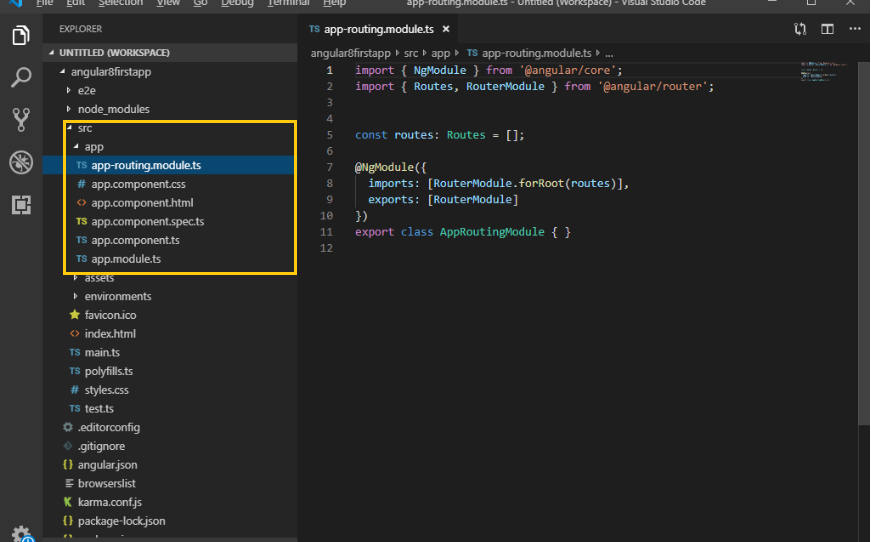
Go further and open the src/app/app.component.ts file and let’s understand the code behind the root component of the application.

Default Code:

Import { Component } from ‘@angular/core’;
 @Component ({
 Selector: ‘app-root’,
 templateUrl: ‘./app.component.html’ ,
 styleUrls: [‘./app.component.css’]
 })
 export class AppComponent {
 title = ‘myfirstapp’;
 } 
Component decorator

Firstly, we import the Component decorator from @angular/core and then we use it to preserve the Typescript AppComponent class. The Component decorator takes an object with multiple parameters, however:

  • selector: It specifies the tag that can be used to call this component in HTML templates just like the standard HTML tags
  • templateUrl: It indicates the path of the HTML template that will be used to display this component.
  • styleUrls: It specifies an array of URLs for CSS style-sheet in the component.

The export keyboard is used to export the component, and it has imported from other components and modules in the application file.

The title variable is a member variable which holds the string' app,' and it is not the part of the legal definition of any Angular component.

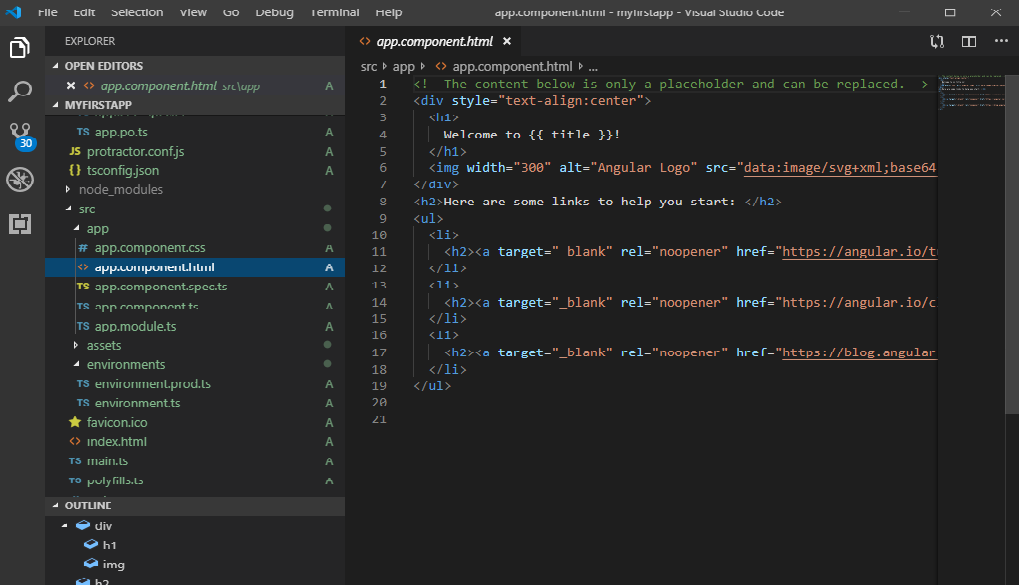
Let's see the corresponding template for that component. If we open src/app.component.html

Default Code:


Welcome to!

Angular Log

Here are some links to help you start:

Angular 8 Component

The template is an HTML file is used inside an HTML template except for the following tags <script>, <html>, and <body> with the exception that it contains template variable or expression and it can be used to insert values in DOM automatically. It is called interpolation and data binding.

How to create a new Component?

This is the basic building block of Angular.

Open VS code then go to your project source folder then expand the app directory and create a new list named 'server.'

Now, create a component in the server directory. Right-click on server directory and create a new file named as 'server.component.ts.' It is the recently created component.

Components are used to build webpages in all versions of  Angular, but they require modules to bundle them together. Now, we have to register our new component in the module.

Creating a component with CLI

Syntax:

 ng generate component component_name
 Or
 ng g c Component-name 

Let's see how to create an element in the command line.

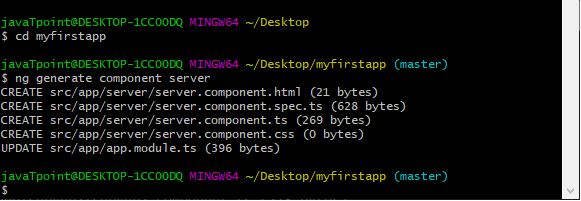
Open the command prompt and stop ng serve Command if it is running on the browser. Type ng generate component server (where the server is the name of the component we are created to create a new component named server2). We can also use a shortcut commandng g c server for the same task. Firstly, we have to open our Project with cd myfirstapp and then create the component server2.
Creating a component with CLI
generate the first app

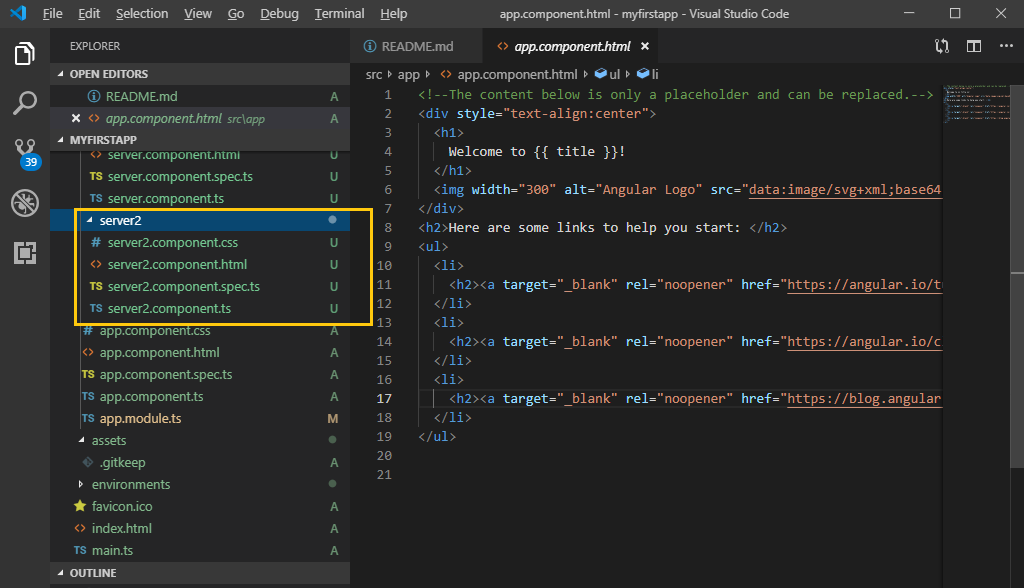
In the above screenshot, we see that a new component named "server2" is created. It contains the same other components which we have seen when we generate the first app.

 server2.component.css
 server2.component.html
 server2.component.spec.ts
 server2.component.ts 

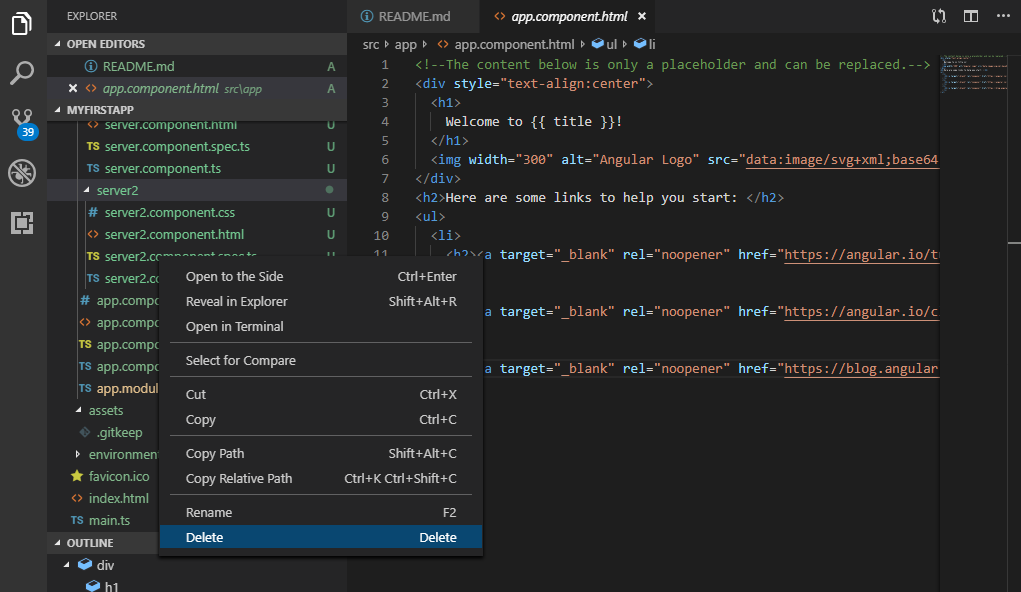
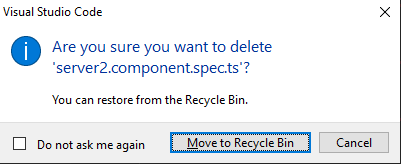
server2.component.spec.ts is usually used for testing purpose. We can delete it by clicking right on it.
Angular 8 Component 02
Visual Studio Code

Related Topics

Dependency Injection in Angular 8

Dependency injection (DI), is an essential application design pattern. Angular 8 has its own DI framework, which used in the design of Angular application to increase efficiency and portability. Dependencies are the services that...

7 minutes read.

Angular 8 Animation

What is Animation? The animation is a process of drawing, designing, making layouts, and preparation of photographic sequences which are integrated into the multimedia and gaming products. A reflection of movement created for displaying...

5 minutes read.

Creating form in Angular 8

The angular reactive form is used to handle the user's input. We can use Angular form in the application to authorize the user to log in, to update profile, to enter information,...

2 minutes read.

Angular 8 Error Fixing

We can get errors in Angular because of many causes. Let's see an example to see some specific types of errors. We have to create an app with the name "testing-app." In this app,...

4 minutes read.

Angular 8 Directives

Angular 8 Directives: Directives are instructions in the DOM (Document Object Model). It specifies how to place our business logic in Angular. The directive is markers on a DOM element...

3 minutes read.

Angular 8 Architecture

Architecture of Angular 8 Angular 8 is a platform and framework which is used to create clients applications in HTML and Typescript. Angular 8 is written in Typescript. Typescript is a...

5 minutes read.

How to create a Todo List App in Angular 7

What is a Todo List App? Todo List app is an app where users can add various tasks that they want to perform and have an idea of every task. If...

4 minutes read.

Routing in Angular 8

Routing Angular Router is a powerful JavaScript router is built and maintained by the Angular core team that can install from the package @angular/router. Routing provides a complete routing library with the possibility of multiple...

4 minutes read.

Advantages | Disadvantages of Angular 8

Advantages of Angular 8 There are some Advantages of angular 8 which are given below: It offers clean code developmentHigher PerformanceAn angular framework can take care of routing, which...

1 minute read.

Angular 8 Pipes

Angular 8 Pipes Pipes are a useful feature in Angular. These are the simple way to transform values in an Angular template. It takes the integers, strings, array, and dates as input separated with...

3 minutes read.

Angular 8 File Structure

File Structure in Angular 8: A file structure contains the files for one or more projects. A project is the set of files that comprise an application on a shareable...

3 minutes read.

Angular CLI Commands

All CLI commands of Angular Angular CLI is a command-line interface which is used to initialize, develop, and maintain Angular applications. We can use these Command on command prompt or consequentially by an associated...

8 minutes read.

Angular 8 changes and new features

The angular version number indicates the level of changes introduced by the release. The use of semantic versioning helps us understand the potential impact of updating to a new version. Angular is the...

5 minutes read.

Angular 8 Module

Angular 8 Module It is a collection of services, directives, controllers, filters, and configuration information. angular.module is used to configure the $injector. The module is a container of the different parts of an application....

6 minutes read.

Angular 8 NgStyle Directive

Angular 8 NgStyle Directive The ngStyle attribute is used to change and style the multiple properties of Angular. We can change the value, color, and size, etc. of the component. It is a built-in...

1 minute read.

Property binding in Angular 8

Property binding is the primary way to binding data in Angular.  To bind data to a property of any element, we use square braces[ ]. It is also a one-way data-binding...

2 minutes read.

Express.js app.listen() Function

Express or Express.js is a flexible online application framework for Node.js that offers a strong set of functionality for both web and mobile applications. While preserving the familiar and adored...

3 minutes read.

Data flow forms in Angular 8

When we are building forms in Angular, it is essential to understand how the framework handles data flowing from the user or programmatic changes. Reactive and template-driven forms follow two different strategies when...

3 minutes read.

ngSwitch Directive in Angular 8

Angular 8 ng-Switch Directive The ng-Switch Directive hides and shows the HTML elements depending on an expression. Child elements with the ng-switch-when directive will be displayed if it gets a match; otherwise, the component and...

2 minutes read.

Angular 8 Libraries

Angular libraries are built a solution of general problems like presenting a unified user interface, presenting data, and allowing the data entry. Developers can create standard solutions for particular domains...

3 minutes read.