
×

Angular 8 Directives

Angular 8 Directives: Directives are instructions in the DOM (Document Object Model). It specifies how to place our business logic in Angular. The directive is markers on a DOM element that tell Angular to attach a specified behavior to that DOM element or even transform the DOM element and its children. Mostly directives in Angular starts with ng- where ng stands for Angular, and it extends the HTML.
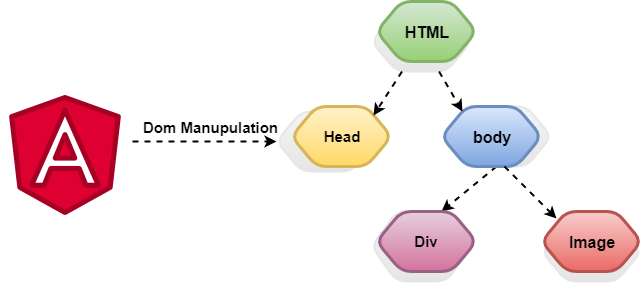
Angular 8 Directives

There are three kinds of directives:

1. Component Directives

2. Structural Directives

3. Attribute Directives
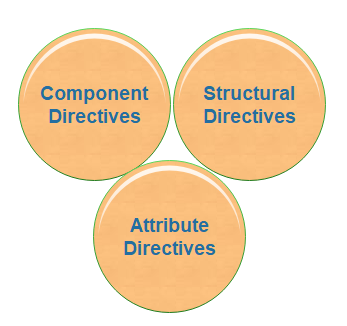
Types of Angular 8 Directives

Component Directives

Components are the most common of the directives. It contains the details of how the component should be processed, instantiated, and used at runtime. The component comprises meta-data.

Structural Directives

Structural Directivesaredone in the elements section. These directives are used to manipulate and change the structure of the DOM elements. Structural directives have a star (*) sign before the directive. Like as,* ngIf, *ngFor, and *ngSwitch directive.

  • *ngIf Directive: The *ngIf allows us to Add/Remove DOM Element.
  • *ngSwitch Directive: The *ngSwitch will enable us to Add/Remove DOM element. It is same as the switch statement of C#.
  • *ngFor Directive: The *ngFor directive is used to repeat a part of HTML template once per each item from an iterable list (Collection).

Attributes Directives

Itdeals with changing the look and behavior of the DOM element. For example: ngClass, ngStyle etc.

  •  NgClass Directive: The ngClass Directive is used to add or remove CSS classes to an element.
  • NgStyle Directive: The ngStyle Directive facilitates you to modify the style of an HTML element using the expression. We can also use the ngStyle Directive to change the style of our HTML element dynamically.
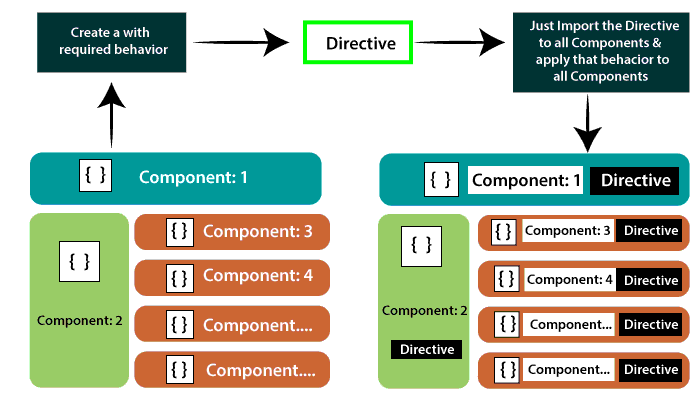
Attributes Directives

Difference between Structural Directive and Attribute Directive

Structural Directive Attribute Directive
Structural directives are applied to <template> elements and used to add or remove content (stamp and template). The component has their view (HTML and styles) because of that, there can be one component on a host element, but multiple directives.

How to Create Custom Directives?

We can create our custom directives to use in Angular components with the help of the command line. The command which is used to develop the Directive using the command line is as follows-

ng g directive name of the Directive
e.g
ng g directive change text 

It is seen in the command line as given in the below code-

C:\projectA7\angular7-app>ng g directive change text
CREATE src/app/change-text.directive.spec.ts (241 bytes)
CREATE src /app/change-text.directive.ts (149 bytes)
UPDATE src/app/app.module.ts (565 bytes) 

The above files, i.e., change-text directive.spec.ts and change-text.directive.ts created and the app.module.ts is updated.

app.module.ts

import { BrowserModule } from ‘@angular/platform-browser’;

import { NgModule } from ‘@angular/core’;
import { AppRoutingModule } from ‘./app-routing.module’;
import { AppComponent } from ‘./app.component’;
import { NewcmpComponent } from ‘. /new-cmp.component’;
import { ChangeTextDirective } from ‘. /change-text.directive’;
@NgModule({
declarations: [
AppComponent,
NewCmpComponent,
ChangeTextDirective
],
Imports: [
BrowserModule,
AppRoutingModule
],
providers: [ ],
bootstrap: [AppComponent]
}]
export class AppModule { }  

The ChangeTextDirective class has been included in the declarations in the above file. The class is also imported from the file given below-

Change-text.directive

 Import {Directive}  from ‘@angular/core’;
@Directive ({
Selector; ‘[changeText]’
})
Export class ChangeTextDirective {
Constructor ( ) { }
} 

The above file has a directive and it also has a selector property. Whatever we define in the selector, the same has to match in the view, where we assign the custom directive.

In the app.component.html view, add the directive as follows-


Welcome to {{title}}.

Welcome to {{ title}}.

We will write the changes in change-text.directive.ts file as-

change-text.directive.ts

 import { Directive, elementRef} from
‘@angular/core’;
@Directive({
Selector: ‘[changeText]’’
})
Export class ChangeTextDirective {
Constructor(Element: ElementRef) {
Console.log(Element);
Element.nativeElement.innerText= “Text is changed by changeText Directive.”;
}
} 

In the above file, there is a class known as ChangeTextDirective, and also a constructor.


Related Topics

Dependency Injection in Angular 8

Dependency injection (DI), is an essential application design pattern. Angular 8 has its own DI framework, which used in the design of Angular application to increase efficiency and portability. Dependencies are the services that...

7 minutes read.

Angular 8 Architecture

Architecture of Angular 8 Angular 8 is a platform and framework which is used to create clients applications in HTML and Typescript. Angular 8 is written in Typescript. Typescript is a...

5 minutes read.

Angular 8 universal

Angular 8 universal Angular Universal is a technology that allows server-side rendering for Angular apps. An angular app is a single-page app, and it runs in a client-side browser. Rendering pages in the DOM is...

6 minutes read.

String Interpolation in Angular 8

String Interpolation in Angular 8 String interpolation is a one-way data-binding technique which is used to output the data from a typescript code to HTML template. It uses the template expression. It uses the...

2 minutes read.

History and Versions of Angular 8

Introduction to Angular JS Misko created Angular JS and the first version of Angular also name as "Angular 1". He built a framework to handle the downfalls of HTML. The first...

3 minutes read.

What is AOT and JIT Compiler in Angular

A program written in a high-level language is translated into machine code or a low-level language by a piece of software called a compiler. HTML templates are the primary building...

3 minutes read.

Express.js app.listen() Function

Express or Express.js is a flexible online application framework for Node.js that offers a strong set of functionality for both web and mobile applications. While preserving the familiar and adored...

3 minutes read.

Data flow forms in Angular 8

When we are building forms in Angular, it is essential to understand how the framework handles data flowing from the user or programmatic changes. Reactive and template-driven forms follow two different strategies when...

3 minutes read.

How to create a Todo List App in Angular 7

What is a Todo List App? Todo List app is an app where users can add various tasks that they want to perform and have an idea of every task. If...

4 minutes read.

ngSwitch Directive in Angular 8

Angular 8 ng-Switch Directive The ng-Switch Directive hides and shows the HTML elements depending on an expression. Child elements with the ng-switch-when directive will be displayed if it gets a match; otherwise, the component and...

2 minutes read.

Scalability and Validation Forms in Angular 8

Form Validation Validation is an essential part of managing any set of forms. If we are checking for required fields or querying an external API for a username. Angular 8 provides a set of...

1 minute read.

Angular 8 Observables

Observables provide support for passing messages between publisher and subscription in our application. The observables can deliver the multiple values of any type like literal, messages, depending on the content. It is an...

6 minutes read.

Angular 8 File Structure

File Structure in Angular 8: A file structure contains the files for one or more projects. A project is the set of files that comprise an application on a shareable...

3 minutes read.

Angular 8 Directives

Angular 8 Directives: Directives are instructions in the DOM (Document Object Model). It specifies how to place our business logic in Angular. The directive is markers on a DOM element...

3 minutes read.

Angular 8 ngClass Directive

Angular 8 ngClass Directive ngClass Directive is a type of attribute directive. Angular provided built-in directive, and it helps in adding or removing CSS classes on an HTML element. The ngClass directive allows...

2 minutes read.

$timeout service in AngularJS

The discipline of web development is expanding quickly. A technology that is released today will inevitably become obsolete in a few months. The webpages were static in the past and...

4 minutes read.

Angular 8 Pipes

Angular 8 Pipes Pipes are a useful feature in Angular. These are the simple way to transform values in an Angular template. It takes the integers, strings, array, and dates as input separated with...

3 minutes read.

Two-way Data Binding in Angular 8

Two-way Data Binding in Angular 8 Two-way data binding is a synchronization between the model and the view. We can use the ngModel directive in two-way data binding. Custom two-way data binding is useful...

2 minutes read.

Angular 8 Conclusion

Angular version 8 looks like a more accessible solution entirely focused on the modern technological trends added features. Like Ivy, route configurations use dynamic imports, builder APIs in the CLI, web worker support,...

2 minutes read.

Installation of Angular 8

Installation Guides to Angular 8 step by Step Angular combines declarative templates, dependency injection and, end to end tooling to solve development challenges. Angular empowers developers to build an application that lives on the...

4 minutes read.