Arrow Function in ES6
Arrow Function in ES6
An Arrow function is a new concept recommended in ECMAScript 2015. It is also called “Fat Arrow Function.” It helps us to write the function more accurately. This function allows us to write short syntax of the function.
The Arrow function also makes the code structured and easy to read. This function can be used as an anonymous (a function without having a name) function. It does not return any statement and also can be declared without using a function keyword.
The developers can also use the arrow function as a constructor. The context of an arrow function is defined in a static and lexical manner. In various languages, the arrow function is also called the Lambda function. The arrow function does not contain prototype property, and we cannot use it with any new keyword.
Syntax
const function_name = (args1, args2) = >
{
         // Code statement to be executed
}
The syntax of Arrow function contains the following three parts-
- Parameters: The arrow functions may or may not have the parameters.
- The Fat Arrow Function (=>) / Lambda Notation: It is the notation of the arrow function.
- Statement: It represents the group of instructions of the function.
We will try to understand it with the help of an example.
Example
var mygen1 = function display ()                            // Function Expression
{
         console.log (“Function Expression”);
}
var mygen2 = function ()                                       // Anonymous Function
{
          console.log (“Anonymous Function”);
}
var mygen3 = () =>                                                  // Arrow Function
{
          console.log (“Arrow Function”);
}
mygen1 ();
mygen2 ();
mygen3 ();
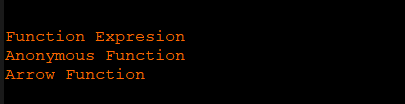
In the above example we have defined three functions; Function Expression, Anonymous Function, Arrow Function.
Output
After execution of the code, we got the following output:
There are also some syntactic variations of Arrow function given below-
- For the single parameter, the parentheses are optional
For Example
var value = a =>
{
          Console.log (a);
}
value (360);
Output
After the execution of the example, we got the following output:

- For the single statement the optional and empty braces (If there is no parameter)
For Example
var display = () => console.log (“Welcome to ES6”);
display ();
Output
After the execution of the code, we got the following Output:

Arrow function with Parameters
In the ECMAScript program, if we need to pass multiple parameters, then we pass them within the parentheses.
Example
var display (p, q, r) =>
{
          console.log (p + “ ” +q “ ” +r);
}
display (150, 250, 350);
Output

The Arrow function with default parameters
ECMAScript provides a facility to initialize a parameter with default values if the value is undefined or null.
Here, we have an example to understand it better.
Example
 var display (r, s = 100) =>
{
       console.log (r + “ ” + s);
}
display (50);
Output
After the execution of the code, we got following result.

Arrow function with rest parameter
The rest parameter allows us to pass a number of values in the function having the same type. The rest parameter also works like a procurator for various arguments that have the same type.
We can declare the rest parameter; the name of the parameter must be prefixed with the spread operator. Let’s try to understand it with the help of the following example.
Example
var display (p, …args) =>
{
          console.log (p + “ ” +args);
}
display (10, 20, 30, 40, 50, 60);
Output
After the successful execution of the code, we got the following output:

Arrow function without parentheses
We can define an arrow function without parentheses if we have only a single parameter to pass. It means parentheses are optional.
Example
var display = u =>
{
          console.log (u);
}
display (“Welcome to programming world”);
Output
After the execution of the example, we got the following output:

Advantages of Arrow function
There are the following advantages of ECMAScript 6.
The arrow function is used to wrap the content statically or in a lexical manner. It is difficult to handle this keyword in an arrow function as compared to normal function. The keyword this is not wrapped in an arrow function. The keyword this is used to show an object in regular function. The object should be a window, a document, a button, or any other. In the arrow function, the keyword this is used to present the object that determines the arrow function.
Example
In ECMAScript 6 – With the arrow function
this.value.forEach((value) =>
{
          if (value < 20)
this.parent.push (value);
});
In the above code, we have a class with an array of values. If the value is less than 20, then it should be pushed into the parent queue.
Example
In ECMAScript 5
this.value.forEach(function(value)
{
          if (value < 20)
this.parent.push (value);
}.bind(this));
The syntax arrow function always helps us to write less program code. It means it allows decreasing the quantity of the code.
The return statement and the function braces are optional for a single line function. In ECMAScript 5, it is mandatory to define the return statement inside the function, but in ECMAScript 6, there is no need to determine the return statement for the single line function.
Example
In ECMAScript 6
var display = num = > num/2;
console.log (display (500));
Example
In ECMAScript 5
function display (num)
{
          return num/2;
}
Important Point: If we do not use curly braces with a single statement, then there is no need to use the return statement, but if we use then we must have to use the return keyword.
We will try to understand it with the help of an example.
Example
With return statement
var display = number =>
{
          return number/2;
}
console.log (display(300));
Output
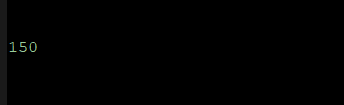
After the execution of the code, we got the following output:
Without return statement
var display = number =>
{
          number/2;
}
console.log (display(300));
Output
After the successful execution of the example, we got the following output: