
String in ES6
String in ES6
The term string can be defined as an object used to represent the sequence of the characters. The string is widely used to store a text-based value like a person’s name or description of a product.
In ES6, if we write ‘aby’ text within the single (‘’) or double quotes (“”) both are referred as a string.
Here, we have the following two ways to define a string-
- With the help of string object (using the new keyword)
- With the help of string literal
We will try to describe the above ways in detail-
With the help of string object
We can create a string with the help of the new keyword. The syntax for the same is given below-
Syntax
var stringname = new string (“String Literal”);
With the help of string literal
We can also define a string with the help of a single (‘’) or double quotes (“”). Here, we have a syntax for defining the string using a string literal.
Syntax
var stringname = “string value”;
String Methods in ES6
In ES6, we have the following four-string methods. They are given below in the tabular form-
| Sr. No. | Method | Description |
| 1. | includes () | This method returns true if the particular argument lies inside the string. |
| 2. | repeat () | This method is used to return a new string, based on repeated argument count. |
| 3. | startsWith () | It is used to determine that the string starts with the characters of a particular string. |
| 4. | endWith () | This method determines that the string ends with characters of a particular string. |
Now, we are going to discuss the above methods in a detailed form.
includes() Method
This method is used to define that the string consists of the characters of a particular string or not. It is a case-sensitive method. The method returns the true; if the string involves the characters; otherwise, it returns the false.
Syntax
string.includes(searchValue, start)
The above syntax contains the following parameter.
searchValue: It is the substring of searching. It is a necessary parameter to use.
start: This parameter presents the address fro, where to start searching inside the string. It contains value 0 by default.
Example
Here, we have an example to understand the above method.
let string = “Welcome to ES6”
console.log (string.includes(‘Welcome’, 6));
console.log (string.includes(‘Welcome’, 8));
Output
After the execution of the above code, we got following output:

repeat() Method
The repeat() method is used to define a new string that includes the particular number of copies of the string.
Syntax
string.repeat(count)
The above syntax contains a single parameter.
Count: This parameter is used to display the repetition of the string. It is a needed parameter. Its range is 0 to infinity.
Example
Here, we have an example to understand the repeat() method.
var string = “Hello ES6”;
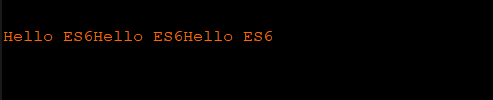
console.log(string.repeat(3));
Output
After the execution of the above code, we got the following output:
startsWith () Method
The startsWith() method defines that the string starts with a particular string character or not. It returns the true if the string starts with string character; otherwise, it returns false.
Syntax
String.startsWith(searchValue, startPosition)
The above syntax has two following parameters:
searchValue: It refers to those characters which are searched for the starting position of a string. It is a necessary parameter.
startPosition: It refers to the specified position, where we start searching. The default value of this parameter 0. It is an optional argument.
Example
var string = “(Welcome to ES6 :)”;
console.log(string.startWith(‘Wel’, 0));
console.log(string.startWith(‘Wel’, 0));
Output
After the execution of the above example, we got the following output:

endWith () Method
This method is used to define that the string ends with a particular string character or not. It is also case-sensitive.
Syntax
String.endsWith(searchValue, length)
The syntax consists of the following two parameters.
searchValue: It refers to those characters which are searched for the ending position of a particular string. It is a needed parameter.
length: It defines the length of the searched string. It is an optional parameter. If we miss this parameter, then the method searches for the full string.
Example
var string = “Welcome to the world of ES6.”;
console.log (string.endsWith(“to”, 10));
console.log (string.endsWith(“To”, 10));
Output
After the successful execution of the code, we got the following output:

Properties of String
Here, we have the following properties of the string, which are tabulated below-
| Sr. No. | Property | Description |
| 1. | prototype | This property is used to enable us to associate the properties and the methods to an enduring object. |
| 2. | constructor | It is used to return the constructor function for the object. |
| 3. | Length | This property returns the length of the object. |
Now, we discuss the properties of string in detail.
String Prototype Property
This property facilitates us to associate the properties and methods with an enduring object type. It is a global property used with all the objects.
Syntax
Object.prototype.name = value;
Example
Here, we have an example to understand the above property.
function employee (name, section)
{
          this.name = name;
          this. section = section;
}
employee.prototype.age = 35;
var emp = new employee (‘Robert’, ‘Security’);
console.log(emp.name);
console.log(emp.section);
console.log(emp.age);
Output
After the execution of the above example, we got the following output:

String constructor property
The String constructor property is used to return the constructor function for an object. This property returns the function of the function instead of the function name.
Syntax
String.constructor
Example
Here, we discuss the string constructor property with the help of the following example.
var string = new String(“Hello JavaScript”);
console.log(“The value of string.constructor is: ” +string.constructor);
Output
We got the following output after the successful execution of the code.

String length Property
This property is used to return the length of the string (number of constructors).
Syntax
string.length
Example
Here, we have an example to understand the above property.
var string = new String(“Welcome to ES6”);
console.log(“The number of characters in a string: ”+string.length);
Output
After the execution of the code, we got the following output:

String Methods in JavaScript
We have some string methods used in JavaScript that are given below in the tabular form.
| Sr. No. | Method | Description |
| 1. | charCodeAt() | This method gives the Unicode character value, lies at a particular address. |
| 2. | charAt() | It is used to return the char value, presented at a specified index (address). |
| 3. | match() | This method is used to search a regular expression in an existing string and it returns that if there should be a match. |
| 4. | concat() | It provides consolidation of multiple string. |
| 5. | indexOf() | It gives us the char value position in the given string. |
| 6. | toString() | This method returns the string which shows a particular object. |
| 7. | lastIndexOf() | It searches the character from last position and returns the char value address in the string. |
| 8. | replace() | This method replaces the existing string with a particular replacement. |
| 9. | valueOf() | The valueOf() method returns the primitive value of string object. |
| 10. | split() | It divides the single object into different string arrays by converting strings to substrings. |
| 11. | slice() | This method is used to extract a section of string and gives the new string. |
| 12. | substr() | The substr() method is used to fetch the section of the string. It is based on the starting address and the particular length. |
| 13. | toLowerCase() | It is used to transform the existing string into lower case characters. |
| 14. | toUpperCase() | It is used to transform the existing string into upper case characters. |
| 15. | trim() | It helps us to remove the white space from the left and right side of the string. |
| 16. | substring() | It fetches the section of the existing string that depends on a particular position. |
| 17. | toLocaleLowerCase() | It transforms the string into lower case according to the current locale host. |
| 18. | toLocaleUpperCase() | It transforms the string into upper case according to the current locale host. |
| 19. | search() | This method is used to search a particular regular expression and gives its address if the condition is matched. |