
Template Literals in ES6

Template Literals in ES6           

ES6 introduced a new feature called template literals. It facilitates us to define a multiline string and executes the string interpolation. The template literals are referred to as string literals, which enable us to work with embedded expressions.

The templates literals are known as template strings before ES6. The quotes enclose the template strings, but the template literals are enclosed by the backticks (``). It is a key situated below the ESC key in the keyboard.

The template literals consist of the placeholders. They are presented by the dollar sign associated with curly braces ($(expression)). If we want to use an expression inside the backtick, then it should be placed inside the ($(expression)).

Syntax

var string = `string value`;    

Multiline string

In the regular string, if we want to create multiple strings, then we use escape sequence (\n) to the new line; but in the template string, we can end a string with the help of backtick (`) character.

Example

We will try to understand the above concept with the help of the following example.

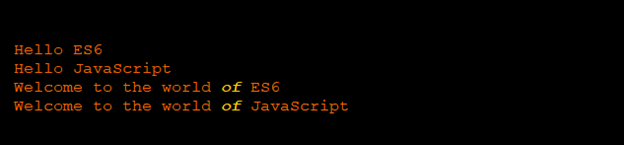
console.log (“Hello ES6 \n Hello JavaScript”);    // Without using Template Literal
console.log (`Welcome to the world of ES6         // With using Template Literal
Welcome to the world of JavaScript`);

Output

After the execution of the code, we got the following output:
Template Literals in ES6

Interpolation in String

ES6 facilitates us to work with string interpolation. The template literals can be considered as the procurator used for string substitution. If we want to combine the regular strings with expressions, we have to use ${} syntax.

Here, we will try to understand the above concept with the help of the following examples.

Example1

var name = “ES6”;
var cname = “JavaScript”;
console.log(`Hello, ${name}!
Welcome to ${cname}`);

Output

After the execution of the above example, we got the following output:

Template Literals in ES6

Example2

Here, we have another example of string interpolation.

var a = 25;
var b =35;
console.log (`The sum of variables ${a} and ${b} is:
${a+b}`);

Output

We got the following output after the successful execution of the code:

Template Literals in ES6

Raw Strings

In the template literal, the raw method enables us to access the raw strings. We can define the raw string with the help of string.raw() method. It is similar to the default template function. The string.raw() method displays the strings without analyzing the back slashed character. It enables us to define back slashes alike literals in the regular expression. The string.raw() method is also helpful in printing sub-directory locations without the use of backslashes.

Example

Here, we have an example to understand the above concept.

var rawText = String.raw` Welcome back \n Hello \n world!
console.log(rawText)

Output

After the execution of the above code, we got the following output:

Template Literals in ES6

Tagged Templates

The tagged templates are referred to as the most prior form of template literals. The tagged template enables us to interpret the template literals with the functions. The script of tagged templates alike the function definition. But the minor difference is when we invoke a tagged literal, the parentheses () are not required.

The first tag argument consists of an array with string values, and the other contains the related expressions.

Here, we will try to understand the above concept with the help of the following examples.

Example1

Function tagliteral(string)
{
          Console.log(string)
}
Tagliteral `Hello ES6` ;

Output

After the execution of the above example, we got the following output:

Template Literals in ES6

If we pass a value to a tagged literal, the output can be an expression or the fetched variable value. Here, we have another illustration for the same.

Example2

function taggedliteral (string, value1, value2)
{
          console.log(string);
console.log(value1+ “   ” + value2);
}
Let text = “Hello ES6”;
Tggedliteral` animals ${text} ${30+20}` ;

Output

After the execution of the code, we got the following output:

Template Literals in ES6

String.from.CodePoint()

The String.fromCodePoint () methods return a new string, which is the combination of a particular sequence of Unicode points.

Example

Here, we have an example to understand the above method.

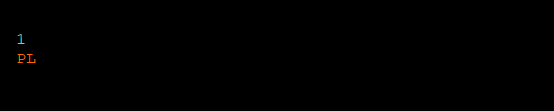
console.log (String.fromCodePoint(49))
console.log (String.fromCodePoint(70, 66))

Output

We have the following output after the execution of the above code.
Template Literals in ES6

Related Topics

Array Destructuring in ES6

Array Destructuring in ES6 The term ‘Destructuring’ is defined as dividing the complicated data structure into easier modules. The Destructuring syntax helps to extract the small segments from an array and the objects....

3 minutes read.

Array in ES6

Array in ES6 The array can be defined as an object that is used to display the set of homogenous type of elements in ECMAScript 6. The array provides the facility to store...

5 minutes read.

Events in ES6

Events in ES6 The events can be defined as the actions or the occurrence of an action that is perceived by the software. The event is used to handle the interaction between...

14 minutes read.

Module in ES6

Module in ES6 In ES6, the modules can be defined as a small chunk of program code stored in a file. The modules are used to modularize the source code with...

6 minutes read.

Types of Inheritance in ES6

Types of Inheritance The term inheritance can be divided into following three parts- Single-level InheritanceMultiple InheritanceMulti-level Inheritance Single-level Inheritance The single-level inheritance can be defined as an inheritance in which the child class can...

5 minutes read.

Dialog box in ES6

Dialog box in ES6 A dialog box can be defined as a regular type of window in the Graphical User Interface (GUI) of the operating system. It is also spelled as...

5 minutes read.

Arrow Function in ES6

Arrow Function in ES6  An Arrow function is a new concept recommended in ECMAScript 2015. It is also called “Fat Arrow Function.” It helps us to write the function more accurately. This function...

5 minutes read.

Functions in ES6 | ECMAScript 6

Functions in ECMAScript 6 In ECMAScript programming language, the term ‘function’ can be defined as a collection or group of input statements, used to perform particular computational calculations and generate the output...

9 minutes read.

Map Object in ES 6

Map Object in ES 6 ES 6 introduced a new feature that is included in JavaScript. In the previous versions of ECMAScript, if we want to perform mapping on values and...

5 minutes read.

Void Keyword in ES6

Void Keyword in ES6 In ES6, the void keyword is referred to as a function return type, but it does not return any value. It classifies the expression and returns the...

2 minutes read.

Array Methods in ES6

Array Methods in ES 6 ES 6 introduced the various new methods such as Array,from(), Array,of(). Here, we have the various array methods used in JavaScript, they are given below in the table...

10 minutes read.

Number in ES6

Number in ES6 In ES6, we have various methods and properties to implement numeric functions such as floating-point, integers, date, etc. The numbers in ES6 enable us to work with number...

7 minutes read.

String in ES6

String in ES6 The term string can be defined as an object used to represent the sequence of the characters. The string is widely used to store a text-based value like...

9 minutes read.

Generator in ES6 | ECMAScript 6

ECMAScript 6 recommends a new way of working with iterators and functions. The way is named as generator or generator function. The ES 6 generator is a distinct type of function that...

5 minutes read.

Loop Control Statement in ES6

Loop Control Statement in ECMAScript 6 The loop control statements can be defined as a set of conditions that control the execution of the loop. It executes the loop until the condition becomes false....

6 minutes read.

Class in ES6

Class in ES6: The Class is a basic term in object-oriented programming (OOPs). A class helps to determine the prototype for modeling in real-world objects. It is used to formulate...

4 minutes read.

ES6 Tutorial

Introduction of ES6 The ECMAScript 6 is a scripting language specification institutionalized by ECMA International. ECMA, named in 1994, is an international organization, related to information and communication system. ECMA stands for “European Computer Manufacturers...

8 minutes read.

Operators in ES6 | ECMAScript 6

Operators in ECMAScript 6 The term Operator is refers to a symbol that is used to instruct the computer system to perform a specific operation. The ECMAScript 2015 supports a rich set of operators....

11 minutes read.

Spread Operator in ES6

Spread Operator in ECMAScript 6 The term 'Spread Operator' can be defined as an operator that allows expending the array into separate elements. Three dots (…) isthe syntax of the Spread Operator.The Spread operator...

5 minutes read.

Page Redirect in ES6

Page Redirect in ES6 The term redirect can be defined as a process to send the user and search engine on a specified URL from the original page. “The page redirection is...

3 minutes read.