×

Declaring a Variable in VBA

Declaring a Variable

A variable is broadly described as a storage location combined with a name and representing a specific value. Declaring a variable is instructing the computer to reserve space in memory for later use.

Syntax for Declaring Variable

Scope VariableName As DataType

Steps for Declaring Variables 

In VBA, declaring has three steps:

  1. Set a Scope for the variable - Every variable has a scope associated with it. The scope of a variable is defined at the time the variable is declared. The available scope for a variable can be the either of three scopes i.e., Dim, Private, and Public.

2. Set a name for the variable – Variables are allocated with a name so as the can identify the variables for future use. Two variables within the same procedure can not have identical names. There are few naming convictions which are as follows:

  • The first character should be alphabetic.
  • The following characters can be alphabetic, numeric or punctuation character excluding * . , # $ % & !
  • Spaces or periods abandoned.
  • Underscore character is also used to increase readability and distinguish two words
  • The name can have a maximum of 254 characters.
  • Variable names cannot be similar to VBA keywords, unlike Sub, Function, Integer, Array, etc.,.

3. Set a type for the variable – Data Types defines the type of data you’re going to store in the variable. The various data types available are Boolean, Byte, Integer, Long, Currency, Single, Double, Date, String, Object, and Variant.

Program 1

Sub DeclaringVariableExample()
                ‘Declaring the variable ‘a’ with scope= Dim and data type = Integer
Dim a As Integer
a = 12
MsgBox "The value of first variable is " & a
'MsgBox will return the Output: 2
‘Declaring the variable ‘b’ with scope= Dim and data type = Long
Dim b As Long
b = a + 2
MsgBox "The value of second variable is " & b
'Outputs: 4
‘Declaring the variable ‘c’ with scope= Dim and data type = String
Dim c As String
c = "Hello World"
MsgBox "The value of third variable is " & c
'Outputs: Hello, world!
End Sub

Output

The Value of a is 2
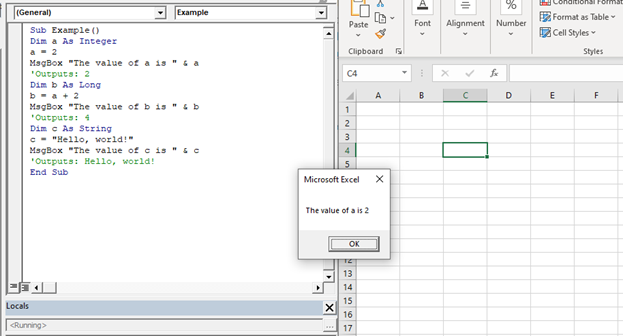
Declaring a Variable in VBA

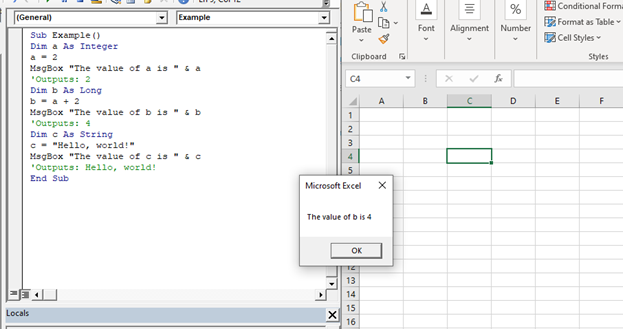
The value of b is 4

Declaring a Variable in VBA

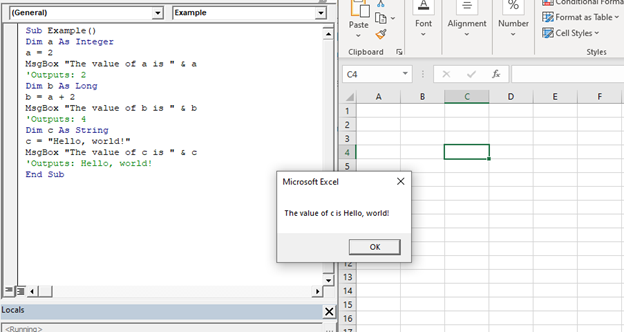
The value of c is Hello, world!

Declaring a Variable in VBA

Declaring Multiple Variables

Program 2

Sub DeclaringMultipleVariableExample()
'declaring multiple variables
Dim X As Integer, Y As Integer, Z As Integer
X = 2
MsgBox "The value of first variable X is " & X
'Outputs: 2
Dim b As Long
Y = X + 2
MsgBox "The value of second variable Y is " & Y
'Outputs: 4
Dim c As String
Z = Y + 2
MsgBox "The value of third variable Z is " & Z
'Outputs: 6
End Sub

Output

The value of X is 2
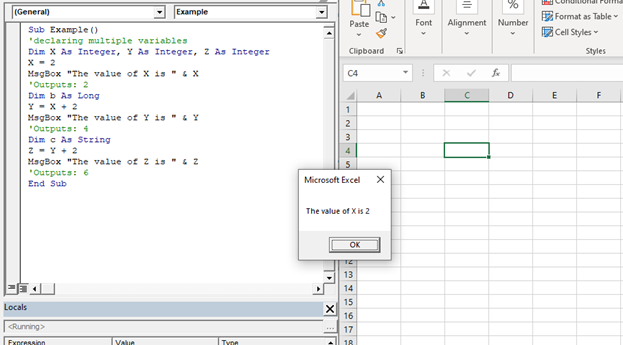
Declaring a Variable in VBA

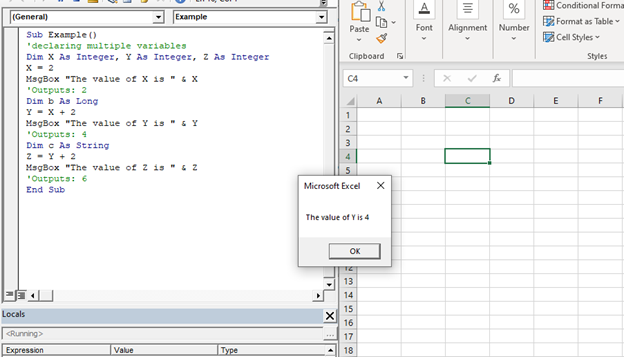
The value of Y is 4

Declaring a Variable in VBA

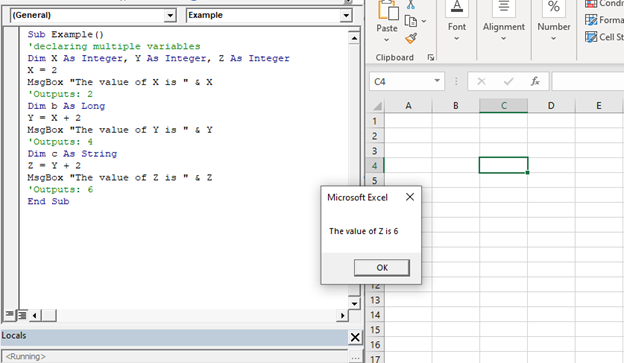
The value of Z is 6

Declaring a Variable in VBA

Related Topics

Excel VBA Filter Function

VBA Filter Function: The Filter function in VBA returns a subset for the given string array, based on specified criteria. Syntax Filter (SourceArray, Match, [Include], [Compare]) Parameter SourceArray (required) – This parameter the array of Strings that you...

2 minutes read.

Excel VBA Conditional Statement

Conditional Statement in VBA Excel Conditional Statements in Excel VBA are one of the most powerful and useful features in programming, this will give you to perform comparisons to decide or...

2 minutes read.

Excel VBA DateValue Function

The DateValue function in VBA returns a VBA Date from the given String representation of a date wherein the time information is ignored. It is unable to interpret dates that include the...

1 minute read.

Excel VBA CDbl Function

VBA CDbl Function: The CDbl function in VBA converts an expression into a Double data type. Syntax CDbl (Expression) Parameter Expression (required) - This parameter represents the expression that that you want to convert to...

1 minute read.

Excel VBA Rnd Function

VBA Rnd Function: The Rnd function in VBA returns a random number that is greater than or equal to (>=) 0 and is less than (<) 1. Syntax Rnd ([Number]) Parameter Number (optional) –This...

1 minute read.

Excel VBA Day Function

The function Day in VBA returns the day number (from 1 to 31) for the given date value. Syntax Day (Date) Parameter Date (required) – This parameter represents the date. Return This function returns the day...

1 minute read.

Excel VBA LBound Function

Excel VBA LBound Function: The LBound function in VBA returns the lowest subscript for the specified dimension in the given array. Syntax LBound (ArrayName, [Dimension]) Parameter ArrayName (required) – This parameter represents an array for which...

1 minute read.

Excel VBA Second Function

Excel VBA Second Function: The Second function in VBA returns the second element for the specified time.  Syntax Second (Time) Parameter Time (required) – This parameter represents the time. Return This function returns the second...

1 minute read.

VBA VBScript Regex Methods Regex

VBA VBScript Regex Methods Regex The VBA Regex supports 3 methods which are as follows: ExecuteReplaceText Execute The execute method is used to extract a match from the given based on the defined matching...

3 minutes read.

VBA runtime error 1004

What is 1004 error?  VBA 1004 Error, also known as object-defined or application-defined, is a runtime error in VBA, usually, if the specified range does not exist in the worksheet or if the Application...

6 minutes read.

Excel VBA Round Function

VBA Round Function: The Round function in VBA rounds a number to a specified number of decimal places and returns the number. Syntax Round (Number, [NumDigitsAfterDecimal]) Parameter Number (required) –This parameter represents a numeric value one wants...

1 minute read.

Excel VBA LCase Function

VBA LCase Function: The LCase function in VBA converts the given String into lower case text. Syntax LCase (String) Parameter String (required)- This parameter represents the text string that you want to convert to...

1 minute read.

Excel VBA Sin Function

VBA Sin Function: The Sin function in VBA returns the sine value for a supplied angle. Syntax Sin (Number) Parameter Number (required) –This parameter represents the angle (in radians) to calculate the sine value. Return This function...

1 minute read.

Excel VBA Split Function

Excel VBA Split Function: The Split function in VBA is used to split a string into several substrings and return a one-dimensional array of substrings. Syntax Split (Expression, [Delimiter], [Limit], [Compare]) Parameter Expression (required) – This parameter...

2 minutes read.

VBA ActiveSheet

What is VBA Activesheet Property? The active sheet means the current worksheet which you are working on and viewing. The ActiveSheet object signifies the worksheet tab that is selected before running the VBA...

5 minutes read.

Excel VBA Replace Function

VBA Replace Function: The Replace function in VBA searches for a substring within the specified string and replaces its occurrences with a second substring. Syntax Replace (Expression, Find, Replace, [Start], [Count], [Compare]) Parameter Expression (required) – This parameter represents...

2 minutes read.

Four VBA Clear methods

Four VBA Clear methods In Microsoft Excel, many times, a situation arises where the user wants to clear the data or any specific range of data. What if the user automates this task with...

6 minutes read.

Excel VBA Array

Introduction to VBA Array An array is a type of variable that holds more than one piece of data. In VBA, you can refer to a specific variable (element) of an array by using...

5 minutes read.

Declaring a Variable in VBA

Declaring a Variable A variable is broadly described as a storage location combined with a name and representing a specific value. Declaring a variable is instructing the computer to reserve space...

2 minutes read.

Excel VBA StrConv Function

The StrConv function in VBA converts a string into a specified format. Syntax StrConv (String, Conversion, [LocaleID]) Parameter String (required) – This parameter represents the string to be converted. Conversion (required) – This parameter specifies the type of conversion. It can...

1 minute read.