×

Excel VBA DatePart Function

The DatePart function in VBA returns a part (day, month, week, etc.) for the specified date and/or time.

Syntax

DatePart
(Interval, Date, [FirstDayOfWeek], [FirstWeekOfYear])

Parameter

Interval (required) – This parameter represents a string specifying the interval to be used.

It can take the following values:

  • “d” – Day of month (1-31)
  • “h” - Hours
  • “n” - Minutes
  • “m” - Months
  • “q” - Quarters
  • “s” - Seconds
  • “ww” – Weeks
  • “yyyy” - Years

Date1 (required) – This parameter represents a date value, returning a part of it.

FirstDayOfWeek (optional) – This parameter represents the weekday that should be used as the first day of the week.

It can take the following values:

  • vbUseSystemDayOfWeek - The first day of the week is as specified in your system settings. The default value is set to vbSunday.
  • vbSunday – Sunday
  • vbMonday – Monday
  • vbTuesday – Tuesday    
  • vbWednesday – Wednesday
  • vbThursday – Thursday
  • vbFriday - Friday
  • vbSaturday - Saturday

FirstWeekOfYear (optional) - This parameter represents the week that should be used as the first week of the year. The default value is set to vbFirstJan1.

It can take the following values:

  • vbSystem – It signifies the first week of the year is as specified in your system settings
  • vbFirstJan1 – It signifies the week in which Jan 1st occurs.
  • vbFirstFourDays – It signifies the first week that contains at least four days in the new year.
  • vbFirstFourDays – It signifies the first full week in the new year

Return

Example 1

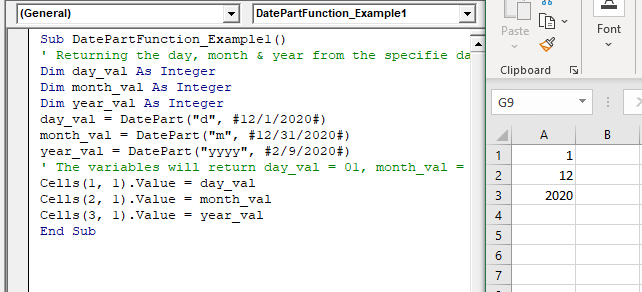
Sub DatePartFunction_Example1()
 ' Returning the day, month & year from the specified date
 Dim day_val As Integer
 Dim month_val As Integer
 Dim year_val As Integer 
 day_val = DatePart("d", #12/1/2020#)
 month_val = DatePart("m", #12/31/2020#)
 year_val = DatePart("yyyy", #2/9/2020#)
 ' The variables will return day_val = 01, month_val = 12 and year_val = 2020. 
 Cells(1, 1).Value = day_val
 Cells(2, 1).Value = month_val
 Cells(3, 1).Value = year_val
 End Sub 

Output

1
12
2020
VBA DatePart Function

Example 2

Sub DatePartFunction_Example2()
 ' Returning the hour, minute & second from the specified date
 Dim hour_val As Integer
 Dim month_val As Integer
 Dim Sec_val As Integer
 hour_val = DatePart("h", #9:15:50 PM#)
 Min_val = DatePart("n", #8:05:30 PM#)
 Sec_val = DatePart("s", #9:35:40 PM#)
 ' The variables will return hour_val = 21, Min_val = 5 and Sec_val = 40.
 Cells(1, 1).Value = hour_val
 Cells(2, 1).Value = Min_val
 Cells(3, 1).Value = Sec_val
 End Sub 

Output

21
5
40

Example 3

Sub DatePartFunction_Example2()
 ' Returning Year, Day of Week, Week of Year & Quarter from the Date
 Dim dayYear As Integer
 Dim dayWeek As Integer
 Dim weekYear As Integer
 Dim quatr As Integer
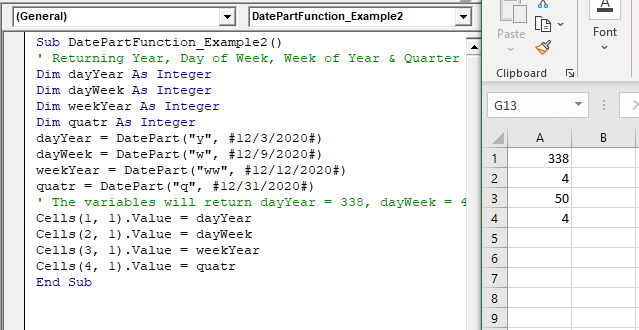
 dayYear = DatePart("y", #12/3/2020#)
 dayWeek = DatePart("w", #12/9/2020#) 
 weekYear = DatePart("ww", #12/12/2020#)
 quatr = DatePart("q", #12/31/2020#)
 ' The variables will return dayYear = 338, dayWeek = 4, weekYear = 50, quatr = 4
 Cells(1, 1).Value = dayYear
 Cells(2, 1).Value = dayWeek 
 Cells(3, 1).Value = weekYear
 Cells(4, 1).Value = quatr
 End Sub 

Output

338
4
50
4
VBA DatePart Function

Related Topics

Excel VBA Date Function

VBA Date Function The Date function in VBA returns the current date. Syntax Date( ) Parameter NA Return This function returns the current date. Example 1 Sub DateFunction_Example1() ' retuning the current date in the variable currentDate Dim currentDate As...

1 minute read.

Excel VBA: IF…..THEN …ELSE Statement

VBA : IF…..THEN …ELSE Statement: This function enables you to check one condition and, based on that, then run one of the two statement blocks present. If the ‘IF’ condition...

2 minutes read.

Excel VBA Year Function

Excel VBA Year Function: The Year function in VBA returns the four-digit year for the specified date. Syntax Year (Date) Parameter Date (required) – This parameter represents the significant date. Return This function returns the four-digit year...

1 minute read.

Excel VBA For Each Loop

A For Each loop executes a statement or a group of statements for each element in an array or collection. It repeats the statement/condition/code for each element in a collection. For Each Loops loop through every...

4 minutes read.

Excel VBA DateDiff Function

The DateDiff function in VBA returns a Long data value representing the number of intervals between two specified dates/times where the type of interval is supplied by the user. Syntax DateDiff (Interval, Date1, Date2, [FirstDayOfWeek], [FirstWeekOfYear]) Parameter Interval (required)...

2 minutes read.

Excel VBA Error Handling

What is Errors and Types of Error? Errors are conditions that resist the flow of the program or enables a problem while running any programming. There are three types of errors in VBA...

5 minutes read.

VBA VBScript Regex Methods Regex

VBA VBScript Regex Methods Regex The VBA Regex supports 3 methods which are as follows: ExecuteReplaceText Execute The execute method is used to extract a match from the given based on the defined matching...

3 minutes read.

VBA Screen Updating

What is VBA Screen Updating property? Screen Updating is a VBA property which is used to display the output generation while running the code. If this property is enabled, we could see...

6 minutes read.

Scope in Visual Basics

Definition of Scope The scope of any programming language implies the area of code where the variables will be identified, accessed, and used. Every variable has a scope associated with it. The scope of...

4 minutes read.

Excel VBA Sqr Function

VBA Sqr Function: The Sqr function in VBA returns the square root for the specified number. Syntax Sqr (Number) Parameter Number (required) – This parameter represents a positive numeric value that you want to calculate...

1 minute read.

Excel VBA Right Function

VBA Right Function: The Right function in VBA returns a substring from the end of the given string. Syntax Right (Str, Length) Parameter Str (required) – This parameter represents the string from which you want to...

1 minute read.

Excel VBA StrConv Function

The StrConv function in VBA converts a string into a specified format. Syntax StrConv (String, Conversion, [LocaleID]) Parameter String (required) – This parameter represents the string to be converted. Conversion (required) – This parameter specifies the type of conversion. It can...

1 minute read.

Excel VBA Conditional Statement

Conditional Statement in VBA Excel Conditional Statements in Excel VBA are one of the most powerful and useful features in programming, this will give you to perform comparisons to decide or...

2 minutes read.

Excel VBA InStrRev Function

VBA InStrRev Function: The InStrRev function in Excel VBA returns an integer representing the position of a substring within the specified string if the substring is fount else it returns...

2 minutes read.

VBA ActiveCell Property

What is the ActiveCell Property? The active cell signifies the active selected cell in the current worksheet. The Active property acts as a reference point and is used to move the cell cursor...

5 minutes read.

VBA Regex Pattern Validation

VBA Regex Pattern Validation The key purpose of using Regex in VBA was to validate the data and extract the same category of data. There are certain formats that are standard...

6 minutes read.

VBA Cell

What is VBA cell? Cells is one of the elements (workbook, worksheet, range) in Excel VBA, which refers to cells of the Excel worksheet.  In VBA, the cell is also a property...

5 minutes read.

Steps to Create a Pivot Table

Steps to Create a Pivot Table: Pivot Tables can be easily automated through VBA coding. To create a Pivot Table in VBA, follow the below step by step procedure to...

4 minutes read.

Excel VBA IsNumeric Function

VBA IsNumeric Function: The IsNumeric function in VBA returns a Boolean value showing whether the specified Expression contains a numeric value or not. Syntax IsNumeric (Expression) Parameter Expression (required)- This parameter represents the variant that...

1 minute read.

Excel VBA Len Function

VBA Len Function: The Len function in VBA returns the number of characters in a supplied string or the number of bytes required to store a supplied variable. Syntax Len (Expression) Parameter Expression (required)-...

1 minute read.