×

Excel VBA FormatNumber Function

VBA FormatNumber Function: The FormatNumber function in VBA is used to apply a number format to a numeric expression, and it returns the result as a string.

Syntax

FormatNumber (Expression, [NumDigitsAfterDecimal], [IncludeLeadingDigit],
[UseParensForNegativeNumbers], [GroupDigits])

Parameter

Expression (required) – This parameter represents the numeric expression that you want to format.

NumDigitsAfterDecimal (optional) – This parameter represents the number of digits that should be shown after the decimal. The default value is -1.

IncludeLeadingDigit (optional) – This parameter represents the vbTriState enumeration value, stating whether a leading zero should be shown for fractional values. The default value is set to vbUseDefault.

It can take the following values:

  • vbFalse – It does not display a leading zero.
  • vbTrue – It displays a leading zero.
  • vbUseDefault (default)– It uses the default computer settings.

UseParensForNegativeNumbers (optional) – This parameter represents the vbTriState enumeration value, stating whether negative numbers should be encased within parentheses. The default value is set to vbUseDefault.

It can take the following values:

  • vbFalse – It does not encase negative numbers in parentheses.
  • vbTrue – It encases the negative numbers in parentheses.
  • vbUseDefault (default)– It uses the default computer settings.

GroupDigits (optional) – This parameter specifies whether the number should be grouped (into thousands, etc.), using the group delimiter that is specified on the computer's regional settings. The default value is set to vbUseDefault.

It can take the following values:

  • vbFalse – It does not group digits.
  • vbTrue – It groups the digits.
  • vbUseDefault (default)– It uses the default computer settings.

Return

This function returns a string value after applying the number format to the supplied numeric expression.

Example 1

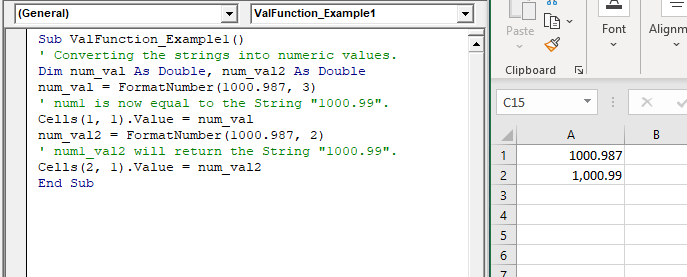
Sub ValFunction_Example1()
 ' Converting the strings into numeric values.
 Dim num_val As Double, num_val2 As Double
 num_val = FormatNumber(1000.987, 3)
 ' num1 is now equal to the String "1000.99".
 Cells(1, 1).Value = num_val
 num_val2 = FormatNumber(1000.987, 2)
 ' num1_val2 will return the String "1000.99".
 Cells(2, 1).Value = num_val2
 End Sub 

Output

1000.987
1,000.99

Example 2

Sub ValFunction_Example2()
 ' Converting the strings into numeric values.
 Dim num_val As Double, num_val2 As Double
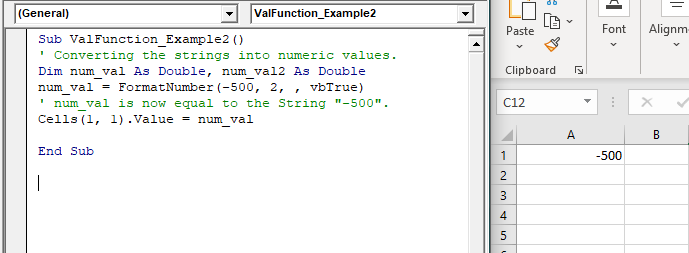
 num_val = FormatNumber(-500, 2, , vbTrue)
 ' num_val is now equal to the String "-500".
 Cells(1, 1).Value = num_val
 End Sub 

Output

-500

Related Topics

Excel VBA: DO WHILE….Loop

DO WHILE….Loop The “Do While” Loop is the same, unlike the FOR statement, just that it will keep on looping till the specified condition is true. It is used when we want to...

3 minutes read.

Steps to Create a Chart in VBA

Steps to Create a Chart Charts are created either by directly working with the chart variable object that defines the chart data or by ChartObject method. In order to get to...

3 minutes read.

VBA runtime error 1004

What is 1004 error?  VBA 1004 Error, also known as object-defined or application-defined, is a runtime error in VBA, usually, if the specified range does not exist in the worksheet or if the Application...

6 minutes read.

Excel VBA StrConv Function

The StrConv function in VBA converts a string into a specified format. Syntax StrConv (String, Conversion, [LocaleID]) Parameter String (required) – This parameter represents the string to be converted. Conversion (required) – This parameter specifies the type of conversion. It can...

1 minute read.

VBA Charts Basic Operations

VBA Charts- Basic Operations The Chart Object in Excel VBA represents the collection of all the charts sheet present in a workbook. A chart can be either an embedded chart or a separate chart sheet. The...

6 minutes read.

VBA Global Variable

What is Global Variable? The Global Variables in VBA refers to the variables declared before the start of any macro. They are defined outside the functions and are used by all the functions or...

6 minutes read.

CodeIgniter Architecture

Here we will understand the architecture and working of the CodeIgniter application, which helps you to elaborate all steps in simple ways. As the above image represents that whenever a request comes from the...

2 minutes read.

Excel VBA DateAdd Function

The DateAdd function in VBA adds a time interval to a supplied date and/or time and returns the resultant date/time. Syntax Dateadd (Interval, Number, Date) Parameter Interval (required) – This parameter a string specifying the interval to be...

1 minute read.

VBA ListBox

What is a ListBox? ListBox refers to a permanently displayed control (usually box-shaped) which contains a list of objects (or attribute, or elements) from which the user can select single or multiple attributes....

8 minutes read.

Excel VBA TimeValue Function

Excel VBA TimeValue Function: The TimeValue function in VBA returns a Time from the specified String interpretation of a time /date where the date information for the given string is...

1 minute read.

Excel VBA Year Function

Excel VBA Year Function: The Year function in VBA returns the four-digit year for the specified date. Syntax Year (Date) Parameter Date (required) – This parameter represents the significant date. Return This function returns the four-digit year...

1 minute read.

VBA UBound

VBA UBound  The UBound or Upper Bound function in VBA is used to specify the length of an array and returns the highest subscript for a dimension for the specified array. It is...

3 minutes read.

VBA Regex Pattern Validation

VBA Regex Pattern Validation The key purpose of using Regex in VBA was to validate the data and extract the same category of data. There are certain formats that are standard...

6 minutes read.

Excel VBA FormatNumber Function

VBA FormatNumber Function: The FormatNumber function in VBA is used to apply a number format to a numeric expression, and it returns the result as a string. Syntax FormatNumber (Expression, [NumDigitsAfterDecimal], [IncludeLeadingDigit], [UseParensForNegativeNumbers], [GroupDigits]) Parameter Expression (required)...

2 minutes read.

Excel VBA Tan Function

VBA Tan Function: The Tan function in VBA returns the tangent for the specified angle in radians. Syntax Tan (Number) Parameter Number (required) – This parameter represents the angle supplied in radiant that you want...

1 minute read.

Excel VBA Round Function

VBA Round Function: The Round function in VBA rounds a number to a specified number of decimal places and returns the number. Syntax Round (Number, [NumDigitsAfterDecimal]) Parameter Number (required) –This parameter represents a numeric value one wants...

1 minute read.

Excel VBA InputBox

Input Box The InputBox function in VBA is used to prompt the users to enter values. The user can click either the OK button or can choose the CANCEL button. If the user clicks...

3 minutes read.

Excel VBA StrReverse Function

The StrReverse function returns a String after reversing the given String. Syntax StrReverse (Expression) Parameter Expression (required) – This parameter represents the String that you want to reverse. Return This function returns a String after reversing the given String. Example...

1 minute read.

Excel VBA Format Function

VBA Format Function The format function in VBA applies a specified format to an expression and returns the result as a string. Syntax Format (Expression, [Format], [FirstDayOfWeek] , [FirstWeekOfYear] ) Parameter Expression (required)- This parameter represents the expression that you want to format. Format...

3 minutes read.

Excel VBA Right Function

VBA Right Function: The Right function in VBA returns a substring from the end of the given string. Syntax Right (Str, Length) Parameter Str (required) – This parameter represents the string from which you want to...

1 minute read.