×

Excel VBA: Do Until….Loop

DO UNTIL….Loop


The “Do Until” Loop is same unlike DO WHILE statement just that it will keep on looping till the condition is not met. This loop is used to repeat a set of statements if the condition is false. The condition may be checked at the beginning of the loop or at the end of Do Until loop.

Syntax

Do Until condition
    [statement 1]
    [statement 2]
    ...
    [statement n]
    [Exit Do] 
    [statement 1]
    [statement 2]
    ...
    [statement n]
 Loop 

Alternate Syntax

Do 
  [statement 1] 
  [statement 2] 
   ... 
 [statement n] 
  [Exit Do] 
   [statement 1] 
   [statement 2] 
   ... 
  [statement n] 
 Loop Until condition 

In the first syntax, the “Do Until” loop checks the condition first and returns the condition result as TRUE or FALSE. If the condition returns true, the loop gets terminated else for False t will execute the code and perform a specified task.

In the second syntax, it will execute the cod task then it test for the condition to check whether the condition is TRUE or FALSE. If the condition is FALSE it will perform the same task again. If the condition is TRUE then it will exit the loop. Even if the condition is TRUE, but it will still run at least once in the second syntax.

Example 1: Write a Macro, using Do Until Loop to print the odd numbers between 1 to 10.  
In the above example, if you change the condition of Do Until I = 10 instead of 11, since variable ‘I’ will never reach this value 10, as 1+2 = 3, then 3+2 = 5 and so on.. i.e. we will have only odd numbers, excel will keep on running till value of I is 32,767 which is the maximum value a variable declared as integer can take. This is how Do Until is different from Do While.

Sub DoUntil_Example1()
 Dim I As Integer
 I = 1
     'repeat a set of statements if the condition is false.
     Do Until I = 11
         Worksheets("Sheet2").Cells(I, 2).Value = I
         I = I + 2 
     Loop
 End Sub 

Output

1

3

5

7

9

Do Unti Loop in VBA

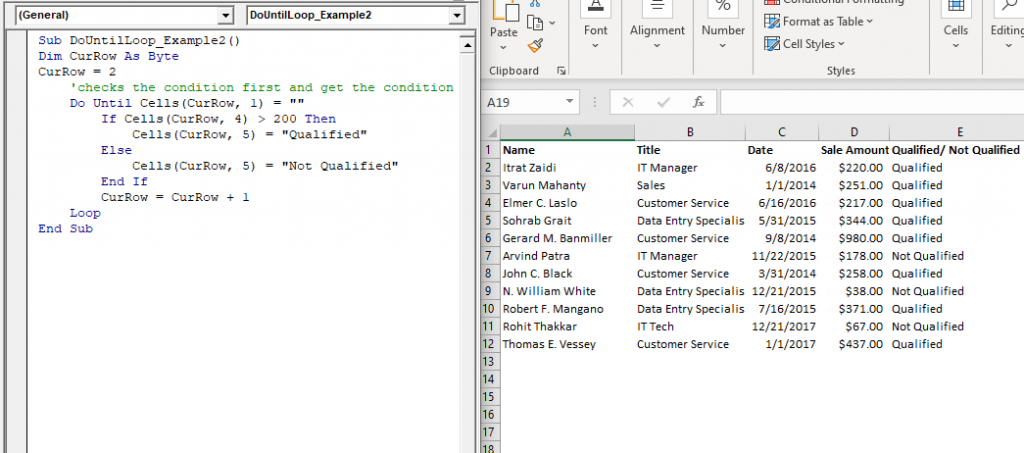
Example 2: Write a procedure or macro using Do Until that does the following task:

Get "Qualified" in column E if the value of column D is above 200 else it should return “Not Qualified”

Sub DoUntilLoop_Example2()
 Dim CurRow As Byte
 CurRow = 2
     'checks the condition first and get the condition result as TRUE or FALSE.
     Do Until Cells(CurRow, 1) = ""
         If Cells(CurRow, 4) > 200 Then
             Cells(CurRow, 5) = "Qualified"
         Else 
             Cells(CurRow, 5) = "Not Qualified"
         End If
         CurRow = CurRow + 1
     Loop    
 End Sub 

Output

Name Title Date Sale Amount Qualified/ Not Qualified
Itrat Zaidi IT Manager 6/8/2016 $220.00 Qualified
Varun Mahanty Sales 1/1/2014 $251.00 Qualified
Elmer C. Laslo Customer Service 6/16/2016 $217.00 Qualified
Sohrab Grait Data Entry Specialist 5/31/2015 $344.00 Qualified
Gerard M. Banmiller Customer Service 9/8/2014 $980.00 Qualified
Arvind Patra IT Manager 11/22/2015 $178.00 Not Qualified
John C. Black Customer Service 3/31/2014 $258.00 Qualified
N. William White Data Entry Specialist 12/21/2015 $38.00 Not Qualified
Robert F. Mangano Data Entry Specialist 7/16/2015 $371.00 Qualified
Rohit Thakkar IT Tech 12/21/2017 $67.00 Not Qualified
Thomas E. Vessey Customer Service 1/1/2017 $437.00 Qualified
procedure or macro using Do Until

Example 3: In the following procedure, the “i < 11” condition is tested at the beginning of the loop, Loop ends because the condition is met. Hence, the it will exit the loop.

Sub DoUntil_Example3()
 'Declaring the variable
 i = 6
 'It will check the condition and if it is true then will run the block of code
     Do Until i < 11
         i = i + 1
         MsgBox "The value of the variable is: " & i 
     Loop
 End Sub 

Output

Alternate Syntax

Example 4: In the following procedure, the “i < 11” condition is tested at the end of the loop. So firstly the code will be executed. Hence, the it will return 7. Then will check the condition and terminate the loop.

Sub DoUntil_Example4()
 'Declaring the variable
 i = 6
 'It will firstly run the program and then check the condition
     Do
         i = i + 1
         MsgBox "The value of the variable is: " & i
     Loop Until i < 11
 End Sub 

Output

DO UNTIL….Loop

Related Topics

VBA UBound

VBA UBound  The UBound or Upper Bound function in VBA is used to specify the length of an array and returns the highest subscript for a dimension for the specified array. It is...

3 minutes read.

Excel VBA DateAdd Function

The DateAdd function in VBA adds a time interval to a supplied date and/or time and returns the resultant date/time. Syntax Dateadd (Interval, Number, Date) Parameter Interval (required) – This parameter a string specifying the interval to be...

1 minute read.

Excel VBA Trim Function

The Trim function in VBA removes the leading and trailing spaces from the specified string. Syntax Trim (String) Parameter String (required) – This parameter represents the string from which you want to remove the leading and...

1 minute read.

VBA Regex

What is a Regex? Regex stands for Regular Expression is basically a pattern matching strings within another string. They are supported in many languages, including .net, C++, Python, etc. They are...

5 minutes read.

VBA Color Index Property

What is Color Index Property? The Excel VBA Color Index is used to change the color for the cell or range of cells or text (located under the Font section). It sets the color...

5 minutes read.

Excel VBA Tutorial

What is VBA? Introduction to Excel VBA: Visual Basic for Applications (VBA) is a programming language developed by Microsoft to automate operations in applications, such as Excel, Word, PowerPoint, etc. It...

5 minutes read.

Excel VBA Year Function

Excel VBA Year Function: The Year function in VBA returns the four-digit year for the specified date. Syntax Year (Date) Parameter Date (required) – This parameter represents the significant date. Return This function returns the four-digit year...

1 minute read.

Excel VBA Atn Function

VBA Atn Function: The Atn function in VBA returns the arctangent between quadrant -?/2 and +?/2 for the specified number, in radians. Syntax Atn (Number) Parameter Number (required) – This parameter represents the number that...

1 minute read.

Excel VBA Timer Function

Excel VBA Timer Function: The Timer function in VBA returns a Single data type, evaluating the number of seconds that have elapsed since midnight of the current day. Syntax Timer () Parameter NA Return This...

1 minute read.

Excel VBA CVErr Function

VBA CVErr Function: The CVErr function in VBA returns an Error data type, involving with a user-specified error code. Syntax CVErr (Expression) Parameter Expression (required)- This parameter represents the required error code. Return This function returns an...

1 minute read.

VBA Regex Pattern Validation

VBA Regex Pattern Validation The key purpose of using Regex in VBA was to validate the data and extract the same category of data. There are certain formats that are standard...

6 minutes read.

Excel VBA: DO WHILE….Loop

DO WHILE….Loop The “Do While” Loop is the same, unlike the FOR statement, just that it will keep on looping till the specified condition is true. It is used when we want to...

3 minutes read.

Excel VBA Split Function

Excel VBA Split Function: The Split function in VBA is used to split a string into several substrings and return a one-dimensional array of substrings. Syntax Split (Expression, [Delimiter], [Limit], [Compare]) Parameter Expression (required) – This parameter...

2 minutes read.

UserForm and its Properties Excel VBA

UserForm and its Properties Userform has certain properties that can be viewed as category wise (based on appearance, behavior, font) or in an alphabetic manner. The property window is used to set or...

11 minutes read.

Excel VBA Array Function

VBA Array Function: The Array function in VBA generates an array containing the given set of values. Syntax Array (Arglist) Parameter Arglist (required) – This parameter the list of values that you want to make...

2 minutes read.

Excel VBA Tan Function

VBA Tan Function: The Tan function in VBA returns the tangent for the specified angle in radians. Syntax Tan (Number) Parameter Number (required) – This parameter represents the angle supplied in radiant that you want...

1 minute read.

Excel VBA Weekday Function

Excel VBA Weekday Function: The TimeValue function in VBA returns an integer (1 to 7), signifying the day of the week for the specified date. Syntax Weekday (Date, [FirstDayOfWeek]) Parameter Date (required) – This parameter...

2 minutes read.

Excel VBA Replace Function

VBA Replace Function: The Replace function in VBA searches for a substring within the specified string and replaces its occurrences with a second substring. Syntax Replace (Expression, Find, Replace, [Start], [Count], [Compare]) Parameter Expression (required) – This parameter represents...

2 minutes read.

Excel VBA ABS Function

VBA ABS Function: The ABS function in VBA returns the absolute value of the specified number. Syntax Abs (Number) Parameter Number (required) – This parameter represents the number that you want the absolute value of. Return This...

1 minute read.

VBA Cell

What is VBA cell? Cells is one of the elements (workbook, worksheet, range) in Excel VBA, which refers to cells of the Excel worksheet.  In VBA, the cell is also a property...

5 minutes read.