
How to Multiply Fractions?

What is a Fraction?

A fraction is a number that divides a whole number into equal parts. A fraction tells us how many parts we have from the whole part. We can identify a fraction by a slash operator written between two numbers. A fraction is made up of the two parts, which is the numerator and the denominator. For example, 1/2  is a fraction that means the top of the number 1 is the numerator, and the bottom number of the fraction 2 is the denominator. Fractions are three types.

1. Proper Fraction: Proper fraction is that fraction where the numerator is less than the denominator.
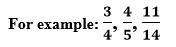
Proper Fraction

2. Improper Fraction: Improper fraction is that fraction where the numerator is greater than the denominator.
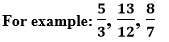
improper Fraction

3. Mixed Fraction: The combination of a whole number and a proper fraction is known as the mixed fraction.
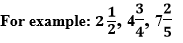
Mixed Fraction

How to multiply fractions?

Let us learn how we can multiply fractions. There are some cases to multiply fractions. These cases are given below:

Case 1: Proper fractions

To multiply the proper fractions, we can follow these steps:

  1. Firstly, we simplify the fractions if they are not in the lowest terms.
  2. Then, multiply the fraction’s numerators to get the new numerator.
  3. Finally, multiply the fraction’s denominators to get the new denominator.
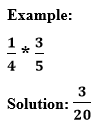
Proper Fraction solution

Case 2: Improper fractions

We will follow all the steps of the proper fraction to solve the Improper fraction.
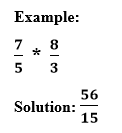
Improper Fraction solution

Case 3: Mixed fractions

To multiply the mixed fractions, we will follow these steps:

  1. Change the mixed fraction into the improper fraction.
  2. Simplify the fraction if it is possible.
  3. Multiply the numerator and denominator to get the new numerator and denominator.
  4. Put the answer in the lowest term of the fraction.
Mixed Fraction

Solution: Now, we convert the above problem of mixed fraction into the improper fraction, as shown below:
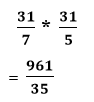
Mixed Fraction solution

We can write the fraction in lowest terms, by dividing the denominator to the numerator.

denominator to the numerator

Related Topics

How to defrag a computer?

How to defrag a computer Topics Covered What is Defragmentation?What is the need of defragmentation?Advantages of DefragmentationWhen to defrag your computerDefragmentation for your SSDDefrag your computer running on windows 10Defrag your computer...

8 minutes read.

How to change the name in Gmail

How to change the name in Gmail Frequently asked questions: How I can change my Gmail nameSteps to change the name of Gmail accountStep to change to the name of Gmail on...

3 minutes read.

How to Cancel Netflix

How to Cancel Netflix Netflix Netflix is a service that lets its members watch a variety of television shows, movies, documentaries, and web series who purchase its subscription. You can enjoy unlimited ad-free...

3 minutes read.

How to find your Computer’s specs?

How to find your computer’s specs The computer specs include the details for every single component in your computer, including your CPU, hard drive space, and even the little things like...

7 minutes read.

How to accelerate the speed of loading images on any website?

No website can be successful without attractive and relevant images or pictures. In the current time, the users want speedy information about their searches on the internet browser. The image...

3 minutes read.

How to convert epoch date to time?

How to convert epoch date to time? The concept of the epoch is vital for computation purposes. Epoch is nothing but the total milliseconds passed from 1st January 1970. This concept...

3 minutes read.

How to mark all emails as read in Gmail?

How to mark all emails as read in Gmail Gmail is extensively used to exchange official documents, expressions, proposals around the world. In the business industry leaving unread mails is considered...

3 minutes read.

How to snooze an email in Gmail

How to snooze an email in Gmail With the popularity of Gmail, today every deal is likely to be discussed in emails. And with so many things rushing in the Inbox,...

3 minutes read.

How to Make Money Online?

How to make money online? Earning money from the traditional way of working is a way harder and requires a lot of manpower and capital. With the increase in the use of the Internet...

9 minutes read.

How to change Gmail Password?

How to change Gmail Password? Today Gmail account is linked to all your application and software unlike, Instagram, Facebook, and Skype, etc. You can log in to different platforms directly using...

6 minutes read.

How to block emails on Gmail?

How to block emails on Gmail? Email or electronic mail is shared on the internet, including content, website URL, signature and different forms of attachments (unlike images, mp4, mp3, Pdf, excel,...

7 minutes read.

How to delete Instagram account?

What is Instagram? Instagram is used for sharing the images and videos on social networking websites through various platforms such as iOS, Android, Windows Phones, and Desktop. In 2010, Instagram was...

3 minutes read.

How to compress jpeg file to 100kb?

Nowadays, everyone loves to share cool snapshots on social media handles. Before putting the images on any site, editing is an integral part. File compression is one of method by...

3 minutes read.

How to Find Connected Components in Graph

In this article, we are going to find connected components in a graph by building a program in C++ language. We are going to use different approaches to build the...

4 minutes read.

How to find Computer name on Windows?

How to find computer name on Windows The computer’s name is undoubtedly useful and needed at times to resolve technical issues or downloading any new software or pairing your system with...

4 minutes read.

How to Create Folders in Gmail

How to Create Folders in Gmail Gmail is a leading email service provider and is used by 1.5 billion-plus active users worldwide. All Gmail professional users receive at least dozens of...

6 minutes read.

How to add Signature to your Mail

How to add Signature to your Mail Gmail has formed an inevitable aura around the business world. Gmail was launched in the year 2004 as an email service provider with very...

7 minutes read.

How to take a Screenshot on computer?

How to take a Screenshot on computer The ScreenShot feature is widely used to procure the content of the screen as an image. This feature was introduced in the late ’90s,...

8 minutes read.

How to unarchive in Gmail?

How to unarchive in Gmail Earlier, we have learned how to archive an email on a computer or a phone device via the Google app. But archiving is not sufficient; you...

3 minutes read.

How to take a screenshot on windows

How to take a screenshot on windows A screenshot is a picture taken on your computer. In this section, we will learn how to take screenshot on windows operating system. We can take screenshot...

5 minutes read.