×

Miscellaneous Exercise of conditional statements and Loop

We have the already worked with syntax and examples of conditional statements and loops in the previous tutorials. In this tutorial, we will learn how to work with both together.  We will explain how to run the loops based on objectives and will try to develop logic as per the specified criteria. In VBA or any other programming language, the whole game is based on logic. There are many ways to solve or encounter any task. The smarter you thought and built the logic, the shorter the code becomes, and hence, increasing the productivity of the code.

In the below, we have given some examples, try to solve them first without looking at the solutions. Your code may be lengthy at first, but slowly you will gain pace and learn how to code to the point and become a VBA developer.

NOTE: Always try to use fewer variables while programming.

Example 1

Objective: Categorize the student’s basis on the criterion given below

  • Less Than 100 - Fail
  • Between 100 & 150 - Pass
  • More than 150 Excellent
Sub Miscellaneous_Example1()
 Dim rng As Range
 Dim cell As Range
 Set rng = Range("E2:E11") 
     'rng is a Range collection and For-Each is moving into each cell of rng collection
     For Each cell In rng
          ‘nested-if to check for the various conditions 
         If cell < 100 Then
             Cells(cell.Row, 6) = "Fail"
         ElseIf cell >= 100 And cell <= 150 Then 
             Cells(cell.Row, 6) = "Pass"
         ElseIf cell > 150 Then
             Cells(cell.Row, 6) = "Excellent"
         End If
     Next
 End Sub 

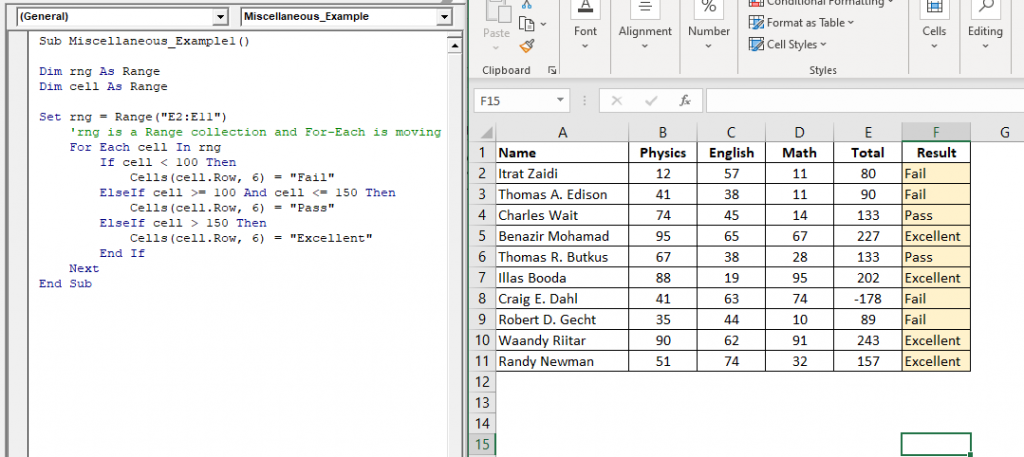
Output: Press F5 for the output (for sone laptops press function+f5). You will get the following output

Name Physics English Math Total Result
Itrat Zaidi 12 57 11 80 Fail
Thomas A. Edison 41 38 11 90 Fail
Charles Wait 74 45 14 133 Pass
Benazir Mohamad 95 65 67 227 Excellent
Thomas R. Butkus 67 38 28 133 Pass
Illas Booda 88 19 95 202 Excellent
Craig E. Dahl 41 63 74 -178 Fail
Robert D. Gecht 35 44 10 89 Fail
Waandy Riitar 90 62 91 243 Excellent
Randy Newman 51 74 32 157 Excellent

Example 2 (Mostly Asked Interview Question).

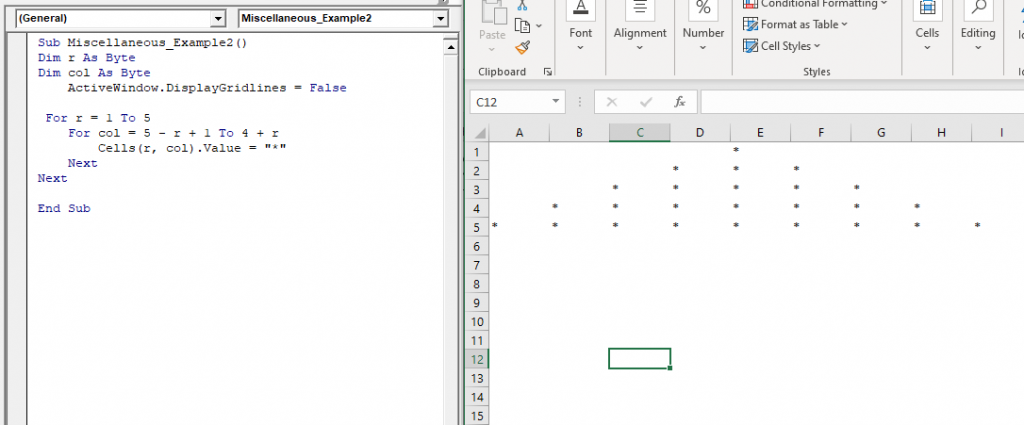
Objective:  Print Pyramid Pattern and write a macro that creates pyramid using VBA:

Sub Miscellaneous_Example2()
 Dim r As Byte
 Dim col As Byte
     ‘will put off the gridlines from the excel sheet.
     ActiveWindow.DisplayGridlines = False 
 For r = 1 To 5 
 ‘step 1: r=1, col 5 to 5: code will run once, hence printing * once at cell (1,5) position.
 ‘step 2: r=2, col 4 to 6: code will run thrice, hence printing * three times at cell (2, 4), cell (2,5), cell (2,6)
 ‘step 3: r=3, col 3 to 7: code will run five times, hence printing * five times at cell (3,3), cell (3,4), cell (3,5), cell (3,6), cell (3,7)
 ‘step 4: : r=4, col 2 to 8: code will run seven times, hence printing * seven times at cell (4,2), cell (4,3), cell (4,4), cell (4,5), cell (4,6), cell (4,7), cell (4,8) 
 ‘step 5: : r=5, col 1 to 9: code will run five times, hence printing * five times at cell (5,1), cell (5,2), cell (5,3), cell (5,4), cell (5,5), cell (5,6), cell (5,7), cell (5,8) position.
     For col = 5 - r + 1 To 4 + r
         Cells(r, col).Value = "*"
     Next
 Next
 End Sub 

Output: Press F5 for the output (for sone laptops press function+f5). You will get the following output

                    *               
               *    *    *           
          *    *    *    *    *       
     *    *    *    *    *    *    *   
*    *    *    *    *    *    *    *    *
Miscellaneous Exercise of conditional statements and Loop2

Example 3

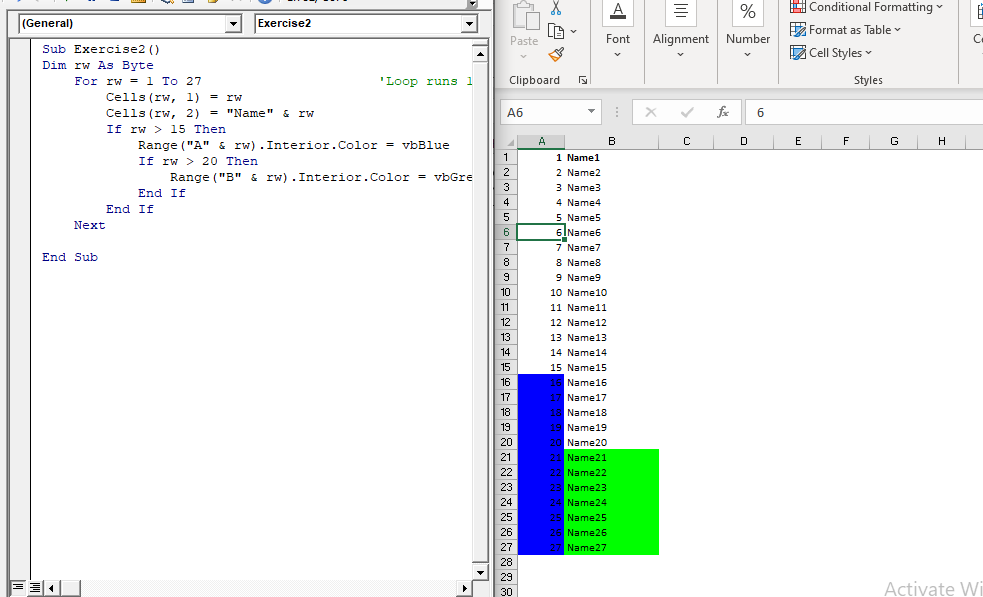
Objective:  Write a loop procedure that Fills the table as shown in the image on the right:

Column "S.No" will go from 1 to 27 and Column "Name" will have "Name+SlNo (i.e. Name1, Name2)

                       > If the "Sl.No" is greater than 20, highlight the cells of column B in Blue,

                       > If the "SI.No" is greater than 15, highlight the cells of column A in Green

Sub Miscellaneous_Example3()
 Dim rw As Byte
  For rw = 1 To 25                      'Loop runs 10 times as the upperbound is set to 10
         Cells(rw, 1) = rw
         Cells(rw, 2) = "Name" & rw
         If rw > 15 Then
             Range("A" & rw).Interior.Color = vbBlue 
             If rw > 20 Then
                 Range("B" & rw).Interior.Color = vbGreen
             End If
         End If
     Next 
 End Sub 

Output: Press F5 for the output (for sone laptops press function+f5). You will get the following output

1 Name1
2 Name2
3 Name3
4 Name4
5 Name5
6 Name6
7 Name7
8 Name8
9 Name9
10 Name10
11 Name11
12 Name12
13 Name13
14 Name14
15 Name15
16 Name16
17 Name17
18 Name18
19 Name19
20 Name20
21 Name21
22 Name22
23 Name23
24 Name24
25 Name25
26 Name26
27 Name27
Miscellaneous Exercise of conditional statements and Loop3

Related Topics

Excel VBA Sqr Function

VBA Sqr Function: The Sqr function in VBA returns the square root for the specified number. Syntax Sqr (Number) Parameter Number (required) – This parameter represents a positive numeric value that you want to calculate...

1 minute read.

Excel VBA Asc Function

VBA Asc Function: The Asc function in VBA returns an integer showing the character code for the first character of a given string. Syntax Asc (String) Parameter String (required) – This parameter represents the text...

1 minute read.

Excel VBA Conditional Statement

Conditional Statement in VBA Excel Conditional Statements in Excel VBA are one of the most powerful and useful features in programming, this will give you to perform comparisons to decide or...

2 minutes read.

VBA Regex

What is a Regex? Regex stands for Regular Expression is basically a pattern matching strings within another string. They are supported in many languages, including .net, C++, Python, etc. They are...

5 minutes read.

Excel VBA Time Function

Excel VBA Time Function: The Time function in VBA returns the current time. Syntax Time () Parameter NA Return This function returns the current time.  Example 1 Sub TimeFunction_Example1() ' returns the current time Dim time_val...

1 minute read.

Introduction to Visual Basic Editor Window

How to enable the Developer Ribbon Tab? In order to work with VBA, users need to make a small change in Excel to display a new tab (Developer) at the top of the...

5 minutes read.

Debugging in Excel VBA

Debugging in VBA: Debugging is a technique used to fix errors in programming languages. In Excel VBA, we have different ways by which you can identify the error in the...

2 minutes read.

Excel VBA Exp Function

VBA Exp Function: The Exp function in VBA returns the value of the exponential function ex (mathematical constant ‘e’ raised to specified power) for the given value of x. Syntax Exp (Number) Parameter Number (required) –This parameter represents...

1 minute read.

Excel VBA Str Function

VBA Str Function: The Str function in VBA converts the given number into a string representation of that number. Syntax Str (Number) Parameter Number (required) – This parameter represents the numeric value that you want...

1 minute read.

Excel VBA Array

Introduction to VBA Array An array is a type of variable that holds more than one piece of data. In VBA, you can refer to a specific variable (element) of an array by using...

5 minutes read.

VBA Type Mismatch Error

What is a Type Mismatch Error? VBA Type Mismatch Error is a run time error in excel, which often occurs when the data types contained in a VBA code are not matched...

3 minutes read.

Excel VBA IsError Function

VBA IsError Function: The IsError function in VBA returns a Boolean value showing whether the specified Expression represents an error or not. Syntax IsError (Expression) Parameter Expression (required)- This parameter represents the variant that you...

1 minute read.

VBA TimeSerial Function

The TimeSerial function in VBA returns a Time for the specified hour, minute, and second. Syntax TimeSerial (Hour, Minute, Second) Parameter Hour (required) – This parameter represents an integer (0 to 23), signifying the hour of the time. Minute...

2 minutes read.

Excel VBA: IF THEN Statement

VBA Excel: IF THEN StatementThis conditional statement enables you to check one condition and on the basis of that then run one or multiple statements if the condition holds. If...

1 minute read.

VBA Color Index Property

What is Color Index Property? The Excel VBA Color Index is used to change the color for the cell or range of cells or text (located under the Font section). It sets the color...

5 minutes read.

VBA Cell

What is VBA cell? Cells is one of the elements (workbook, worksheet, range) in Excel VBA, which refers to cells of the Excel worksheet.  In VBA, the cell is also a property...

5 minutes read.

Excel VBA Minute Function

The Minute function in VBA returns the minute component for the specified time. Syntax Minute (Time) Parameter Time (required) – This parameter represents the time. Return This function returns the minute component for the specified time. Example 1 Sub MinteFunction_Example1() ...

1 minute read.

Excel VBA IsNumeric Function

VBA IsNumeric Function: The IsNumeric function in VBA returns a Boolean value showing whether the specified Expression contains a numeric value or not. Syntax IsNumeric (Expression) Parameter Expression (required)- This parameter represents the variant that...

1 minute read.

Excel VBA Day Function

The function Day in VBA returns the day number (from 1 to 31) for the given date value. Syntax Day (Date) Parameter Date (required) – This parameter represents the date. Return This function returns the day...

1 minute read.

Excel VBA Hex Function

VBA Hex Function: The Hex function in VBA converts the given number into hexadecimal notation and returns the result as a string. Syntax Hex (Number) Parameter Number (required) – This parameter represents the numeric value...

1 minute read.