
×

Excel VBA FormatPercent Function

VBA FormatPercent Function: The FormatPercent function in VBA is used to apply a percent format to a numeric expression, and it returns the result as a string.

Syntax

FormatPercent (Expression, [NumDigitsAfterDecimal], [IncludeLeadingDigit],
[UseParensForNegativeNumbers], [GroupDigits])

Parameter

Expression (required) – This parameter represents the expression that you want to format.

NumDigitsAfterDecimal (optional) – This parameter represents the number of digits that should be shown after the decimal. The default value is -1.

IncludeLeadingDigit (optional) – This parameter represents the vbTriState enumeration value, stating whether a leading zero should be shown for fractional values. The default value is set to vbUseDefault.

It can take the following values:

  • vbFalse – It does not display a leading zero.
  • vbTrue – It displays a leading zero.
  • vbUseDefault (default)– It uses the default computer settings.

UseParensForNegativeNumbers (optional) – This parameter represents the vbTriState enumeration value, stating whether negative numbers should be encased within parentheses. The default value is set to vbUseDefault.

It can take the following values:

  • vbFalse – It does not encase negative numbers in parentheses.
  • vbTrue – It encases the negative numbers in parentheses.
  • vbUseDefault (default)– It uses the default computer settings.

GroupDigits (optional) – This parameter specifies whether the number should be grouped (into thousands, etc.), using the group delimiter that is specified on the computer's regional settings. The default value is set to vbUseDefault.

It can take the following values:

  • vbFalse – It does not group digits.
  • vbTrue – It groups the digits.
  • vbUseDefault (default)– It uses the default computer settings.

Return

This function returns a string value after applying the percentage format to the supplied numeric expression.

Example 1

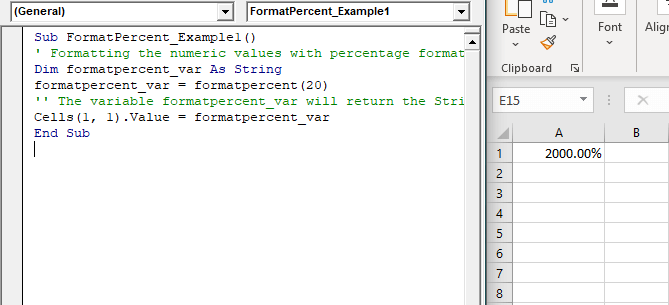
Sub FormatPercent_Example1()
 ' Formatting the numeric values with percentage formats.
 Dim formatpercent_var As String
 formatpercent_var = formatpercent(20)
 '' The variable formatpercent_var will return the String "2000.00%".
 Cells(1, 1).Value = formatpercent_var
 End Sub 

Output

2000.00%
VBA FormatPercent Function

Example 2

Sub FormatPercent_Example2()
 ' Formatting the numeric values with percentage formats.
 Dim formatpercent_var As String
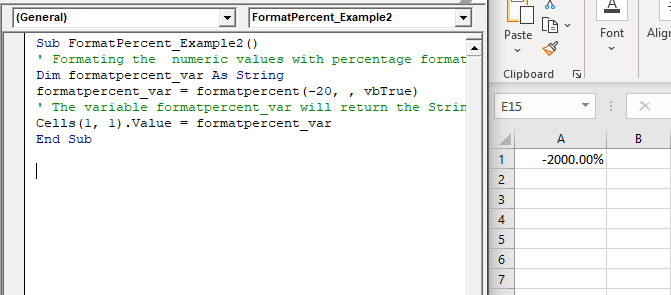
 formatpercent_var = formatpercent(-20, , vbTrue)
 ' The variable formatpercent_var will return the String "-2000.00%".
 Cells(1, 1).Value = formatpercent_var
 End Sub 

Output

-2000.00%
VBA FormatPercent Function

Example 3

Sub FormatPercent_Example3()
 ' Formatting the numeric values with percentage formats.
 Dim formatpercent_var As String
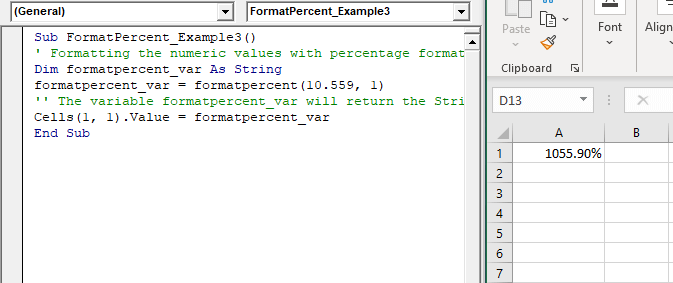
 formatpercent_var = formatpercent(10.559, 1)
 '' The variable formatpercent_var will return the String "1055.90%".
 Cells(1, 1).Value = formatpercent_var
 End Sub 

Output

1055.90%
VBA FormatPercent Function

Example 4

Sub FormatPercent_Example4()
 ' Formatting the numeric values with percentage formats.
 Dim formatpercent_var As String
 'initializing with string "Hello VBA"
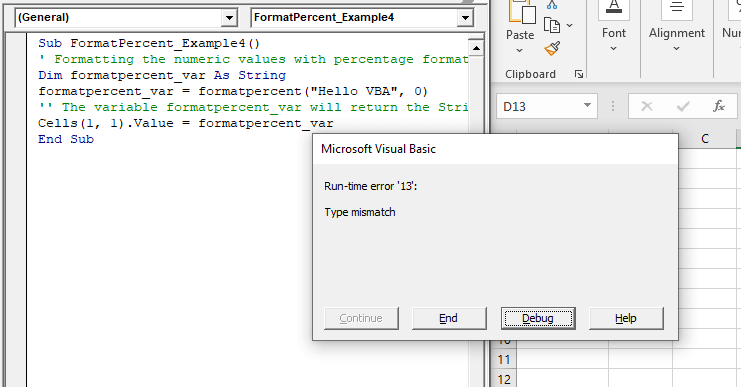
 formatpercent_var = formatpercent("Hello VBA", 0)
 '' The variable formatpercent_var type mis match run time error.
 Cells(1, 1).Value = formatpercent_var
 End Sub 

Output
VBA FormatPercent Function

Related Topics

Excel VBA Format Function

VBA Format Function The format function in VBA applies a specified format to an expression and returns the result as a string. Syntax Format (Expression, [Format], [FirstDayOfWeek] , [FirstWeekOfYear] ) Parameter Expression (required)- This parameter represents the expression that you want to format. Format...

3 minutes read.

Excel VBA Val Function

VBA Val Function: The Val function in VBA converts the given string into a numeric value. This function ignores spaces and continues to read the characters after space(s). It stops...

1 minute read.

Excel VBA Now Function

Excel VBA Now Function: The Now function in VBA returns the current date and time.  Syntax Now () Parameter NA Return This function returns the current date and time.  Example 1 Sub NowFunction_Example1() 'It will return...

1 minute read.

Excel VBA AutoFilter

One of the reasons for Excel VBA’s popularity is its capability to filter and analyze data from huge database with the help of a method known as AutoFilter. This method permits a...

4 minutes read.

Excel VBA Year Function

Excel VBA Year Function: The Year function in VBA returns the four-digit year for the specified date. Syntax Year (Date) Parameter Date (required) – This parameter represents the significant date. Return This function returns the four-digit year...

1 minute read.

Excel VBA Weekday Function

Excel VBA Weekday Function: The TimeValue function in VBA returns an integer (1 to 7), signifying the day of the week for the specified date. Syntax Weekday (Date, [FirstDayOfWeek]) Parameter Date (required) – This parameter...

2 minutes read.

Steps to Create a Chart in VBA

Steps to Create a Chart Charts are created either by directly working with the chart variable object that defines the chart data or by ChartObject method. In order to get to...

3 minutes read.

Excel VBA Trim Function

The Trim function in VBA removes the leading and trailing spaces from the specified string. Syntax Trim (String) Parameter String (required) – This parameter represents the string from which you want to remove the leading and...

1 minute read.

Excel Objects in VBA

What are Excel Objects? The Excel objects belong to the entities that make up an Excel Workbook, Worksheets, Columns, Rows, Cell Ranges, etc. Each object in Excel has loads of Properties that are...

6 minutes read.

Excel VBA Day Function

The function Day in VBA returns the day number (from 1 to 31) for the given date value. Syntax Day (Date) Parameter Date (required) – This parameter represents the date. Return This function returns the day...

1 minute read.

Excel VBA Time Function

Excel VBA Time Function: The Time function in VBA returns the current time. Syntax Time () Parameter NA Return This function returns the current time.  Example 1 Sub TimeFunction_Example1() ' returns the current time Dim time_val...

1 minute read.

Excel VBA Month Function

The Mont function in VBA returns the month number for the specified date. Syntax Month (Date) Parameter Time (required) – This parameter represents the date. Return This function returns the month number for the specified date. Example 1 Sub MonthFunction_Example1() ...

1 minute read.

VBA ListBox

What is a ListBox? ListBox refers to a permanently displayed control (usually box-shaped) which contains a list of objects (or attribute, or elements) from which the user can select single or multiple attributes....

8 minutes read.

Excel VBA IsMissing Function

VBA IsMissing Function: The IsMissing function in VBA checks if any parameter to a procedure is missing or not. It returns a Boolean value True if the specified parameter has not been...

1 minute read.

Excel VBA Timer Function

Excel VBA Timer Function: The Timer function in VBA returns a Single data type, evaluating the number of seconds that have elapsed since midnight of the current day. Syntax Timer () Parameter NA Return This...

1 minute read.

Excel VBA Error Function

VBA Error Function: The Error function in VBA returns the error message corresponding to a supplied error code. Syntax Error ([ErrorNumber]) Parameter ErrorNumber (optional) – This parameter represents the required error number. By default, the...

1 minute read.

Excel VBA While wend Loop

WHILE wend loop is used when the user is not sure how many times they want to execute the VBA code within the program. With a WHILE loop, the loop body may...

3 minutes read.

Userform Events

What are Events? Anything you do in to trigger an excel file is an event (an action). Example: If you want a greeting message ‘Good Day’ whenever an excel file is...

7 minutes read.

Excel VBA ABS Function

VBA ABS Function: The ABS function in VBA returns the absolute value of the specified number. Syntax Abs (Number) Parameter Number (required) – This parameter represents the number that you want the absolute value of. Return This...

1 minute read.

VBA Find Function

VBA Find Function The Excel VBA FIND function finds any information in your Excel. It can be used on a Range object on the worksheet. It works the same, unlike the Excel Find &...

6 minutes read.