×

Excel VBA IsEmpty Function

VBA IsEmpty Function: The IsEmpty function in VBA returns a Boolean value showing whether the specified Expression is Empty (variant has not been declared) or not.

Syntax

IsEmpty (Expression)

Parameter

Expression (required)- This parameter represents the variant that you want to check.

Return

This function returns a Boolean value True if the given expression is empty else it returns False.

Example 1

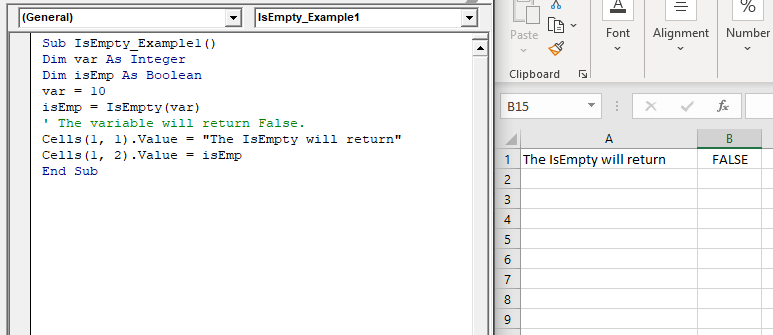
Sub IsEmpty_Example1()
 Dim var As Integer
 Dim isEmp As Boolean
 var = 10
 isEmp = IsEmpty(var)
 ' The variable will return False.
 Cells(1, 1).Value = "The IsEmpty will return"
 Cells(1, 2).Value = isEmp
 End Sub 

Output

The IsEmpty will return FALSE
VBA IsEmpty Function

Example 2

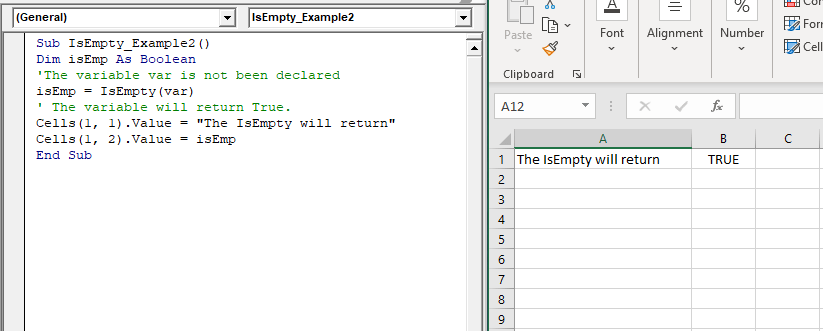
Sub IsEmpty_Example2()
 Dim isEmp As Boolean
 'The variable var is not been declared
 isEmp = IsEmpty(var)
 ' The variable will return True.
 Cells(1, 1).Value = "The IsEmpty will return"
 Cells(1, 2).Value = isEmp
 End Sub 

Output

The IsEmpty will return TRUE
VBA IsEmpty Function

Example 3

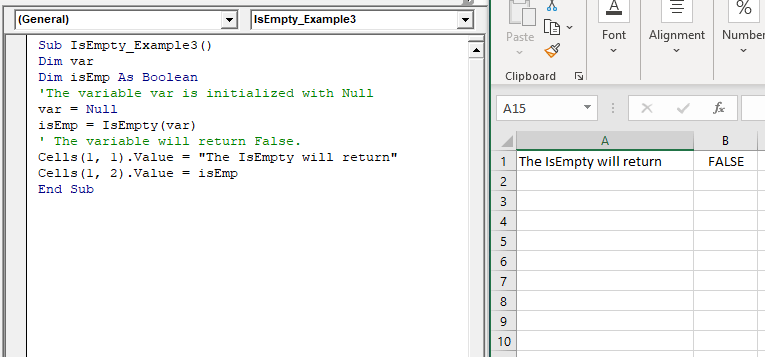
Sub IsEmpty_Example3()
 Dim var
 Dim isEmp As Boolean
 'The variable var is initialized with Null
 var = Null
 isEmp = IsEmpty(var)
 ' The variable will return False.
 Cells(1, 1).Value = "The IsEmpty will return"
 Cells(1, 2).Value = isEmp
 End Sub 

Output

The IsEmpty will return FALSE
VBA IsEmpty Function

Related Topics

Excel VBA Array

Introduction to VBA Array An array is a type of variable that holds more than one piece of data. In VBA, you can refer to a specific variable (element) of an array by using...

5 minutes read.

Excel VBA IsArray Function

VBA IsArray Function: The IsArray function in VBA returns a Boolean, showing whether the given variable is an Array or not. Syntax IsArray (VarName) Parameter VarName (required)- This parameter represents the variable that you want...

1 minute read.

VBA Find Function

VBA Find Function The Excel VBA FIND function finds any information in your Excel. It can be used on a Range object on the worksheet. It works the same, unlike the Excel Find &...

6 minutes read.

Excel VBA CDbl Function

VBA CDbl Function: The CDbl function in VBA converts an expression into a Double data type. Syntax CDbl (Expression) Parameter Expression (required) - This parameter represents the expression that that you want to convert to...

1 minute read.

Excel VBA IsObject Function

VBA IsObject Function: The IsObject function in VBA returns a Boolean value showing whether the specified variable represents an Object variable type or not. Syntax IsObject (Expression) Parameter Expression (required)- This parameter represents the...

1 minute read.

VBA Dim

What is Dim? DIM or Dimension or Declare in Memory is a keyword that is used in VBA to declare a variable with the different data types (Integer, String, variable, Boolean, Double, etc.)...

7 minutes read.

Excel VBA Hex Function

VBA Hex Function: The Hex function in VBA converts the given number into hexadecimal notation and returns the result as a string. Syntax Hex (Number) Parameter Number (required) – This parameter represents the numeric value...

1 minute read.

Excel VBA CDec Function

VBA CDec Function: The CDec function in VBA converts an expression into a Decimal data type. Syntax CDec (Expression) Parameter Expression (required) – This parameter represents the expression that you want to convert to a...

1 minute read.

Excel VBA Second Function

Excel VBA Second Function: The Second function in VBA returns the second element for the specified time.  Syntax Second (Time) Parameter Time (required) – This parameter represents the time. Return This function returns the second...

1 minute read.

VBA Subscript out of Range

What is Subscript out of Range? The VBA Subscript out of Range error (which is also called as Run-Time Error 9) mostly triggers when the user selects any cell, sheet, or workbook which does...

5 minutes read.

VBA ListBox

What is a ListBox? ListBox refers to a permanently displayed control (usually box-shaped) which contains a list of objects (or attribute, or elements) from which the user can select single or multiple attributes....

8 minutes read.

Excel VBA Filter Function

VBA Filter Function: The Filter function in VBA returns a subset for the given string array, based on specified criteria. Syntax Filter (SourceArray, Match, [Include], [Compare]) Parameter SourceArray (required) – This parameter the array of Strings that you...

2 minutes read.

Excel VBA: DO WHILE….Loop

DO WHILE….Loop The “Do While” Loop is the same, unlike the FOR statement, just that it will keep on looping till the specified condition is true. It is used when we want to...

3 minutes read.

VBA Object Required

What is Object Required Error? VBA Object Required is a run time error which occurs when the user does not define a valid object qualifier, or the assigned object doesn’t exist in the...

6 minutes read.

Excel VBA Oct Function

VBA Oct Function: The Oct function in VBA converts the given number into octal notation and returns the result as a string. Syntax Oct (Number) Parameter Number (required) – This parameter represents the numeric value...

1 minute read.

Excel VBA Chr Function

VBA Chr Function: The Chr function in VBA returns the character equivalent to a supplied character code between 0 and 255. Syntax Chr (CharCode) Parameter CharCode (required) – This parameter represents the character code for...

1 minute read.

Excel VBA CByte Function

VBA CByte Function: The CByte function in VBA converts an expression into a Byte data type. Syntax CByte (Expression) Parameter Expression (required) - This parameter represents the expression that that you want to convert to...

1 minute read.

Excel VBA IsNull Function

VBA IsNull Function: The IsNull function in VBA returns a Boolean, indicating whether a supplied expression is Null. Syntax IsNull (Expression) Parameter Expression (required)- This parameter represents the name of the argument that you want...

1 minute read.

Excel VBA: Select … Case Statement

Select … Case Statement When a group of statements is executed, depending upon the value of an Expression, then Switch Case is used.  If you have several conditions to check, then the If condition...

4 minutes read.

Excel VBA: IF…..THEN …ELSE Statement

VBA : IF…..THEN …ELSE Statement: This function enables you to check one condition and, based on that, then run one of the two statement blocks present. If the ‘IF’ condition...

2 minutes read.