
×

Excel VBA Year Function

Excel VBA Year Function: The Year function in VBA returns the four-digit year for the specified date.

Syntax

Year (Date)

Parameter

Date (required) – This parameter represents the significant date.

Return

This function returns the four-digit year for the specified date.

Example 1

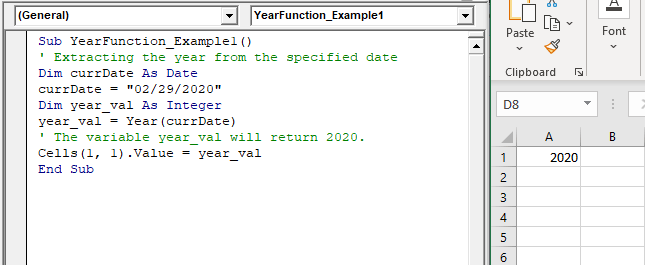
Sub YearFunction_Example1()
 ' Extracting the year from the specified date
 Dim currDate As Date
 currDate = "02/29/2020" 
 Dim year_val As Integer
 year_val = Year(currDate)
 ' The variable year_val will return 2020. 
 Cells(1, 1).Value = year_val
 End Sub 

Output

2020
VBA Year Function

Example 2

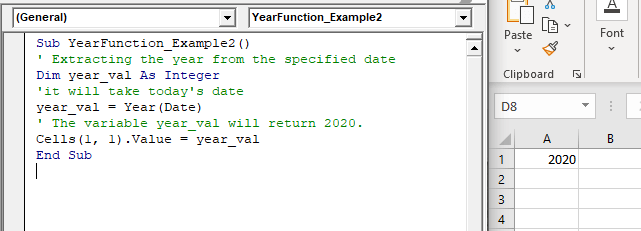
Sub YearFunction_Example2()
 ' Extracting the year from the specified date
 Dim year_val As Integer
 'it will take today's date
 year_val = Year(Date)
 ' The variable year_val will return 2020.
 Cells(1, 1).Value = year_val
 End Sub 

Output

2020
VBA Year Function

Example 3

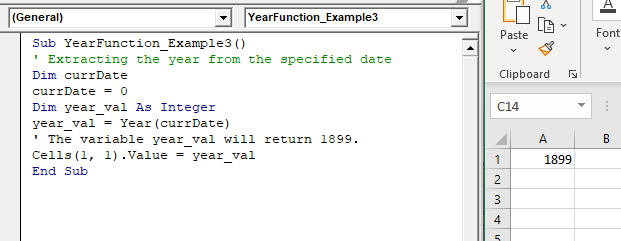
Sub YearFunction_Example3()
 ' Extracting the year from the specified date
 Dim currDate
 currDate = 0
 Dim year_val As Integer 
 year_val = Year(currDate)
 ' The variable year_val will return 1899. 
 Cells(1, 1).Value = year_val 
 End Sub 

Output

1899
VBA Year Function

Related Topics

VBA Pivot Table

What is a Pivot Table? One of the most powerful features of Excel VBA is the Pivot Table. A pivot table is a VBA tool that is used to create summary...

3 minutes read.

Excel VBA Weekday Function

Excel VBA Weekday Function: The TimeValue function in VBA returns an integer (1 to 7), signifying the day of the week for the specified date. Syntax Weekday (Date, [FirstDayOfWeek]) Parameter Date (required) – This parameter...

2 minutes read.

Excel Objects in VBA

What are Excel Objects? The Excel objects belong to the entities that make up an Excel Workbook, Worksheets, Columns, Rows, Cell Ranges, etc. Each object in Excel has loads of Properties that are...

6 minutes read.

Four VBA Clear methods

Four VBA Clear methods In Microsoft Excel, many times, a situation arises where the user wants to clear the data or any specific range of data. What if the user automates this task with...

6 minutes read.

Excel VBA: DO WHILE….Loop

DO WHILE….Loop The “Do While” Loop is the same, unlike the FOR statement, just that it will keep on looping till the specified condition is true. It is used when we want to...

3 minutes read.

Excel VBA Error Handling

What is Errors and Types of Error? Errors are conditions that resist the flow of the program or enables a problem while running any programming. There are three types of errors in VBA...

5 minutes read.

Excel VBA Str Function

VBA Str Function: The Str function in VBA converts the given number into a string representation of that number. Syntax Str (Number) Parameter Number (required) – This parameter represents the numeric value that you want...

1 minute read.

VBA Not Equal Operator

What is VBA Not Equal Operator? VBA Not Equal binary operator (“<>”) is a logical function that is used to check if the specified values are not equal or not. This...

5 minutes read.

Excel VBA While wend Loop

WHILE wend loop is used when the user is not sure how many times they want to execute the VBA code within the program. With a WHILE loop, the loop body may...

3 minutes read.

Excel VBA Second Function

Excel VBA Second Function: The Second function in VBA returns the second element for the specified time.  Syntax Second (Time) Parameter Time (required) – This parameter represents the time. Return This function returns the second...

1 minute read.

Excel VBA StrReverse Function

The StrReverse function returns a String after reversing the given String. Syntax StrReverse (Expression) Parameter Expression (required) – This parameter represents the String that you want to reverse. Return This function returns a String after reversing the given String. Example...

1 minute read.

Excel VBA DatePart Function

The DatePart function in VBA returns a part (day, month, week, etc.) for the specified date and/or time. Syntax DatePart (Interval, Date, [FirstDayOfWeek], [FirstWeekOfYear]) Parameter Interval (required) – This parameter represents a string specifying the interval to be used. It can...

2 minutes read.

Excel VBA Month Function

The Mont function in VBA returns the month number for the specified date. Syntax Month (Date) Parameter Time (required) – This parameter represents the date. Return This function returns the month number for the specified date. Example 1 Sub MonthFunction_Example1() ...

1 minute read.

Excel VBA Year Function

Excel VBA Year Function: The Year function in VBA returns the four-digit year for the specified date. Syntax Year (Date) Parameter Date (required) – This parameter represents the significant date. Return This function returns the four-digit year...

1 minute read.

Procedures in VBA

Procedures in VBA A procedure is a block of statements or units of computer code that performs some action. It is enclosed with a declaration statement, and its primary purpose is to carry out...

3 minutes read.

Excel VBA CCur Function

The CCur function in VBA is used to convert an expression into a Currency data type. It can take a maximum of 15 digits to the left of the decimal place and...

1 minute read.

Excel VBA Atn Function

VBA Atn Function: The Atn function in VBA returns the arctangent between quadrant -?/2 and +?/2 for the specified number, in radians. Syntax Atn (Number) Parameter Number (required) – This parameter represents the number that...

1 minute read.

Excel VBA: Select … Case Statement

Select … Case Statement When a group of statements is executed, depending upon the value of an Expression, then Switch Case is used.  If you have several conditions to check, then the If condition...

4 minutes read.

VBA Type Mismatch Error

What is a Type Mismatch Error? VBA Type Mismatch Error is a run time error in excel, which often occurs when the data types contained in a VBA code are not matched...

3 minutes read.

Excel VBA Time Function

Excel VBA Time Function: The Time function in VBA returns the current time. Syntax Time () Parameter NA Return This function returns the current time.  Example 1 Sub TimeFunction_Example1() ' returns the current time Dim time_val...

1 minute read.