
Module in ES6
Module in ES6
In ES6, the modules can be defined as a small chunk of program code stored in a file. The modules are used to modularize the source code with the help of partitioning it into small separate pieces of code. These code pieces can be imported for other purposes. The modules also help us to manage the source code, reuse the code, and debug the code. The Module can be used after it is loaded.
Module in JavaScript is an important concept. It is a new feature introduced in ES6. We can also use the concept of the module in ES5 with the help of the Transforming process. Transforming is a process used to change the code of one language into a similar language.
We can use the module transpiler tool to change the ES6 module into an ES5 module in JS style or AMD. The AMD (Asynchronous Module Definition) is used as a JavaScript specification. We can also use Grunt, babel, and Gulp tool to perform module transpilation.
Exporting a Module
ES6 helps us to export the primitive value, object, function, and class with the help of the export keyword. The term export can be divided into following two types:
Default Export: It helps us to export one or more than one value with the help of the export keyword.
Named Export: The export that can be identified by its name is known as a Named Export. It helps us to export the functions and multiple variables with the help of the export keyword.
Importing a Module
We can import a module with the help of the import keyword. It helps us to import the value which is exported from a module. The import keyword is also used to import function, variable, and class from one to another module. If we want to import a module, we need to define the path of modules.
If we import named export, then we need to use the same name for the module object.
If we import the default export, then we can use different names for the module object.
Now, we will discuss the imports and exports with their syntax and examples.
Named Export and Imports
The Named exports are differentiated by their names. We can import the function, class, and variable (exported by the named export) with the same name. We can also import and export multiple functions by using the named export.
Here, we have the syntax to see how we can export the function, class, and variable by using the named export.
Syntax
class Samsung                               // Named export in class
{
          // methods
          // properties
}
export {Samsung};                       // Named export
function display(){                       // Name export in function
}
export {display};
const x = 100;
export {x};
A module can contain more than one Named export. We can also work with multiple named export with the help of the following syntax.
class Samsung
{
          // Properties
          // methods
}
function display(){
}
const x = 100;
export {Samsung, display};
Importing the Named Export
We can import the properties of a module exported by other modules with the help of a static import statement. The imported modules always lie inside the strict mode, whether they are declared or not in the same mode.
Syntax
Application.js
Import {Samsung, display} from ‘./Mobile.js’;
We can import all export statements by importing them separately. But it is complex to perform if we have more than one named export. We can perform it as given below.
Import * as device from ‘./Mobile.js’;
// Here, the device name is alias and module name are Mobile.js.
Now, we will define a class Samsung inside the module Mobile.js. We can perform it as given below when we try to access it with the help of an alias.
device.Samsung      // Samsung is a class name
device.display        //  display is a function name
device.x                // x is a variable name
Default Exports and Imports
A module only contains a single default export. We can import a default export in a module by using any name.The default export is used to export variable, class, and function. We can export only one export at a time in default export.
Here, we have the syntax of default export in variable, class, and function.
Syntax
class Samsung                                   // class with Default Export
{
          // Properties
          // methods
}
export default Samsung;                      // Default Export
function display(){                              // function with Default Export
}
export default display;
const y = 200;                                     // Default Export in variables
export default y;
Importing the Default Export
We can import the properties of a module that are exported by other modules with the help of static export statements. The imported modules always lie inside the strict mode, whether they are declared or not in the same mode.
Syntax
Mobile.js
class Samsung
{
          // Properties
// methods
}
export default Samsung;
Application,js
import Samsung from ‘./Mobile.js’
Example
Here, we will discuss the default export with the help of the following example.
<!DOCTYPE html>
<html lang="en">
<head>
    <meta charset="UTF-8">
    <meta name="viewport" content="width=device-width, initial-scale=1.0">
    <meta http-equiv="X-UA-Compatible" content="ie=edge">
    <script type = "module" src = "Application.js"></script>
    <title>Document</title>
</head>
<body>
    <h2>ES6 Modules import and export</h2>
    <h3>Default Modules import and export</h3>
</body>
</html>
Mobile.js
class Display{
    show(){
        console.log("Hello ES6 :)");
console.log("Default Export and Import Sample");
    }
}
export default Display;
Application.js
import Display from "./Mobile.js";
const y = new Display();
x.show();
Output
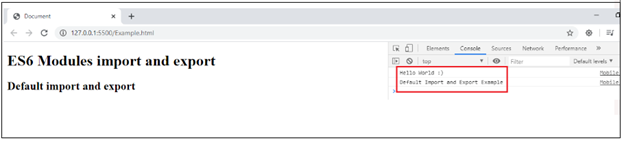
Now, we execute the Sample.html file with the help of server, and press Ctrl+Shift+I to open the terminal. After the execution of the code, we got the following output:
Cyclic Dependency in ES6
The term cyclic dependency refers to as a relation between two modules that confide on each other. These modules also can be called as recursive modules. In ES6, the modules support the cyclic dependency.
The two modules P and Q is said to be cyclic dependent if P imports Q, and Q imports P in direct or indirect manner.
For Example: Suppose we have three modules P, Q, and R. Their dependency chain is like-
P?>Q P depends upon Q.
Q ?>R Q depends upon R.
R ?>P R depends upon P.
JS library and many other libraries supports the cyclic dependency, but many times the user face some problems during the importing and using named export from a cyclic dependent module. ES6 provide a solution to solve this problem. ES6 wrap the value instead of value itself in the export. It means we can make connectivity with the variables declared inside the module body.
Here, we have an example to understand the above concept.
Example
<!DOCTYPE html>
<html lang="en">
<head>
    <meta charset="UTF-8">
    <meta name="viewport" content="width=device-width, initial-scale=1.0">
    <meta http-equiv="X-UA-Compatible" content="ie=edge">
    <script type = "module" src = "Application.js"></script>
    <title>Document</title>
</head>
<body>
    <h2>ES6 Cyclic Dependency</h2>
</body>
</html>
Mobile.js
export let number = 0;
export function display()
{
          number++;
}
Application.js
Import {display, number} from ‘./Mobile.js’;
Console.log(number);
display();
console.log(number);
Output
Now, we execute the html file with the help of server, and press Ctrl+Shift+I to open the terminal. After the execution of the code, we got the following output:
