CodeIgniter Date helper
A date helper file contains some predefined functions that work with date functions. Before using the date function in CodeIgniter, you have to load the date helper in the controller. For example:
$this->load->helper(‘date’);
Functions of Date Helper
- now(): The now () function takes the time from the local server, or the php supported timezone set in the config file that shows the current time in the form of Unix timestamp.
Syntax
echo now();
Parameters:
$timezone: It defines the time zone that is predefined in the config file, or it can be select from the local server.
UNIX timestamp: It shows the time in UNIX timestamp.
Note: If you have not defined a timezone, it shows the time according to the time_reference setting in config.
Example: Create a Tests.php file in application/controller folder and write the following program:
Tests.php
<?php
 class Tests extends CI_Controller
  {
     public function getCurrentDate() // define getCurrentDate() function that call on the URL
     {
        $this->load->helper('date');  // loading of date helper
         echo "<title> Tutorial And Example </title>";
       echo "<h2> USE of now() function </h2><br/>";
         echo now();  // define the now() function that call local’ server time
 }
 }
 ?>
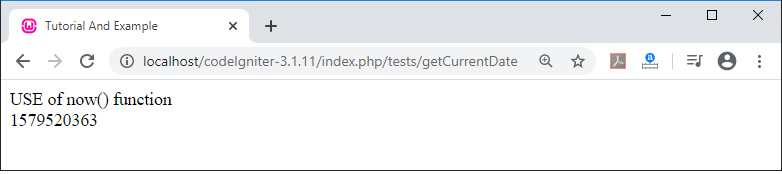
When you execute the above program by invoking the URL localhost/CodeIgniter-3.1.11/index.php/tests/and call the getCurrentDate() function. It shows the output, as shown below.
2. mDate(): It represents the data in MySQL style date format. Where each letter uses % sign as a prefix. For example: %d %m %y.
Syntax
mdate($datestring, $time);
The method contains two parameters.
Parameters
- $datestring: It defines the pattern of date, which you want to display in your system screen.
- $time (int): It defines the time in UNIX timestamp.
Note: If you have not provided timestamp in second parameters, by default, it selects the current time of your system.
Example: Create a Tests.php file in application/controller folder and write the following program.
Tests.php
<?php
 class Tests extends CI_Controller
  {
     public function getCurrentDate() // define getCurrentDate() function that call on the URL
     {
        $this->load->helper('date');  // loading of date helper
         echo "<title> Tutorial And Example </title>";
            echo "<h3> Use of mdate() function  </h3>";
        $dates = ' Day: %d Month: %m Year: %Y  - %h:%i:%s %a';
        $time = time();
         echo mdate($dates, $time);
 }
 }
 ?>
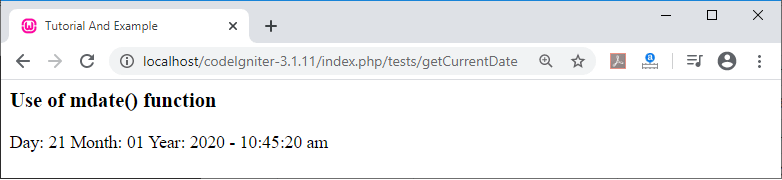
When you execute the above program by invoking the URL localhost/CodeIgniter-3.1.11/index.php/tests/and call the getCurrentDate() function. It shows the output, as shown below.
3. standard_date(): It is used to display a standard format of date and time in the system.
Syntax
standard_date( [$format = ‘ DATE_1036’ [, $time =
NULL] ]);
Parameters
- $format (string): It denotes the date format that you want to use.
- $time – It shows the time in the UNIX timestamp.
There are some standard formats of date helpers, as shown below:
| Constant | Output |
| DATE_COOKIE | Tue, 21 Jan 2020 13:06:55 UTC |
| DATE_ATOM | 2020-01-21T 13:07:20+0000 |
| DATE_RFC822 | Tue, 21Jan 20 13:08:20 UTC |
| DATE_RFS850 | Tuesday, 21-Jan-20 13:10:20 UTC |
| DATE_RSS | Tue, 21 Jan 2020 13:10:50 UTC |
| DATE_RFC1036 | Tuesday, 21-Jan-20 13:11:10 UTC |
| DATE_RFC1123 | Tue, 21 Jan 2020 13:11:40 UTC |
| DATE_RFC2822 | Tue, 21 Jan 2020 13:11:55 +0000 |
| DATE_W3C | 2020-01-21T 13:12:05+0000 |
| DATE_ISO8601 | 2020-01-21T 13:13:03+00:00 |
Example: Create a Tests.php file in application/controller folder and write the following program.
Tests.php
<?php
 class Tests extends CI_Controller
  {
     public function getCurrentDate()
     {
        $this->load->helper('date');  // loading the date helper
         echo "<title> Tutorial And Example </title>";
            // standard_date() function
         echo "<h3> USE of standard_date() function </h3> ";
       $format= 'DATE_RFC850';
      $time = time();
     echo standard_date($format, $time);
 }
 }
 ?>
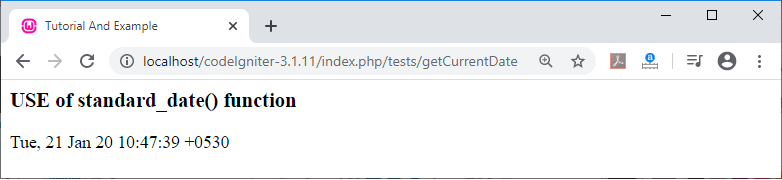
When you execute the above program by invoking the URL localhost/CodeIgniter-3.1.11/index.php/tests/and call the getCurrentDate() function. It shows the output, as shown below.
4. local_to_gmt() function: This function is used to convert the UNIX timestamp into GMT time.
Syntax
local_to_gmt( $time())
Example: Create a Tests.php file in application/controller folder and write the following program.
Tests.php
<?php
 class Tests extends CI_Controller
  {
 public function getCurrentDate()
     {
        $this->load->helper('date');  // loading the date helper
         echo "<title> Tutorial And Example </title>";
        echo “ Convert time from Local to gmt time <br/>”;
 $gmt = local_to_gmt(time());
 echo ($gmt);
 }
 }
 ?>
When you execute the above program by invoking the URL localhost/CodeIgniter-3.1.11/index.php/tests/and call the getCurrentDate() function, it shows the output, as shown below.

5. gmt_to_local() function: It takes the UNIX timestamp (in GMT) as input and converts into localized timestamp that set on the timezone and Daylight saving time.
Syntax
gmt_to_local($timestamp,
$timezone, $daylight_saving);
Parameters:
- $timestamp (int): It is used to take UNIX timestamp as an input.
- $timezone: It defines the timezone. For example, UM12, UM11, UM9, UM8, UM7, etc.
- $daylight_saving or $dst (bool): It takes Boolean value.
Example: Create a Tests.php file in application/controller folder and write the following program.
Tests.php
<?php
 class Tests extends CI_Controller
  {
 public function getCurrentDate()
     {
        $this->load->helper('date');  // loading the date helper
         echo "<title> Tutorial And Example </title>";
        echo "Convert time from gmt to local time <br>";
 $timestamp = 1579564573;
 $timezone  = 'UP55';
 $daylight_saving = TRUE;
 echo gmt_to_local($timestamp, $timezone, $daylight_saving);
 }
 }
 ?>
When you execute the above program by invoking the URL localhost/CodeIgniter-3.1.11/index.php/tests/and call the getCurrentDate function. It shows the output, as shown below.

6. mysql_to_unix(): It takes MySQL timestamps as input and return the time in UNIX timestamp.
Syntax
mysql_to_unix( $time = ‘’]);
Here, $time (string) is used as input of MySQL timestamp.
Example: Now create a Tests.php file in application/controller folder and write the following program.
Tests.php
<?php
 class Tests extends CI_Controller
  {
 public function getCurrentDate()
     {
        $this->load->helper('date');
         echo "<title> Tutorial And Example </title>";
        echo "Convert time from MySQL to UNIX timestamp <br>";
 $data = mysql_to_unix('20200121050935'); // it is in the format of yyyy-mm-dd-hh-mm-ss
 echo $data;
 }
 }
 ?>
When you execute the above program by invoking the URL localhost/CodeIgniter-3.1.11/index.php/tests/and call the getCurrentDate() function. It shows the output, as shown below.

7. unix_to_human() function: It takes Unix timestamps as input and returns the date and time in a human-readable format like yyyy-mm-dd hh:mm:ss am/pm.
Syntax
unix_to_human( $time = ‘ ’ [, $seconds =FALSE [, $fmt
= ’in’] ] ]);
Parameters
- $time (int) – It defines the Unix timestamps.
- $seconds (bool) – It defines whether you want to show seconds using Boolean TRUE or FALSE respectively.
- $fmt = It defines the format of date as per the country name. For example, in, us, aus etc.
Example: Now create a Tests.php file in application/controller folder and write the following program.
Tests.php
<?php
 class Tests extends CI_Controller
  {
 public function getCurrentDate()
     {
        $this->load->helper('date');
         echo "<title> Tutorial And Example </title>";
 echo "Convert time from Unix  to human readable format YYYY-MM-DD HH:MM:SS AM/PM <br>";
 $now = time();
 echo unix_to_human($now); // INDIA time withoutseconds
 echo " Time without Second";
 echo "</br>";
 echo unix_to_human($now, TRUE, 'in'); // INDIA time with seconds
 echo "  Time with Second";
 }
 }
 ?>
When you execute the above program by invoking the URL localhost/CodeIgniter-3.1.11/index.php/tests/and call the getCurrentDate() function. It shows the output, as shown below.
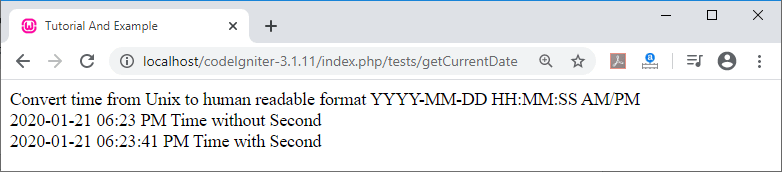
8. human_to_unix() Function: It is opposite to the unix_to_human() function. It takes human readable time as input and return the time in Unix timestamp.
Syntax
$unixForm = human_to_unix($humanReadable);
Example: Create a Tests.php file in application/controller folder and write the following program.
Tests.php
<?php
 class Tests extends CI_Controller
  {
 public function getCurrentDate()
     {
        $this->load->helper('date');
         echo "<title> Tutorial And Example </title>";
 $now = time();
 $humanReadable = unix_to_human($now);
 echo "Human Readable Format of Date :YYYY-MM-DD HH:MM AM/PM: ";
 echo ($humanReadable); // it will show date in human redable format
 echo "</br>";
 $unixForm = human_to_unix($humanReadable); // it will call human readable date //and convert into Unix timestamp.
 echo "In Unix timestamp:";
 echo ($unixForm);}
 }
 ?>
When you execute the above program by invoking the URL localhost/CodeIgniter-3.1.11/index.php/tests/and call the getCurrentDate() function, it shows the output, as shown below.

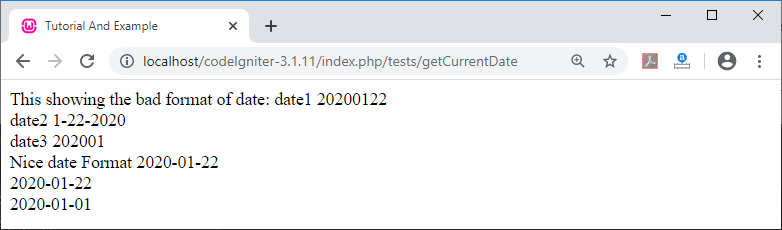
9. nice_date() Function: As the name suggests, it produces a nice format of date by improving the poor or unordered format of date.
Syntax
nice_date( [$bad_date =’ ‘ [, $format = False ] ]);
It has two parameters $bad_date and $format. The $bad_date parameter defines the bad format of date as bad. Whereas, $format uses true or false values such as Boolean values to return the date format as bad_date or not.
Example: Create a Tests.php file in application/controller folder and write the following program.
Tests.php
<?php
 class Tests extends CI_Controller
  {
 public function getCurrentDate()
     {
        $this->load->helper('date');
         echo "<title> Tutorial And Example </title>";
 $bad_date1 = '20200122';
 $bad_date2 = '1-22-2020';
 $bad_date3 = '202001';
 echo "This showing the bad format of date:"." date1"." ".$bad_date1."<br> date2"." ".$bad_date2. "<br> date3"." ".$bad_date3;
 // It will show: 2020-01-22
 echo "<br>";
 $better_date1 = nice_date($bad_date1, 'Y-m-d');
 $better_date2 = nice_date($bad_date2, 'Y-m-d');
 $better_date3 = nice_date($bad_date3, 'Y-m-d');
 echo "Nice date Format" ." ".$better_date1. " <br> ".$better_date2."<br> ".$better_date3;
 }
 }
 ?>
When you execute the above program by invoking the URL localhost/CodeIgniter-3.1.11/index.php/tests/and call the getCurrentDate() function it shows the output, as shown below.
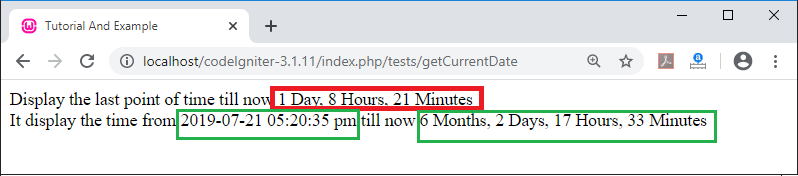
10. timestamp() Function: It is used to display the elapsed time from some point in the past to the current time.
Syntax
timespan([ $past_time= ‘ ‘ [, $unix_time= ‘’ [, $units
= ‘ ‘  ] ] ]);
Parameters
- $past_time (int): It takes the past time in UNIX timestamp.
- $unix_time (int): It takes the current time as input in Unix timestamp.
- $units (int): It defines the number of units or fields, that you want to show.
Example: Create a Tests.php file in application/controller folder and write the following program.
Tests.php
<?php
 class Tests extends CI_Controller
  {
 public function getCurrentDate()
     {
        $this->load->helper('date');
         echo "<title> Tutorial And Example </title>";
 $past_date = '1579564573';  // it display the yesterday time till now
 $past_date1 = '1563666635';
 $now = time(); // it take current time in Unix timestamp
 $units = 3;       // no. of units
 $units2 = 5;
 echo "Display the last point of time till now ";
 echo timespan($past_date, $now, $units);
 echo "<br> It display the time from 2019-07-21 05:20:35 pm till now ";
 echo timespan($past_date1, $now, $units2);
 }
 }
 ?>
When you execute the above program by invoking the URL localhost/CodeIgniter-3.1.11/index.php/tests/and call the getCurrentDate() function. It shows the output, as shown below.
11. days_in_month() Function:- It is used to return the number of days in a given month and year.
Syntax
days_in_month( [ $month = ‘ ‘ [. $year = ‘ ‘] ]);
Parameters
- $month (int): It takes month in numeric.
- $year (int): It takes year in numeric.
Example: Now create a Tests.php file in application/controller folder and write the following program:
<?php
 class Tests extends CI_Controller
  {
 public function getCurrentDate()
     {
        $this->load->helper('date');
         echo "<title> Tutorial And Example </title>";
 echo "NUMBER OF DAYS in (February, 2020) is ";
 echo days_in_month(02, 2020);  //month and year
 }
 }
 ?>
When you execute the above program by invoking the URL localhost/CodeIgniter-3.1.11/index.php/tests/and call the getCurrentDate function, it shows the output, as shown below.

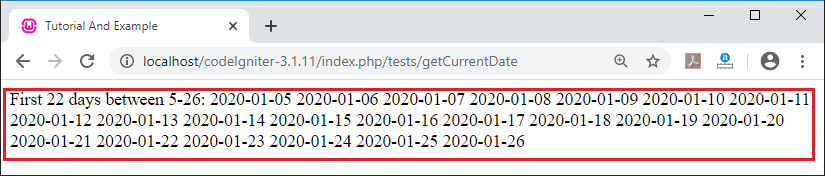
12. date_range() Function: It is used to create a list of dates within a specified period.
Syntax
date_range( [ $unix_start = ‘ ‘, [, $mixed = ‘ ‘ [,
$is_unix = TRUE [, $format = ‘Y-m-d’] ] ] ]);
Parameters
- $unix_start (int): It defines the starting date in Unix timestamp.
- $mixed (int): It defines the ending date of the range in Unix timestamp.
- $format: It defines the format of date in ‘y-m-d’.
Example: Create a Tests.php file in application/controller folder and write the following program.
<?php
 class Tests extends CI_Controller
  {
 public function getCurrentDate()
     {
        $this->load->helper('date');
         echo "<title> Tutorial And Example </title>";
 $rangeBetween  = date_range('2020-01-05', '2020-01-26'); // SET RANGE
 echo "First 22 days between 5-26: ";
 foreach ($rangeBetween as $info)
 {
         echo " ".$info."\t ";
 }
 }
 }
 ?>
When you execute the above program by invoking the URL localhost/CodeIgniter-3.1.11/index.php/tests/and call the getCurrentDate() function, it shows the output, as shown below.
13. timezones(): It is used to take the reference timezone and return the number of hours from the UTC zone.
Syntax
timezones( [$tz = ‘’]);
Where, $tz = It is used to take numeric timezone. For example, UM8, UM6, UP55, UP575, UM1, etc.
Example: Create a Tests.php file in application/controller folder and write the following program.
Tests.php
<?php
 class Tests extends CI_Controller
  {
 public function getCurrentDate()
     {
        $this->load->helper('date');
         echo "<title> Tutorial And Example </title>";
 echo "timezone of india: ";
 echo timezones('UP55');
 }
 }
 ?>
When you execute the above program by invoking the URL localhost/CodeIgniter-3.1.11/index.php/tests/and call the getCurrentDate() function, it shows the output, as shown below.

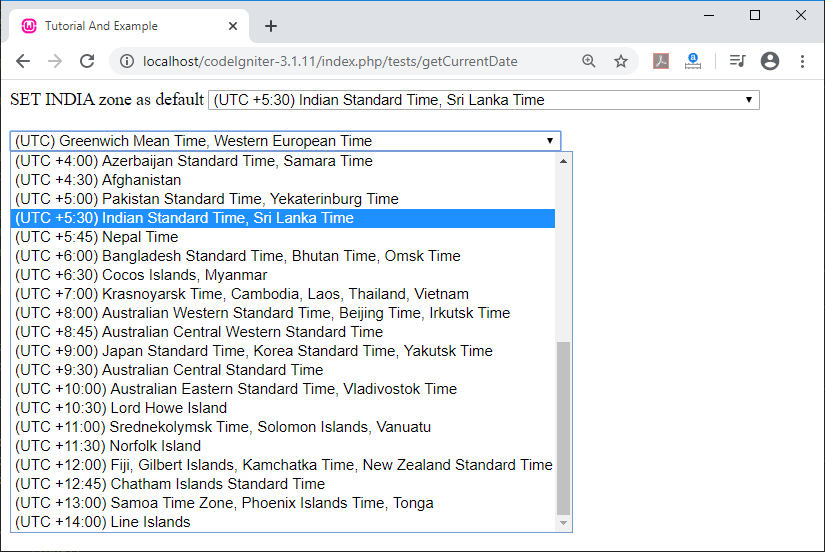
14. timezone_menu() Function: It is used to create a menu of timezones. It contains one argument that for pre selecting of the particular timezone. For example, if you want to set Indian time as default, you can use timezone_menu(‘UP55’);.
Example: Create a Tests.php file in application/controller folder and write the following program.
Tests.php
<?php
 class Tests extends CI_Controller
  {
 public function getCurrentDate()
     {
        $this->load->helper('date');
         echo "<title> Tutorial And Example </title>";
 echo "SET INDIA zone as default ";
 echo timezone_menu('UP55');
 echo "<br/> <br>";
 echo timezone_menu();
 }
 }
 ?>
When you execute the above program by invoking the URL localhost/CodeIgniter-3.1.11/index.php/tests/and call the getCurrentDate() function, it shows the output, as shown below.