SQL SELECT BETWEEN Operator
This SQL tutorial explains and helps us understand how to use the BETWEEN operator in the SELECT query with examples.
The SQL SELECT BETWEEN operator retrieves the data from the table where the values are within the specified expression. The BETWEEN operator range starts with the starting value followed by AND operator and the ending value. The range values can be numeric, string, or dates
The syntax of the SQL SELECT BETWEEN Operator is as follows:
SELECT Column_Name_1, Column_Name_2, Column_Name_3, Column_Name_4, Column_Name_5 FROM Table_Name WHERE Column_Name BETWEEN starting_value AND ending_value;
Let’s understand the SQL SELECT BETWEEN Operator with the help of examples.
Consider the already existing table, which has the following data:
Table Name:- D_Students
| Student_Id | Student_Name | First_Sem | Second_Sem | Third_Sem | Fourth_Sem | Fifth_Sem | Sixth_Sem | Total | Department_Id |
| 202111 | Vaishnavi Patil | 94 | 91 | 88 | 85 | 95 | 92 | 91 | 1 |
| 202112 | Vaibhav Lokhande | 85 | 90 | 92 | 80 | 85 | 82 | 86 | 2 |
| 202113 | Yash Dhull | 90 | 88 | 94 | 87 | 85 | 90 | 89 | 3 |
| 202114 | Sonali Patole | 95 | 90 | 92 | 88 | 92 | 90 | 91 | 4 |
| 202115 | Axar Patel | 85 | 80 | 82 | 86 | 92 | 84 | 85 | 1 |
| 202116 | Meena Mishra | 78 | 75 | 80 | 74 | 85 | 77 | 78 | 3 |
| 202117 | Mahesh Kumbhar | 75 | 80 | 75 | 78 | 80 | 76 | 77 | 5 |
| 202118 | Sakshi Patil | 80 | 78 | 74 | 78 | 80 | 77 | 78 | 2 |
| 202119 | Sopan Bhore | 70 | 68 | 75 | 75 | 80 | 80 | 75 | 2 |
| 202220 | Prajwal Lokhande | 80 | 85 | 85 | 75 | 78 | 80 | 81 | 4 |
| 202221 | Anuja Wanare | 85 | 88 | 86 | 82 | 84 | 85 | 85 | 5 |
| 202222 | Venkatesh Iyer | 90 | 89 | 87 | 90 | 92 | 91 | 90 | 3 |
| 202223 | Anushka Sen | 70 | 75 | 71 | 74 | 80 | 78 | 75 | 1 |
| 202224 | Aakash Jain | 80 | 75 | 72 | 74 | 85 | 80 | 78 | 4 |
| 202225 | Akshay Agarwal | 85 | 80 | 78 | 88 | 90 | 82 | 84 | 5 |
| 202226 | Shwetali Bhagwat | 90 | 80 | 85 | 88 | 90 | 80 | 86 | 1 |
| 202227 | Mayuri Wagh | 80 | 80 | 85 | 80 | 82 | 85 | 82 | 4 |
| 202228 | Utkarsh Rokade | 85 | 80 | 80 | 90 | 84 | 84 | 84 | 5 |
| 202229 | Manthan Koli | 85 | 75 | 84 | 78 | 82 | 80 | 81 | 2 |
| 202230 | Mayur Jain | 80 | 88 | 87 | 90 | 92 | 90 | 88 | 1 |
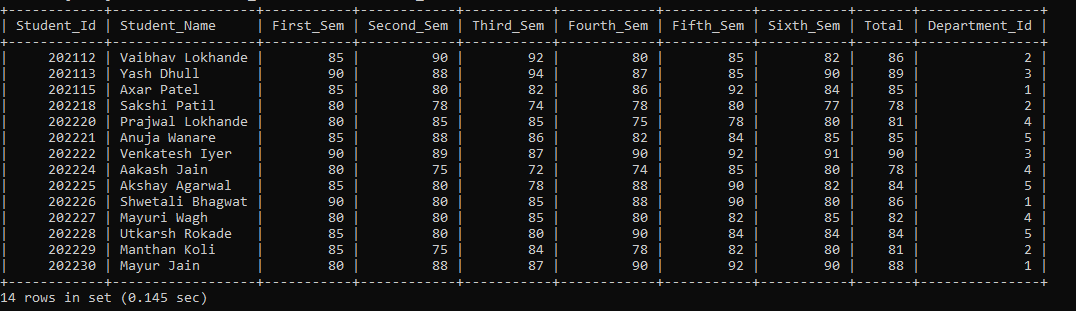
Example 1: Execute a query to display student's information where the student's first-semester percentage is between 80 and 90.
SELECT * FROM D_Students WHERE First_Sem BETWEEN 80 AND 90;
We fetched the student's information from the D_Students table, where the student's first-semester percentage is between 80 and 90 in the above query.
The output of the above query is as follows:
| Student_Id | Student_Name | First_Sem | Second_Sem | Third_Sem | Fourth_Sem | Fifth_Sem | Sixth_Sem | Total | Department_Id |
| 202112 | Vaibhav Lokhande | 85 | 90 | 92 | 80 | 85 | 82 | 86 | 2 |
| 202113 | Yash Dhull | 90 | 88 | 94 | 87 | 85 | 90 | 89 | 3 |
| 202115 | Axar Patel | 85 | 80 | 82 | 86 | 92 | 84 | 85 | 1 |
| 202118 | Sakshi Patil | 80 | 78 | 74 | 78 | 80 | 77 | 78 | 2 |
| 202220 | Prajwal Lokhande | 80 | 85 | 85 | 75 | 78 | 80 | 81 | 4 |
| 202221 | Anuja Wanare | 85 | 88 | 86 | 82 | 84 | 85 | 85 | 5 |
| 202222 | Venkatesh Iyer | 90 | 89 | 87 | 90 | 92 | 91 | 90 | 3 |
| 202224 | Aakash Jain | 80 | 75 | 72 | 74 | 85 | 80 | 78 | 4 |
| 202225 | Akshay Agarwal | 85 | 80 | 78 | 88 | 90 | 82 | 84 | 5 |
| 202226 | Shwetali Bhagwat | 90 | 80 | 85 | 88 | 90 | 80 | 86 | 1 |
| 202227 | Mayuri Wagh | 80 | 80 | 85 | 80 | 82 | 85 | 82 | 4 |
| 202228 | Utkarsh Rokade | 85 | 80 | 80 | 90 | 84 | 84 | 84 | 5 |
| 202229 | Manthan Koli | 85 | 75 | 84 | 78 | 82 | 80 | 81 | 2 |
| 202230 | Mayur Jain | 80 | 88 | 87 | 90 | 92 | 90 | 88 | 1 |
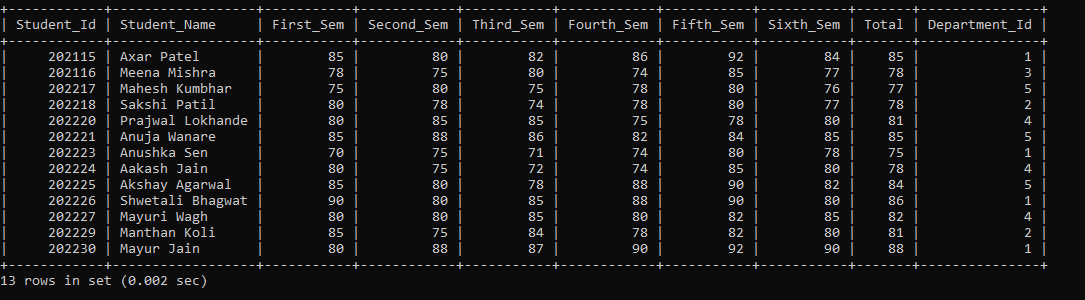
Example 2: Execute a query to display student’s information where student name between 'Aakash Jain' AND 'Shwetali Bhagwat'.
SELECT * FROM D_Students WHERE Student_Name BETWEEN 'Aakash Jain' AND 'Shwetali Bhagwat';
We retrieved the student's information from the D_Students table where the student's name is between 'Aakash Jain' AND 'Shwetali Bhagwat' in the above query.
The output of the above query is as follows:
| Student_Id | Student_Name | First_Sem | Second_Sem | Third_Sem | Fourth_Sem | Fifth_Sem | Sixth_Sem | Total | Department_Id |
| 202115 | Axar Patel | 85 | 80 | 82 | 86 | 92 | 84 | 85 | 1 |
| 202116 | Meena Mishra | 78 | 75 | 80 | 74 | 85 | 77 | 78 | 3 |
| 202117 | Mahesh Kumbhar | 75 | 80 | 75 | 78 | 80 | 76 | 77 | 5 |
| 202118 | Sakshi Patil | 80 | 78 | 74 | 78 | 80 | 77 | 78 | 2 |
| 202220 | Prajwal Lokhande | 80 | 85 | 85 | 75 | 78 | 80 | 81 | 4 |
| 202221 | Anuja Wanare | 85 | 88 | 86 | 82 | 84 | 85 | 85 | 5 |
| 202223 | Anushka Sen | 70 | 75 | 71 | 74 | 80 | 78 | 75 | 1 |
| 202224 | Aakash Jain | 80 | 75 | 72 | 74 | 85 | 80 | 78 | 4 |
| 202225 | Akshay Agarwal | 85 | 80 | 78 | 88 | 90 | 82 | 84 | 5 |
| 202226 | Shwetali Bhagwat | 90 | 80 | 85 | 88 | 90 | 80 | 86 | 1 |
| 202227 | Mayuri Wagh | 80 | 80 | 85 | 80 | 82 | 85 | 82 | 4 |
| 202229 | Manthan Koli | 85 | 75 | 84 | 78 | 82 | 80 | 81 | 2 |
| 202230 | Mayur Jain | 80 | 88 | 87 | 90 | 92 | 90 | 88 | 1 |
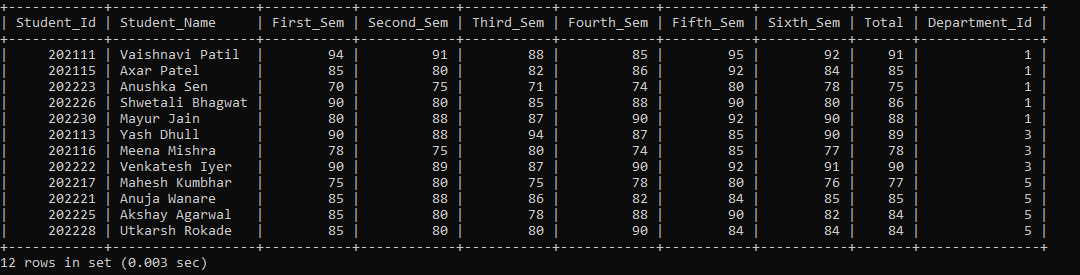
Example 3: Execute a query to display student's information where the student's fifth-semester percentage is between 75 and 95, AND the department name is Computer, Mechanical, and Civil Engineering.
SELECT * FROM D_Students WHERE Fifth_Sem BETWEEN 75 and 95 AND Department_Id IN (SELECT Department_Id FROM Department WHERE Department_Name IN ('Computer Engineering', 'Mechanical Engineering', 'Civil Engineering'));
We displayed the student's information where the fifth-semester percentage is between 75 and 95. The student's department names are Computer, Mechanical, and Civil Engineering, and the records are displayed in ascending order.
The output of the above query is as follows:
| Student_Id | Student_Name | First_Sem | Second_Sem | Third_Sem | Fourth_Sem | Fifth_Sem | Sixth_Sem | Total | Department_Id |
| 202111 | Vaishnavi Patil | 94 | 91 | 88 | 85 | 95 | 92 | 91 | 1 |
| 202115 | Axar Patel | 85 | 80 | 82 | 86 | 92 | 84 | 85 | 1 |
| 202223 | Anushka Sen | 70 | 75 | 71 | 74 | 80 | 78 | 75 | 1 |
| 202226 | Shwetali Bhagwat | 90 | 80 | 85 | 88 | 90 | 80 | 86 | 1 |
| 202230 | Mayur Jain | 80 | 88 | 87 | 90 | 92 | 90 | 88 | 1 |
| 202113 | Yash Dhull | 90 | 88 | 94 | 87 | 85 | 90 | 89 | 3 |
| 202116 | Meena Mishra | 78 | 75 | 80 | 74 | 85 | 77 | 78 | 3 |
| 202222 | Venkatesh Iyer | 90 | 89 | 87 | 90 | 92 | 91 | 90 | 3 |
| 202117 | Mahesh Kumbhar | 75 | 80 | 75 | 78 | 80 | 76 | 77 | 5 |
| 202221 | Anuja Wanare | 85 | 88 | 86 | 82 | 84 | 85 | 85 | 5 |
| 202225 | Akshay Agarwal | 85 | 80 | 78 | 88 | 90 | 82 | 84 | 5 |
| 202228 | Utkarsh Rokade | 85 | 80 | 80 | 90 | 84 | 84 | 84 | 5 |