×

Excel VBA Rnd Function

VBA Rnd Function: The Rnd function in VBA returns a random number that is greater than or equal to (>=) 0 and is less than (<) 1.

Syntax

Rnd ([Number])

Parameter

Number (optional) –This parameter represents a numeric value.

It can take the following values:

< 0 (greater than 0) – It signifies the same random number on each call as the seed Number

= 0 (equal to 0) – It signifies the recently generated random number.

>0 (less than 0) - It signifies the next random number in the sequence

Return

This function returns a random number that is greater than or equal to (>=) 0 and is less than (<) 1.

Example 1

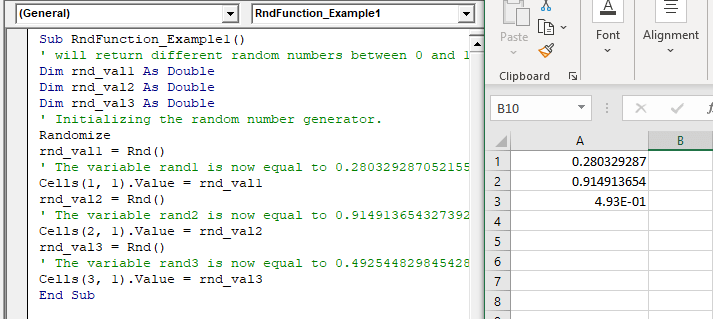
Sub RndFunction_Example1()
 ' will return different random numbers between 0 and 1.
 Dim rnd_val1 As Double
 Dim rnd_val2 As Double
 Dim rnd_val3 As Double
 ' Initializing the random number generator.
 Randomize
 rnd_val1 = Rnd()
 ' The variable rand1 is now equal to 0.280329287052155.
 Cells(1, 1).Value = rnd_val1
 rnd_val2 = Rnd()
 ' The variable rand2 is now equal to 0.914913654327392
 Cells(2, 1).Value = rnd_val2
 rnd_val3 = Rnd()
 ' The variable rand3 is now equal to 0.492544829845428
 Cells(3, 1).Value = rnd_val3
 End Sub 

Output

0.280329287
0.914913654
4.93E-01
VBA Rnd Function

Example 2

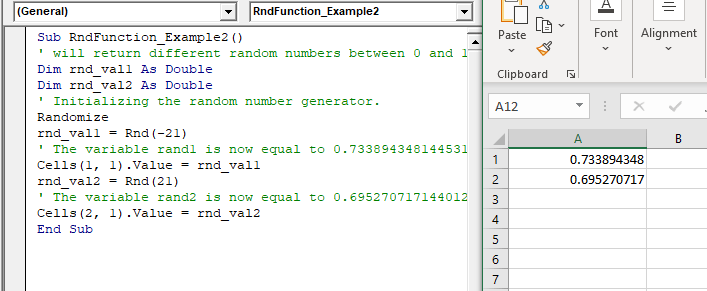
Sub RndFunction_Example2()
 ' will return different random numbers between 0 and 1.
 Dim rnd_val1 As Double
 Dim rnd_val2 As Double
 ' Initializing the random number generator.
 Randomize
 rnd_val1 = Rnd(-21)
 ' The variable rand1 is now equal to 0.733894348144531.
 Cells(1, 1).Value = rnd_val1
 rnd_val2 = Rnd(21)
 ' The variable rand2 is now equal to 0.695270717144012.
 Cells(2, 1).Value = rnd_val2
 End Sub 

Output

0.733894348144531

0.695270717144012
VBA Rnd Function

Related Topics

Excel VBA Sqr Function

VBA Sqr Function: The Sqr function in VBA returns the square root for the specified number. Syntax Sqr (Number) Parameter Number (required) – This parameter represents a positive numeric value that you want to calculate...

1 minute read.

Excel VBA Round Function

VBA Round Function: The Round function in VBA rounds a number to a specified number of decimal places and returns the number. Syntax Round (Number, [NumDigitsAfterDecimal]) Parameter Number (required) –This parameter represents a numeric value one wants...

1 minute read.

Excel VBA CStr Function

VBA CStr Function: The CStr function in VBA converts an expression into a string data type. Syntax CStr (Expression) Parameter Expression (required) – This parameter represents the expression that you want to convert to a...

1 minute read.

VBA VBScript Regex Methods Regex

VBA VBScript Regex Methods Regex The VBA Regex supports 3 methods which are as follows: ExecuteReplaceText Execute The execute method is used to extract a match from the given based on the defined matching...

3 minutes read.

VBA Option Explicit

VBA Option Explicit The Option Explicit in VBA is used to declare the variables at the top of your macro code. It is the most secure and easy option to maintain your variables....

5 minutes read.

Excel VBA StrComp Function

VBA StrComp Function: The StrComp function in VBA compares two strings and returns an integer value displaying the result of the comparison. Syntax StrComp (String1, String2, [Compare]) Parameter String1 (required)- This parameter represents the first string to...

2 minutes read.

Excel VBA DateAdd Function

The DateAdd function in VBA adds a time interval to a supplied date and/or time and returns the resultant date/time. Syntax Dateadd (Interval, Number, Date) Parameter Interval (required) – This parameter a string specifying the interval to be...

1 minute read.

Excel VBA DateSerial Function

The DateSerial function in VBA returns a Date from a supplied year, month, and day number. Syntax DateSerial (Year, Month, Day) Parameter Year (required) – This parameter represents an integer signifying the year. Month (required) – This parameter...

2 minutes read.

Miscellaneous Exercise of conditional statements and Loop

We have the already worked with syntax and examples of conditional statements and loops in the previous tutorials. In this tutorial, we will learn how to work with both together.  We will explain...

3 minutes read.

Excel VBA: DO WHILE….Loop

DO WHILE….Loop The “Do While” Loop is the same, unlike the FOR statement, just that it will keep on looping till the specified condition is true. It is used when we want to...

3 minutes read.

UserForm and its Properties Excel VBA

UserForm and its Properties Userform has certain properties that can be viewed as category wise (based on appearance, behavior, font) or in an alphabetic manner. The property window is used to set or...

11 minutes read.

VBA Object Required

What is Object Required Error? VBA Object Required is a run time error which occurs when the user does not define a valid object qualifier, or the assigned object doesn’t exist in the...

6 minutes read.

Excel VBA String Function

The String function in VBA creates a String, consisting of several repeated characters. Syntax String (Number, Character) Parameter Number (required) – This parameter represents the number of characters in the returned String. Character (required) – This parameter...

1 minute read.

Excel Objects in VBA

What are Excel Objects? The Excel objects belong to the entities that make up an Excel Workbook, Worksheets, Columns, Rows, Cell Ranges, etc. Each object in Excel has loads of Properties that are...

6 minutes read.

Excel VBA Val Function

VBA Val Function: The Val function in VBA converts the given string into a numeric value. This function ignores spaces and continues to read the characters after space(s). It stops...

1 minute read.

VBA Pivot Table Grouping

VBA- Pivot Table Grouping For an instance, if in our pivot table, we have 11 different age groups from 20 to 30 -  but there might be a possibility that we...

2 minutes read.

Excel VBA Log Function

VBA Log Function: The Log function in VBA returns the natural logarithm for the specified number. Syntax Log (Number) Parameter Number (required) –This parameter represents a positive numeric value that you want to find the...

1 minute read.

Excel VBA Timer Function

Excel VBA Timer Function: The Timer function in VBA returns a Single data type, evaluating the number of seconds that have elapsed since midnight of the current day. Syntax Timer () Parameter NA Return This...

1 minute read.

Excel VBA Format Function

VBA Format Function The format function in VBA applies a specified format to an expression and returns the result as a string. Syntax Format (Expression, [Format], [FirstDayOfWeek] , [FirstWeekOfYear] ) Parameter Expression (required)- This parameter represents the expression that you want to format. Format...

3 minutes read.

VBA ListBox

What is a ListBox? ListBox refers to a permanently displayed control (usually box-shaped) which contains a list of objects (or attribute, or elements) from which the user can select single or multiple attributes....

8 minutes read.