×

VBA Updating Pivot Table

VBA- Updating Pivot Table

The pivot table is an important feature to explore, summarize, and interpret the bulk amount of data. It helps data evaluating, reviewing, as well as making useful interpretations of it. But the problem with the Pivot table is that it needs to be updated by the user every time (manually) whenever there is any change in the data. Unlike in the below, if you change a value in B4 cell i.e., 400 to 500, but you will notice the Pivot table still shows the previous data without undergoing any change. The sheet has to be refreshed for any changes to reflect in the Pivot Table. If there are multiple Pivot tables, it becomes very tedious and time-consuming. But with the invent of VBA, this process has become easy, and the user can skip the manual refreshing with just a few lines of code.

The steps for refreshing or updating a Pivot Table through VBA are as follows:

  1. Defining Worksheet Event

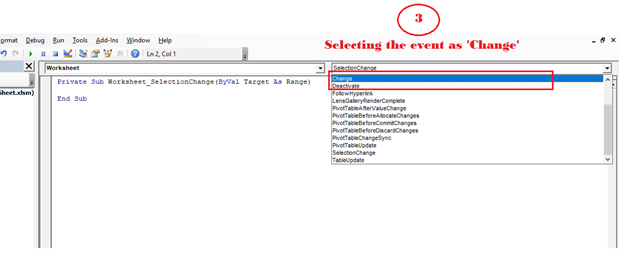
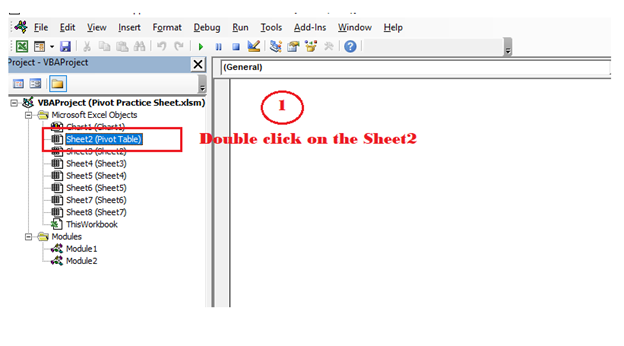
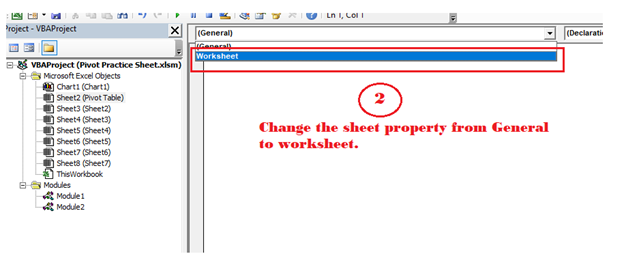
Double click on the sheet. It will direct you to a blank sheet. Then, from the top select the worksheet and select the event to ‘Change’.
VBA Updating Pivot Table
  • Defining Worksheet Object

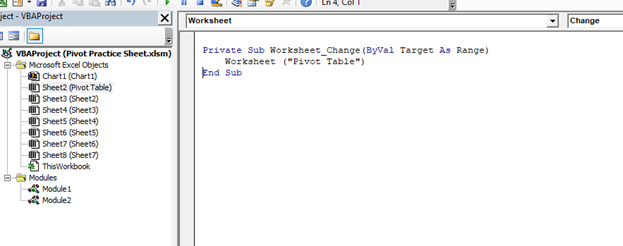
We will be using the worksheet object in between the sub procedures.

Program:

Private Sub Worksheet_Change(ByVal Target As Range)
    Worksheet ("Pivot Table")
End Sub
VBA Updating Pivot Table
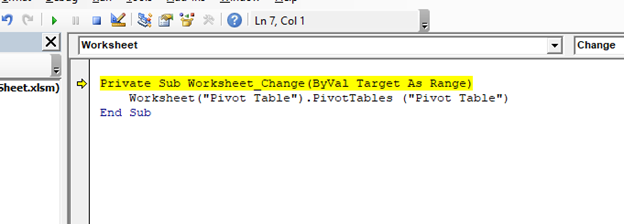
  • Referring Pivot Table

Here we will be referring to the Pivot table by its name (in the below example, we have used the same name for the sheet as well as for Pivot Table).

Program:

Private Sub Worksheet_Change (ByVal Target As Range)
    Worksheet ("Pivot Table").PivotTables ("Pivot Table")
End Sub
VBA Updating Pivot Table
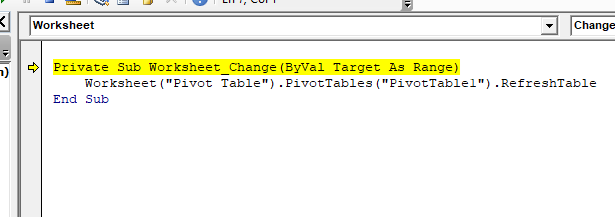
  • Refresh Table Method

Program:

Private Sub Worksheet_Change(ByVal Target As Range)
    Worksheet("Pivot Table").PivotTables("PivotTable1").RefreshTable
End Sub
VBA Updating Pivot Table

Refreshing multiple Pivot Tables

In big projects, usually, the VBA developer adds separate Pivot Tables for each report, in separate work sheets within the same workbook. In these cases, it will become tedious if we keep on writing the VBA refreshing code for each pivot table for separate sheets.

The only solution for the above problem is to write a single code wherein we can loop through the various sheets and refresh all the Pivot tables once with a single click.

Program: With Pivot Table object

Sub Refreshing_Multiple_Pivot_Tables_Example1()
  Dim PT As PivotTable
  For Each PT In ActiveWorkbook.PivotTables
    PT.RefreshTable
  Next PT
End Sub

Example 2: With Pivot Cache

Sub Refreshing_Mutiple_Pivot_Tables_Example2()
  Dim PT As PivotTable
  Dim PC As PivotCache
  For Each PC In ActiveWorkbook.PivotCaches
    PC.Refresh
  Next PT
End Sub

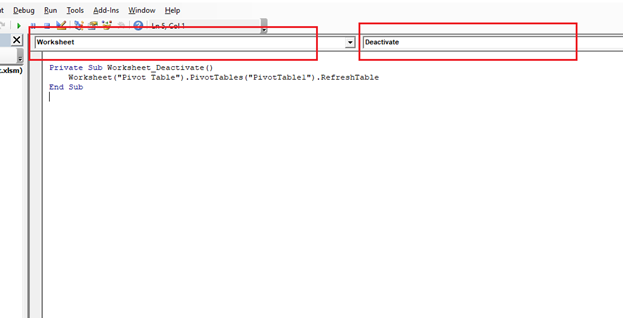
Worksheet Deactivate Event

Whenever we refresh any worksheet by using the “Worksheet Change” event, it keeps on refreshing everything even if there is no alters in the data and a change occurs in the worksheet and there is no change in the data source

Even if the user enters a comma or dot in the worksheet the VBA code refreshes the complete pivot table. Thus, increasing the loading time for the program unnecessarily. But this could be avoided by using the “Worksheet Deactivate” method instead of the “Worksheet Change” method.

Program:

Private Sub Worksheet_Deactivate()
    Worksheet("Pivot Table").PivotTables("PivotTable1").RefreshTable
End Sub
VBA Updating Pivot Table

Related Topics

Excel VBA : With End-with Constructs

With End-with Constructs The With-End With construct enables the user to perform multiple operations on a single object. If you are going to perform several different actions on the same object and typing the same...

4 minutes read.

Miscellaneous Exercise of conditional statements and Loop

We have the already worked with syntax and examples of conditional statements and loops in the previous tutorials. In this tutorial, we will learn how to work with both together.  We will explain...

3 minutes read.

Excel VBA Trim Function

The Trim function in VBA removes the leading and trailing spaces from the specified string. Syntax Trim (String) Parameter String (required) – This parameter represents the string from which you want to remove the leading and...

1 minute read.

Excel VBA Date Function

VBA Date Function The Date function in VBA returns the current date. Syntax Date( ) Parameter NA Return This function returns the current date. Example 1 Sub DateFunction_Example1() ' retuning the current date in the variable currentDate Dim currentDate As...

1 minute read.

VBA Updating Pivot Table

VBA- Updating Pivot Table The pivot table is an important feature to explore, summarize, and interpret the bulk amount of data. It helps data evaluating, reviewing, as well as making useful...

3 minutes read.

Userform Events

What are Events? Anything you do in to trigger an excel file is an event (an action). Example: If you want a greeting message ‘Good Day’ whenever an excel file is...

7 minutes read.

Excel VBA StrComp Function

VBA StrComp Function: The StrComp function in VBA compares two strings and returns an integer value displaying the result of the comparison. Syntax StrComp (String1, String2, [Compare]) Parameter String1 (required)- This parameter represents the first string to...

2 minutes read.

Scope in Visual Basics

Definition of Scope The scope of any programming language implies the area of code where the variables will be identified, accessed, and used. Every variable has a scope associated with it. The scope of...

4 minutes read.

Excel VBA Rnd Function

VBA Rnd Function: The Rnd function in VBA returns a random number that is greater than or equal to (>=) 0 and is less than (<) 1. Syntax Rnd ([Number]) Parameter Number (optional) –This...

1 minute read.

Excel VBA Mid Function

VBA Mid Function: The Mid function in VBA returns a substring from within a supplied string. Syntax Mid (Str, Start, [Length]) Parameter Str (required) -This parameter represents a string from which you want to extract the substring. Start...

1 minute read.

Excel VBA- Pivot Table Fields

VBA- Pivot Table Fields: The Pivot Fields collection contains all the fields from the data source, including any calculated fields. The main aspect of adding a field is its Position...

4 minutes read.

Excel VBA Asc Function

VBA Asc Function: The Asc function in VBA returns an integer showing the character code for the first character of a given string. Syntax Asc (String) Parameter String (required) – This parameter represents the text...

1 minute read.

Excel VBA StrReverse Function

The StrReverse function returns a String after reversing the given String. Syntax StrReverse (Expression) Parameter Expression (required) – This parameter represents the String that you want to reverse. Return This function returns a String after reversing the given String. Example...

1 minute read.

VBA ActiveSheet

What is VBA Activesheet Property? The active sheet means the current worksheet which you are working on and viewing. The ActiveSheet object signifies the worksheet tab that is selected before running the VBA...

5 minutes read.

Excel VBA Now Function

Excel VBA Now Function: The Now function in VBA returns the current date and time.  Syntax Now () Parameter NA Return This function returns the current date and time.  Example 1 Sub NowFunction_Example1() 'It will return...

1 minute read.

VBA TimeSerial Function

The TimeSerial function in VBA returns a Time for the specified hour, minute, and second. Syntax TimeSerial (Hour, Minute, Second) Parameter Hour (required) – This parameter represents an integer (0 to 23), signifying the hour of the time. Minute...

2 minutes read.

VBA VBScript Regex Methods Regex

VBA VBScript Regex Methods Regex The VBA Regex supports 3 methods which are as follows: ExecuteReplaceText Execute The execute method is used to extract a match from the given based on the defined matching...

3 minutes read.

Excel VBA Exp Function

VBA Exp Function: The Exp function in VBA returns the value of the exponential function ex (mathematical constant ‘e’ raised to specified power) for the given value of x. Syntax Exp (Number) Parameter Number (required) –This parameter represents...

1 minute read.

Excel VBA Round Function

VBA Round Function: The Round function in VBA rounds a number to a specified number of decimal places and returns the number. Syntax Round (Number, [NumDigitsAfterDecimal]) Parameter Number (required) –This parameter represents a numeric value one wants...

1 minute read.

Excel VBA InStr Function

VBA InStr Function The InStr function in VBA searches for a substring inside the given string. It returns the position of a substring within a string, as an integer if the substring is found...

1 minute read.