
×

Configuring EIGRP

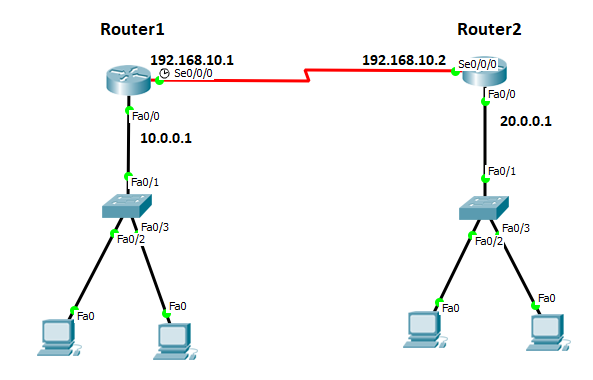
Consider the topology given below –
Configuring EIGRP

The initial IP configuration table is given below:

Devices Interface IP address
Router1 Se0/0/0 192.168.10.1
Router1 Fa0/0 10.0.0.1
Router2 Se0/0/0 192.168.10.2
Router2 Fa0/0 20.0.0.1
Switch1 N/A N/A
Switch1 N/A N/A
PC1 Fa0 10.0.0.2
PC2 Fa0 10.0.0.3
PC3 Fa0 20.0.0.2
PC4 Fa0 20.0.0.3

Configure IP address to router’s interfaces

Router1

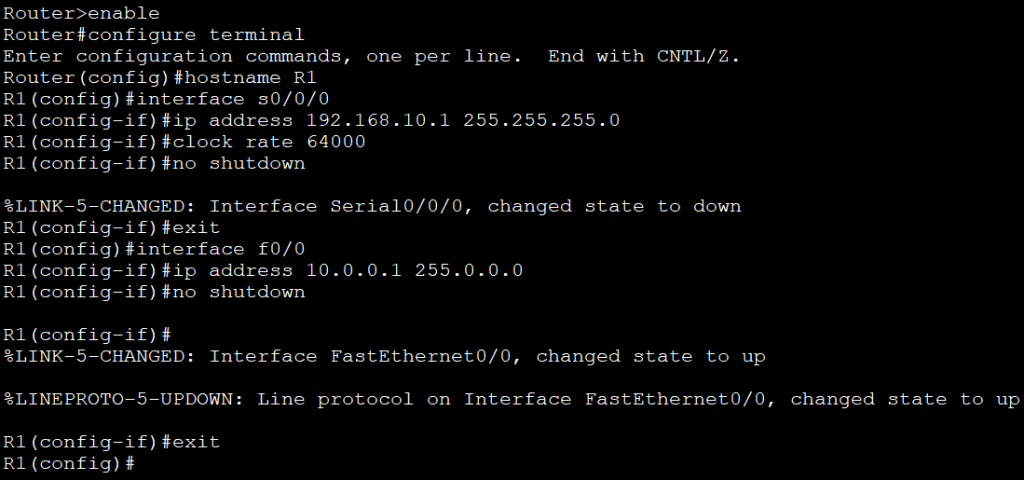
On router1, give the following commands to configure hostname and IP address.

Router>enable is used to enter the   privileged exec mode.   
Router#configure   terminal is used to enter the global configuration mode.   Router(config)#hostname   R1 is used to identify the router in the whole   network uniquely.   R1(config)#interface   s0/0/0 is used to enter the serial interface.   
R1(config-if)#ip   address 192.168.10.1 255.255.255.0 is used to configure an IP address in the serial interface.   
R1(config-if)#clock   rate 64000 is used to control the data flow.   
R1(config-if)#no   shutdown is used to make interface always up.   
R1(config-if)#exit is used   to return the previous mode.   
R1(config)#interface   f0/0 is used to enter the fastEthernet.   
R1(config-if)#ip   address 10.0.0.1 255.0.0.0 is used to configure an IP address in the fastEthernet interface.   
R1(config-if)#no   shutdown is used to make interface always up.   R1(config-if)#exit is used   to move to global configuration mode.   
R1(config)#    
Router2

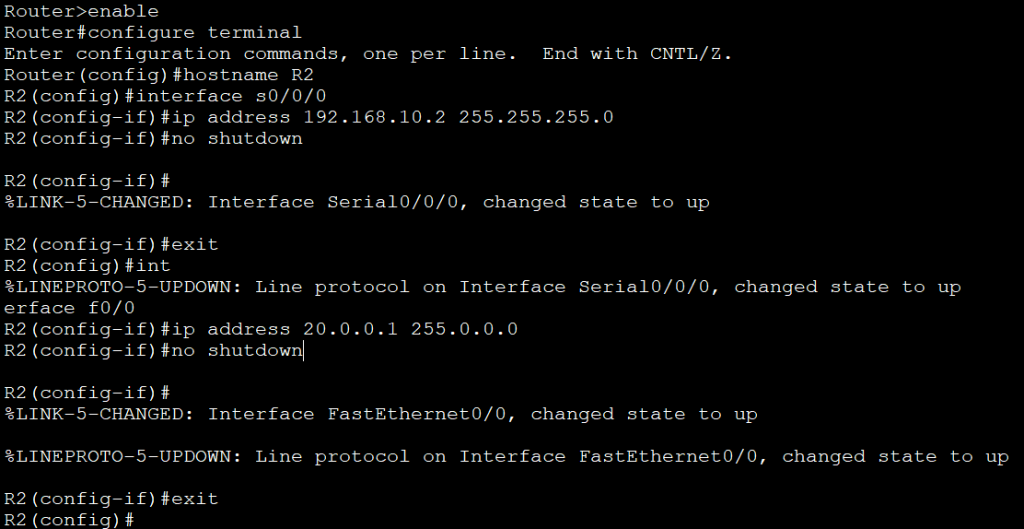
On router2, give the following commands to configure hostname and IP address.

Router>enable
Router#configure terminal   
Router(config)#hostname R2   
R2(config)#interface s0/0/0
R2(config-if)#ip address 192.168.10.2   255.255.255.0
R2(config-if)#no shutdown
R2(config-if)#exit
R2(config)#interface f0/0
R2(config-if)#ip address 20.0.0.1 255.0.0.0
R2(config-if)#no shutdown
R2(config-if)#exit
R2(config)#    
Configure the EIGRP routing protocol -

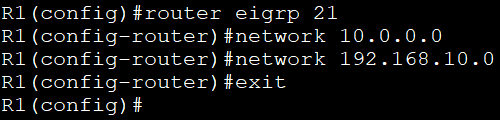
To enable EIGRP, the following commands are used:

R1(config)#router   eigrp 21  is used   to enable EIGRP with AS number 21. 
R1(config-router)#network   10.0.0.0 is used to enable   EIGRP on interfaces which belongs tonetwork 10.0.0.0   
R1(config-router)#network  192.168.10.0  is used to enable EIGRP on interfaces which belongs to network   192.168.10.0.   
R1(config-router)#exit   is used to move the global configuration mode. 
R1(config)#    

The following screenshot shows the EIGRP configuration on Router1 and Router2.
Router2

Verifying EIGRP Routing

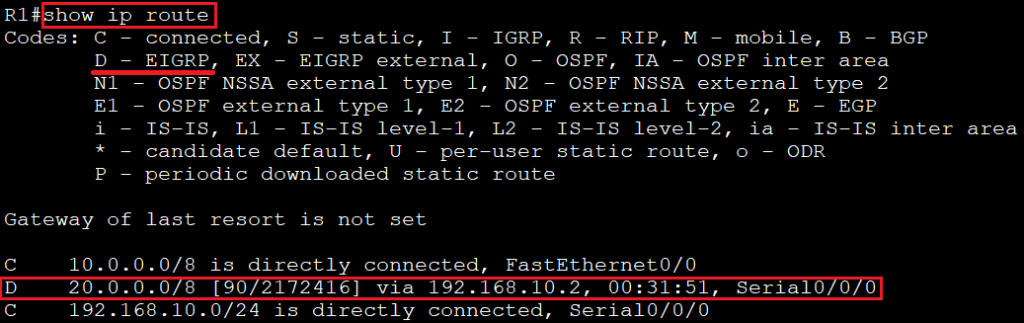
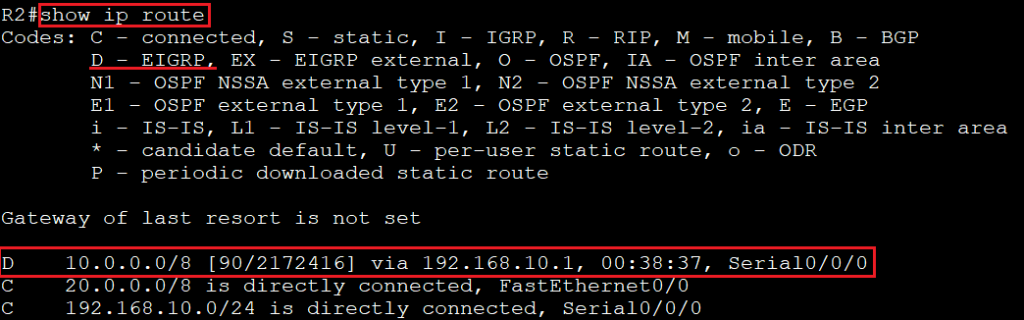
To verify EIGRP Routing, we use "show ip route" command on the routers (router1 or router2). If in the routing table there is the entry of the symbol "D" then we say that EIGRP is enabled in the network.

The following screenshots show the Routing table:

Router1
Router2
To verify that routers have become neighbors, we use "show ip eigrp neighbors" command on either router.


Related Topics

Subnetting

Subnetting is the process of dividing a big network into many small networks. Suppose there is a company which has four departments like Development, HR, Marketing, and Testing. We don't want that all...

5 minutes read.

Internetworking Basics

What is a Network? A network is a group of two or more devices connected by some transmission media, i.e., cables. The purpose of designing a network is to enable the sharing...

4 minutes read.

CCNA Tutorial

What is CCNA? CCNA stands for Cisco Certified Network Associate. It is a certification course offered by Cisco. CCNA improves your understanding of the internet working and how different network topologies work...

3 minutes read.

Routing Basics

Routing is the process of delivering a message across one or more networks by choosing the most appropriate path.It is performed by many kinds of networks like telephone network (Circuit Switching), electronic data networks...

2 minutes read.

Types of Spanning Tree Protocol

There are the following types of Spanning Tree Protocol – 1. Common Spanning Tree (802.1D) A Common Spanning Tree (802.1D) standard is developed by IEEE which elects only one Root Bridge for the...

2 minutes read.

Spanning Tree Protocol (STP)

Spanning Tree Protocol (STP) is a Data link layer (layer 2) protocol that is used to discover and maintain a valid loop-free path for the switched network. It is also used to analyze...

4 minutes read.

Power on a Cisco device

Power on a Cisco device When you power on a new purchased Cisco device for the first time, it performs a power-on-self-test (POST) operation to identify the hardware components and to verify that all...

1 minute read.

Data Encapsulation and De-Encapsulation

Data Encapsulation It is the process of adding headers and trailers to data. When a host transmits data to another device over a network, the data is encapsulated, with protocol information...

5 minutes read.

Switching

A switch is a network device which is used to connect multiple devices (routers, computers) inside the LAN (Local Area Network). It operates at Data Link Layer (Layer 2) of the OSI reference...

3 minutes read.

Verifying OSPF Configuration

There are several ways to verify OSPF configuration and operations, which are: show ip route commandshow ip ospf commandshow ip ospf database commandshow ip ospf interface commandshow ip protocol commandshow ip ospf neighbor commanddebugging ospf Consider the following topology –We...

2 minutes read.

Routing Information Protocol

Routing Information Protocol (RIP) Routing Information Protocol is a distance-vector routing protocol. It uses hop count to determine the best way for the remote network. By default, it has a maximum hop count 15. In...

5 minutes read.

Configuring Catalyst Switches

When you power on a new purchased Switch for the first time, it runs a series of Power-On Self Tests (POSTs) operations. A  POST is designed to verify the basic operations of the...

3 minutes read.

IP Addressing

IP Addressing IP Addressing is designed to allow hosts on a network to communicate with another host on a different network. There are two types of IP address: IPv4 IPv4 addresses are 32-bits long. It allows...

2 minutes read.

Configuring EIGRP

Consider the topology given below – The initial IP configuration table is given below: Devices Interface IP address Router1 ...

2 minutes read.

Checking Network Connectivity and Troubleshooting

As a Network Engineer, you must know that how to check network connectivity and troubleshoot a network. There are following commands are used in the network to check and troubleshoot the network connectivity – 1)...

3 minutes read.

Saving, Erasing, and Verifying Configuration

Saving Configuration Cisco device store commands information into two configuration files: running configurationstartup configuration running configuration In the running configuration, you can manually save the data from RAM to NVRAM by typing the copy running-config startup-config command. When you...

3 minutes read.

Static Routing

Static Routing Static Routing is the process in which static routes are manually added to the routing table through the direct configuration. Static routing is configured in the global configuration mode using syntax: Router(config)#ip route...

3 minutes read.

Classes of IP Addresses

Classes of IP Addresses There are following five classes of IP Addresses: Class A – It is used for allocating an IP address.Class B - It is used for allocating an IP address.Class C – It...

6 minutes read.

Configuring IP Routing in Our Network

There are 3 types of IP routing that we can configure in our network. Default RoutingStatic RoutingDynamic Routing Default Routing Default Routing is used to configure unknown destination networks.It is used on stub networks. Stub networks are...

3 minutes read.

Configure IP address to Router and PC in Packet Tracer

Configure IP address to Router and PC in Packet Tracer As a Network Engineer, it is compulsory to know how to configure an IP Address on networking devices like Router, Switch, PC, and Server.Assigning...

3 minutes read.